
obsutil: moving and managing files in Huawei Cloud OBS
obsutil is the Huawei Cloud OBS command-line tool: download it, configure the AP-Bangkok endpoint with a least-privilege IAM user, use cp, sync and -recover.
By UNIXDEV Team · 15 min read
Original published · English edition
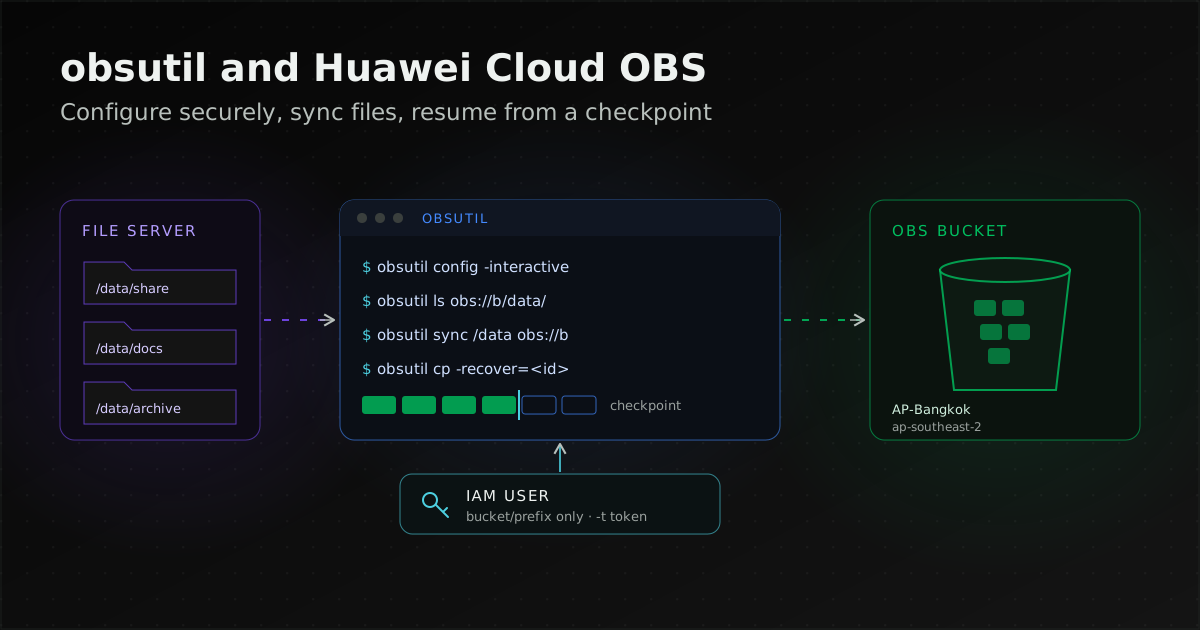
obsutil is Huawei Cloud's command-line tool for uploading, downloading, synchronising and deleting files in OBS (Object Storage Service), Huawei Cloud's object storage. It suits batch jobs, scheduled runs and large file transfers, needs no installation, and runs on Windows, Linux and macOS once downloaded from Huawei Cloud's documentation.
Before real use, set the endpoint for the bucket's region and use the access keys of an IAM user that holds only the permissions the job needs (never the account's own keys). Files above the multipart threshold are uploaded in parts and resume automatically after an interruption.
Planning a whole-system move to the cloud, including Thailand's data-location rules, is covered in our cloud migration guide.
obs.ap-southeast-2.myhuaweicloud.com):
- Check the download:
./obsutil version - Configure:
./obsutil config -interactive - Test the connection:
./obsutil ls obs://bucket/prefix/ -limit=10 - Move files:
./obsutil sync /data/share obs://bucket/share - Resume a failed upload:
./obsutil cp -recover=<task_id> -f
What is obsutil, and when should you use it instead of OBS Browser+?
obsutil is a command-line tool for accessing and managing OBS. Huawei Cloud's introduction to obsutil describes it as suited to batch processing and automated tasks such as scheduled backup and archiving, and able to do things OBS Browser+ cannot, such as synchronous upload, download and copy.
The tool itself is free, but the same page says the requests it sends to OBS are billed as OBS usage, and repeating a request can be charged again. Keep that in mind before scheduling frequent sync jobs over many files.
| Task | Tool | Why, per the documentation |
|---|---|---|
| Occasional uploads or sharing through a GUI | OBS Console or OBS Browser+ | OBS Browser+ is a desktop GUI client (OBS Tools) |
| Scripts, scheduled backups, syncing changed files | obsutil | The OBS Tools page recommends obsutil when there are millions of tasks, because OBS Browser+ then searches slowly and tasks may fail |
| Mounting a parallel file system as a directory on Linux | obsfs | A FUSE-based tool, per the OBS Tools page |
| One CLI for OBS and other Huawei Cloud services | KooCLI (hcloud obs) | The KooCLI documentation says it has integrated obsutil and each command takes the same parameters |
| Your own program reading or writing OBS | OBS SDK or REST API | Access methods listed on Accessing OBS |
The KooCLI page we checked does not say obsutil is deprecated or replaced; it describes an integration. Teams already using KooCLI can use hcloud obs; a machine that only moves files needs nothing beyond obsutil.
Downloading and checking obsutil
Download obsutil from Huawei Cloud's Downloading and Installing obsutil page, which lists packages for 64-bit Windows, x86 64-bit Linux, Arm 64-bit Linux and 64-bit macOS, each with a SHA-256 value. File names and links can change between releases, so open that page each time rather than hard-coding a URL in scripts.
No installation is needed. On Linux, extract the archive with tar -xzvf, change into the extracted folder and make the binary executable; the documentation notes you otherwise get "Permission denied". On Windows, unzip it and run it from Command Prompt.
chmod 755 obsutil
./obsutil version
The download page lists SHA-256 values but no verification steps. Our practice is to compute the hash with the operating system's own tool, such as sha256sum on Linux or certutil -hashfile <file> SHA256 on Windows, and compare it with the page before extracting.
The download links point to a bucket in ap-southeast-1 (CN-Hong Kong). That is only where the packages are stored; it is not the endpoint to configure if your bucket is in Bangkok.
Configuring obsutil securely: endpoint, IAM user and access keys
Configuration uses obsutil config, which requires an AK (access key ID), an SK (secret access key) and an endpoint, according to Initializing the Configuration. A security token is added with -t and is mandatory when you use temporary credentials.
The AP-Bangkok endpoint
Huawei Cloud's Thai region is called AP-Bangkok. Its region ID is ap-southeast-2 and its OBS endpoint is obs.ap-southeast-2.myhuaweicloud.com, per Accessing OBS (all regions are listed in API Explorer). Enter the regional endpoint only, without a bucket name in front: the OBS FAQ says using a bucket domain name as the endpoint causes a signature mismatch.
The configuration parameters page says an endpoint without a protocol defaults to HTTPS, and Initializing the Configuration recommends HTTPS for security.
Use an IAM user with only the permissions the job needs
Do not use the account's own access keys. Huawei Cloud's IAM recommendations advise not creating access keys for the account at all, granting least privilege, keeping access keys out of code, and rotating keys by using two in turn.
For a transfer job, create a separate IAM user per system or job and attach a custom policy limited to the bucket and prefix it uses. The example on OBS custom policies grants read and write on obs-example/my-project/* with these actions:
obs:bucket:ListBucketon the bucketobs:object:PutObject,obs:object:GetObjectandobs:object:ListMultipartUploadPartson objects under the prefixobs:object:DeleteObjectonly if the job deletes; drop it for upload-only users
The OBS permissions guide says IAM users working through OBS Console or OBS Browser+ with a custom policy need at least obs:bucket:ListAllMyBuckets and obs:bucket:ListBucket. The example policy above has no obs:bucket:ListAllMyBuckets. The guide does not mention obsutil, but if ./obsutil ls -s should list all buckets, add obs:bucket:ListAllMyBuckets, which the guide says must be granted on all resources.
Temporary access keys and ECS agencies
Temporary access keys with a security token limit the damage of a leak because they expire. The IAM API allows a validity of 15 minutes to 24 hours (default 15 minutes) and an optional policy to narrow them further, which the page says only OBS enforces. Pass the token to obsutil with -t.
Temporary keys can expire mid-job; for transfers that outlast the token, obtain new keys and reconfigure before the next round, or use an ECS agency as described next.
When obsutil runs on a Huawei Cloud ECS (Elastic Cloud Server) instance, bind the instance to an IAM agency (Huawei Cloud's mechanism for delegating permissions to a service such as ECS) with OBS permissions and set autoChooseSecurityProvider=true in .obsutilconfig, as described in Configuring Auto Obtaining of Access Keys.
With that setting, obsutil looks for keys in the configuration file, then in the environment variables OBS_ACCESS_KEY_ID, OBS_SECRET_ACCESS_KEY and OBS_SECURITY_TOKEN, then asks the ECS for temporary keys. You still set the endpoint yourself, and if no keys are found anywhere, access is anonymous.
Keeping keys out of shell history and the config file
The documentation warns that after configuring with -i, -k and -e on the command line, the Linux history command shows the values. Our practice is to use interactive mode, the other method the documentation describes, and type the AK, SK, endpoint and token at the prompts.
./obsutil config -interactiveSettings are stored in .obsutilconfig in the home directory (~ on Linux and macOS, C:\Users\<username> on Windows). The documentation says the file is hidden by default and obsutil encrypts the AK/SK in it. We also restrict the file to the user that runs the job, for example chmod 600 ~/.obsutilconfig; that is our own practice, not Huawei Cloud's guidance.
Checking the configuration
Run ./obsutil ls -s and read the result as Initializing the Configuration describes: Bucket number in the output means the configuration works. Other messages are covered in the troubleshooting table below.
If the IAM user's policy is limited to one bucket as in the example above, it has no obs:bucket:ListAllMyBuckets, so ls -s returns 403 even with correct keys. Check with this command instead, or add obs:bucket:ListAllMyBuckets to the policy.
./obsutil ls obs://bucket/prefix/ -limit=10Everyday obsutil commands
Five commands cover most work: ls to list, cp to upload and download, sync to send only changes, cp -recover to resume a failed task, and rm to delete. The examples use the Linux and macOS form (./obsutil); bucket names and paths are examples.
Listing buckets and objects
./obsutil ls -s
./obsutil ls obs://bucket/prefix/ -du
Options, per Listing buckets and Listing objects:
-sgives a short listing-duquickly returns the total size of the listed objects (obsutil 5.4.6 and later)-dlists only the current directory level-limitcaps the number of objects listed; without it, 1,000 are listed, and 0 or less lists all
Uploading files and folders
./obsutil cp /data/report.pdf obs://bucket/docs/
./obsutil cp /data/share/ obs://bucket/share/ -r -f
Common options, per Uploading an Object:
-ruploads a whole folder-fskips confirmation-uuploads only files that are missing from the bucket, differ in size, or are newer than the object-include/-excludefilter by pattern-dryRunsimulates the run
A single file can be up to 5 GB in a normal upload and up to 48.8 TB in a multipart upload. Do not change source files during an upload, and note that each comparison made by -u is a billable HEAD request.
Downloading
./obsutil cp obs://bucket/share/ /restore/ -r -fDownloading an Object says the partition holding -tempFileDir needs more free space than the objects being downloaded, and that -vmd5 on download is skipped when an object lacks the x-obs-meta-md5chksum metadata.
Syncing only what changed
./obsutil sync /data/share obs://bucket/shareSynchronously uploading explains that sync sends only changed files, and afterwards every source file has a counterpart in the bucket. A plain sync or cp -u does not remove objects whose source files were deleted, per the obsutil FAQ.
To make the bucket mirror the source, add -delete. The documentation says it works for uploads only, needs -u and -r when used with cp, and cannot be undone; it advises enabling versioning and previewing with -dryRun.
./obsutil sync /data/share obs://bucket/share -delete -dryRunTwo buckets can be synced with ./obsutil sync obs://src obs://dst, per bucket-to-bucket sync. Without client-side cross-region replication (-crr), both buckets must be in the same region.
Resuming a failed upload
./obsutil cp -recover=<task_id> -fPer Resuming a Failed Upload Task, the task ID is shown after the upload, or is the last 36 characters of the result file name (without .txt) in .obsutil_output, the default -o folder.
Resuming depends on multipart upload. The resumable transfer page says files above the threshold use multipart, which automatically enables resumable transfer. Uploading an Object says part records are kept in the checkpoint folder (.obsutil_checkpoint in the home directory by default, changed with -cpd).
Files below the threshold are uploaded directly with no part record; the same page says such uploads do not support resuming, so they are sent again in full. When -threshold is not given on the command, defaultBigfileThreshold from the configuration file applies.
Deleting objects
./obsutil rm obs://bucket/old/report.pdf
./obsutil rm obs://bucket/old/ -r
Deleting an Object says deletion cannot be undone, that a batch delete with -r and no key deletes every object in the bucket, and that -f, which skips confirmation, should be used with caution. That page shows no -dryRun for rm, so list the same prefix with ls before deleting.
Tuning speed with -j and -p
For many small files, raise -j (files transferred at once); for large files, raise -p (parts per file transferred at once) and -ps (part size), per the performance tuning page. Both defaultJobs and defaultParallels default to 5.
The page warns that too much total concurrency (jobs × parallels) degrades performance and makes some tasks fail, and that very large -p or -ps values on an unstable network can cause EOF errors. Start low and increase gradually. The documented starting formula for parallels is:
defaultParallels = Min(
  CPUs x 2,
  object size / defaultPartSize x 1.5)
If part of a run fails after tuning, run it again with -u or resume it with -recover.
Moving a large file set from a file server into OBS
Move in rounds: measure, test, sync repeatedly until the remaining difference is small, verify, then stop writes for a final sync before cutting over. The same steps apply to a file server, a NAS, or data from another object store that you first copy to a staging machine, because obsutil reads from local paths or from OBS buckets.
- Measure the source: count size and files on the source with the file system's own tools and keep the numbers for later comparison. If the source is an OBS bucket, use
ls -du. - Choose a method by size: Huawei Cloud's guide Migrating Local Data to OBS recommends OBS tools such as obsutil for up to 1 TB, and CDM (Cloud Data Migration) or DES (Data Express Service, which ships data on disks or devices) for larger volumes. Check that an alternative service is available in your region before planning around it.
- Dry run: run the real command with
-dryRunto confirm the include and exclude patterns select the right files. - Pilot: send a sample folder with both small and large files, time it yourself, adjust
-jand-p, and use the result to estimate the full run. - First and later syncs: run
syncwhile the old system stays in use; later rounds send only changed files. - Verify: add
-vlengthto compare sizes or-vmd5to compare MD5 values. MD5 has to be computed for every file, so allow time for it on large sets, and Resuming a Failed Upload Task says not to use-vmd5if objects need encryption. Then open anycp_failed_report_*files in.obsutil_outputand compare thels -dutotal with the source figures. - Cut over: stop writes at the source, run the final sync, verify again, then switch the application or users to OBS. For removing objects whose source files were deleted, see the sync section above.
If the data already sits in another cloud's object storage, consider OMS (Object Storage Migration Service). Huawei Cloud's documentation describes it as an online service that moves data into OBS from the object storage of AWS, Alibaba Cloud, Microsoft Azure, Google Cloud and other providers, as well as HTTP/HTTPS sources, with tasks you can pause, resume and restart. The obsutil route, by contrast, needs a staging copy first.
Planning a whole-system move, including migration approaches, cost and rollback, is covered in the cloud migration guide. If you want a team to design and carry out a move to Huawei Cloud, see UNIXDEV's Huawei Cloud service.
Common problems and what to check
Most early problems come from an endpoint for the wrong region, keys without permission, or a machine clock that is off. The table lists the symptoms Huawei Cloud's documentation explains.
| Symptom | Cause and what to check |
|---|---|
ls -s returns Http status [403] | Access keys may be wrong, or the user may lack permission to list buckets (obs_11_0005). Check the AK/SK, an expired token, and whether the IAM user's policy lacks ListAllMyBuckets. |
A connection attempt failed | OBS cannot be reached. Check DNS, firewall, proxy and the machine's outbound route. |
cloud_url [url] is not in well format | Incorrect endpoint or domain name. Check the -e value against the endpoint table. |
| SignatureDoesNotMatch | A bucket domain name used as the endpoint, or mismatched AK/SK (obs_faq_0173). Use the regional endpoint, such as obs. |
| Requests rejected for clock difference | Client and server times differ by more than 15 minutes (obs_03_0347). Correct the machine's clock, for example with NTP. |
If the cause is still unclear, set utilLogPath and sdkLogPath in the configuration file; the parameters page says no logs are written while they are blank.
Status as of 2026-11-11
| Item | Status and source |
|---|---|
| OBS endpoint in AP-Bangkok | obs.ap-southeast-2.myhuaweicloud.com (Accessing OBS, updated 2026-11-02) |
| obsutil version in the download page's sample output | 5.7.9; sample output, not a release announcement (Downloading and Installing obsutil, updated 2026-10-21) |
| Packages offered | 64-bit Windows, x86 64-bit Linux, Arm 64-bit Linux, 64-bit macOS, each with SHA-256 (same page) |
| Configuration defaults | defaultBigfileThreshold 50 MB, defaultJobs 5, defaultParallels 5, maxRetryCount 3 (Configuration parameters, updated 2026-09-20) |
ls -du | Requires obsutil 5.4.6 or later (Listing objects, updated 2026-09-20) |
| Temporary access key validity | 15 minutes to 24 hours, default 15 minutes (IAM API, updated 2026-09-28) |
| Method by local data volume | OBS tools up to 1 TB, CDM under 8 TB at a time, disk-based DES under 30 TB at a time (Migrating Local Data to OBS, updated 2026-10-14) |
| KooCLI and obsutil | KooCLI integrates obsutil as hcloud obs; this page does not say obsutil is deprecated (KooCLI, updated 2025-05-27) |
How UNIXDEV helps move data into Huawei Cloud OBS
UNIXDEV designs and carries out migrations to Huawei Cloud in the AP-Bangkok region. For the work in this article that means role-based IAM users and OBS policies, bucket setup, and a procedure for large file transfers from pilot to cut-over with verification. Details are on our Huawei Cloud and cloud services pages.
A good first step is to send us the data size, the number of files and the window in which writes can stop, so we can help choose between obsutil, OMS or another method before the move starts.
Sources and further reading
- Huawei Cloud — Introduction to obsutil · OBS Tools
- Downloading and Installing obsutil · Initializing the Configuration · Configuration parameters · Configuring Auto Obtaining of Access Keys
- Listing buckets · Listing objects · Uploading an object · Downloading an object · Deleting an object
- Synchronously uploading · -delete parameter · Bucket-to-bucket sync · FAQ: deleted local files
- Resuming a failed upload task · Resumable data transfer · Performance tuning
- Accessing OBS (regions and endpoints) · API Explorer — OBS endpoints
- IAM security recommendations · Obtaining temporary access keys · OBS custom policies · OBS permissions for Console and Browser+
- OBS FAQ — time difference · OBS FAQ — signatures don't match
- Migrating Local Data to OBS · What Is OMS? · KooCLI — hcloud obs
- Related: cloud migration in Thailand, how to start and what drives cost
- Related: ransomware-resistant backups, including OBS WORM
- UNIXDEV capability: Huawei Cloud
- All articles on cloud and system migration
Sources checked on 2026-11-11
How we checked: based on the primary sources above, reviewed by the UNIXDEV team