
Ransomware-resistant backups: immutable, offline or air-gapped?
What makes a backup ransomware cannot delete: offline vs air-gapped vs immutable storage such as Object Lock, separate credentials, and restore tests.
By UNIXDEV Team · 25 min read
Original published · English edition
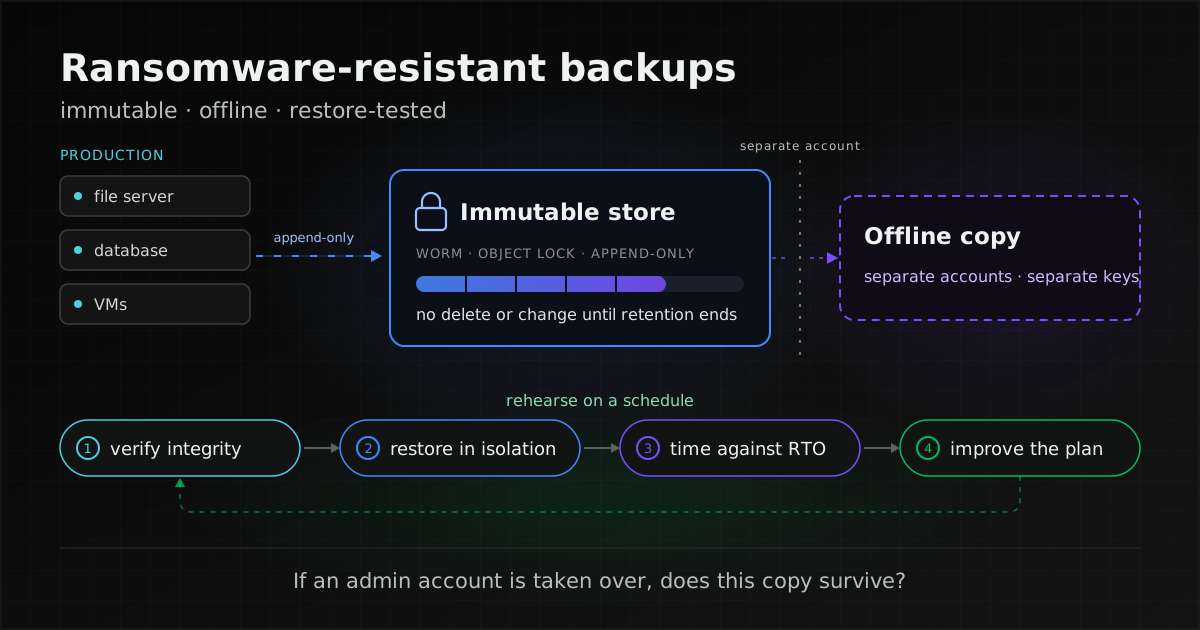
A backup that actually survives ransomware is one the attacker cannot delete, change or encrypt even after taking over an administrator account, and one you have already restored a working system from. Immutable and offline are not alternatives: immutability locks data against deletion or change for the retention period, while offline storage and air gaps remove the attacker's path to the copy. Critical systems should have at least one copy outside the accounts and network used for day-to-day administration.
Backups let you recover without paying, but they do nothing against data theft: CISA's #StopRansomware Guide describes "double extortion", where actors both encrypt and threaten to release stolen data, and cases where actors threaten to release stolen data without using ransomware at all. Prevention for that is covered in our ransomware guide.
This article expands the backup section of ransomware: how Thai organisations prepare and respond, which already covers prevention, the response plan and reporting duties. Here we go deeper on backups only: why attackers go after them, how offline, air-gapped and immutable differ, what each immutability mechanism does and does not protect against, separating credentials, holding encryption keys, monitoring, and restore testing. It is written for IT teams, system administrators and the managers who decide retention and budget. Product names are examples drawn from each vendor's own documentation, not a recommendation of any brand. All sources were checked on 8 November 2026.
Why do attackers delete or encrypt backups first?
Because if the backups survive, the victim can restore without paying. The CISA #StopRansomware Guide (PDF edition, published October 2023) says backups must be kept offline because most ransomware actors try to find and delete or encrypt accessible backups so that restoration is impossible unless the ransom is paid. The same guide notes that actors often hunt for and collect credentials stored in the environment and use them to try to access backup solutions, and use publicly available exploits against unpatched backup solutions.
In MITRE ATT&CK, destroying recovery options is T1490 Inhibit System Recovery. Deleting Windows shadow copies with vssadmin or wbadmin, and how to alert on it, is covered in our ransomware guide, but T1490 goes further. MITRE records adversaries who:
- delete or encrypt virtual machine snapshots on ESXi, for example with
vim-cmd vmsvc/snapshot.removeall; - delete "online" backups connected to the network, on network storage or in folders that sync to cloud services;
- in the cloud, disable versioning and backup policies, then delete snapshots, database backups, machine images and prior object versions kept for recovery;
- disable recovery notifications and then corrupt backups.
None of this needs a special exploit if the attacker already holds a privileged account. T1078 Valid Accounts describes how compromised credentials bypass access controls on resources across the network. Goal 3.O of CISA's Cross-Sector Cybersecurity Performance Goals 2.0 states the risk plainly: adversaries can delete data and disable recovery services, preventing system recovery.
The backup system itself is a target too. CISA's Known Exploited Vulnerabilities Catalog (version 2026.11.06) lists exploited vulnerabilities in backup software from several vendors, a number of them flagged as known to be used in ransomware campaigns. Backup servers need patching and network isolation like any other critical system.
How do offline, air-gapped and immutable backups differ?
They answer different questions. Offline means the copy is not attached to running systems. An air gap means no physical connection and no automated logical connection. Immutable means the data is locked against change or deletion even while it stays connected.
| Type | What the sources say | Protects against | Limits |
|---|---|---|---|
| Offline | NIST SP 800-209 (IS-SS-R7) says cyber-attack recovery copies should not be mounted, exported or mapped to a host or application. NIST's NCCoE guide recommends keeping a set of systems completely disconnected from the business network: offline, on a separate fire-walled network, or outside the office. | Malware that hunts for mounted shares and drives | The copy is reachable while connected for copying. In our view, if it is connected with the same domain accounts as production, it is not really separate. |
| Air gap | The NIST glossary defines it as an interface between two systems that are not connected physically and whose logical connection is not automated, so data moves only manually, under human control. | All network access | SP 800-209 (IS-SS-R8) distinguishes strict air gaps, with full physical and network separation, from the less strict isolation that certain storage technologies also call "air-gapping", which shuts data ports and opens them briefly for periodic sync, and asks organisations to weigh each against the value of the data and the adversary's capabilities. |
| Immutable | SP 800-209 defines immutability as the ability to lock data after it has been created, preventing alteration or deletion. CISA recommends enabling delete protection or object lock on storage often targeted in ransomware attacks. | Deletion or overwrite through a compromised account, within the retention period and depending on the mode | Some modes can still be unlocked by privileged users. CISA warns that immutable storage does not meet compliance criteria for certain regulations and that misconfiguration can impose significant cost. |
NIST SP 800-209 (Security Guidelines for Storage Infrastructure, 2020) adds principles that apply to all three: create recovery copies on designated, separated storage, which in a private cloud means physically separate storage systems and in a public cloud means separate accounts (IS-SS-R1); store them off site from production data (IS-SS-R4); and consider immutable storage such as retention locking or immutability policies (IS-SS-R10). In our view, critical systems need both layers: an immutable copy for fast recovery, and a copy under separate accounts or offline for the case where the whole backup management system is taken over.
Does the 3-2-1 rule still apply?
It is still a good starting point, and our legacy systems guide explains it. The 2012 paper Data Backup Options, produced for US-CERT, attributes the rule to Peter Krogh's The DAM Book (2009). But 3-2-1 does not say the off-site copy must be undeletable from the production accounts. Some vendors extend it: Veeam uses its own term 3-2-1-1-0, adding one immutable, offline or air-gapped copy and "zero" errors in recovery verification. The idea matches CISA and NIST guidance and does not require any particular vendor's product.
Which immutability mechanisms exist, and what does each not protect against?
The mechanisms with clear primary documentation fall into four groups: WORM object storage, append-only repositories, filesystem snapshots, and backup servers that protect snapshots. They protect to very different degrees. The question to ask every time is who can still unlock or delete.
What does S3 Object Lock (WORM) protect against, and what not?
S3 Object Lock uses a write-once-read-many (WORM) model to help prevent objects being deleted or overwritten for a fixed or variable period, or indefinitely. It requires S3 Versioning and can be enabled on new or existing buckets, but once enabled it cannot be disabled and versioning cannot be suspended. A bucket's default retention is set in days or years, and there are two controls: retention periods and legal holds.
- Governance mode: users with
s3:BypassGovernanceRetentionwho sendx-amz-bypass-governance-retention:truecan override or remove retention, and AWS notes that the S3 console sends that header by default. A compromised account with this permission can therefore delete backups. AWS suggests governance mode for testing retention settings before moving to compliance mode. - Compliance mode: no user, including the account's root user, can overwrite or delete a protected version; the mode cannot be changed and retention cannot be shortened, only extended. AWS states that the only way to delete such an object before its retention date is to delete the AWS account. Set it too long and you store, and pay for, the data until it expires.
- Legal hold: has no expiry and stays until removed, but anyone with
s3:PutObjectLegalHoldcan place and remove it freely. - What Object Lock does not stop: locks protect versions, not the creation of new versions or delete markers. A simple DELETE succeeds but only adds a delete marker, leaving the old version in place; a permanent delete of a specific version returns 403 Access Denied. Your restore process has to know how to read prior versions.
AWS also gives variable retention (an event hold, with S3 setting the retain-until-date to the release time plus a set duration when the hold is released) as an option for a configurable recovery window against ransomware or accidental deletion.
Self-hosted, S3-compatible storage offers similar controls. MinIO AIStor documentation describes WORM object locking with GOVERNANCE, bypassable with s3:BypassGovernanceRetention, and COMPLIANCE, which no user, including the MinIO AIStor root user, can modify, and which cannot be removed before the retention period passes. Versioning is required; releases from RELEASE.2025-05-20T20-30-00Z allow locking on existing buckets, while earlier ones required enabling it at bucket creation. In the cloud, Huawei Cloud's OBS WORM, for example, supports compliance mode only; enabling it turns on versioning, which cannot be disabled; WORM itself cannot be disabled; object-level retention can be extended but not shortened; delete markers are not protected; and the documentation states that storage costs will increase.
In our view, a governance-mode bucket in the same account as production, administered by the same people who hold the bypass permission, protects against mistakes but not against an attacker. MITRE's mitigations suggest copying backups to other accounts or regions (M1053) and limiting the accounts that can access backups (M1018), including, in AWS, Service Control Policies that restrict API calls to delete backups, snapshots and images.
What do append-only repositories in restic and Borg protect against?
Several open-source backup tools offer an append-only mode in which clients can write new backups but not delete old ones. restic's rest-server with --append-only allows new backups but prevents deletion and modification of existing ones, so an attacker who gains access to the backed-up server cannot wipe its backups. The restic documentation is clear about the limit: forget and prune need full read, write and delete access, and if an attacker has that, append-only protection is void. Run those tasks from a separate, well-secured client, and use --keep-within with append-only repositories because an attacker could add garbage snapshots.
Borg's append-only mode (Borg 1.4 documentation) means a hacked client cannot permanently delete backups on the server: prune or delete only tag data as deleted in a new transaction and free no space, and you can roll back to a good transaction as long as borg compact has not run. The documented limits: other tools do not respect the mode, so rm on the server still works; an automated prune running in normal mode makes append-only moot; and you should run borg check --verify-data before compacting.
In short, append-only protects against a compromised client, not against someone with root on the repository host. That host needs accounts and access paths separate from production.
Do ZFS snapshots count as immutable backups?
In OpenZFS, a snapshot is a read-only copy of a file system or volume. zfs hold adds a named reference so that zfs destroy returns EBUSY until zfs release removes it, and zfs allow delegates individual permissions to non-root users. A backup account can therefore take snapshots, place holds and send them, with snapshot (which also needs mount), hold and send delegated, and no destroy or release rights (the documentation notes that release might destroy the snapshot).
The limit: root on the storage host, or anyone with release permission, can release a hold and destroy the snapshot. SP 800-209 (IS-SS-R5) also points out that for snapshots the baseline copy is the production data itself, while cyber-attack recovery copies should not depend on production data. Snapshots on the same machine give fast restores, but they must also be sent to another host under separate accounts.
How far does Proxmox Backup Server protect snapshots from deletion?
Proxmox Backup Server can mark a snapshot as protected with proxmox-backup-client snapshot protected update, which prevents pruning or manual deletion until the flag is removed. A privileged user can remove it, though, and the remotes documentation notes that the flag is not synced by sync jobs. We found no built-in WORM datastore in the Proxmox Backup Server documentation. What it does offer is sync jobs between PBS instances, in pull or push direction; a pull job can only sync the backup groups the remote user or API token can read, and for push jobs the documentation recommends a remote user with limited access. There is also a remove-vanished option that deletes local copies no longer present on the remote. If the copy must survive deletion at the source, leave remove-vanished off for that sync job.
Commercial products have comparable mechanisms. Veeam's hardened repository, for example, sets immutable attributes on backup files on a Linux host for a configured period, with its own requirements, such as block storage rather than NFS or SMB, and the vendor recommends a physical machine with local storage to reduce the attack surface. Whatever you choose, read the limitations section of the vendor's documentation before deciding.
How do you stop one account from deleting every backup?
Separate both the systems that manage backups and the accounts that can delete them or change retention from the systems and accounts used to run production every day. NIST SP 800-209 sets out the principles:
- Separate management systems (IS-SS-R2): recovery copies should be managed from designated management systems separated from production, which cannot be accessed with regular credentials, including production and regular backup credentials.
- Few people, separate credentials (IS-SS-R3): for sensitive information, cyber-attack recovery copies should not be accessible to regular IT staff, only to a single person (such as the CISO) or a very narrow group of executives or security managers using credentials separate from their day-to-day ones, so that a compromised IT administrator's credentials cannot reach them.
- Protected systems must not change their own protection (DP-SS-R4): backup, point-in-time copy and replication configuration should be centrally managed and separated from the data consumption plane.
NIST SP 800-53 Rev. 5 control CP-9(7) calls for dual authorization to delete or destroy organisation-defined backup information, meaning two qualified people must carry out the task, also known as two-person control. CISA's general account guidance applies directly to backup systems: separate administrator accounts from user accounts, use only designated admin accounts for admin work, do not save passwords in local files, give admin and service accounts unique passwords that differ from regular user accounts (CPG 2.0 goal 3.C), and grant least privilege with recurring reviews (3.H). In our view, the backup console should enforce MFA and should not accept logins from the production domain, because if the domain falls the attacker gets both.
Should the backup system pull or should production push?
It depends on which side you let hold credentials. With push, the production server holds credentials to write backups; if it is compromised, the attacker gets those credentials, so they must be limited to writing, through append-only or object lock. With pull, the backup side starts the connection, as in Borg's pull mode, whose documentation warns that a server logged in as root could cause unlimited damage to the client, so pull mode should only be used from fully trusted servers; or Proxmox Backup Server pull sync jobs, which can only read what the remote user is allowed to read. We found no CISA or NIST guidance that prefers pull over push; what NIST sets is the DP-SS-R4 principle above. Either way, the machine that holds the right to delete backups must be the best-protected machine you have.
If backups are encrypted, where should the keys live?
Outside anything that could fail along with production, and tested to work during a restore. CP-9(8) in SP 800-53 calls for cryptographic mechanisms to prevent unauthorised disclosure and modification of backup information, together with key management. SP 800-209 (DP-SS-R1) says encryption of backups should be at least as secure as encryption of the protected data, and that key retention and rotation should be considered.
- Keep recovery keys offline: the NIST NCCoE guide on protecting data from ransomware asks you to determine which backups and other information must be secured offline, including passwords, digital certificates, encryption keys and anything else needed to restore operations quickly.
- Protect what recovery depends on: SP 800-209 (RA-SS-R2) says dependent components such as Active Directory, DNS and external key management systems must be protected to enable full recovery. If the keys sit in a vault that needs an AD login and AD is down too, an intact backup still cannot be opened.
- Separate duties where it fits: CISA notes that in some cloud environments the account that provisions or manages keys should not be able to use them, and vice versa, while warning that the overhead makes this unsuitable for every environment.
- A vendor example: Proxmox Backup Server supports client-side AES-256-GCM encryption and advises keeping keys separate from the backed-up content, for example in a password manager, on a USB drive kept somewhere secure, and as a paper copy of the master key made with paperkey.
What should you monitor on the backup system?
Both failed jobs and anything that reduces your ability to recover. CISA recommends enabling logging on all cloud resources and alerting on abnormal usage; SP 800-209 (DP-SS-R3) calls for monitoring backup execution against policy with notifications, and for an audit trail. At minimum, alert on:
- backup jobs that fail, do not run, or capture unusually little data (the NCCoE guide asks you to check both that backup files are created and that they can be recovered and used);
- cloud API calls that disable snapshot schedules, backup policies or versioning followed by snapshot or volume deletion, a pattern MITRE uses as a detection example for T1490;
- removal of all VM snapshots on ESXi through the shell or vim-cmd;
- shortened retention, removed legal holds, removed protected flags or use of governance bypass;
- backup console logins from unexpected machines or at unexpected times, and new administrator accounts in the backup system;
- backup notifications being switched off, since MITRE records adversaries disabling recovery notifications before corrupting backups.
SP 800-209 (AL-SS-R5) says archived logs should be protected from tampering, for example with WORM or immutable storage, object locking or MFA approval for deletion, and kept long enough because compromises are often noticed late; in practice, send backup logs and alerts somewhere the backup administrators cannot delete. If you already run a SIEM such as Wazuh, add the backup servers and cloud audit logs to it and write rules for the list above; planning that is covered in planning a Wazuh deployment.
How do you test a restore so you know it really works?
Restore whole systems into an isolated network, time every step, and compare the result with the targets your organisation has set. NIST SP 800-34 Rev. 1 defines those targets:
- RTO (recovery time objective): the maximum time a system can be unavailable before there is an unacceptable impact on other systems and the business processes they support.
- RPO (recovery point objective): the point in time before an outage to which data can be recovered from the most recent backup, in other words how much data loss the business can tolerate.
- MTD (maximum tolerable downtime): the total outage time the system owner is willing to accept for a business process.
Your organisation sets these numbers. As a hypothetical example, an accounting system might have an RTO of one working day and an RPO of the previous day's close, while an order system might need far less. Without them, a test can only show that a restore works, not that it is fast enough.
What should a restore test cover?
- Repository integrity: by default
restic checkverifies structure only, not that pack files on disk are unmodified; add--read-datato read the data, or--read-data-subsetto check part of it at a time. Borg usesborg check --verify-data, and Proxmox Backup Server uses verify jobs, with the vendor recommending that all backups be re-verified at least monthly. - Whole systems, not just files: SP 800-209 (RA-SS-R1) lists what recovery copies must include: storage volumes, critical file systems, databases, software images, certificates, encryption keys, startup files, catalog information, ACLs, virtualisation settings and configuration files.
- Application-consistent databases: SP 800-209 (DP-SS-R2) asks you to consider integrity at the application and business-process level; if two components must be restored to the same point in time to work, plan a mechanism for it. The test is whether the application can actually use the restored data.
- End-to-end timing against the RTO: SP 800-209 (RA-SS-R4) says the ability to meet RTOs should be examined holistically, including dependent components such as configuration files and encryption keys. The NCCoE guide lists what to record: time to retrieve files from off site, time to restore them, time to rebuild systems, and technical and procedural gaps.
- Restore into isolation: SP 800-209 (IS-SS-R7) says recovery copies should be restored onto an isolated staging or air-gapped environment rather than directly onto target hosts, and for applications with strict restoration speed requirements calls for an end-to-end test restore of the complete dataset into a sandbox that simulates a real restoration (DP-SS-R3).
- Check before use: CPG 2.0 goal 3.O says to validate the integrity of backups before starting a restore and to check restoration assets for indicators of compromise, corruption and other integrity issues. For sensitive data, SP 800-209 (DP-SS-R3) suggests periodically scanning at least a subset of past copies with current anti-malware tools to find poisoned copies.
How do you run a restore drill?
- Choose the system and write down the RTO and RPO your organisation has set for it.
- List everything the restore needs: data, configuration, installers, licences, encryption keys, credentials, and dependencies such as AD and DNS.
- Prepare a staging environment on a network isolated from production.
- Retrieve from the locked or separated copy, not the most convenient one, and start the clock.
- Verify backup integrity and scan for indicators of compromise before restoring.
- Restore the whole system using only the keys and credentials from the offline set.
- Have the system owner do real work on the restored system and compare the latest data with the RPO.
- Record the time for each step against the RTO, plus anything missing or any documentation that was wrong.
- Update the runbook and backup plan from what you found, then tear down the staging environment.
How often should you rehearse?
That is your organisation's decision, based on how critical each system is. SP 800-53 CP-9(1) leaves the frequency of backup testing to the organisation. Other sources set minimums:
- CPG 2.0 goal 3.O: test backups and recovery on a recurring basis, no less than once per year.
- SP 800-209 (DP-SS-R3): test backups of critical data at least monthly.
- SP 800-209 (IS-SS-R9): check that recovery copies are still isolated at least once a year; sensitive and high-value storage systems may need at least a quarterly audit and a check after every major change.
Who runs the test and what evidence they hand over belongs in the MA contract.
How long should retention be, and what is the trade-off?
There is no single number. Longer retention means you can go further back, but it uses more space, and a compliance lock set too long cannot be shortened. Weigh these before choosing:
- How far back you need to go: in our view, retention on the locked copy should reach back past the point the attacker got in. If an intrusion is noticed later than the retention period, every remaining copy may already include the attacker's foothold.
- Locks cannot be undone: S3 compliance mode and OBS WORM cannot shorten retention, so data set too long stays until it expires. Test with governance mode or a trial bucket first.
- Cost: Huawei Cloud states that enabling WORM increases storage costs, and CISA warns that misconfigured immutable storage can impose significant cost. Estimate from your actual data volumes and your provider's pricing.
- Obligations: CISA notes that immutable storage does not meet compliance criteria for certain regulations. If you hold data you are obliged to delete within a set time, have legal or your DPO check whether undeletable copies conflict with that duty.
- Remove what is obsolete: SP 800-209 (DP-SS-R11) says obsolete snapshots and clones should be removed to reduce the attack surface, and CPG 2.0 goal 3.O asks for a list of all maintained backups with the retention period of each.
Which approach suits which kind of system?
This table summarises the capabilities verified in the sources above. Use it as a starting point for discussion, not as a substitute for assessing the real systems.
| System | Specific risk | Documented options | Watch out for |
|---|---|---|---|
| File servers and shares | MITRE records deletion of backups on network storage and in folders synced to the cloud; CISA warns that encrypted files may sync up and overwrite good data | An append-only repository on a separate host, or object storage with object lock, plus an offline copy | Run forget, prune or compact only from a separate trusted host; sync is not backup |
| Databases | MITRE (T1489) records stopping services such as SQL Server before destroying or encrypting data, and deletion of database backups in the cloud | Back up with the database's own method, store the output in immutable or append-only storage, and copy it to another account or region | Test that the application can use the restored data, and restore components that must share a point in time together |
| Virtual machines (ESXi, Proxmox VE) | MITRE records removal of all VM snapshots on ESXi | Disk images and snapshots copied off the system (MITRE M1053), for example Proxmox Backup Server with a second server pulling copies through a sync job, which can only read what the remote user can read, plus regular verify jobs | The protected flag can be removed and is not synced; snapshots on the same host are not recovery copies |
| Linux servers and ZFS storage | Root on the storage host can release holds and destroy snapshots | Snapshots with holds, sent to another host, with snapshot (which also needs mount), hold and send delegated through zfs allow, and no destroy or release rights | The receiving host must use accounts and access paths separate from production |
| Cloud workloads and object storage | MITRE records disabling versioning and backup policies, then deleting snapshots, machine images and prior object versions | Object Lock or WORM in a bucket under a separate account (SP 800-209 IS-SS-R1), and Service Control Policies restricting deletion in AWS (M1018) | Governance mode can be bypassed, compliance mode cannot be undone, and delete markers are not protected |
| SaaS email and documents | CISA warns that automated cloud backups may not be enough if encrypted local files sync up and overwrite good data | CISA recommends backing up often, offline or cloud-to-cloud, and considering more than one provider in case all accounts with one vendor are affected | Read the provider's shared responsibility model first to see which parts are the customer's job |
Does Thailand's PDPA say anything about backups?
Not in those words. Section 37(1) of the Personal Data Protection Act B.E. 2562 (in Thai) requires data controllers to provide appropriate security measures to prevent loss, unauthorised access, use, alteration, correction or disclosure of personal data. The PDPC notification on security measures for data controllers B.E. 2565 (2022) (in Thai) defines security in clause 3 to include availability, says in clause 4(3) that measures should cover recovering from damage caused by threats or breaches, as necessary, appropriate and feasible for the level of risk, and in clause 4(6)(b) that user access management may include management of privileged access rights. We found no mention of backup in that notification. What can fairly be said is that recovery and availability are within the scope of required security measures, not that the law prescribes a particular backup method. This is a summary for planning, not legal advice. Reporting duties after a ransomware attack are covered in our ransomware guide.
If a third party maintains your backups, CISA recommends making sure they follow the same practices and putting your security requirements in the contract.
Checklist: can your backups really withstand ransomware?
Answer yes or no to each item. Every "no" or "not sure" is something to fix first.
- Do you have a list of every backup you maintain, with its retention, location and owner?
- Does each critical system have at least one copy that is immutable or kept offline?
- Would that copy survive a takeover of a domain administrator account, with that account unable to delete it or change its retention?
- Does the backup console use accounts outside the production domain, with MFA enforced?
- Are all passwords and access keys that can delete backups kept off production machines?
- Does deleting backups or shortening retention require two people or an approval step?
- If you use Object Lock, do you know which mode is in use and who can bypass it or remove legal holds?
- If you use append-only repositories, do forget, prune and compact run only from a separate trusted host?
- Are the backup servers and software patched and placed in a restricted network zone?
- Are backup encryption keys and recovery credentials also kept offline, outside anything that could fail at the same time?
- Do you get alerts for failed backup jobs, mass deletion of backups or snapshots, and changes to retention or versioning?
- Do integrity checks read the actual data, not just the structure, on a set schedule?
- Have you restored a whole system into an isolated environment and timed it against the RTO within the interval your organisation set?
- If a provider runs your backups, does the contract state the security practices and the restore-test evidence required?
How can UNIXDEV help review backups and rehearse restores?
Backup planning and restore testing are part of our DevOps & SRE managed services, together with patching cadence, access management and network segmentation; for older systems past end of support, see our legacy application maintenance service. A good first step is to review the real systems against the checklist above and rehearse restoring one critical system into an isolated environment, to find out which copy the attacker cannot reach and whether the restore meets the targets your organisation has set. Security incident response and post-incident digital forensics should go to specialists in those fields.
Sources and further reading
- CISA, MS-ISAC, NSA, FBI — #StopRansomware Guide (PDF, October 2023)
- CISA — Cross-Sector Cybersecurity Performance Goals 2.0
- US-CERT — Data Backup Options (2012)
- CISA — Known Exploited Vulnerabilities Catalog (data feed)
- NIST SP 800-209 — Security Guidelines for Storage Infrastructure (2020)
- NIST SP 800-53 Rev. 5 — Security and Privacy Controls (CP-9)
- NIST SP 800-34 Rev. 1 — Contingency Planning Guide for Federal Information Systems
- NIST NCCoE — Protecting Data from Ransomware and Other Data Loss Events
- NIST IR 8374 Rev. 1 — Ransomware Risk Management: A Cybersecurity Framework 2.0 Community Profile
- NIST CSRC Glossary — air gap
- MITRE ATT&CK — T1490 Inhibit System Recovery · T1078 · T1489
- AWS — Locking objects with Object Lock
- MinIO AIStor — Object locking and immutability
- Huawei Cloud — OBS WORM
- restic rest-server · restic — Removing backup snapshots · restic — Working with repositories
- Borg — Additional notes (append-only mode) · Borg — Backing up in pull mode
- OpenZFS — zfs-hold · zfs-allow
- Proxmox Backup Server — Backup client usage · Maintenance tasks · Managing remotes and sync
- Veeam — Hardened repository immutability · Veeam — 3-2-1 backup rule
- PDPC notification on security measures for data controllers B.E. 2565 (in Thai)
- Related: ransomware, how Thai organisations prepare and respond
- Related: legacy systems past end of support
- Related: MA and SLA contract checklist
- Related: planning a Wazuh deployment
- Related: detecting ransomware with Wazuh, what to configure
- All articles on DevOps and enterprise system operations
By UNIXDEV Team · English edition 8 November 2026 · Based on CISA, NIST, MITRE, PDPC office and official vendor documentation as of writing, which may change. Product names are examples, not a recommendation of any brand. Legal points are summarised for planning and are not legal advice; commands and settings must be tested on your own systems before use.