
Planning a Wazuh deployment: sizing, retention and agent rollout
Plan a Wazuh 4.14 install: all-in-one or distributed, sizing by agents and alerts per second, log retention under Thai law, legacy agents, alert noise.
By UNIXDEV Team · 16 min read
Original published · English edition
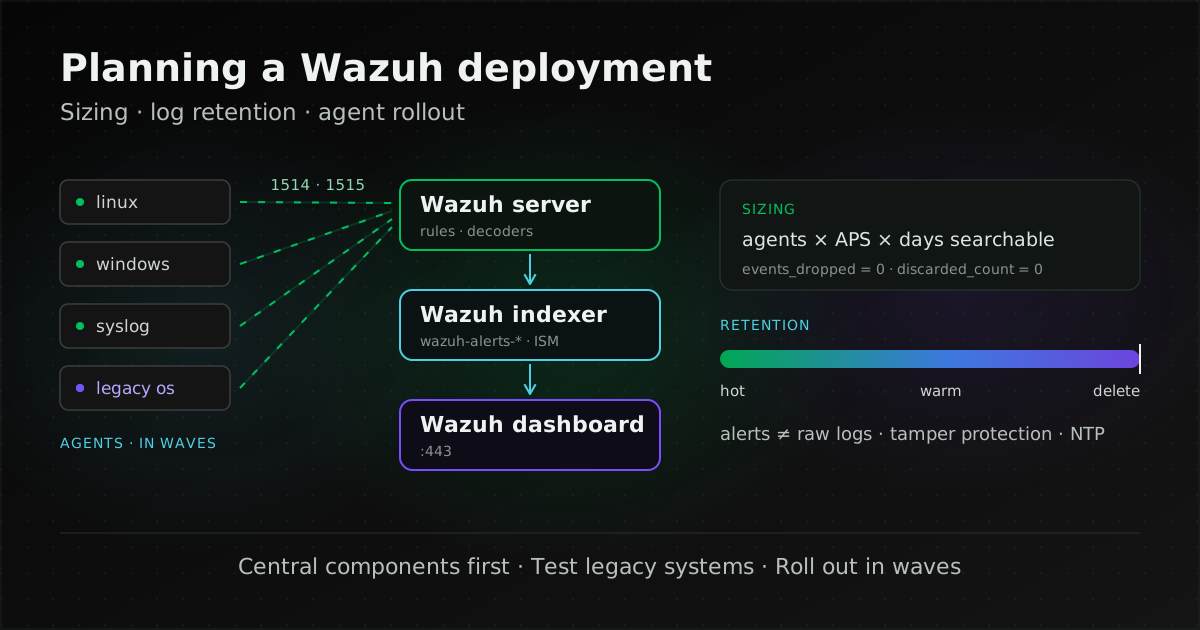
Planning a Wazuh deployment means deciding, before you install anything, whether the Wazuh indexer, server and dashboard share one machine or run separately, how large each machine must be for your agents and alert volume, how long logs are kept and how, and how agents will be rolled out to every existing machine in waves without burying the team in alerts.
This guide is for system administrators and IT managers who have already chosen Wazuh and now need machines, disk and an installation plan. If you are still deciding what Wazuh does and whether it fits, start with What is Wazuh? and Wazuh vs EDR. Technical details follow the Wazuh 4.14 documentation (the latest release is 4.14.9, published 14 October 2026), checked on 2 November 2026.
What components does a Wazuh deployment need?
Wazuh has an agent installed on endpoints and three central components: the Wazuh server (manager), which analyses data; the Wazuh indexer, which stores and searches alerts; and the Wazuh dashboard, the web interface. According to the Wazuh architecture page, the agent collects security data and forwards it to the server for analysis. What each component does is covered in What is Wazuh?; this guide is about where to put them.
| Model | Layout | What the documentation says it suits |
|---|---|---|
| All-in-one | Server, indexer and dashboard on one machine | Labs and small environments |
| Single-node | Server, indexer and dashboard on separate machines, one of each | Medium environments |
| Multi-node (cluster) | Several server and indexer instances | Large environments with high event throughput, or where fault tolerance and high availability are required |
The installation guide installs the central components in this order: indexer, then server, then dashboard. Each can be installed with the Assisted installation or the Step-by-step installation. All three support Amazon Linux 2 and 2023, CentOS Stream 10, Red Hat Enterprise Linux 7, 8, 9 and 10, and Ubuntu 16.04, 18.04, 20.04, 22.04 and 24.04, on a 64-bit processor (x86_64 or ARM64).
Wazuh also ships a pre-built Open Virtual Appliance (OVA) on Amazon Linux 2023. Per the virtual machine page, the 4.14.9 VM is configured by default with 4 CPU cores, 8 GB RAM and a 50 GB disk, runs only on x86_64, and does not provide high availability or scalability out of the box, so it suits trials more than production. The central components can equally be installed on any VM running a supported Linux release.
Agree on ports with the network team before placing machines, because agents across VLANs or branch offices must reach the server. The documented defaults, all of which can be changed, are:
| Component | Port | Purpose |
|---|---|---|
| Wazuh server | 1514/TCP | Agent connection (1514/UDP is optional and disabled by default) |
| 1515/TCP | Agent enrolment | |
| 1516/TCP | Server cluster communication | |
| 514/UDP | Syslog collector (disabled by default; TCP optional) | |
| 55000/TCP | Wazuh server RESTful API | |
| Wazuh indexer | 9200/TCP | Wazuh indexer RESTful API |
| 9300–9400/TCP | Indexer cluster communication | |
| Wazuh dashboard | 443/TCP | Web interface |
In our view, the first question is not "how many machines?" but "if the server or indexer goes down, how long can we live with it?" If the answer is "not long", design a cluster from day one rather than starting all-in-one and migrating data later.
What determines Wazuh hardware sizing?
Three things: how many machines send data and of what kind, how many alerts per second (APS) they generate, and how many days of alerts must stay searchable. Agent count alone does not tell you, because one network device can generate many times the alerts of a workstation.
For up to roughly 100 endpoints with 90 days of alerts, the Wazuh quickstart gives all-in-one sizes in three agent bands:
| Agents | CPU | RAM | Storage (90 days) |
|---|---|---|---|
| 1–25 | 4 vCPU | 8 GiB | 50 GB |
| 26–50 | 8 vCPU | 8 GiB | 100 GB |
| 51–100 | 8 vCPU | 8 GiB | 200 GB |
The quickstart recommends a distributed deployment for larger environments. Once components are split, each installation guide sets these requirements:
| Component | Minimum | Recommended | Disk depends on |
|---|---|---|---|
| Wazuh indexer | 4 GB RAM, 2 CPU cores | 16 GB RAM, 8 CPU cores | APS and alert retention |
| Wazuh server | 2 GB RAM, 2 CPU cores | 4 GB RAM, 8 CPU cores | Local alert files and the vulnerability database |
| Wazuh dashboard | 4 GB RAM, 2 CPU cores | 8 GB RAM, 4 CPU cores | No table given |
Indexer disk
The Wazuh indexer installation guide says disk space depends on APS and gives per-agent estimates for 90 days of indexed alerts:
| Endpoint type | APS | Storage per agent (90 days) |
|---|---|---|
| Servers | 0.25 | 3.7 GB |
| Workstations | 0.1 | 1.5 GB |
| Network devices | 0.5 | 7.4 GB |
The documentation's example of 80 workstations, 10 servers and 10 network devices needs about 231 GB of indexer storage for 90 days. Every figure is for 90 days; searchable history beyond that needs roughly proportionally more space.
Server disk
The server uses the same APS figures but stores different data, so do not merge its numbers with the indexer's. The Wazuh server installation guide estimates local alert storage as:
| Endpoint type | APS | Storage per agent (90 days) |
|---|---|---|
| Servers | 0.25 | 0.1 GB |
| Workstations | 0.1 | 0.04 GB |
| Network devices | 0.5 | 0.2 GB |
The same 80/10/10 example needs about 6 GB for alerts plus 11 GB for the vulnerability database, 17 GB in total. The documentation also requires at least 20 GB free on the volume holding /var/ossec before the Wazuh manager starts for the first time, because the vulnerability database is unpacked then.
Limiting what agents send
Agents have an anti-flooding buffer, enabled by default. Per the client_buffer reference, the queue holds 5,000 events and the agent sends up to 500 events per second to the manager by default (configurable from 1 to 1,000). The documentation warns that disabling the buffer in large environments may overwhelm the manager and the network. If some machines genuinely produce more events, such as chatty servers, adjust that group only, after measuring.
Checking whether the machines are big enough
All the numbers above are planning estimates. Once running, the Wazuh server guide says to watch events_dropped in wazuh-analysisd.state and discarded_count in wazuh-remoted.state. Both should be zero in a healthy environment; if either is not, add nodes to the cluster. For CPU, memory and I/O on the hosts themselves, the tools in Linux performance tools apply.
How long should Wazuh keep logs?
It depends on which requirements apply to your organisation. Not every organisation is bound by the same 90-day rule, and what Wazuh keeps by default is not every raw log. Separate what the law is about from what Wazuh stores before deciding.
What Thai law requires, and of whom
- Section 26 of the Computer-related Crime Act B.E. 2550 (2007): service providers must retain computer traffic data for at least 90 days from the date it enters the computer system. Where necessary, an official may order a particular provider to keep it beyond 90 days but not more than two years, case by case. The second paragraph requires keeping user-identification data from the start of service until at least 90 days after it ends. A provider that fails to comply faces a fine of up to 500,000 baht. The two-year ceiling comes from section 17 of the amending Act (No. 2) B.E. 2560 (2017).
- The Ministry of Digital Economy and Society (MDES) notification on traffic-data retention criteria for service providers, B.E. 2564 (2021) (Royal Gazette, vol. 138, special part 188 Ngor, 13 August 2021). Clause 5 limits the duty to listed provider types, such as telecom carriers, internet access providers, hosting providers, internet cafés, social media services, content and application providers, and cloud providers serving end users directly. Annex A of the notification also lists, as examples, "computer network access providers for organisations, such as government agencies, companies or educational institutions" and mail server providers. Clause 12 sets at least 90 days and lets an official order further retention up to six months at a time, consecutively, but no more than two years in total.
An organisation that gives its staff network or internet access through its own systems may therefore fall within Annex A; confirm the scope with legal counsel. Organisations also subject to other rules, such as government agencies, critical information infrastructure operators or financial institutions, will find those summarised in What is Wazuh?; set retention from the strictest one that applies. This section supports system planning and is not legal advice.
What Wazuh keeps by default
By default Wazuh writes and indexes only alerts: events that matched a rule at or above log_alert_level. According to the Wazuh archives documentation, keeping every event, including those that trigger no alert, requires enabling archives (logall or logall_json in the <global> section of ossec.conf). They are written under /var/ossec/logs/archives/ and can optionally be indexed as wazuh-archives-*. Archives are disabled by default because they store logs indefinitely on the server and consume significant storage, so weigh the disk and performance impact before turning them on.
Server log files are rotated and compressed daily, with MD5, SHA1 and SHA256 checksums. These let you detect changes only if the checksums are kept where administrators cannot alter them; stopping administrators from changing or deleting logs still needs separate permissions and storage design.
Setting retention with Index State Management
How long alerts stay in the indexer is controlled with Index State Management (ISM), per the index lifecycle management documentation. Its example policy, wazuh-alert-retention-policy, matches the wazuh-alerts-* pattern and deletes indices once min_index_age reaches 90d (adjust the days to your requirement). Apply it to existing indices under Indexer management > Index Management > Indices > Actions > Apply policy.
The same page describes a hot-warm architecture, set with node.attr.temp: hot or warm in /etc/wazuh-indexer/opensearch.yml. Its example policy moves indices to warm nodes at 30 days and removes replicas; hot nodes are fast and expensive, warm nodes slower and cheaper. The page does not cover a cold tier or snapshots, so long-term storage beyond what the indexer's disks hold has to be designed separately.
What to design around Wazuh if you are a clause 5 provider
| Requirement | What to design |
|---|---|
| Clause 12: keep traffic data at least 90 days | Traffic data is raw logs, not alerts. Decide whether it is kept through Wazuh archives or another log store, and size disk for that period. An ISM policy deleting wazuh-alerts-* at 90d is not enough on its own. |
| Clause 12(2): further retention on order, up to two years in total | A procedure to suspend automatic deletion, or to set aside the data under order, without changing the policy for everything else. |
| Clause 9: storage that preserves integrity, identifies who accessed it and cannot be modified by system administrators (the notification's examples are a centralized log server, data archiving or data hashing), and users identifiable individually, even behind a proxy or NAT | Separate Wazuh administration rights from the right to modify or delete logs, copy logs to storage administrators cannot change, and keep the proxy or NAT logs needed to identify users. |
| Clause 10: retention may be outsourced, but the duty stays with the provider | If a contractor runs Wazuh, put log retention in the contract. |
| Clause 11: set the clocks of all service equipment to the international reference time (Stratum 0) | Configure Network Time Protocol (NTP) on the server, indexer, agent hosts and syslog-sending network devices against the same time source. |
How do you roll out Wazuh agents on legacy systems?
Start with the version rule, then check that each operating system has an agent package, then test on representative machines and install in waves.
The agent and manager version rule
The upgrade guide requires all central components to have identical version numbers, including the patch level, and the manager to be the same version as or newer than the agents. The agent installation guide likewise says compatibility is guaranteed when the manager version is later than or equal to the agent's. Wazuh recommends disabling the Wazuh repository, or holding the package, on endpoints to avoid accidental agent upgrades. So upgrade the central components first and the agents after.
Older operating systems with agent packages
The 4.14.9 packages list still includes agents for many older platforms:
| Operating system | Versions listed |
|---|---|
| CentOS, Red Hat Enterprise Linux, Oracle Linux | 6 and later, plus version 5 via el5 packages |
| SUSE | 12 and 11 (el5 packages) |
| Debian / Ubuntu | Debian 7 and later / Ubuntu 12 and later |
| Windows | XP or later (32- and 64-bit, one MSI) |
| Solaris | 10 and 11 (i386 and SPARC) |
| AIX | 6.1 or greater (PowerPC) |
| HP-UX | 11.31 (Itanium) |
CentOS 7 falls within "6 and later". Windows Server 2012 R2 is not named, but falls within the range the Windows agent guide states: from Windows XP to the latest versions, including Windows 11 and Windows Server 2022. The documentation does not confirm that every capability works equally on older systems, so install on a representative machine for each operating system first and check that the data you need reaches the dashboard. An agent does not fix an operating system that no longer receives patches; for that, see Keeping a legacy system running safely.
Installing agents at scale
According to the agent installation guide, the agent uses about 35 MB of RAM on average, and for large environments the documentation suggests automation tools such as Puppet, Chef, SCCM and Ansible. The dashboard can also generate install commands under Agents management > Summary > Deploy new agent.
- Windows: install with the GUI wizard or from the command line, for example
msiexec.exe /i wazuh-agent-4.14.9-1.msi /q WAZUH_MANAGER="10.0.0.2", with further variables such as the agent name, group and registration password. Administrator rights are required. For distribution through Group Policy (GPO) in Active Directory, Wazuh describes a method in a Wazuh blog post; it is not part of the main documentation. - Linux: Wazuh maintains the
wazuh-ansiblerepository with roles and playbooks for the central components and agents. Per the Ansible guide, theansible-wazuh-agentrole installs agents on Linux over SSH and registers them with the manager. Use the branch matching your version, such asv4.14.9. The documentation notes that deploying agents to Amazon Linux 2 with Ansible 2.17 or later is not supported. - Upgrading agents centrally: per the remote upgrade documentation, use
/var/ossec/bin/agent_upgradeon the server (-llists outdated agents,-atakes agent IDs) or the Wazuh server API (GET /agents/outdated,PUT /agents/upgrade,GET /agents/upgrade_result). The API is recommended in a cluster, and when upgrading more than 3,000 agents at once, setwait_for_complete=trueto avoid an API timeout.
In our view, a safe order is: (1) install on one representative machine per operating system; (2) extend to a small group, such as non-critical servers; (3) collect alert statistics and tune rules for a while; then (4) roll out in waves by agent group. Assigning groups at enrolment lets you separate configuration by machine type from the start.
How do you reduce alert noise in Wazuh?
Tune rules source by source rather than raising log_alert_level for the whole system. Raising it hides evidence you may need later along with the noise.
- Alert levels:
log_alert_levelinossec.confsets the minimum severity stored inalerts.logandalerts.json; the default is 3, andemail_alert_leveldefaults to 12. In the rules classification, level 0 means ignored, used to avoid false positives; level 12 is a high-importance event; level 14 indicates an attack; and level 15 is a severe attack needing immediate attention. - Custom rules: per the custom rules documentation, put small changes in
/var/ossec/etc/rules/local_rules.xmland larger ones in new files under/var/ossec/etc/rules/, using IDs 100000–120000. To change a built-in rule, copy it under/var/ossec/etc/rules/and addoverwrite="yes";if_sid,if_group,if_level,if_matched_sidandif_matched_groupcannot be changed this way. Files under/var/ossec/ruleset/rulesare overwritten on every upgrade. - Custom decoders: per the custom decoders documentation, add decoders to
/var/ossec/etc/decoders/local_decoder.xml. To modify a built-in decoder, copy its whole decoder file (for example0310-ssh_decoders.xml) to/var/ossec/etc/decoders/and exclude the original file with<decoder_exclude>inossec.conf. The documentation notes that the copy survives upgrades but will not receive the updates the original file gets, so compare it after each upgrade. Restart the manager after any rule or decoder change.
In our view, what works is to switch on the first group of agents, collect alerts for a while as a baseline, find which rules fire most and from which machines, decide whether each is normal behaviour or a real problem, and then tune only that rule with a custom rule whose conditions are as narrow as possible. Record the reason for every change so whoever runs the system next knows why certain alerts were lowered.
Checklist before installing Wazuh
- Count the machines that will run agents, by type (servers, workstations, network devices) and by operating system.
- Decide whether you need high availability, then choose all-in-one, single-node or a cluster.
- Size indexer and server disk separately from APS and the days of searchable history, and leave 20 GB free on
/var/ossec. - Identify the requirements that apply, then decide whether raw logs must be kept, where, for how long, and who can change or delete them.
- Set ISM for
wazuh-alerts-*(andwazuh-archives-*if enabled) to the retention you decided. - Open firewall ports for what you actually use, and point every machine's NTP at the same time source.
- Test the agent on a representative machine for every operating system, especially legacy ones.
- Hold the agent package and always upgrade the central components before agents.
- Keep custom rules and decoders only under
/var/ossec/etc/, and record the reason for each change. - Name separate owners for running the platform and for reading alerts. If someone else runs it, define the scope in a maintenance and SLA contract, and see managed services vs an in-house team.
UNIXDEV sizes Wazuh from the number of endpoints by type, the events per second (EPS) agents send and the alerts per second (APS) actually generated, installs the Wazuh manager, indexer and dashboard on Linux, deploys agents to servers and collects syslog from network devices, tunes rules to cut false positives, and provides ongoing care under an agreed MA scope through our DevOps & Managed Services. The recommended first step is a Wazuh deployment assessment based on your real environment: send your machine counts by type and operating system, the log retention you need and the requirements that apply through the project brief form.
Sources and further reading
- Wazuh documentation — Release notes
- Wazuh documentation — Architecture
- Wazuh documentation — Installation guide
- Wazuh documentation — Quickstart
- Wazuh documentation — Wazuh indexer installation
- Wazuh documentation — Wazuh server installation
- Wazuh documentation — Wazuh dashboard installation
- Wazuh documentation — client_buffer
- Wazuh documentation — Wazuh archives
- Wazuh documentation — Index lifecycle management
- Wazuh documentation — Packages list
- Wazuh documentation — Wazuh agent installation
- Wazuh documentation — Wazuh agent for Windows
- Wazuh documentation — Deploying with Ansible
- Wazuh blog — Deploying Wazuh agents using Windows GPO
- Wazuh documentation — Upgrade guide
- Wazuh documentation — Remote agent upgrade
- Wazuh documentation — alerts (ossec.conf)
- Wazuh documentation — Rules classification
- Wazuh documentation — Custom rules
- Wazuh documentation — Custom decoders
- Wazuh documentation — Virtual machine (OVA)
- Computer-related Crime Act B.E. 2550 and (No. 2) B.E. 2560, in Thai (ETDA)
- Computer-related Crime Act (No. 2) B.E. 2560, Royal Gazette vol. 134 part 10 Kor, in Thai (copy)
- MDES notification on traffic-data retention criteria for service providers B.E. 2564, in Thai (Royal Gazette) · copy
- Related article: What is Wazuh?
- Related article: Wazuh vs EDR
- Related article: Keeping a legacy system running safely
- All articles on Wazuh and security monitoring
By UNIXDEV Team · 2 November 2026 · Technical details follow the Wazuh 4.14 (4.14.9) documentation as of writing and may change in later releases. Sizing figures are documentation estimates; measure your own environment. The legal summary supports planning and is not legal advice.