
What is Wazuh? Open source SIEM/XDR vs commercial SIEM, and which organisations it fits
Wazuh is an open source SIEM/XDR platform with no licence fee, but its real cost lies in hardware, log storage, people and rule tuning. Commercial SIEMs bill on data volume, resources or nodes instead. It fits organisations with a team or partner to run it.
By UNIXDEV Team · 17 min read
Original published · English edition
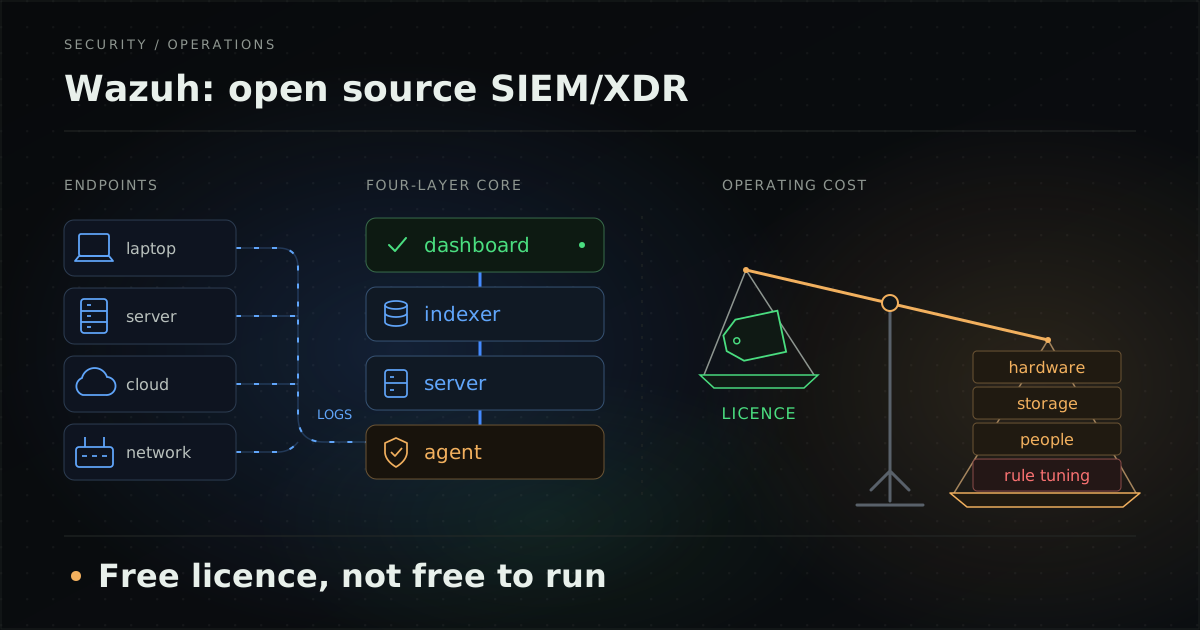
Many organisations start looking for a SIEM because they need logs from servers, workstations and business systems in one place, need to show auditors that threats are actually monitored, and need evidence when something goes wrong. Then the first commercial SIEM quotes arrive, and many of the pricing models are tied to data volume or compute. The name that usually comes up as an alternative is Wazuh.
This guide is for IT managers, CISOs and heads of IT evaluating a SIEM. It explains what Wazuh is made of, what it does, what "free" means in practice, how commercial SIEMs bill, which Thai requirements a SIEM can help produce evidence for, and which organisations Wazuh fits. For our deployment and operations service, see Wazuh SIEM/XDR.
What is Wazuh?
Wazuh is an open source security platform that combines SIEM and XDR capabilities. The official documentation describes it as a "free and open source security platform that unifies XDR and SIEM capabilities".
For a reference point on what a SIEM does, the NIST glossary (citing NIST SP 800-128) defines a SIEM tool as an application that gathers security data from information system components and presents it as actionable information via a single interface. NIST SP 800-92 gives a shorter definition: a program that provides centralized logging capabilities for a variety of log types.
As of writing (October 2026), the latest stable release is Wazuh 4.14.9, released on 14 October 2026 according to the Wazuh release notes. Wazuh 5.0 is in pre-release as of October 2026, so this article describes 4.x behaviour.
What are the components of Wazuh?
Wazuh has four main parts: the agent installed on endpoints, the Wazuh server that analyses data, the Wazuh indexer that stores and searches alerts, and the Wazuh dashboard used to work with it all.
| Component | Role | Worth knowing |
|---|---|---|
| Wazuh agent | Installed on endpoints such as laptops, desktops, servers, cloud instances or VMs to provide threat prevention, detection and response | The install guide covers Linux, Windows, macOS, Solaris, AIX and HP-UX |
| Wazuh server | Analyses agent data with decoders and rules, uses threat intelligence to look for indicators of compromise (IOCs), and manages agents, including remote configuration and upgrades | Can be clustered for load balancing and high availability |
| Wazuh indexer | A full-text search and analytics engine that indexes and stores the alerts the server generates | A fork of OpenSearch |
| Wazuh dashboard | The web interface for visualising and analysing data, managing Wazuh configuration and monitoring its status | A fork of OpenSearch Dashboards |
In 4.x, agents connect to the server on TCP 1514 and enrol on TCP 1515. Agent messages are AES-encrypted by default. The server forwards alerts to the indexer through Filebeat over TLS. Both the server and the indexer can be clustered for load balancing and high availability, according to the Wazuh architecture page.
What can Wazuh do?
Wazuh covers log analysis, endpoint checks and automated response. The documentation groups its use cases into 12 areas: configuration assessment, malware detection, file integrity monitoring, threat hunting, log data analysis, vulnerability detection, incident response, regulatory compliance, IT hygiene, container security, posture management and workload protection. The capabilities SIEM evaluators ask about most are:
- Log data analysis: examining and extracting insights from logs produced by systems, applications and devices.
- File Integrity Monitoring (FIM): monitoring the integrity of system and application files.
- Security Configuration Assessment (SCA): checking systems against a set of predefined rules. The bundled policies are mostly based on CIS benchmarks.
- Vulnerability detection: the agent collects a software inventory and sends it to the server, which matches it against vulnerability data from Wazuh CTI or an offline repository.
- Malware detection: several methods combined, such as FIM with rules, YARA and VirusTotal integration.
- Active response: runs scripts on monitored endpoints when an alert for a chosen rule fires.
- MITRE ATT&CK mapping: the bundled rules already carry MITRE IDs, and custom rules can be given them.
- Compliance mapping: the documentation says Wazuh "helps implement" compliance requirements, with content for PCI DSS, HIPAA, NIST 800-53, TSC and GDPR. Other standards can be added through compliance identifiers in rules.
- Containers and cloud: tracks Docker engine events and resources in Kubernetes clusters, plus posture management for AWS, Microsoft Azure and Google Cloud Platform.
The Wazuh documentation itself warns that active response needs care, because poorly implemented rules and responses can make an endpoint more vulnerable. In our view, start with alerting only and enable automated responses one tested case at a time. Whether Wazuh can replace an EDR is covered in Wazuh vs EDR.
Is Wazuh really free?
It is free in licensing terms, not in total cost of ownership (TCO). The software has no licence fee, but you still pay for hardware, storage, the people who run it and the time spent tuning rules.
Which licences apply to each component?
- Wazuh server and agent (wazuh/wazuh repository): for the 4.x releases, such as 4.14.9, GNU GPL version 2 with an OpenSSL linking exception, building on OSSEC work. The branch developing 5.0 uses a mixed licensing scheme, so check the terms again when 5.0 is generally available.
- Wazuh indexer: a fork of OpenSearch, licensed under Apache License 2.0.
- Wazuh dashboard: a fork of OpenSearch Dashboards, licensed under Apache License 2.0.
Where does the real cost of Wazuh come from?
There are four main cost drivers: hardware, log storage for the retention you need, the people who run the platform and read alerts, and rule tuning.
1. Hardware and storage: the Wazuh quickstart gives these sizes for an all-in-one installation (indexer, server and dashboard on one host) with 90 days of queryable alerts:
| Agents | CPU | RAM | Storage |
|---|---|---|---|
| 1–25 | 4 vCPU | 8 GiB | 50 GB |
| 26–50 | 8 vCPU | 8 GiB | 100 GB |
| 51–100 | 8 vCPU | 8 GiB | 200 GB |
The documentation says this setup is usually enough for monitoring up to about 100 endpoints; beyond that, components are typically split across hosts. For each indexer node, the Wazuh indexer installation guide sets a minimum of 4 GB RAM and 2 CPU cores and recommends 16 GB RAM and 8 cores. Disk space depends on alerts per second (APS); the per-agent estimates for 90 days are 3.7 GB for a server, 1.5 GB for a workstation and 7.4 GB for a network device. The documentation's worked example of 80 workstations, 10 servers and 10 network devices comes to about 231 GB for 90 days.
These are documentation estimates. A real environment may generate more or fewer alerts, and retention beyond 90 days needs proportionally more space, so measure during a pilot before settling on a size.
2. People to run the platform and read alerts: In our view, Wazuh is software that does not come with a monitoring team, so two responsibilities need owners: running the platform itself (upgrades, backups, capacity) and reading, triaging and responding to alerts.
3. Rule tuning: Wazuh lets you modify its bundled rules, but according to the custom rules documentation, edits to files in /var/ossec/ruleset/rules are overwritten during upgrades. The supported method is to copy the rule into a file under /var/ossec/etc/rules/, such as local_rules.xml, edit it there and add overwrite="yes". Custom rules should use IDs 100000–120000. In our view, tuning is ongoing work, because an organisation's systems and log patterns keep changing.
4. Paid options: Wazuh, Inc. offers two paid options.
- Professional support: architecture and hardware guidance, health checks and upgrades, custom rules, dashboards and integrations, and a customer success manager. The two plans differ by support hours, health checks per year and response time, as published by Wazuh at the time of writing: Standard offers 8/5 business-hours support, 2 health checks per year and an 8-hour response SLA; Premium offers 24/7 support for critical issues, 4 health checks per year and a 4-hour response SLA. Pricing is on request. The professional support page lists support services and does not offer monitoring on your behalf.
- Wazuh Cloud: the SaaS edition of Wazuh, hosted and operated by Wazuh, Inc. Plans (Small, Medium, Large and Custom) are defined by active agents (up to 100, 250 or 500, or custom), indexed and archive data retention, and support plan. The plan table lists no ingest-volume (GB) limit, and there is a free 14-day trial.
How do commercial SIEMs bill?
The commercial SIEMs covered here bill on data ingested, compute resources, credits, or the number of hosts or nodes, depending on the vendor and edition. Examples from official pricing pages and documentation as of writing are below (we give no prices, because they vary by contract and over time).
- Splunk: four models: activity-based, ingest, workload and entity. Enterprise Security can use activity-based, workload or ingest pricing. Ingest pricing is based on GB ingested; workload pricing on the compute and storage resources needed for search and analytics; activity-based pricing has two meters, ingest and search activity. Entity is a further model that is not based on data volume.
- Microsoft Sentinel: the analytics tier offers pay-as-you-go or commitment tiers, which reserve a set amount of daily ingestion for a fixed daily fee. A data lake tier provides long-term storage with separate compute and storage meters, and other Azure services used alongside it, such as Log Analytics or Logic Apps, are billed separately.
- Elastic: Elastic Cloud Hosted uses resource-based pricing and Elastic Cloud Serverless uses usage-based pricing. Self-managed, which is not part of Elastic Cloud, is licensed by number of nodes and RAM used. Elastic Security Serverless bills monthly for GB ingested, GB retained and egress at the rate of the chosen feature tier.
- Google Security Operations (formerly Chronicle): uses a credit-based model for core data ingestion. The Standard, Enterprise and Enterprise Plus packages combine a subscription with a metering component. Purchased GB become a credit balance that ingestion draws down, and ingestion above the commitment with no credits left incurs overage charges.
- IBM QRadar: in May 2024 IBM announced the sale of its QRadar SaaS assets to Palo Alto Networks, under which QRadar SaaS customers would move to Cortex XSIAM and IBM would continue to support on-premises QRadar customers. Organisations running QRadar should confirm their path with the vendor directly.
For evaluators, the point is that in volume-based models, adding log sources or extending retention affects the bill directly. With self-hosted Wazuh, that cost moves into hardware and disk instead.
How does Wazuh differ from a commercial SIEM?
The main difference is who carries the cost and the operational work. Self-hosted Wazuh has no licence fee, but the organisation runs the infrastructure and rules itself. A commercial SIEM bills according to the vendor's model, and in cloud editions the vendor takes on the infrastructure.
| Aspect | Self-hosted Wazuh | Wazuh Cloud | Commercial SIEM (e.g. Splunk, Sentinel, Elastic, Google SecOps) |
|---|---|---|---|
| Software licence fee | None (GPLv2 for the 4.x core, Apache 2.0 for indexer and dashboard) | Service fee by plan | Per the vendor's model |
| What drives cost | Hardware, disk and people | Active agents, retention and support plan | Data ingested (GB), compute, credits or nodes, depending on vendor |
| Who runs the infrastructure | The organisation or a partner | Wazuh, Inc. | The vendor (cloud editions) or the organisation (self-managed editions) |
| Where data lives | On infrastructure the organisation chooses | On systems operated by Wazuh, Inc. | Depends on edition and contract |
| Effect of adding log sources | More hardware or disk | May require a larger plan by agents and retention | Affects the bill in volume-based models |
| Rule tuning and alert review | Done by the organisation or a partner | Agree with the vendor who reviews alerts; in our view the organisation still needs someone reading them | In our view, every product still needs tuning to the organisation's environment |
Which Thai requirements can a SIEM help produce evidence for?
A SIEM helps where requirements call for keeping logs, detecting anomalies and having data to support incident notification. It does not make an organisation legally compliant on its own; policies, processes, response plans and reviews remain the organisation's job. The summary below supports planning and is not legal advice. Check the original documents and consult legal counsel.
| Requirement | Applies to | Relevant points | Where a SIEM helps |
|---|---|---|---|
| Cybersecurity Regulating Committee (CRC) notification on the Code of Practice and Standard Framework for cybersecurity, B.E. 2564 (2021) | Government agencies and critical information infrastructure (CII) organisations | Under Protect, keep logs of all access and access attempts to critical services and review them regularly for anomalous activity. Under Detect, build mechanisms to detect, classify and analyse events, and review them at least once a year. | Centralises access logs, raises alerts from rules and keeps alert history as evidence of detection |
| Computer Crime Act section 26 and the Ministry of Digital Economy and Society (MDES) notification on retention of computer traffic data by service providers, B.E. 2564 (2021) | Service providers listed in clause 5 of the notification, such as internet access providers, hosting providers or cloud providers serving end users directly | Retain traffic data for at least 90 days from entry into the system, store it on media that preserves integrity and that administrators cannot alter, and synchronise device clocks to a reference time. | Acts as the central log store with configurable retention, but access rights, tamper protection and time synchronisation still need to be designed |
| Personal Data Protection Act B.E. 2562 (2019), section 37(4) | Data controllers | Notify the PDPC Office of a personal data breach without delay and, where feasible, within 72 hours of becoming aware, unless the breach is unlikely to risk individuals' rights and freedoms; high-risk breaches must also be notified to data subjects. | Helps detect incidents and provides an event timeline to support assessment and notification |
| BOT Notification No. SorKorChor 5/2566 on IT risk governance | Financial institutions and specialised financial institutions | Log critical servers, systems and network devices, including review of access logs and activity logs, and run security monitoring with processes or tools to detect anomalies. | Supports log collection and review and detection; the monitoring function itself still has to be staffed |
Further details worth knowing:
- CRC notification: published in the Royal Gazette on 6 September 2021, it states that it sets minimum requirements and takes effect one year after publication. The framework has five main headings labelled Identify, Protect, Detect, Respond and Recover. Beyond Detect, the Respond heading requires an incident response plan that is exercised and reviewed at least once a year, which is work for people and processes, not tools.
- Computer traffic data: the Computer Crime Act as amended in 2017 lets an official order retention beyond 90 days case by case, up to two years. The 2021 MDES notification gives examples of tamper protection such as a Centralized Log Server, Data Archiving or Data Hashing. Ordinary companies that do not provide services to others are not automatically in scope, so first check whether your organisation is a service provider under clause 5.
- Bank of Thailand: the implementation guideline issued with BOT Notification No. SorKorChor 5/2566 expects a clearly designated unit for monitoring, tracking, analysis and coordination. This is guidance rather than the notification itself, and it shows that a tool alone is not enough.
Integrity and clock requirements are worth designing in from the start. If logs can be altered or machine clocks disagree, evidence from a SIEM carries less weight.
Which organisations does Wazuh fit, and when is it not enough?
In our view, Wazuh fits organisations that want log collection and endpoint monitoring without tying cost to data volume, and that have an internal team or partner responsible for running the platform and reviewing alerts on an ongoing basis.
It tends to fit when:
- Data must stay on infrastructure the organisation chooses, such as an internal data centre or a specific cloud.
- Endpoints run several operating systems, including Solaris, AIX or HP-UX.
- You want FIM, SCA and vulnerability detection alongside log analysis in one platform.
- Someone understands Linux and logs well enough to tune rules, or a partner does it for you.
It is not enough when:
- You need round-the-clock monitoring staff: in our view, Wazuh is software that does not come with a SOC team, and the Wazuh professional support page lists support services rather than monitoring on your behalf. Build a team or consider a separate managed security service.
- Nobody owns tuning: without someone reviewing rules and alerts regularly, in our view the platform becomes a log store nobody opens.
- You need specialised endpoint response tooling: compare with EDR before deciding; see Wazuh vs EDR.
What are the deployment options for Wazuh?
There are four main approaches: self-hosted all-in-one, self-hosted distributed or clustered, Wazuh Cloud, and deployment and operation by a partner within an agreed scope.
| Approach | What it is | Suits | Watch out for |
|---|---|---|---|
| Self-hosted all-in-one | Indexer, server and dashboard on one host | Pilots or small environments (the documentation says it is usually enough for about 100 endpoints over 90 days) | One host is a single point of failure, and backups need planning |
| Self-hosted distributed or cluster | Indexer, server and dashboard on separate hosts, optionally clustered | More agents or a need for high availability | Requires cluster operations skills and disk planning for retention |
| Wazuh Cloud | SaaS hosted and operated by Wazuh, Inc. | Teams that do not want to run infrastructure | Check each plan's retention and your data location requirements |
| Partner-deployed and operated | A partner deploys, tunes and operates the platform within the contracted scope | Organisations without a full-time platform team | Write down clearly who reviews alerts and who responds to incidents |
If a partner will run it, review the contract using our MA and SLA contract checklist and the comparison of managed services and in-house IT.
What should you check before choosing a SIEM?
Before choosing Wazuh or a commercial SIEM, answer the questions below. The answers determine system size, cost and the people you need.
- List the log sources to collect (servers, workstations, network devices, business systems, cloud) and their approximate counts.
- Identify the requirements that actually apply: are you CII, a service provider under the traffic data notification, or regulated by the Bank of Thailand? Set log retention accordingly.
- Estimate disk from agent count and retention, then re-measure on real systems during a pilot.
- Decide where data must live (on-premises, in-country cloud or SaaS).
- Design tamper protection for logs, administrator access and time synchronisation for every machine.
- Name separate owners for running the platform and for reviewing and responding to alerts.
- Set up a rule-tuning method that survives upgrades, and record the reason for each change.
- Enable active response one tested case at a time, not everything on day one.
- Open firewall ports as needed (TCP 1514 and 1515 for agents in 4.x) and plan upgrades for new releases.
- Compare total cost over several years, including licence or service fees, hardware and disk, and people, not licence fees alone.
If the systems to monitor are older systems that must keep running, also read keeping a legacy system running safely.
UNIXDEV deploys, tunes and operates Wazuh within an agreed scope: sizing hardware and log retention, rolling out agents, structuring rule overrides so they survive upgrades, and operating the platform through our DevOps and managed services. See Wazuh SIEM/XDR for details.
Sources and further reading
- Wazuh documentation — Getting started
- Wazuh documentation — Components
- Wazuh documentation — Architecture
- Wazuh documentation — Use cases
- Wazuh documentation — Quickstart
- Wazuh documentation — Wazuh indexer installation guide
- Wazuh documentation — Custom rules
- Wazuh documentation — Active Response
- Wazuh documentation — MITRE ATT&CK framework
- Wazuh documentation — Regulatory compliance
- Wazuh 4.14.9 release notes
- Wazuh — LICENSE (wazuh/wazuh, tag v4.14.9)
- Wazuh Cloud
- Wazuh — Professional support
- NIST CSRC Glossary — SIEM tool
- NIST CSRC Glossary — Security Information and Event Management (SP 800-92)
- Splunk — Pricing models
- Splunk — Pricing
- Microsoft Sentinel pricing
- Elastic pricing
- Elastic Security Serverless pricing
- Google Security Operations — Understand billing
- TechTarget — IBM sells QRadar SaaS assets to Palo Alto Networks (May 2024)
- CRC Notification on the Code of Practice and Standard Framework for Cybersecurity for Government Agencies and CII Organisations, B.E. 2564 (in Thai)
- Lawplus — Amendments to Thailand's Computer Crimes Act finally published
- MDES Notification on Criteria for Retention of Computer Traffic Data by Service Providers, B.E. 2564 (in Thai)
- Personal Data Protection Act B.E. 2562 (2019), unofficial English translation (PDPC)
- BOT Notification No. SorKorChor 5/2566 and implementation guideline (in Thai)
- Related article: Wazuh vs EDR
- Related article: Keeping a legacy system running safely
By UNIXDEV Team · 30 October 2026 · Product details and billing models are as of October 2026 and should be confirmed with each vendor. The legal summary supports planning and is not legal advice.