
Already have EDR or antivirus? Do you also need Wazuh? Roles compared and how to combine them
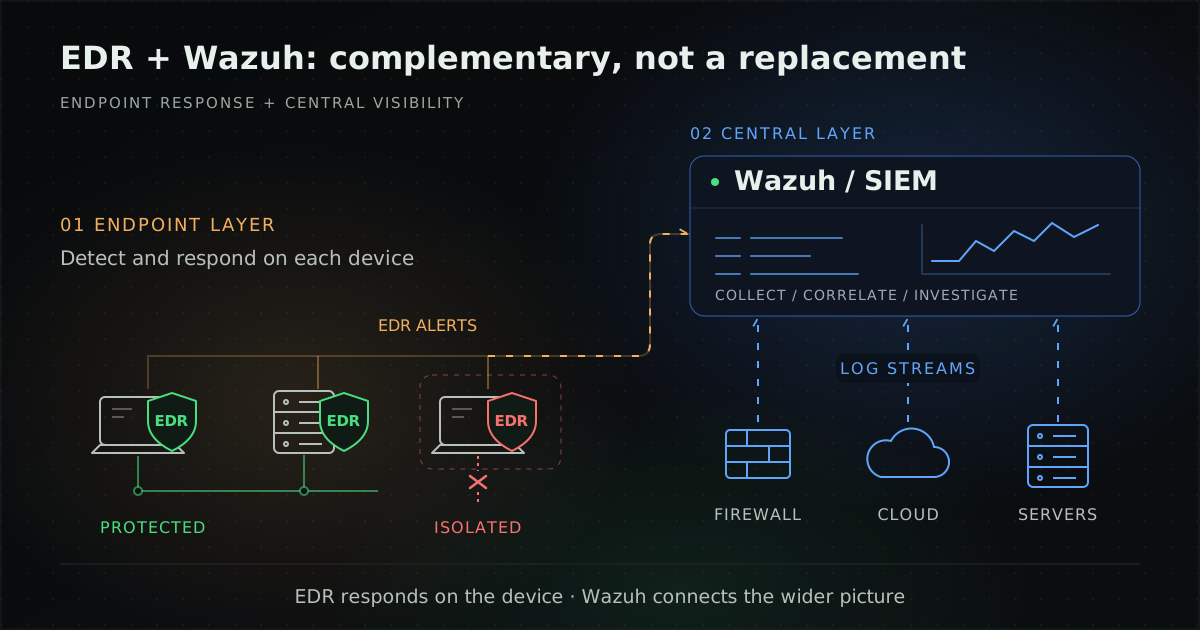
EDR detects and responds on endpoints, while Wazuh fits as the central log and SIEM layer that ingests EDR alerts and adds file, software, vulnerability and configuration checks. The two usually complement each other, and Wazuh should not replace EDR.
By UNIXDEV Team · 13 min read
Original published · English edition
Your organisation already runs EDR or antivirus on user devices, and the team proposes adding Wazuh. The first question from whoever approves the budget is usually "isn't that duplication?" or "if Wazuh is open source, could it replace the EDR and save money?"
This guide is for CISOs, IT managers and budget approvers. It explains how EDR, XDR and SIEM differ, what Wazuh can and cannot do on endpoints, how it works alongside an EDR, and gives a checklist for the decision.
What is EDR and what does it do?
EDR (endpoint detection and response) is a security solution that continuously monitors end-user devices to detect and respond to threats such as ransomware and malware, as described by CrowdStrike.
CrowdStrike credits Gartner's Anton Chuvakin with coining the term and quotes his description (as cited by CrowdStrike): EDR records and stores endpoint-system-level behaviours and uses various data analytics techniques to detect suspicious system behaviour.
Examples from the Microsoft Defender for Endpoint documentation:
- Telemetry: continuous behavioural telemetry, including process information, network activity, deep optics into the kernel and memory manager, user logins, and registry and file system changes. Microsoft says the data is stored for six months so an analyst can go back to the start of an attack.
- Response: Microsoft states that Defender for Endpoint Plan 1 and Microsoft Defender for Business include only four manual response actions: run an antivirus scan, isolate the device, stop and quarantine a file, and add an indicator to block or allow a file. Capabilities therefore depend on the licence tier.
- Incidents: alerts with the same attack techniques or attributed to the same attacker are grouped into an incident.
The same page notes that Defender for Endpoint detection is not intended to be an auditing or logging solution that records every operation. That sentence explains why an EDR and a log aggregation layer are separate jobs.
In its Eviction Strategies guidance on isolating endpoints, CISA (countermeasure CM0065) assumes the organisation uses endpoint management software or an EDR, and names CrowdStrike, Defender for Endpoint and SentinelOne as tools that can quickly segregate endpoints.
How do XDR and SIEM differ from EDR?
EDR covers endpoints only, XDR combines data from many sources to detect and respond, and SIEM focuses on collecting and analysing logs, according to Microsoft. These are a vendor's definitions, not a neutral standard.
- XDR (extended detection and response): a unified platform that ingests data from endpoints, networks, clouds, email and identities to detect, investigate and respond to threats.
- EDR: Microsoft says it is limited to endpoints and does not provide full visibility into networks, cloud workloads or identity systems.
- SIEM (security information and event management): collects and analyses logs for visibility and compliance, but often requires manual correlation.
An example of an XDR-level capability is automatic attack disruption in Microsoft Defender XDR, which Microsoft says can automatically contain attacks in progress, including disabling compromised user accounts and isolating affected devices. It depends on the licence tier.
What can Wazuh do on endpoints?
Wazuh focuses on endpoint visibility and hygiene: file integrity monitoring, hardware and software inventory, configuration assessment, vulnerability detection, layered malware detection and script-based automated response, all reported to one central platform.
The Wazuh documentation describes it as a free and open source security platform that unifies XDR and SIEM capabilities. It has agents on endpoints, a server that analyses data with decoders and rules, an indexer that stores alerts, and a dashboard for visualisation and analysis. Agents install on Linux, Windows, macOS, Solaris, AIX and HP-UX. As of this writing (October 2026), the latest stable release is 4.14.9, released on 14 October 2026, and Wazuh 5.0 is still a pre-release.
Core capabilities such as file integrity monitoring (FIM), security configuration assessment (SCA), vulnerability detection and MITRE ATT&CK mapping are covered in our Wazuh SIEM and XDR guide, so this section focuses on what matters for the EDR comparison.
- System inventory (Syscollector): collects hardware, operating system, installed software, network interfaces, ports, running processes, browser extensions, services, users and groups, and Windows updates on Windows endpoints.
- Linux system calls: uses the Linux Audit system (auditd) to monitor system calls.
- Sysmon on Windows: supported, but according to the default agent configuration file for version 4.14, the Windows agent collects only the Application, Security and System logs plus the active response log, so you must add a
<localfile>entry for theMicrosoft-Windows-Sysmon/Operationalchannel yourself (see the format in the event logging documentation).
How does Wazuh detect malware?
Wazuh detects malware in layers that rely on supporting data sources. The malware detection documentation states plainly that the FIM module cannot detect malicious files on its own. It is combined with:
- threat detection rules and CDB lists of file hashes;
- the VirusTotal integration and YARA scans;
- rootkit behaviour detection on monitored endpoints;
- collection and analysis of logs from other malware detection software such as Windows Defender and ClamAV.
Two cautions:
- YARA: when FIM detects a change, it triggers a YARA scan through active response. The documented Linux example script only logs matches, while the documented Windows example script deletes every file that matches a YARA rule, and the documentation warns to monitor only directories where that is acceptable. It is an example, not a default; test it before production use.
- VirusTotal: the integration sends only the hash of a file flagged by FIM, not the file itself. The Wazuh documentation states that the Public API is limited to 500 requests per day and 4 requests per minute, and must not be used in commercial products or services. Organisations using it in a business context should check VirusTotal's terms of use first.
What can Wazuh active response do?
Active response runs scripts on endpoints when an alert matches a configured rule ID, level or rule group. Responses are either stateless (one-time actions) or stateful (reverted after a set period).
The default scripts are mostly IP blocking, such as firewall-drop, firewalld-drop, host-deny, route-null and netsh.exe on Windows. The rest include disable-account, agent restart, a Slack notifier and a Kaspersky hook.
We found no documented built-in host network isolation. If you need it, you would write a custom script or have your existing EDR isolate the device.
At what level of the operating system does the Wazuh agent run?
In a blog post on endpoint security without kernel-level access, Wazuh explains that its agent runs in user mode and relies on operating system APIs such as the Windows Event Log API, inotify, auditd and journald, arguing that this reduces complexity and the risks associated with kernel-level access.
Microsoft, by contrast, says Defender for Endpoint collects deep optics into the kernel and memory manager. Putting the two statements side by side, our conclusion is that the two systems see the same machine at different levels of detail. That conclusion is ours, not a statement by either vendor.
How do EDR and Wazuh compare?
EDR focuses on behavioural detection and response on endpoints, while Wazuh focuses on aggregating logs from many sources, checking endpoint hygiene and keeping evidence for audits. The table summarises the documentation cited in this article, using Defender for Endpoint as the EDR example.
| Aspect | EDR | Wazuh |
|---|---|---|
| Main job | Detect and respond to threats on endpoints | Aggregate logs and alerts from many sources (SIEM), plus endpoint capabilities |
| Endpoint data | Behavioural telemetry, including kernel and memory manager optics | User-mode agent using operating system APIs such as Event Log, inotify and auditd |
| Data sources | Mainly endpoints | Endpoints, network devices, cloud workloads and third-party APIs, including EDR alerts |
| Malware detection | Behavioural detection, plus antivirus scans | Layered: FIM with rules, CDB lists, YARA, VirusTotal, and Defender or ClamAV logs |
| Response | For example device isolation and file quarantine (depends on licence tier) | Active response scripts, mostly IP blocking and account disabling; no documented built-in host isolation |
| Logging for audit and compliance evidence | Microsoft says Defender for Endpoint detection is not intended to be an auditing or logging solution that records every operation | FIM, inventory, CIS-based SCA, vulnerability detection, and mappings to PCI DSS, GDPR, HIPAA, NIST 800-53 and TSC |
| Licensing model | Commercial software with capabilities by licence tier | Open source: core 4.x under GPLv2, the wazuh-indexer and wazuh-dashboard repositories (OpenSearch forks) under Apache 2.0; or SaaS through Wazuh Cloud |
A note on licensing: licence details for each component, including the differences between 4.x and 5.0, are in the "Is Wazuh really free?" section of our Wazuh SIEM and XDR guide. If you plan to modify or redistribute it, have legal counsel check the version you actually use.
If you already have EDR, do you need Wazuh too?
Consider it when you have no central log or SIEM layer, or when you need work the EDR does not do, such as file integrity monitoring on servers, software inventory, configuration checks and collecting logs from systems the EDR does not cover. If an existing SIEM or XDR already does all of that, Wazuh may be redundant.
The complementary pattern is to keep the EDR on endpoints and use Wazuh as the central layer that receives EDR alerts and views them alongside other logs. How you connect them depends on the EDR vendor:
- Microsoft Defender products: Wazuh has an official ms-graph module that pulls logs through Microsoft Graph GET requests from Defender for Endpoint, Microsoft 365 Defender, Defender for Identity, Defender for Office 365, Defender for Cloud Apps, Entra ID Protection and Purview. The setup page uses read-only permissions such as SecurityAlert.Read.All and SecurityIncident.Read.All. The module ingests data only; response actions are still taken in the Defender console.
- SentinelOne: a Wazuh blog post describes exporting logs through syslog or through the SentinelOne API with a Python script. It is a how-to guide, not a built-in module.
- CrowdStrike Falcon: as of this writing (October 2026) we found no official integration in the Wazuh documentation, and GitHub feature request #8129 is still open. The available approach is to send syslog output from the Falcon SIEM connector and write your own decoders and rules, a community approach you would need to build and test yourself.
Is EDR alone enough?
EDR is an important control, but relying on it alone carries risk. An example comes from CISA advisory AA24-326A (November 2024), which summarises lessons from a red team assessment of one organisation.
CISA found that the organisation relied too heavily on host-based EDR and did not implement sufficient network-layer protections, and that it relied too heavily on known indicators of compromise and its EDR instead of independently analysing its network activity.
This lesson comes from a single assessment, so it does not mean EDR fails. It shows that other layers are needed. A log aggregation platform such as Wazuh lets the team analyse logs from network devices and other systems alongside EDR alerts, but Wazuh does not replace network-layer protection. Controls such as firewalls and network segmentation remain separate work.
Can Wazuh replace EDR?
Wazuh should not be treated as an EDR replacement, because its agent runs in user mode and we found no documented built-in host isolation in the Wazuh documentation (as of October 2026). It can, however, be a sensible starting point in some situations where EDR does not yet cover every machine.
- Linux servers and older systems: when you need visibility of logs, system calls, file changes and vulnerabilities on servers, including operating systems the Wazuh agent supports such as Solaris, AIX and HP-UX. For more on running older systems, see how to keep a legacy system running safely.
- Audit evidence: the Wazuh regulatory compliance documentation says it helps implement compliance requirements for PCI DSS, GDPR, HIPAA, NIST 800-53 and TSC. Installing Wazuh does not make an organisation compliant or certified. You still need policies, processes and owners, and should confirm requirements with your auditor or legal adviser.
- A central layer before choosing an EDR: start by aggregating logs and building an asset inventory, then use that data to choose an EDR for the highest-risk machines.
Hypothetical example: EDR on user devices but not on servers
The following scenario is a hypothetical example to illustrate the reasoning. It is not a client result. Suppose an organisation runs Defender for Endpoint on staff Windows devices, but the Linux servers running internal systems have no EDR and firewall logs are not sent anywhere.
- The team installs Wazuh agents on the Linux servers, enables FIM on key directories, and uses SCA and vulnerability detection.
- Firewall logs are sent to Wazuh, and the ms-graph module is enabled so Defender alerts can be viewed alongside them.
- Isolation of Windows devices is still triggered from the Defender console; Wazuh active response is used only for tested cases such as IP blocking.
- The team agrees who watches alerts during and outside business hours, and which alert levels go to whom.
The point is that each tool does what it is good at, and someone clearly owns the alerts.
What should you check before deciding?
Start from what you already have, the gaps nobody is watching and who will receive the alerts, not from a list of tools.
- What you have: which EDR or antivirus edition you run, which kinds of machines it covers (user devices, Windows servers, Linux, older systems), and whether your licence tier includes device isolation. Traditional antivirus may lack response capabilities such as device isolation, so check the vendor documentation.
- Log layer: do you already have a SIEM or XDR that brings server, network device and cloud logs and EDR alerts into one place?
- Gaps: which machines or systems have logs, file changes, vulnerabilities or misconfigurations that nobody sees?
- Integration: can your EDR send alerts to Wazuh through a documented method, or will you need to build decoders?
- Response: which system triggers device isolation, account disabling and IP blocking, who is allowed to trigger them, and have they been tested?
- Who watches alerts: who triages alerts during and outside business hours, and how are they escalated? A tool nobody watches helps little.
- External integrations: if you use VirusTotal, have you checked its terms for commercial use?
- Compliance: which requirements need evidence, and who owns the policies and processes? The tool only helps collect evidence.
If you are unsure whether to run these systems in-house or through a provider, read managed services or in-house IT, and if you hire a provider, check the scope against our MA and SLA contract checklist.
UNIXDEV deploys, tunes rules for and maintains Wazuh to work alongside your EDR and existing systems within an agreed scope, including ongoing operations through our DevOps and SRE managed services.
Sources and further reading
- CrowdStrike — What is Endpoint Detection and Response (EDR)?
- Microsoft Learn — Overview of endpoint detection and response
- Microsoft — What is XDR?
- CISA — Isolate Endpoints from Network (CM0065)
- CISA — Advisory AA24-326A (red team assessment lessons learned)
- Wazuh documentation — Getting started
- Wazuh documentation — Malware detection
- Wazuh documentation — Default active response scripts
- Wazuh documentation — Monitoring Microsoft Graph API
- Wazuh documentation — VirusTotal integration
- Wazuh documentation — Detecting malware using YARA integration
- Wazuh documentation — Active response
- Wazuh documentation — Microsoft Graph API setup
- Wazuh documentation — Regulatory compliance
- Wazuh documentation — Event logging
- Wazuh blog — Endpoint security without kernel-level access
- Wazuh blog — Integrating SentinelOne XDR with Wazuh
- GitHub — wazuh/wazuh issue #8129: CrowdStrike integration
- Related: Wazuh SIEM and XDR guide
Article by the UNIXDEV Team · 30 October 2026 · Product details reflect vendor documentation as of this writing (October 2026). The example is hypothetical, and the notes on compliance and licensing are for planning only, not legal advice.