
Legacy systems past end of support: reducing risk until you modernize
If a legacy system cannot move yet, find which parts are end-of-life, isolate it in its own network zone, cut unnecessary data flows, monitor proactively, keep backups you have restored, and set criteria for when to speed up modernization. Compensating controls reduce risk; they do not remove vulnerabilities.
By UNIXDEV Team · 15 min read
Original published · English edition
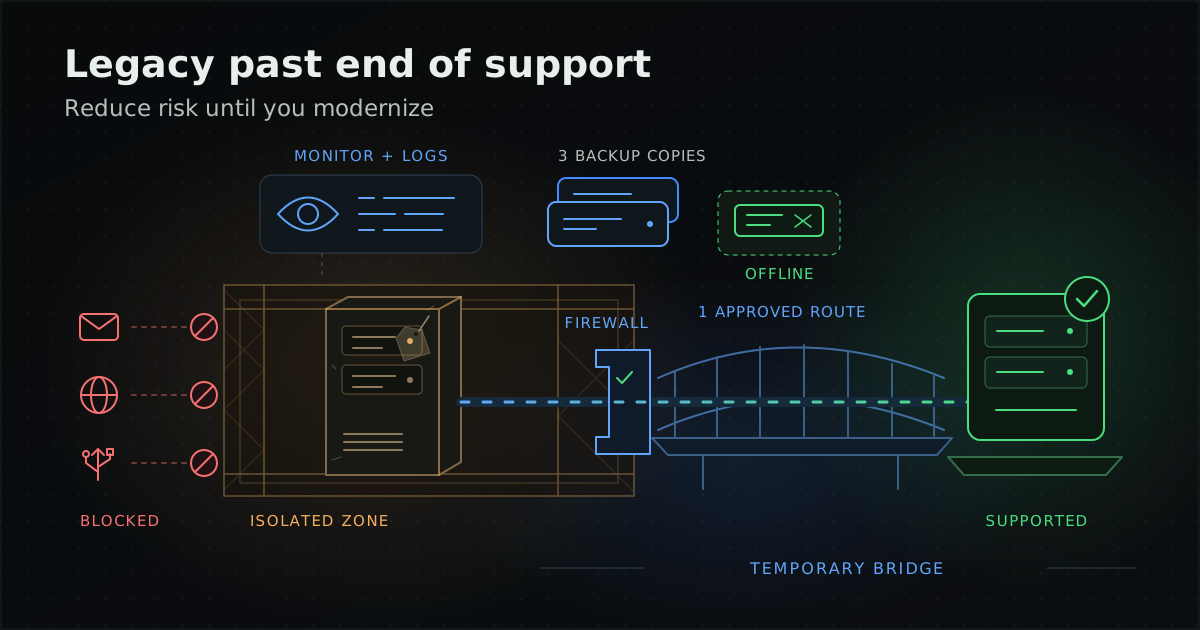
Some core systems still run on Windows Server 2012 R2, CentOS 7 or PHP 7.4. The modernization budget may not be approved yet, the original software supplier may have stopped development, or the system supports work that cannot stop. So it has to keep running for a while, even though it no longer receives security updates.
This guide is for IT managers and system owners in exactly that position: the period before or while you modernize. It does not explain what a legacy system is or which modernization approach to choose; that is covered in legacy system modernization. Nor does it cover taking over a system from an outgoing supplier, which is in the vendor handover checklist. If the system has no documentation at all, read taking over an undocumented legacy system as well.
How do you know whether your legacy system is end-of-life?
Split the system into layers: operating system, runtime or language, database and framework. Compare the version actually running at each layer with the vendor's lifecycle page. If any layer is end-of-life (EOL), part of the system no longer receives security fixes.
The table below summarises stacks commonly found in legacy systems, as of writing (October 2026), from each vendor's own site. A dash means the sources used here do not mention an extended programme; it does not prove none exists. Check with the vendor before deciding.
| Software | Status / end date | Paid extended programme or note |
|---|---|---|
| CentOS Linux 7 | EOL 30 June 2024 | — |
| CentOS Linux 8 | Ended at the end of 2021, per the CentOS project announcement | — |
| Red Hat Enterprise Linux (RHEL) 7 | In its ELS period since 30 June 2024 | The Extended Life Cycle Support (ELS) add-on provides certain critical-impact security fixes, selected urgent priority bug fixes and troubleshooting for RHEL 7.9 until 31 May 2029. Only Standard or Premium subscriptions are eligible; a purchase after the ELS start date must be back-dated. Red Hat says ELS is being superseded by Extended Life Cycle (ELC), and new deployments should plan for ELC. |
| Windows Server 2012 / 2012 R2 | Extended support ended 10 October 2023 | Extended Security Updates (ESU) Year 3 ended 13 October 2026, so there are no further security updates from Microsoft |
| Windows Server 2016 | Mainstream support ended January 2022; extended support ends January 2027 | Little time left; start planning now |
| .NET Framework 4.5.2 / 4.6 / 4.6.1 and 4.6.2 | 4.5.2, 4.6 and 4.6.1 retired on 26 April 2022; 4.6.2 has an end date in January 2027 | 4.7 through 4.8.1 have no end date listed on the lifecycle page |
| PHP 7.4 | EOL 28 November 2022 (last release 7.4.33) | — |
| PHP 8.1 | EOL 31 December 2025 (last release 8.1.34) | The oldest branch with security support is 8.2, until 31 December 2026 |
| Java 8 (Oracle Java SE) | Premier Support ended March 2022 | Oracle Extended Support until December 2030, and Sustaining Support with no end date |
| Java 8 (Eclipse Temurin) | Adoptium lists builds until at least December 2030 | A planned build schedule, not a support contract |
| Python 2 | Sunset on 1 January 2020 | The Python core team no longer fixes it, even for security problems |
| Node.js 16 / 18 / 20 | EOL 11 September 2023 / 30 April 2025 / 30 April 2026 | Node.js advises production to use only Active LTS or Maintenance LTS releases |
| MySQL 5.7 | Under Oracle Sustaining Support since October 2023 (no new regular updates) | Oracle encourages upgrading to MySQL 8.0 |
| PostgreSQL 11 / 12 / 13 | Final releases 9 November 2023 / 21 November 2024 / 13 November 2025; all unsupported | PostgreSQL supports each major version for 5 years after its initial release |
| Ubuntu 18.04 LTS | Standard security maintenance ended May 2023 | Expanded Security Maintenance (ESM) with Ubuntu Pro until May 2028; Legacy add-on until May 2033 |
| Ubuntu 20.04 LTS | Standard security maintenance ended May 2025 | ESM with Ubuntu Pro until May 2030; Legacy add-on until May 2035 |
php.net puts the EOL status plainly: users of an unsupported release should upgrade as soon as possible, because they may be exposed to unpatched security vulnerabilities. The same applies to every row that is already out of support.
The output of this step is an inventory that records the real version of every layer, its end-of-support date and the business services that depend on it. You will use it to rank risk in the sections that follow.
How long can extended support or ESU keep a legacy system going?
Only as long as the vendor's programme runs, and it should be treated as a bridge, not a destination. Use that time to finish the migration, not to postpone the decision.
- Microsoft describes ESU in its ESU FAQ as a last-resort paid option that is not intended as a long-term solution but as a temporary bridge while you migrate to a supported platform. It carries only Critical and Important security updates for up to three years after end of extended support, does not extend the product lifecycle and provides no further technical support.
- The UK NCSC says in its guidance on obsolete products that once a product goes into extended support there is no guarantee that all future vulnerabilities will be addressed, so it should not be seen as a long-term alternative to migrating to a supported operating system.
- Red Hat describes RHEL 7 ELS as covering certain critical-impact security fixes, selected urgent bug fixes and troubleshooting for RHEL 7.9, which is narrower than regular maintenance.
For Windows Server 2012 and 2012 R2 that bridge ended on 13 October 2026. Systems still running them receive no further security updates from Microsoft. What remains is the compensating controls in the next section, together with a migration plan that has a firm date.
What compensating controls do you need when you cannot patch?
Use several layered controls. Start by isolating the system from the rest of the network and restricting the routes data can take to reach it, then monitor it and reassess the risk periodically. No single control replaces a patch.
NIST SP 800-40 Rev. 4 notes that sometimes a patch will never be released because the vendor no longer supports the software. It treats such systems as "unpatchable assets", handled through isolation or other methods that mitigate risk, for example firewalls and network segmentation that reduce the attack surface. NIST advises planning multiple types of mitigation together and periodically re-evaluating the alternatives through a risk assessment and a cost-benefit analysis of whether the system is still worth the cost of mitigating, transferring or accepting the risk.
The NCSC guidance goes further:
- Treat obsolete servers as untrusted: the wider enterprise should handle the data and services they offer accordingly.
- Close the routes malicious data could use: NCSC lists email, web browsing, file shares, network ports and removable media, and recommends disabling them as far as possible, using air gaps where you can.
- Reduce data flows to the server: consider each flow carefully and control it with a discrete network firewall where possible.
- Zone the network: to reduce the ability of malware to spread laterally through the organisation.
NCSC also stresses that its guidance reduces risk but does not make continued use of obsolete products risk-free. The only fully effective mitigation is to stop using the product.
| Control | What it involves | Limitation |
|---|---|---|
| Network segmentation / zoning | Move the legacy system into a separate zone and allow only necessary connections through a firewall | The vulnerability remains; anyone who can reach the zone can still attack it |
| Restricting data routes | Disable email, web browsing, file shares, unused ports and removable media on the machine | Must be rechecked after every change to the system |
| No direct internet exposure | Give external users a controlled entry point instead of exposing the legacy system's ports directly | Some systems were designed to serve external users directly and cannot change at once |
| Virtual patching (e.g. a WAF) | Write rules that block exploit patterns for known vulnerabilities | Does not remove the vulnerability; covers only inspected traffic and attack variants the rules recognise |
| Application control | Restrict which programs can run on the machine | Microsoft states third-party application control is not a replacement for product security fixes |
| Protective monitoring | Collect logs and raise alerts that someone acts on | Detects, but does not prevent, an attack |
Can virtual patching with a WAF replace patching?
No. Virtual patching reduces risk while you wait, but the vulnerability in the code is still there, so the code fix or migration must continue.
The OWASP Virtual Patching Cheat Sheet defines a virtual patch as a security policy enforcement layer that detects and blocks exploitation attempts against a known vulnerability without changing the vulnerable code. OWASP is explicit that it reduces exposure only for traffic the layer inspects and attack variants its rules recognise, and that it does not remove the underlying vulnerability. It advises testing for bypasses and continuing the code or vendor fix.
OWASP also says code-level fixes and virtual patching are not mutually exclusive, and lists reasons code cannot simply be fixed that match legacy situations: lack of resources, third-party software the user cannot modify, and outsourced development where changes would require a new project. Its methodology has six phases: Preparation, Identification, Analysis, Virtual Patch Creation, Implementation/Testing, and Recovery/Follow Up.
The same principle applies to application control. Microsoft states that third-party application control solutions are not a replacement for product security fixes.
How should you back up a legacy system so it can really be restored?
Follow the 3-2-1 rule, keep offline, encrypted copies and test restores regularly. For a legacy system, also keep what you need to rebuild it, not just the data.
- The 3-2-1 rule: the CISA Data Backup Options paper sums it up as keeping 3 copies of any important file (1 primary and 2 backups), on 2 different media types to protect against different hazards, with 1 copy stored offsite.
- Offline and encrypted: the CISA #StopRansomware Guide recommends offline, encrypted backups of critical data, because many ransomware variants try to find and delete or encrypt accessible backups, and regular tests of backup availability and integrity in a disaster recovery scenario.
- Keep what you need to rebuild: the same guide recommends maintaining golden images and storing source code or executables with offline backups, along with escrow and licence agreements. This suits legacy systems that are hard to reinstall from scratch.
NIST SP 800-34 Rev. 1, a contingency planning guide, says of backup tapes that they should be tested regularly to ensure data are stored correctly and can be retrieved without errors or lost data. It also says plan tests should be conducted as close to the operating environment as possible, covering system recovery on an alternate platform from backup media and restoration of normal operations.
Restoring a legacy system on another machine may expose problems nobody has seen, such as installers or licences that can no longer be found. A restore test therefore answers more than whether the data are complete; it shows whether the organisation can rebuild the system at all.
What should you monitor and log while the legacy system keeps running?
Monitor proactively: alerts that someone acts on, not just logs kept for later. The NCSC says that when using obsolete products it is especially important to have an effective, proactive protective monitoring capability, and notes that many organisations can record security events but do not alert or act on them.
For a legacy system, you should at least see:
- Logins, especially administrator accounts and logins from unexpected places
- Changes to system files, configuration files and application files (file integrity monitoring)
- Network connections outside the allowed data flows
- Failed backup jobs and disks close to full
Open source tools such as Wazuh are one option for collecting logs and file integrity monitoring; see the Wazuh SIEM/XDR guide and the Wazuh product page. Before installing an agent on an old operating system, check the tool's documentation to confirm that version is supported, or collect logs another way. A tool makes events visible but does not close vulnerabilities, and someone still has to handle the alerts under an agreed procedure.
How does change control reduce legacy system risk?
It keeps a fragile system from breaking through unplanned changes, and regular reviews keep the compensating controls working. If knowledge of the system sits with only a few people, that is a risk in its own right.
- Runbook: steps to start, stop and restore the system that someone other than the main administrator can follow. If there is no runbook yet, see how to write one in taking over an undocumented legacy system.
- Recorded configuration: settings made by hand on the server, firewall rules and allowed data flows, so you can tell what has changed.
- Change control: every change needs an approver, a test on a copy of the system first where possible, and a rollback plan.
- Regular reviews: review firewall rules, user accounts and restore test results so the compensating controls keep working.
If the system also has performance problems, see systems performance care. If you are deciding whether to run it in-house or with a provider, read managed services or an in-house IT team.
When is "keep it running for now" no longer acceptable?
When the system is exposed to the internet, holds sensitive data, receives no updates of any kind, or nobody in the organisation can operate and restore it. The more of these apply, the more urgently you need a modernization plan rather than another layer of compensating controls.
The CISA Bad Practices catalogue (published in 2021 and now marked as archived content) lists the use of unsupported software in systems serving critical infrastructure as a dangerous practice, especially in technologies accessible from the internet, and encourages all organisations to address it.
| Criterion | Signal to act | Why |
|---|---|---|
| Internet exposure | The legacy system takes traffic directly from the internet | In the context of critical infrastructure, CISA says the danger of unsupported software is especially serious in internet-accessible technologies |
| Data sensitivity | It holds personal data, financial data or data critical to core operations | The impact of a breach is high even if compensating controls lower the likelihood |
| No updates at all | For example Windows Server 2012/2012 R2 after ESU, Python 2 or PHP 7.4 | New vulnerabilities will never be fixed; they only accumulate |
| Skills and people | No one in the team or at a provider can operate or restore the system | The system cannot be recovered in an incident, even with backups |
| Cost of compensating controls | Exceptions and controls around the system keep growing | NIST advises reassessing whether the system is still worth the cost of mitigating, transferring or accepting the risk |
Once the criteria are met, start by choosing an approach in legacy system modernization, and if the plan is to move to the cloud, continue with the cloud migration guide.
Hypothetical example: an internal system on Windows Server 2012 R2
The following is a hypothetical example to illustrate the approach, not a client result. Suppose an organisation runs an internal document approval system on Windows Server 2012 R2 with an old database. The migration plan is approved but has not started. The team does the following:
- Confirms from the inventory that ESU for Windows Server 2012 R2 has ended, so there will be no more security updates.
- Moves the server into a separate zone where the firewall allows only internal user networks to reach the application port, and disables web browsing and file shares on the machine.
- Sets alerts for administrator logins and changes to application files, with a named recipient.
- Tests a restore on a standby machine and finds the installer for one component is missing from storage, so adds it to the offline backup.
- Agrees a risk review date with the system owner, tied to the migration plan's schedule.
The point: these measures let the system run under control while you wait, but they do not bring it back into support.
What belongs on a checklist for running a legacy system until you modernize?
Review it with the system owner periodically. Record any item without evidence as a risk that needs a decision.
- An inventory records the real version of the operating system, runtime, database and framework, with end-of-support dates
- You know which layers are in extended support, when that ends, and have a plan to migrate before then
- The legacy system sits in a separate network zone, with a firewall allowing only necessary data flows
- Email, web browsing, file shares, unused ports and removable media are disabled on obsolete machines
- The legacy system is not exposed directly to the internet, or the reason and supporting controls are documented
- If you use virtual patching or application control, it is understood as an extra layer, not a replacement for patches
- Backups follow 3-2-1, include an offline, encrypted copy, and also hold golden images, installers and licences
- A restore on a standby machine has been tested, with a date and the tester recorded
- Alerts exist for logins, file changes and unusual connections, each with an owner
- A runbook and change approval process with a rollback plan are in place
- There are criteria and a review date for deciding when to speed up modernization
UNIXDEV helps organisations run legacy systems until they modernize through its Legacy Application Maintenance service: building the inventory and end-of-support dates, deploying and tuning monitoring, testing backups and restores, and maintaining the system within an agreed scope. Infrastructure and pipeline work is done together with DevOps & SRE, so the existing system stays under control until the modernization plan is complete.
Sources and further reading
- NIST SP 800-40 Rev. 4 — Guide to Enterprise Patch Management Planning
- NCSC — Obsolete products
- OWASP — Virtual Patching Cheat Sheet
- Microsoft — Extended Security Updates FAQ
- Microsoft — Windows Server 2016 lifecycle
- Microsoft — .NET Framework lifecycle
- Red Hat — CentOS Linux end of life
- Red Hat — Legacy errata support policy (ELS)
- CentOS Project — CentOS Linux 8 announcement (2020)
- PHP — Unsupported branches
- PHP — Supported versions
- Oracle — Java SE support roadmap
- Adoptium — Eclipse Temurin support
- Python — Sunsetting Python 2
- Node.js — Release schedule
- Node.js — Previous releases
- MySQL — End of life notice
- PostgreSQL — Versioning policy
- Ubuntu — Release cycle
- CISA — Bad Practices (2021, archived)
- CISA — Data Backup Options
- CISA — #StopRansomware Guide
- NIST SP 800-34 Rev. 1 — Contingency Planning Guide for Federal Information Systems
- Related: legacy system modernization
- Related: switching software vendors, what to take over
Article by UNIXDEV Team · 30 October 2026 · End-of-support dates are as of writing (October 2026) from vendor sites; check them again before deciding. A summary of practice for planning purposes, not legal advice; the example is hypothetical.