
Switching software vendors: what to take over from the outgoing team
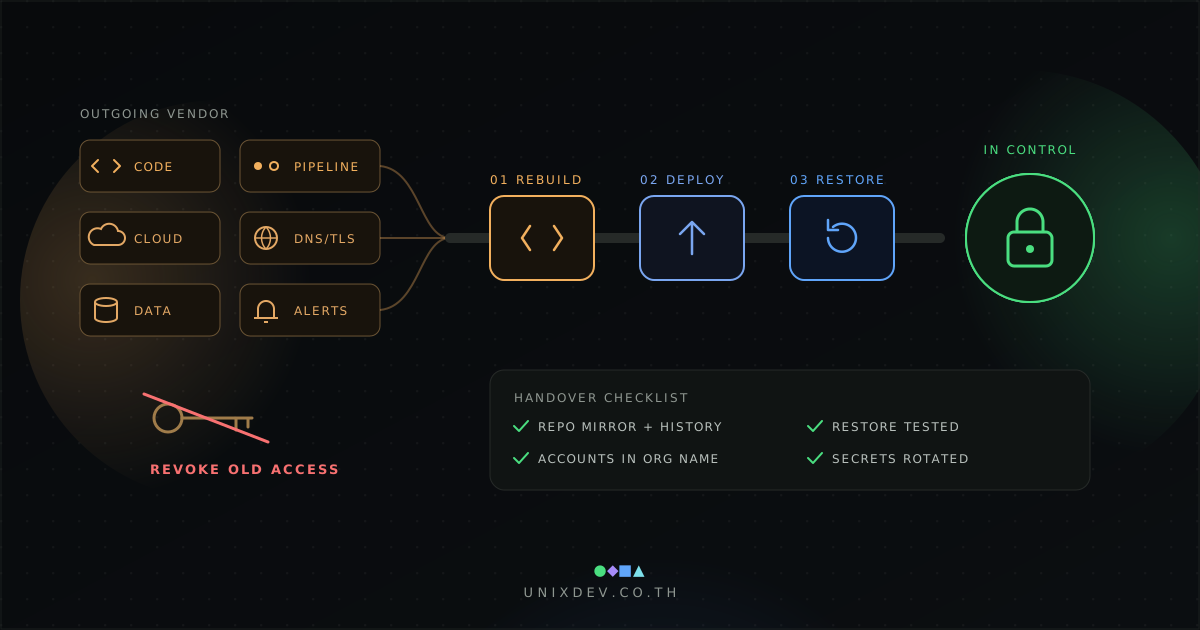
When a vendor leaves, take over the code with full history, the pipeline, cloud accounts, domains, backups and runbooks in your organisation's name. Prove it by having the new team rebuild, deploy to staging and restore on its own, then revoke the old team's access.
By UNIXDEV Team · 5 min read
Original published · English edition
A maintenance contract is about to end, or the team that built a system is moving on. The system still runs every day, yet nobody inside the organisation is sure who holds the cloud root account, whose name the domain is registered in, or whether last night's backup can actually be restored.
This guide is for IT managers, executives and procurement teams taking over a running system, whether it moves to a new supplier or back in-house. It covers what to collect, which contract clauses to check, how to prove the handover is complete and how to close access afterwards.
Why does switching software vendors often go wrong?
Control of the system is usually spread across the outgoing team's people and accounts. When they leave, the organisation loses access as well as knowledge. Typical symptoms: source code delivered as a zip file without history, cloud and domain accounts tied to personal or vendor email addresses, deployment steps that exist only on one developer's laptop, backups that have never been restored, and certificate or licence expiry alerts still going to the old team.
This is the step before legacy modernization: gain control of the running system first, then decide whether to rehost, refactor or rebuild.
What should you collect from the outgoing vendor?
Everything needed to build, deploy, operate and recover the system without help from the previous team, in five groups:
- Code and pipeline: the full repository with history, the build and deploy pipeline, configuration for each environment, and which commit is running in production. The GOV.UK Service Manual, writing about making source code open, advises being clear about who owns code, including code written by an agency, and storing it in a repository the department manages. When changing vendors, we recommend moving the repository into an account your organisation controls rather than relying on the vendor's. A git clone --mirror captures all refs, not just a snapshot.
- Infrastructure and accounts: cloud and server accounts, domains, DNS, TLS certificates, third-party services and licences. AWS root user guidance recommends a business-managed group email address, MFA, no root access keys, and recovery channels controlled by the organisation and split between people. Under the current (2024) ICANN Transfer Policy, the registered name holder has authority to approve transfers and receives the AuthInfo code, so the domain must be in the organisation's name.
- Data and backups: databases, files, backup schedules and locations, and a restore the new team has performed.
- Monitoring and documentation: who receives alerts, runbooks, system diagrams, integrations and scheduled jobs.
- Backlog: open tickets, known issues and commitments made to users.
Which contract clauses should you check?
Check who owns the source code and other intellectual property, whether the supplier must assist with exit, and how your data will be returned or deleted. UK government guidance shows what good clauses cover: NCSC supply chain principle 6 calls for clear requirements for the return and deletion of information and assets on termination or transfer, and Schedule 30 of the Mid-Tier Contract covers an exit plan, a virtual library and termination assistance. These are UK templates, not Thai law, so review your own contract with legal counsel. When you draft the agreement with the incoming team, write handover and exit terms in from the start.
What should happen during knowledge transfer, and how long should it take?
The new team should do the work while the old team watches, not just attend presentations. Start with shadowing, then reverse shadowing, and have the new team complete at least one real release before the old team leaves. Turn every question-and-answer session into a runbook, review each open ticket and known issue, and agree who decides during a production incident. Define exit criteria rather than a fixed number of days.
How do you know the handover is complete?
- Rebuild: clone from the organisation's repository and build from the documentation; the result should match production.
- Deploy: use the handed-over pipeline to deploy to staging and test the main user journeys.
- Restore: restore the database and files from a real backup into staging and check completeness. The Google SRE book notes that people want restores, not backups, and that only a full end-to-end test is trustworthy.
- Access check, then revoke: confirm the new team can sign in to every account with organisational credentials before removing the old team's access.
If any step needs help from the previous team, the handover is not complete.
What security work follows the handover?
NCSC supply chain guidance (principle 5, where a supplier's systems connect to yours) says such access should be limited, controlled and monitored, reviewed periodically, and removed when no longer required. Remove user accounts, SSH keys, VPN, repository, CI/CD, cloud, DNS and third-party access. The OWASP Secrets Management Cheat Sheet says secrets that are no longer required or potentially compromised must be revoked, and recommends regular rotation. It also notes that secrets are often hardcoded in source and configuration files, that rewriting git history breaks links to commits, and that a dedicated secrets management solution is preferable. In practice, treat any secret found in code as exposed: rotate it and move it to a secrets manager.
What does a phased takeover plan look like?
Use five phases, and move on only when each phase meets its exit criteria, not when a date passes.
- Inventory: list every item with an owner and request read access early.
- Shadow and knowledge transfer: the old team remains responsible for production.
- Verify: rebuild, deploy to staging and restore, all by the new team.
- Cutover: move alerts, on-call and production responsibility.
- Revoke and rotate: remove old access, rotate secrets and confirm data return or deletion.
Start transferring account and domain ownership early, because it depends on third parties. A failed restore test found while the old team is still available is far better than one found during an incident. Once you control the system, decide who runs it next: compare managed services and in-house IT, or read how to choose a software development company.
UNIXDEV takes over running systems through its legacy application maintenance service, starting with an inventory and a rebuild, deploy and restore check on staging before taking responsibility for ongoing support.