
Ransomware: how Thai organisations prepare and respond
How ransomware works, how Thai organisations can prevent it, backups attackers cannot reach, the first hour, and PDPA and Cybersecurity Act duties.
By UNIXDEV Team · 23 min read
Original published · English edition
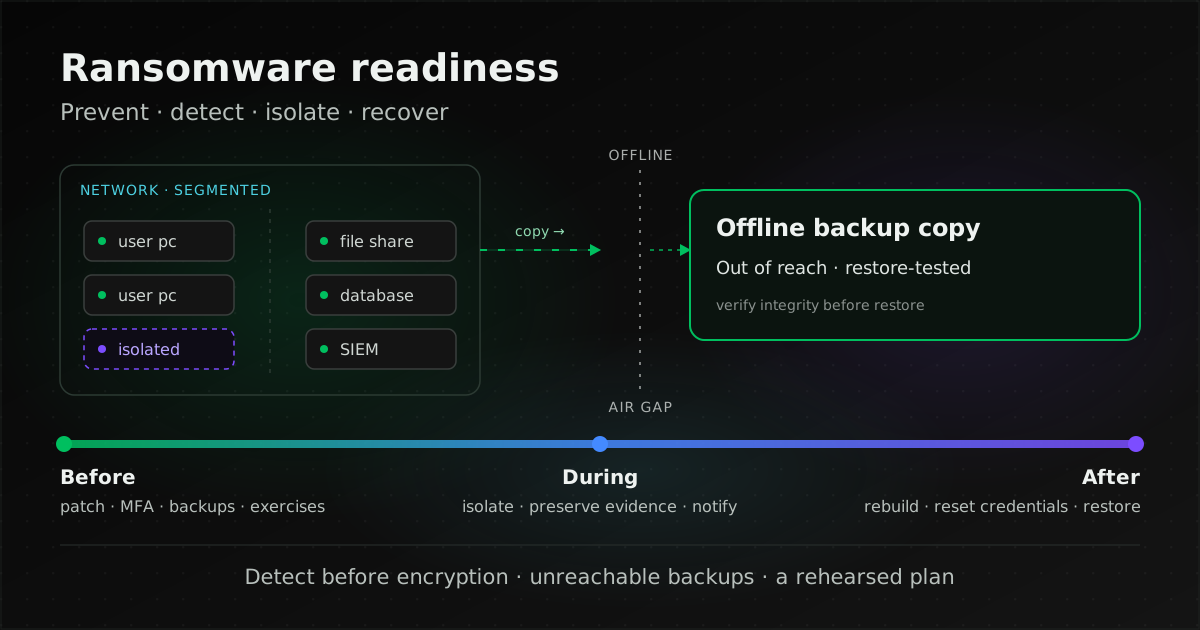
Ransomware is malware that encrypts the files on a device so that the files, and the systems that depend on them, can no longer be used; the attackers then demand a ransom for decryption. An organisation copes best by preparing before an incident: closing the common ways in, keeping backups the attacker cannot reach and that have actually been restored, and having a plan that says who does what in the first hour and who must be notified.
This guide is for IT teams, executives and data protection officers (DPOs) in Thai companies and government agencies. It covers before, during and after an incident, and the reporting duties under Thai law. For what Wazuh is, read what Wazuh is; for how a SIEM differs from EDR, read do you need Wazuh if you already have EDR. All sources were checked on 7 November 2026.
What is ransomware?
The #StopRansomware Guide from the US Cybersecurity and Infrastructure Security Agency (CISA) defines ransomware as malware designed to encrypt files on a device, rendering them and the systems that rely on them unusable, after which the attackers demand a ransom in exchange for decryption. The current edition, from September 2023, was written jointly by CISA, MS-ISAC, NSA and the FBI, and has two parts: prevention best practices and a response checklist.
The same guide notes that attackers now also steal data and pressure victims to pay by threatening to release it. Using both tactics is known as double extortion, and in some cases attackers skip encryption and use the threat of release alone. Good backups get you running again, but they do nothing about data that has already left.
In MITRE ATT&CK, the knowledge base of adversary techniques, encryption is T1486 Data Encrypted for Impact, and deleting or disabling recovery features such as Windows shadow copies and the backup catalog is T1490 Inhibit System Recovery, which MITRE notes may deny access to available backups and recovery options.
How does modern ransomware get in and spread?
Encryption is usually the last step. Before it, the attacker has to get in, raise privileges, move to other machines and take data out, and that period is when an organisation has a chance to notice. The initial access vectors the #StopRansomware Guide groups its advice around are internet-facing vulnerabilities and misconfigurations, compromised credentials, phishing, precursor malware infection, advanced social engineering, and third parties and managed service providers.
| Stage | What the attacker does | ATT&CK technique |
|---|---|---|
| Get in | Phishing, exploiting an internet-facing device or application, logging in through an exposed VPN or RDP, or using stolen credentials | T1566 Phishing, T1190 Exploit Public-Facing Application, T1133 External Remote Services, T1078 Valid Accounts |
| Escalate and harvest credentials | Exploit a flaw for higher privileges, dump passwords from memory | T1068 Exploitation for Privilege Escalation, T1003 OS Credential Dumping |
| Move laterally | Use RDP to reach other machines | T1021.001 Remote Desktop Protocol |
| Keep remote control | Install remote access tools to control compromised hosts | T1219 Remote Access Tools (ATT&CK classes it under Command and Control) |
| Take data out | Upload to web file storage or over another protocol | T1567 Exfiltration Over Web Service, T1048 Exfiltration Over Alternative Protocol |
| Block recovery and encrypt | Delete shadow copies and the backup catalog, stop services, then encrypt | T1490 Inhibit System Recovery, T1489 Service Stop, T1486 Data Encrypted for Impact |
The table is our own arrangement of ATT&CK technique names, not a sequence every group follows. CISA notes that attackers often get in through exposed and poorly secured remote services, then move across the network with the native Windows RDP client, and also often exploit VPNs or use compromised credentials.
What does Thailand's NCSA say about ransomware?
We found no official count of ransomware incidents in Thailand, so we give none. What NCSA has published:
- NCSA annual report 2025 (B.E. 2568) says malware is becoming more complex and harder to detect, especially ransomware and trojans arriving in email or online files, and that attackers targeted unpatched software, especially old versions without patch management.
- The same report (page 57) counts 204,066,962 leaked usernames and passwords under the .th domain, with ThaiCERT notifying 5,875 affected organisations (data from October 2024 to 30 September 2025), and lists ransomware deployment among the possible consequences of leaked credentials. These are leaked accounts, not ransomware incidents.
- NCSA's national cyber threat risk assessment for 2025 (B.E. 2568) ranks external attackers exploiting software vulnerabilities to plant specialised malware, such as evasive ransomware, in the information systems of organisations in the general government data category among the country's top five risks; the risk of important data being destroyed, for example by ransomware, appears in every sector's risk report, mostly at low and medium levels.
The entry points NCSA stresses (unpatched software, email and leaked credentials) are the same ones CISA lists, so that is where prevention should start.
Where should ransomware prevention start?
Close the common ways in, then make it hard for an attacker who does get in to spread. The advice below comes from the #StopRansomware Guide and NIST IR 8374 Rev. 1 (Ransomware Risk Management: A Cybersecurity Framework 2.0 Community Profile, June 2026).
Internet-facing systems
- Do not expose RDP and similar services to the internet (CISA). If external access is needed, allow it only through a secure VPN (NIST).
- Patch the software and firmware of VPNs, network devices and remote-work devices to current versions, and enforce MFA on every VPN connection.
- Scan for vulnerabilities regularly, especially on internet-facing devices, and patch internet-facing servers promptly, above all for known exploited vulnerabilities.
- Systems that can no longer be patched need compensating controls such as a separate network zone and active monitoring; see legacy systems past end of support.
Accounts and privileges
- Use phishing-resistant MFA, as CISA recommends, and escalate to senior management when a system cannot support MFA.
- Require unique passwords of at least 15 characters, per CISA's password policy advice, and change default administrator usernames and passwords.
- Separate administrator accounts from user accounts. Daily work happens on standard accounts with MFA, with least privilege, as NIST recommends.
- Third parties and service providers: apply least privilege and separation of duties. If a provider maintains your backups, make sure they follow the same practices, and put your security requirements in the contract; see the MA and SLA contract checklist.
Network and email
- Segment the internal network so malware cannot spread across the whole organisation, and allow only authorised applications to run, per NIST's basic steps.
- Implement DMARC to lower the chance of spoofed email from your own domain. CISA points out that DMARC protects your domain from spoofing but not against inbound mail spoofed from domains without DMARC.
- Watch for password-protected archives. CISA warns that malware is often compressed in password-protected archives that evade antivirus scanning and email filters.
Which backups can ransomware not reach?
Backups where at least one copy is outside the attacker's reach and has been restored in practice. This section sums up the principles; choosing between immutable and offline copies, separating the right to delete backups, and rehearsing a restore are covered in ransomware-resistant backups: immutable, offline or air-gapped? CISA explains that backups must be kept offline because many ransomware variants try to find and delete or encrypt accessible backups so that restoration is impossible without paying. NIST IR 8374r1 (PR.DS-11) likewise says backups should have a copy stored offline or otherwise in a way that prevents access by the attacker or compromise by ransomware.
- Keep a copy apart from production. A backup on the same share, under the same domain accounts, or deletable from the console administrators log into every day, is still reachable. In our view the test is simple: if an administrator account is taken over, can the attacker delete this copy?
- Use immutable storage with care. CISA notes that some cloud vendors offer immutable storage that protects data without a separate environment, but warns that it does not meet compliance criteria for certain regulations and that misconfiguration can impose significant cost.
- Test restores. CISA recommends offline, encrypted backups of critical data and regular tests of their availability and integrity in a disaster recovery scenario.
- Verify integrity before restoring. NIST IR 8374r1 (RC.RP-03) stresses verifying backup integrity before using it to recover from ransomware.
- Keep what you need to rebuild. CISA recommends golden images of critical systems, infrastructure-as-code templates kept offline, and source code or executables stored with offline backups.
The 3-2-1 rule (three copies, two media types, one off site) and test restores of older systems on other hardware are covered in our legacy systems guide. Who is responsible for backups and restore tests when a contractor runs the system belongs in the MA contract.
How should you prepare and exercise a response plan?
CISA recommends creating, maintaining and regularly exercising a basic cyber incident response plan (IRP) and a communications plan that include response and notification procedures for ransomware and data extortion or breach incidents. The CEO or equivalent should review and approve them in writing, and hard-copy and offline versions should exist, because document systems may be unavailable during an incident. NIST IR 8374r1 adds defined roles and decision-making strategies, out-of-band communications, and a contact list that includes law enforcement, legal counsel and incident response resources.
What to settle in the plan before anything happens:
- Asset inventory. CISA asks for an inventory of logical assets (data, software) and physical ones (hardware), knowing which systems are most critical and how they depend on each other, stored securely with offline and paper copies.
- Restore order. A predefined critical asset list, which CISA uses to triage which systems to restore first.
- Notification details. The PDPC office's sample breach notification form (in Thai) asks for the time of the incident, the amount and kind of data, initial remediation, whether a police report was filed, the expected impact on data subjects, organisational, technical and physical measures, the record of processing activities (RoPA) and a risk assessment. Much of this can be prepared in advance.
- Who decides what: who orders the network cut, who assesses notification duties, who speaks to the media and customers, and who declares the incident over.
A tabletop exercise walks the people involved through a scenario without touching real systems; CISA publishes ready-made Tabletop Exercise Packages. In our view one ransomware scenario worth running at least once is "the file shares are encrypted on Monday morning and so is the backup server", because it shows whether the team knows whom to call and which backups still work.
For government agencies, regulators and CII organisations, section 44 of the Cybersecurity Act B.E. 2562 (2019) requires their code of practice to include at least a risk assessment plan, carried out at least once a year, and a plan for responding to cyber threats; section 56 requires CII organisations to have a monitoring mechanism and to take part in the readiness tests NCSA runs.
Which signals reveal ransomware, and where does Wazuh help?
The most valuable signals come before encryption. CISA recommends centralising logs from network devices, hosts and cloud services in a SIEM so network and host logs can be correlated, keeping logs for critical systems for at least a year where possible, and tuning host-based tools to detect anomalous binaries, lateral movement and persistence.
Signs CISA says to hunt for when an intrusion is suspected:
- New Active Directory accounts or escalated privileges, and anomalous VPN logins.
- Use of
vssadmin.exe,wbadmin.exe,bcdedit.exe,fsutil.exeorwmic.exethat may impair backups, shadow copies or boot configuration, which CISA calls a common ransomware technique to inhibit recovery. ATT&CK T1490 gives examples such asvssadmin.exe delete shadows /all /quiet. - Remote management software IT did not install, unusual PowerShell or PsTools use, and credential dumping from LSASS.
- Unexpected endpoint-to-endpoint traffic and abnormal outgoing data, for example through Rclone, Rsync, web file storage or FTP/SFTP.
- New services or scheduled tasks nobody created.
Wazuh, an open source SIEM/XDR, helps in the following ways, as its documentation describes:
- File integrity monitoring (FIM). According to the FIM documentation, Wazuh alerts when a user or process creates, modifies or deletes monitored files. Scheduled scans run every 12 hours by default; immediate alerts need the
realtimeattribute, available on Windows and Linux, and who-data records which user and program made a change. An unusual burst of file changes in a monitored folder is a reason to look. - Vulnerability detection. Per the vulnerability detection documentation, agents send their software inventory to the server, which correlates it with vulnerability data. That finds the unpatched hosts NCSA and CISA both warn about.
- Sysmon and custom rules. A Wazuh blog post from December 2025 combines Sysmon logs, real-time FIM, YARA through active response and custom rules, including one for deleting Volume Shadow Copies mapped to T1490. A 2024 post pairs FIM with VirusTotal, active response and VSS snapshots for rollback. Both are vendor example configurations: the rules and scripts are custom, not shipped by default, and the 2024 post itself says the approach does not detect every type of ransomware.
How to configure each part, from the Sysmon localfile and custom rules for shadow copy deletion (the standard Wazuh ruleset has none) to FIM modes and alert routing, is covered in detecting ransomware with Wazuh: what to configure.
The limits matter. Wazuh does not replace EDR or backups, as explained in Wazuh and EDR, which also covers Sysmon, YARA and VirusTotal setup; and we found no built-in host isolation in the Wazuh documentation. A SIEM also needs rules tuned to the real environment and people watching alerts at agreed hours; an alert at 2 a.m. that nobody sees until morning helps little. Sizing, log retention and reducing alert noise are covered in planning a Wazuh deployment.
What should you do in the first hour after a ransomware attack?
Follow the approved plan. The order below summarises the response checklist in the #StopRansomware Guide and the evidence-handling guidance for CII organisations in the National Cyber Security Committee's 2021 (B.E. 2564) notification on cyber threat levels; it does not replace your own plan.
- Open the plan and call the team out of band, for example by phone; CISA warns that using compromised systems can tip off the attackers.
- Identify affected systems and isolate them immediately. If several systems or subnets are affected, take the network offline at the switch level; if only a few machines are affected, unplug their network cable or turn off their Wi-Fi, and isolate all of them at the same time, following the plan.
- Do not power machines off if you can isolate them another way. CISA says to power down only when you cannot disconnect, because powering off loses evidence in memory.
- Preserve evidence; do not wipe. Snapshot cloud volumes, take system images and memory captures from a sample of affected machines, and save short-lived logs such as Windows Security logs and firewall buffers. For CII organisations, the 2021 notification's guidance requires incident data to be safeguarded for forensics and as evidence for prosecution; other organisations should do the same.
- Check that the offline backup copy is untouched, and do not connect it to a network that is not yet clean.
- Bring in management, legal and the DPO to start assessing notification duties at once: the PDPA clock runs from becoming aware, and the CII deadline from detection or occurrence (see the next section).
- Do not restore yet, not until you have found how the attackers got in, the precursor malware and their persistence. CISA notes that a ransomware event may be evidence of an earlier, unresolved compromise and says to find dropper malware before rebuilding from backups.
Who must you notify under Thai law?
That depends on whether personal data is affected and what kind of organisation you are. This summarises the cited texts; it is not legal advice, and your legal team and DPO should assess what applies.
| Who | Notifies | Time frame |
|---|---|---|
| Data controller, when personal data is affected | PDPC office, and data subjects if the risk is high | PDPC office: without delay and within 72 hours of becoming aware where feasible, unless there is no risk · Data subjects: without delay |
| Data processor, such as an IT maintenance contractor | The data controller | As the contract sets; the 2022 notification requires the contract to specify notice within 72 hours of the processor becoming aware |
| CII organisation | NCSA and its regulator | Significant incident: report to NCSA within 24 hours of detection or occurrence · Regulator: within the time it sets |
| Government agency | NCSA and its regulator | Promptly; the 24-hour rule applies mutatis mutandis to significant incidents affecting government systems |
| Private organisation that is not CII | ThaiCERT (NCSA) and the police, voluntarily | No Cybersecurity Act deadline; PDPA duties in the first row still apply if personal data is affected |
PDPA: when personal data is affected
Section 37(4) of the Personal Data Protection Act B.E. 2562 (2019) (in Thai) requires a data controller to notify the PDPC office of a breach without delay and, where feasible, within 72 hours of becoming aware of it, unless the breach is unlikely to risk the rights and freedoms of individuals. Where the risk is high, data subjects must also be told, with remedial measures, without delay. Section 40(2) requires a processor to notify the controller.
The details are in the Personal Data Protection Committee notification on criteria and methods for personal data breach notification B.E. 2565 (2022) (in Thai; Royal Gazette vol. 139, special part 292 Ngor, 15 December 2022). The points that bear on ransomware:
- Clause 3 defines a breach to include incidents caused by computer crime and cyber threats.
- Clause 4 sets out three kinds of breach, one of which is an availability breach: personal data cannot be accessed, or is destroyed so that it is not in usable condition. Encryption of personal data by ransomware may therefore count even if nothing was stolen, and if data was taken as well it may also be a confidentiality breach.
- Clause 5: on learning that a breach has or may have occurred, assess the information and verify the facts without delay, contain it at once if the risk is high, and notify the PDPC office within 72 hours if there is reason to believe a breach occurred.
- Clause 6: the notification should state, as far as possible, the nature of the breach and the number of data subjects or records, the contact details of the DPO or coordinator, the likely impact, and the measures taken or planned.
- Clause 7: if a necessary reason delays notification beyond 72 hours, the controller may ask the PDPC office to waive liability for the delay, giving reasons, but must notify no later than 15 days after becoming aware; notifying the PDPC office does not discharge duties under sector-specific or other laws.
- Clause 8: contracts with processors must require them to notify the controller without delay and within 72 hours of the processor becoming aware where feasible, which belongs in MA, hosting and cloud contracts.
- Clause 9: a controller may claim the no-risk exception if it can show, for example, that the data is unusable because adequate technical measures were in place, and must submit evidence to the PDPC office.
According to the PDPC office's service manual for breach notification (in Thai), organisations notify through its electronic correspondence system (saraban); documents can be emailed to saraban@pdpc.or.th (Monday to Friday, 08:30–16:30, excluding public holidays), and there is no fee.
Cybersecurity Act: CII and government agencies
Under the Cybersecurity Act B.E. 2562 (2019) (in Thai):
- Section 57: when a significant cyber threat hits a CII organisation's systems, it must report to NCSA and its regulator; section 73 sets a fine of up to 200,000 baht for a CII organisation that fails to report without reasonable cause.
- Section 58: when a cyber threat occurs or is expected against the systems of a government agency or CII organisation, it must investigate, prevent and respond, and notify NCSA and its regulator promptly.
- The 2023 (B.E. 2566) regulatory committee notification on cyber threat reporting (Royal Gazette vol. 140, special part 107 Ngor, in Thai): clause 4 has government agencies and CII organisations notify NCSA promptly using form Kor 1; clause 5 has CII organisations send a form Kor 2 report to NCSA within 24 hours of detecting or suffering a significant incident, update it during the response and send a closing report, and applies this mutatis mutandis to government agencies for significant incidents. The annex says that if the report cannot be completed within 24 hours, send what is known and update it.
- Where ransomware fits: the 2021 (B.E. 2564) national committee notification on cyber threat levels puts malware intrusion in category 4, and NCSA's 2026 (B.E. 2569) reporting manual (in Thai) gives ransomware as an example of that category, with a worked scenario in which an agency reports what it knows as the 24 hours run out, before the cause is found.
If you are unsure whether you are CII, check the 2025 (B.E. 2568) national committee notification on the criteria and characteristics of CII organisations and the assignment of their regulators (in Thai; Royal Gazette, 16 September 2025). Section 49 lists the sectors that can be designated, such as important public services, banking and finance, IT and telecommunications, transport and logistics, energy and utilities, and public health. Finance and other sectors may also have regulators with their own reporting deadlines.
Other organisations, ThaiCERT and the police
- Private organisations that are not CII have no section 57 duty, but section 58, paragraph two, lets any organisation or person struggling to handle a threat ask NCSA for help. The reporting channel on ThaiCERT's contact page is thaicert@ncsa.or.th (a PGP key is available) or +66 2 114 3531.
- Police report: file online at thaipoliceonline.go.th, run by the Royal Thai Police's Technology Crime Suppression Center. The PDPC sample form also asks whether a police report was filed and for proof if so.
Should you pay the ransom?
That is a decision for management together with legal counsel and law enforcement, not for IT alone. NIST IR 8374r1 describes the dilemma: pay and hope the attackers keep their word to restore access and not disclose data, or do not pay and try to restore operations yourself.
- The FBI does not support paying a ransom: payment does not guarantee recovery and encourages further attacks.
- The US Treasury's OFAC advisory (21 September 2021) says the US government strongly discourages paying ransom and that facilitating payments may risk violating sanctions. That is US law, but it shows paying can carry legal risk that must be checked.
- We found no official Thai guidance on paying a ransom in the sources we checked, so we draw no conclusion about its legality in Thailand.
CISA also advises asking law enforcement about available decryptors, since researchers have found flaws in some ransomware variants and released decryption tools. Whatever is decided, paying does not remove notification duties and does not make stolen data confidential again.
How do you recover without being hit again?
Remove the attacker first, then restore in order of priority. These steps summarise the containment, eradication and recovery sections of the #StopRansomware Guide.
- Scope the intrusion. Identify the systems and accounts involved in the initial breach, including email accounts. CISA notes that breaches often involve mass credential exfiltration, so you may have to disable VPNs, remote access servers, single sign-on and public-facing assets for a while, and look for persistence both outside-in and inside-out.
- Rebuild from clean sources. Rebuild by priority of critical services from pre-configured standard images, then restore data from offline backups, taking care not to re-infect clean systems, for example by putting only cleaned systems into a new recovery VLAN.
- Reset credentials and close the gaps. Once the environment has been cleaned and rebuilt, reset passwords for all affected systems, fix the vulnerabilities found and close the visibility gaps.
- Declare the end against criteria. The designated IT or security authority declares the incident over based on established criteria; CII organisations also owe NCSA a closing report under the 2023 notification.
- Record lessons learned. CISA asks for lessons learned to update policies, plans and future exercises, and clause 5 of the 2022 PDPC notification calls for measures to prevent recurrence and a review of security measures.
In our view the most common mistake is restoring quickly before the way in has been closed. The freshly restored systems are encrypted again, or the attacker still holds an account.
Checklist: preparing for ransomware
- Inventory data, software and hardware, name the critical systems and their restore order, and keep offline and paper copies.
- Confirm that no RDP or management interface is exposed to the internet, and allow external access only through a VPN with MFA.
- Scan internet-facing devices for vulnerabilities regularly, and patch VPNs and firewalls first, especially for known exploited vulnerabilities.
- Enable MFA for VPN, email and administrator accounts, and report systems that cannot use MFA to management.
- Separate administrator from everyday accounts, change default passwords, and remove unneeded privileges, including those of external providers.
- Segment the network so user machines reach servers and backups only on the paths they need.
- Set up DMARC for your domains.
- Keep at least one copy of critical backups offline or isolated from production accounts and networks, and test restores on a set schedule.
- Keep golden images, infrastructure-as-code templates and installation files with the offline backups.
- Send endpoint, network device and cloud logs to a SIEM, and decide who watches alerts in and out of office hours.
- Alert on unusual vssadmin, wbadmin and bcdedit use, new administrator accounts and anomalous VPN logins.
- Write the response and communications plans, have the chief executive approve them in writing, and print them.
- List contacts: management, DPO, legal, MA provider, PDPC office, NCSA or ThaiCERT, and the police.
- Establish whether you are a government agency or CII, and write the notification deadlines (72 and 24 hours) into the plan.
- Require data processors by contract to report breaches within 72 hours, and state who runs backups and restore tests.
- Run a tabletop exercise in which the backups are attacked too, and update the plan from what it reveals.
Where can UNIXDEV help with ransomware readiness?
UNIXDEV installs, tunes and maintains Wazuh within an agreed MA scope, for example enabling FIM on key folders and shares, collecting server and network device logs, and writing rules for the signals that come before encryption. The underlying operations work (patching cadence, access management, network segmentation and backups that are actually restore-tested) is part of our DevOps & SRE managed services. A good first step is to assess three things on the real systems: which backup the attacker cannot reach, which signals detection actually sees, and what the response plan is missing. Send your system list and what you already have through the proposal request form. Post-incident digital forensics should go to specialists in that field.
Sources and further reading
- CISA, MS-ISAC, NSA, FBI — #StopRansomware Guide (September 2023)
- NIST IR 8374 Rev. 1 — Ransomware Risk Management: A Cybersecurity Framework 2.0 Community Profile
- NIST SP 800-61 Rev. 3 — Incident Response Recommendations and Considerations for Cybersecurity Risk Management
- CISA — Tabletop Exercise Packages
- MITRE ATT&CK — T1486 Data Encrypted for Impact
- MITRE ATT&CK — T1490 Inhibit System Recovery
- MITRE ATT&CK — T1566 Phishing · T1190 · T1133 · T1078 · T1068 · T1003 · T1021.001 · T1219 · T1567 · T1048 · T1489
- FBI IC3 — Ransomware
- U.S. Treasury OFAC — Updated Advisory on Potential Sanctions Risks for Facilitating Ransomware Payments (2021)
- Personal Data Protection Act B.E. 2562 (Royal Gazette copy published by the PDPC office, in Thai)
- PDPC notification on personal data breach notification B.E. 2565 (in Thai)
- PDPC office — service manual for breach notification (in Thai)
- PDPC office — sample breach notification form (in Thai)
- Cybersecurity Act B.E. 2562 (Royal Gazette copy published by NCSA, in Thai)
- Regulatory committee notification on cyber threat reporting B.E. 2566 (in Thai)
- National committee notification on cyber threat levels and measures B.E. 2564 (in Thai)
- NCSA — manual on reporting cyber threat incidents B.E. 2569 (in Thai)
- NCSA — national committee notification on CII characteristics B.E. 2568 (in Thai)
- NCSA — annual report 2025 (in Thai)
- NCSA — national cyber threat risk assessment 2025 (in Thai)
- ThaiCERT — contact and incident reporting
- Royal Thai Police — online crime reporting
- Wazuh documentation — File integrity monitoring
- Wazuh documentation — Vulnerability detection
- Wazuh blog — Ransomware protection on Windows with Wazuh (2024)
- Wazuh blog — Detecting and responding to Cephalus ransomware with Wazuh (2025)
- Related: what Wazuh is
- Related: already have EDR or antivirus? Do you also need Wazuh?
- Related: planning a Wazuh deployment
- Related: detecting ransomware with Wazuh, what to configure
- Related: ransomware-resistant backups, immutable, offline or air-gapped?
- Related: legacy systems past end of support
- Related: MA and SLA contract checklist
- All articles on Wazuh and security monitoring
By UNIXDEV Team · English edition 7 November 2026 · Based on CISA, NIST, MITRE, PDPC office, NCSA and Wazuh documents as of writing, which may change. Legal points are summarised for planning and are not legal advice; Wazuh configurations from the vendor's blog must be adapted and tested before use.