
Detecting ransomware with Wazuh: what to configure
How to configure Wazuh to detect ransomware: Sysmon collection, custom rules for shadow copy deletion, real-time FIM, alert routing and safe lab testing.
By UNIXDEV Team · 20 min read
Original published · English edition
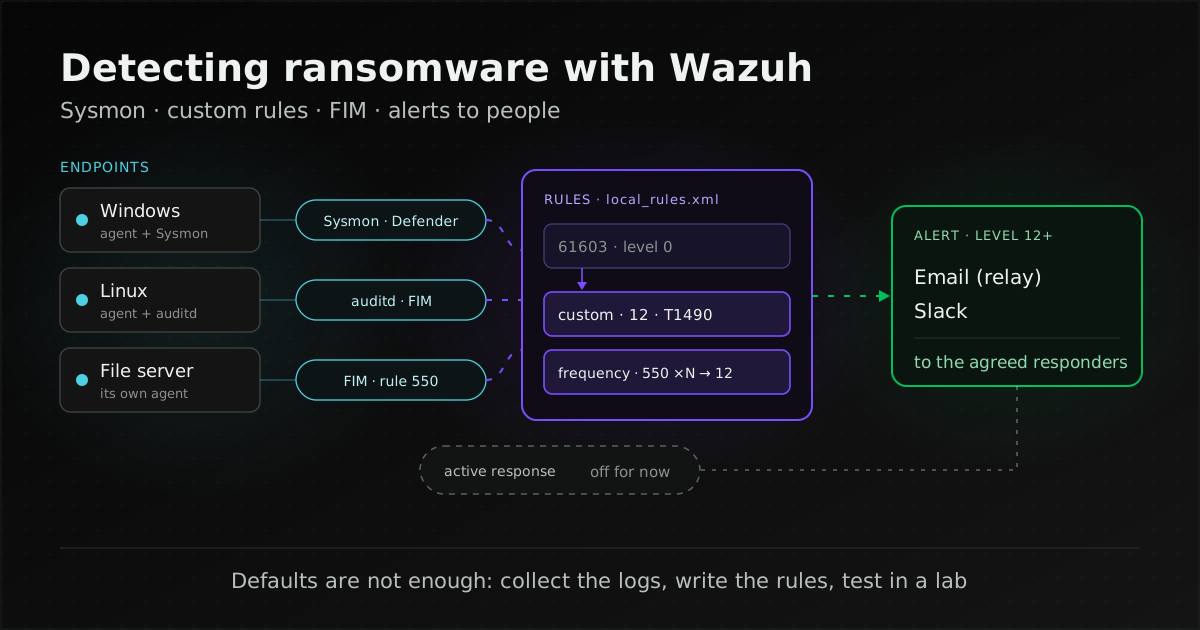
Wazuh can detect ransomware from what it does before and during encryption, but the defaults are not enough. You need four additions: collect Sysmon logs on Windows; write custom rules for shadow copy deletion and other recovery-inhibiting commands (the Wazuh ruleset does not ship them); run FIM in real-time mode on data folders with a rule that counts mass file changes; and route high-level alerts to the people who have to act. Wazuh is not an EDR that guarantees encryption will be stopped, so start in alert-only mode before enabling active response.
This is the hands-on companion to ransomware: how Thai organisations prepare and respond, which already lists the warning signs and where Wazuh fits. Here we go down to configuration: which logs to collect, which rules exist and which you must write, how to set up FIM, where alerts should go, and how to test without putting real systems at risk. It is written for administrators who already run Wazuh. If you are new to it, start with what Wazuh is; for whether it can replace EDR, see Wazuh vs EDR; sizing and alert-noise tuning are in planning a Wazuh deployment.
Wazuh details come from the current Wazuh 4.x documentation, the Wazuh v4.14.9 ruleset on GitHub and posts on the Wazuh blog; attack techniques come from MITRE ATT&CK. Everything was checked on 8 November 2026. The configuration examples are trimmed for length and must be tested on your own systems before use.
<localfile> so the agent reads Microsoft-Windows-Sysmon/Operational; write custom rules chained from rule 61603 for vssadmin, wmic, wbadmin and bcdedit; enable realtime or whodata FIM on data folders on the machine that actually stores the files; add a frequency rule on rule 550; send level 12+ alerts by email or Slack to named people; and rehearse with Atomic Red Team on a disposable VM only.How well can Wazuh actually detect ransomware?
Wazuh matches the logs and file changes its agents send against rules on the server, and raises an alert at the rule's level when one matches. Its strength is seeing behaviour many ransomware families commonly show: deleting shadow copies, disabling protection, stopping services and changing many files in a short time.
Limits to know before you set expectations:
- It only detects what it receives logs for and has a rule for. Without Sysmon, it never sees process command lines.
- Wazuh's own post Ransomware protection on Windows (October 2024) says the approach does not detect all types of ransomware, and that active response cannot trigger once the Program Files folder has been encrypted.
- Automated response is a script run by a rule, not kernel-level containment as in EDR; Wazuh vs EDR explains the difference.
The realistic goal is to see the signals early enough for a person to isolate a machine or stop a service before the damage spreads. Recovery still depends on backups ransomware cannot delete.
Which ransomware behaviours can Wazuh see?
The table maps MITRE ATT&CK techniques to data sources and Wazuh rules. The full list of signals CISA says to hunt for is in the ransomware preparedness article; here we only look at what each one needs in Wazuh.
| Technique (ATT&CK) | Data source | Shipped rule | What you add |
|---|---|---|---|
| T1003.001 dumping credentials from LSASS memory (a precursor to spreading) | Sysmon Event ID 10 (ProcessAccess) | 92900, level 12: another process reads lsass.exe memory | A Sysmon config that logs a filtered Event 10; Microsoft notes it is noisy |
| T1685 disabling or modifying security tools (Wazuh rules still tag the older T1562.001) | Windows Defender channel, agent status, Security log | 62152, level 5: Defender real-time protection disabled · 506, level 3: agent stopped · 60117, level 9: audit log cleared | A localfile for the Defender channel, and higher levels if you want email |
| T1489 stopping services such as databases before encryption | Sysmon Event ID 1 (net stop, sc stop, sc config) | None specific | A custom rule chained from 61603, filtered to important services |
| T1490 deleting shadow copies or the backup catalog, disabling boot recovery | Sysmon Event ID 1 | None (61603 is level 0) | Level-12 custom rules for vssadmin, wmic, wbadmin, bcdedit |
| T1486 encrypting files | FIM (real-time or who-data) | 550, level 7: checksum changed · 553: file deleted · 554, level 5: file added | A frequency rule on 550, and a rule for the same file appearing in many folders (ransom notes) |
A note on IDs: since ATT&CK v19 (current release v20), Disable or Modify Tools is T1685 and the old T1562.001 page redirects there, while Wazuh v4.14.9 rules still tag it T1562.001, so search the dashboard with the older ID.
Lateral movement (T1021 Remote Services, such as RDP and SMB) shows up in the Security log, which the Windows agent already collects by default. Telling normal logons from suspicious ones depends on knowing your own environment, so we left it out of the table.
Which Windows logs does Wazuh need to see ransomware?
According to the log data collection documentation, the Windows agent monitors the System, Application and Security channels by default. None of these carries the process command lines needed for T1490 and T1489, so add two sources: Sysmon and Windows Defender.
Which Sysmon events should be enabled?
Sysmon is a Microsoft service and driver that logs system activity to the Windows event log. Microsoft notes that Sysmon does not analyse the events it generates; that is the SIEM's job. The events that matter for ransomware:
- Event ID 1 (process creation): the full command line and parent process. This is the main source for vssadmin, wbadmin, bcdedit and
sc stop. - Event ID 10 (ProcessAccess): detects tools reading lsass.exe memory, but it is noisy and needs filtering in the config file.
- Event ID 11 (FileCreate) and 13 (registry value set): supporting context, such as files created or overwritten and registry changes.
- Event ID 23 and 26 (file deletion): Event 23 archives deleted files to
C:\Sysmon, which Microsoft warns can grow to an unreasonable size; Event 26 logs the deletion without keeping the file. - Event ID 3 (network connection): disabled by default; enable it if you want to see traffic between machines.
Microsoft recommends a configuration file to filter events, because collecting everything is not practical. Install with sysmon -accepteula -i c:\windows\config.xml. The Sysmon page (dated 10 September 2026) lists Windows 11 and later and Windows Server 2019 and later; if you run older servers, check Microsoft's supported list before planning.
Then add a localfile to the agent's ossec.conf and restart the agent with Restart-Service -Name wazuh:
<localfile>
  <location>Microsoft-Windows-Sysmon/Operational</location>
  <log_format>eventchannel</log_format>
</localfile>
Should you collect Windows Defender logs as well?
Yes, because ransomware often disables protection before encrypting. The Wazuh documentation adds a localfile for the Microsoft-Windows-Windows Defender/Operational channel in eventchannel format; rules in 0600-win-wdefender_rules.xml (62100 onward) then apply, for example rule 62152 when real-time protection is disabled (event 5001).
Note that rule 62152 is level 5, below the default email threshold of 12. Unless you change something, the alert sits in the dashboard and nobody is told. Routing is covered in the alert section below.
The CISA #StopRansomware Guide also recommends enabling PowerShell logging (including module, script block and transcription logging) with at least 180 days of retention. Once enabled, those logs can be sent to Wazuh with the same eventchannel localfile pattern.
Why doesn't Wazuh alert when shadow copies are deleted?
Because the standard ruleset has no rule for it. We searched every rule file in the Wazuh v4.14.9 ruleset for vssadmin, shadow, wbadmin and bcdedit and found no rule detecting deletion of shadow copies or the backup catalog. The only hits were rule 92023, for PowerShell reading the SAM or SECURITY hive from a shadow copy (T1003.002), and VSS service error rules.
Every Sysmon Event 1 lands on rule 61603, which is level 0: it is decoded but raises no alert. Detecting T1490 therefore needs a custom child rule with <if_sid>61603</if_sid> that matches the command line. This example is adapted from rule 107014 in the Cephalus ransomware post (Wazuh blog, December 2025) and goes in local_rules.xml on the server:
<rule id="107014" level="12">
  <if_sid>61603</if_sid>
  <field name="win.eventdata.CommandLine" type="pcre2">(?i)vssadmin\sdelete\sshadows\s\/all\s\/quiet</field>
  <description>Shadow copy deletion with vssadmin</description>
  <mitre><id>T1490</id></mitre>
</rule>
Points to watch when you adopt it:
- The regex is narrow. It only matches that exact form of the command; a small variation slips past. The 2024 Wazuh post instead uses several rules: 100615–100619 for shadow copy deletion through vssadmin and
wmic shadowcopy delete, 100621 forwbadmin delete catalog, and 100611, 100620 and 100622 for boot configuration and recovery changes. 100615–100619 are level 12 and mapped to T1490 (with T1059.003); 100620–100622 are level 12 but the post tags them T1059, and 100611 is level 10. If you reuse them, retag the recovery and catalog rules as T1490. - The rule IDs are examples. Pick your own IDs in the range Wazuh reserves for custom rules and check they do not collide (managing
local_rules.xmlis covered in the deployment planning article). - Related commands. ATT&CK T1490 gives
wmic shadowcopy delete,wbadmin.exe delete catalog -quietandbcdedit.exe /set {default} bootstatuspolicy ignoreallfailuresas examples. Service stops (T1489) follow the same rule pattern fornet stopandsc stop, filtered by service name, because administrators stop services as routine work. - Administrators may delete shadow copies too. Before setting a high level, check whether any script or backup software in your environment runs these commands on a schedule.
The 2024 post also demonstrates creating shadow copies on a schedule and then disabling the VSS service so ransomware cannot delete them. That is a vendor proof of concept that changes normal VSS and backup behaviour; we do not recommend it as standard practice. Keeping recoverable copies is covered in ransomware-resistant backups.
How should Wazuh FIM be set up to catch mass encryption?
File integrity monitoring (FIM, or syscheck) alerts when monitored files are created, changed or deleted. Encryption changes a file's checksum (rule 550), and some families write a new file and delete the original (rules 554 and 553). Whether FIM sees it in time depends on the mode.
How do real-time, who-data and scheduled scans differ?
| Mode | How it works | Documented limits |
|---|---|---|
| Scheduled scan (default) | Scans every 43200 seconds (12 hours); adjust with <frequency> | Files can all be encrypted before the next scan |
realtime="yes" | Alerts as changes happen; uses inotify on Linux and also works on Windows | Directories only, not individual files; the directory must exist before the agent restarts; real-time detection pauses during scheduled scans |
whodata="yes" | Alerts immediately and records the user and process (audit.user.name, audit.process.name) | Linux needs auditd or an eBPF-capable kernel; Windows uses audit policies (SACLs) that Wazuh configures, and if another service changes them, FIM switches all who-data directories to real-time |
Details from the advanced settings documentation that matter here:
- Linux with audit: install auditd (plus audispd-plugins for Audit 3.1.1 and later) and remove any
-a never,taskrule. - Linux with eBPF: requires a kernel with BPF ring buffer and BTF (upstream 5.8 or later, or a backport such as RHEL 8.10). Process names are limited to 15 characters in this mode, so rules matching a program's absolute path do not match eBPF alerts. Do not use audit and eBPF together.
- Bursts of changes: the documentation suggests tuning the eBPF
queue_sizefor mass deletions andsyscheck.rt_delayininternal_options.confon Linux when events flood in.
Which folders should you monitor?
Both Wazuh posts monitor only user folders on Windows: the 2024 post watches Downloads, Documents and Desktop under C:\Users\*, the Cephalus post only Downloads. Both are single-workstation examples. Wazuh gives no folder list for servers, so the following is our own recommendation:
- File servers: monitor the shared folders on the file server itself. The basic settings documentation states that from Wazuh 4.13.0, FIM on Windows does not support UNC paths or mapped network drives in any mode, so an agent on a workstation cannot see files on a share. Install an agent on the file server.
- Web servers: the document root and application configuration files.
- Databases: data files change constantly and only produce noise. Watch dump and configuration folders instead, and rely on service-stop rules (T1489).
- Linux: the defaults already cover
/etc,/usr/bin,/usr/sbin,/bin,/sbinand/boot; add the folders where users' data lives.
Do not monitor too broadly. Per the syscheck reference, FIM tracks up to 100000 entries by default (file_limit) and sends at most 50 events per second (max_eps). Our inference from those defaults, not a vendor statement, is that when many files are encrypted at once, events beyond that rate reach the server later than they happened.
We also advise against report_changes on data folders: it works only for text files and keeps copies of monitored files on the endpoint, which uses extra disk.
Example settings (Windows real-time as in the Wazuh blog, Linux who-data as in the documentation):
<directories realtime="yes">C:\Users\*\Documents</directories>
<directories check_all="yes" whodata="yes">/etc</directories>
How do you write a rule for mass file changes?
Rule 550 fires once per file, so mass encryption produces far more alerts than anyone can read. What you want is a rule that says "many files changed in a short time". This example is adapted from rule 100627 in the 2024 post, which fires when rule 550 matches files under C:\Users ten times within 30 seconds:
<rule id="100627" level="7" timeframe="30" frequency="10" ignore="300">
  <if_matched_sid>550</if_matched_sid>
  <field name="file" type="pcre2">(?i)C:\\Users</field>
  <description>Multiple Files modified in the User directory in a short time</description>
</rule>
In the same post, rule 100626 fires when a file with the same md5 is created in several folders, typical of ransom notes, and rule 100628 correlates these signals into a level-12 "Ransomware activity detected" alert.
Ten files in 30 seconds is the example's value, not one that suits every system. Folders with sync or build jobs routinely change hundreds of files in seconds. Measure normal change volume first, then set the thresholds, and use ignore to suppress repeats.
What else is needed on Linux?
On Linux, Wazuh monitors system calls through the Linux Audit system. The proof-of-concept guide for monitoring malicious commands adds audit rules that log users' execve calls, reads /var/log/audit/audit.log with <log_format>audit</log_format>, and pairs a CDB list called suspicious-programs with a level-12 custom rule (chained from rule 80792) that fires when a listed program runs.
For ransomware on Linux, we suggest starting with three things:
- who-data FIM on data folders and
/etc, so you know which account and process changed a file; - auditd logging of user commands as in the PoC, with a list of programs that should never run on that server;
- watching for service stops with
systemctl stop, which ATT&CK T1489 lists as Linux behaviour.
How far do VirusTotal and YARA help?
Both build on FIM and are explained at concept level in Wazuh vs EDR. The points that affect configuration:
- VirusTotal: the integration sends only the file hash from the FIM alert, not the file. It is configured with
<group>syscheck</group>inside<integration>; rule 87105 (level 12) fires when engines flag a file, and rule 87101 when the API limit is hit. VirusTotal states that the Public API is limited to 500 requests per day and 4 per minute and must not be used in commercial products or services. In practice it catches malware files whose hashes VirusTotal already knows, not encrypted data files, each of which gets a new hash. - YARA: FIM detects a change and active response runs
yara.shoryara.bat. The results need custom decoders on the server because they are not decoded out of the box, and the documentation warns thatyara.batdeletes every file matching a YARA rule and recommends testing in a sandbox, not in production.
How do Vulnerability Detection and SCA help before an attack?
Neither detects ransomware, but both help close the way in. Vulnerability Detection correlates installed software with a vulnerability database to find unpatched hosts. Security Configuration Assessment (SCA) scans for misconfigurations and recommends fixes, with built-in policies mostly based on CIS benchmarks. Their output only helps if someone uses it to prioritise patches and fixes in each maintenance cycle.
Should active response be enabled from the start?
No. Active response runs scripts on endpoints when an alert matches a rule ID, level or group. The Wazuh documentation warns that poor implementation of rules and responses might increase the vulnerability of an endpoint: while a rule still has false positives, the script will block or delete things it should not.
"Alert-only" is not a Wazuh setting. It simply means not adding an <active-response> block yet, or keeping <disabled>yes</disabled>, until the rule has proved accurate in your environment. The block format from the configuration documentation (the rule ID is an example):
<active-response>
  <disabled>yes</disabled>
  <command>firewall-drop</command>
  <location>local</location>
  <rules_id>100200</rules_id>
  <timeout>600</timeout>
</active-response>
IP-blocking scripts such as firewall-drop (Linux) and netsh (Windows) read the source IP from the alert (the srcip or win.eventdata.ipAddress field, per the Wazuh v4.14.9 source code). If the linked rule carries no IP, as with rules on Sysmon Event 1, the script has nothing to block.
Know these before you switch it on:
- Shipped scripts: per the default scripts list, Windows has only
netsh.exe(IP blocking),restart-wazuh.exeandroute-null.exe. There is no host isolation or process kill script. Theremove-threatscript in the VirusTotal proof of concept is an example the vendor asks you to review and validate. - Stateful vs stateless: set
<timeout>on a command withtimeout_allowedand the action reverts after that time; without it, the action runs once. - Exempt critical hosts: use
<white_list>in<global>for IPs or hostnames that must never be blocked, such as the Wazuh server, gateways and admin workstations. - Be careful with
locationset to all: the documentation warns that incorrect configuration can cause problems across your environment. - Check results in
active-responses.logon the endpoint.
Our recommended order: run alert-only until you know the false-positive rate, then enable active response one rule at a time on a small group of machines someone is watching. When a real incident calls for isolating a machine, let a person decide, or use the EDR you already have.
How do you design alerts so people see them in time?
An accurate rule helps little if its alert sits unseen in a dashboard. Three things need deciding: which alerts matter, where they go, and who responds.
Which alerts should reach a person immediately?
Wazuh rule levels run from 0 to 16 per the rules classification; 12 is a high-importance event, 15 a severe attack needing immediate attention, and 16 is reserved for custom rules that need maximum severity. What each level means and how to change levels is in the deployment planning article. What matters for ransomware is that several relevant rules sit below level 12, the default email threshold:
- level 12: 92900 (LSASS memory read), 87105 (VirusTotal hit) and the vendor's custom T1490 rules;
- level 9: 60117 (audit log cleared);
- level 7: 550 (file checksum changed) and the example frequency rule 100627;
- level 5: 62152 (Defender real-time protection disabled);
- level 3: 504–506 (agent disconnected, removed or stopped).
Either write child rules that raise the level of events your environment treats as critical, or route by rule ID or group as below.
Where can alerts be sent?
- Email: per the alert management documentation, enable it in
<global>withemail_notification,smtp_server,email_fromandemail_to, then use<email_alerts>to route by level, rule ID or group. The minimum in<alerts>overrides granular settings, and Wazuh does not handle SMTP authentication, so send through a relay such as Postfix.email_maxperhourdefaults to 12. - Slack and other tools: per the integration documentation, built-in integrations exist for Slack, PagerDuty, VirusTotal, Shuffle and Maltiverse, filterable by
<level>,<rule_id>or<group>. For other chat tools you write your own integration, whose name must begin withcustom-.
<integration>
  <name>slack</name>
  <hook_url>https://hooks.slack.com/services/...</hook_url>
  <level>12</level>
  <alert_format>json</alert_format>
</integration>
Who responds?
That is an organisational decision, not a Wazuh setting. Write down before any incident who receives ransomware alerts, who covers out of hours, who has authority to take a machine off the network, and how quickly they must respond. If an outside provider runs the system, put scope and response times in the contract; see the MA and SLA contract checklist. What to do after the alert (isolating, preserving evidence and reporting) is in the ransomware preparedness article.
How do you test that detection really works?
Only in a lab. The Wazuh proof-of-concept guide recommends dedicated VMs with snapshots taken right after setup so tests do not interfere with each other, and the Wazuh post Emulation of ATT&CK techniques (2022), which pairs Atomic Red Team with Sysmon, recommends a disposable virtual machine.
- T1490: Atomic Red Team T1490 test #1 deletes shadow copies with vssadmin, #2 does it through WMI, and #3 deletes the backup catalog with wbadmin. All three need admin rights: #1 and #2 really delete shadow copies, and #3 really deletes the catalog. Never run them on production or on a machine attached to real backups. Microsoft states that WMIC is removed and no longer available as a Feature on Demand on Windows 11 24H2 and later (August 2026 update), so test #2 will not run there.
- T1486: the T1486 tests use ordinary encryption tools such as gpg or 7z, or simulate a ransom note, so they exercise the FIM frequency rule without real ransomware.
- VirusTotal and YARA: use the EICAR test file, as the Wazuh PoC does. Never download real malware samples for testing.
After each test you should see your custom rule's alert at the level you set, and a message on the real notification channel. If nothing appears, work through it in order: did the event appear in the VM's Event Viewer, does the agent read that channel, and does the rule's regex match the actual command line? Record results as a test → rule → channel table, and repeat after every Wazuh upgrade or rule change.
Checklist: is your Wazuh ready to catch ransomware?
Answer yes or no to each item. Anything you answer no or not sure to is where to start.
- Do important Windows machines run Sysmon with a filtered config, and does the agent read
Microsoft-Windows-Sysmon/Operational? - Does the agent read the Windows Defender channel, or the logs of whatever protection you use?
- Do you have custom rules for vssadmin, wmic, wbadmin and bcdedit at a level high enough to notify someone, tested in a lab?
- Do you have rules for stopping critical services such as databases and backup agents?
- Does Sysmon log a filtered Event 10, and has rule 92900 fired in the lab?
- Is FIM on data folders set to real-time or who-data, not the 12-hour scan?
- Does each file server run its own agent, rather than relying on workstations with mapped drives?
- Is there a frequency rule on rule 550, tuned to your system's normal change volume?
- On Linux, is who-data running on auditd or eBPF, and are users' execve calls logged?
- Do level 12+ alerts, and rules you raised yourself, reach real people by email through a relay or Slack?
- Are you notified when an agent stops or disconnects?
- Is it written down who takes alerts out of hours and who may order a machine isolated?
- Is active response still off until you know the false-positive rate, with a white_list for critical hosts?
- If you use VirusTotal, have you checked the commercial-use terms and API limits?
- Do you re-test after every Wazuh upgrade or rule change?
How can UNIXDEV help configure Wazuh for ransomware?
UNIXDEV installs Wazuh, tunes rules to cut false positives, and maintains it under an agreed MA scope. For this topic that means checking that important machines send Sysmon and Defender logs, writing and testing custom rules for the signals in the table, setting FIM up appropriately for file servers and other servers, and routing alerts to the owners your organisation names. Foundations such as patch cycles and backups are part of DevOps & SRE Managed Services. Incident response and digital forensics after an incident should go to specialists in that field.
Sources and further reading
- Wazuh documentation — syscheck reference · FIM basic settings · FIM advanced settings
- Wazuh documentation — Log data collection configuration · Windows Defender logs collection
- Wazuh ruleset v4.14.9 (GitHub)
- Wazuh documentation — VirusTotal integration · YARA
- Wazuh documentation — Active response configuration · Default scripts · global (white_list)
- Wazuh documentation — Alert management · Integration with external APIs · Rules classification
- Wazuh Proof of Concept guide · Monitoring execution of malicious commands · Detecting and removing malware using VirusTotal
- Wazuh blog — Ransomware protection on Windows with Wazuh (2024) · Detecting and responding to Cephalus ransomware (2025) · Emulation of ATT&CK techniques (2022)
- Microsoft Sysinternals — Sysmon · Microsoft — Deprecated features in the Windows client (WMIC)
- VirusTotal — Public vs Premium API
- MITRE ATT&CK — T1490 Inhibit System Recovery · T1486 · T1489 · T1685 · T1003.001 · T1021
- CISA, MS-ISAC, NSA, FBI — #StopRansomware Guide (September 2023)
- Atomic Red Team — T1490 · T1486
- Related: ransomware, how Thai organisations prepare and respond
- Related: ransomware-resistant backups, immutable, offline or air-gapped?
- Related: already have EDR or antivirus? Do you also need Wazuh?
- Related: planning a Wazuh deployment
- Related: what Wazuh is
- All articles on Wazuh and security monitoring
By UNIXDEV Team · English edition 8 November 2026 · Based on Wazuh 4.x documentation, ruleset v4.14.9, the Wazuh blog, Microsoft, VirusTotal, MITRE ATT&CK and CISA as of writing, which may change. Rule and configuration examples are adapted from vendor material and must be adjusted and tested on your own systems before use. This is not legal advice.