
IceWarp vs Microsoft 365, Google Workspace and Lark
IceWarp, Microsoft 365, Google Workspace and Lark compared on data location, self-hosting, Outlook and mobile clients, identity and exit, from vendor docs.
By UNIXDEV Team · 16 min read
Original published · English edition
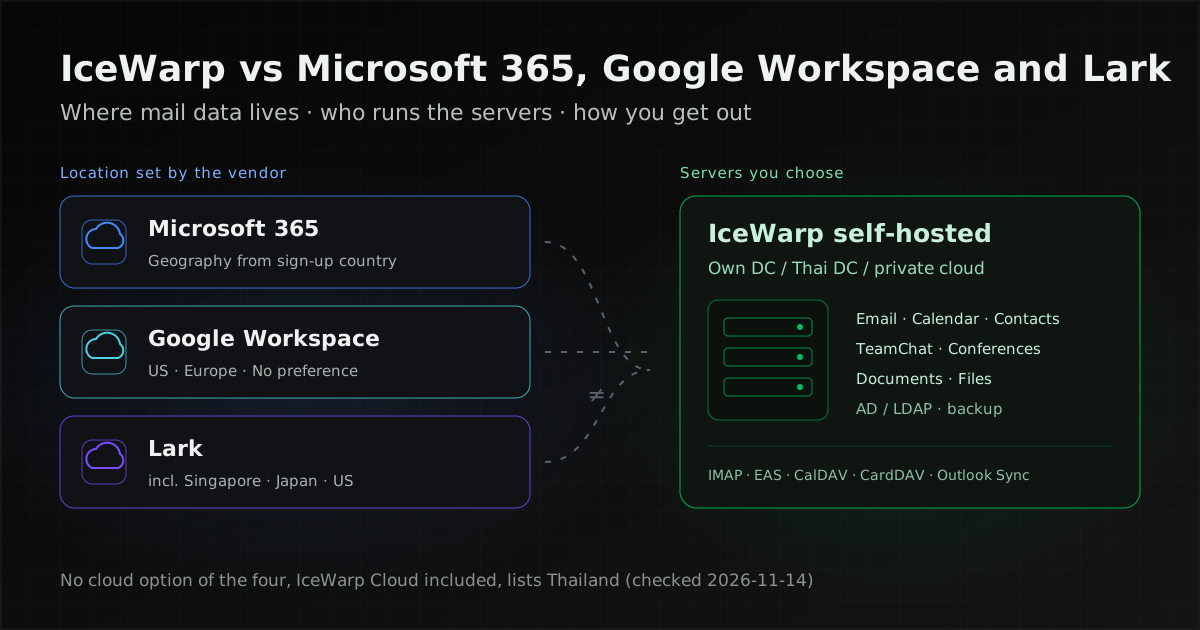
If an organisation in Thailand needs its email, calendars and files on servers in Thailand that it chooses itself, self-hosted IceWarp can run there. The Microsoft 365, Google Workspace and Lark documentation we checked on 14 November 2026 describes data stored on the vendor's own servers, and none of it lists Thailand as a data location.
If you already run Teams, SharePoint and Microsoft Entra ID, use Google services across the organisation, or your teams work mainly in chat, another suite may fit better. Choose on your organisation's criteria, not on the brand.
A collaboration suite here means a system that puts email, calendars, contacts, chat, online meetings and shared document editing under one user account. All four do those things. What separates them for a buyer is how they are deployed, where the data lives, which clients they support, how users sign in, and how you get your data out if you leave.
Disclosure: UNIXDEV is listed in IceWarp's partner directory as a Certified business partner in Thailand, and we install, migrate and maintain IceWarp. Everything said here about Microsoft 365, Google Workspace and Lark comes from each vendor's own documentation, linked at each point.
What IceWarp, Microsoft 365, Google Workspace and Lark are
All four bundle email, calendars, chat, meetings and documents, but they come from different kinds of vendor. IceWarp sells the same product as a cloud service and as self-hosted software; the other three are cloud services in the documentation we checked.
Microsoft 365 is Microsoft's cloud suite. The data its residency documentation covers is Exchange Online mailbox content, SharePoint, OneDrive and Teams chat, per the Product Terms data residency page, and it uses Microsoft Entra ID for identity, per the Microsoft 365 identity model documentation.
Microsoft's self-hosted mail server is a separate product, Exchange Server Subscription Edition (SE). Microsoft's announcement says it became generally available on 1 July 2025 and changes how Exchange is serviced and licensed compared with earlier versions.
Google Workspace is Google's cloud suite, covering Gmail, Google Calendar, Google Chat, Google Meet, Google Drive, Google Docs, Sheets, Slides and Contacts, among the services listed on Google's Data covered by data regions page.
Lark, served from larksuite.com, is a suite that puts chat (Messenger), email, calendars, meetings and documents in one app. It is operated by Lark Technologies Pte. Ltd. in Singapore, per the Lark privacy policy. The Lark home page lists Messenger, Base, Approval, Docs, Wiki, Email, Calendar, Meetings and AI Meeting Notes under one subscription.
IceWarp is an email and collaboration vendor headquartered in Prague, Czech Republic, per its company page. The IceWarp home page positions it as an alternative to Microsoft 365 and Google Workspace, with Email, TeamChat, Conferences, Calendar, Files, Documents (real-time co-authoring), Notes, Tasks, Contacts, a Desktop Client and Outlook Sync, offered as cloud or self-hosted.
Can business email stay in Thailand? Where each suite stores data
Not with any of the four as a cloud service, IceWarp Cloud included, in the documentation we checked on 14 November 2026. Among these four, the only documented way to keep mail on servers in Thailand is to self-host IceWarp there.
| Suite | Data location the vendor documents | Is Thailand listed? |
|---|---|---|
| Microsoft 365 | The Default Geography comes from the country given when the tenant is created. A commitment to a geography comes in three forms: Product Terms, Multi-Geo and Advanced Data Residency, per What is Microsoft 365 Data Residency; the last two are paid add-ons, per the comparison page | Not in any of the three lists, and not among the Local Region Geographies on the datacenter locations page |
| Google Workspace | Data regions offer three choices: United States, Europe or No preference, on certain editions only, per Choose a geographic location for your data | No (no Asian option) |
| Lark | The privacy policy says data may be stored on servers outside your country of residence, including Singapore, Japan and the United States. The data residency page says an organisation's location follows system calculation and cannot be modified | Not among the countries named |
| IceWarp Cloud | The customer picks a data centre from a list on the cloud pricing page. IceWarp's data centres are in Europe, the United States, India, South Africa and other countries; three IceWarp pages list different sites (see the status table below) | Not listed |
| IceWarp self-hosted | On whatever servers the organisation installs it: its own data centre, a Thai data centre, a private cloud or a cloud region in Thailand | Your choice |
Microsoft's comparison of data residency offerings says that for a tenant without a durable commitment, customer data is not committed to reside in any particular datacenter; Microsoft stores it where service delivery is effective, and that location is subject to change without notice. Admins can see the tenant's current data location on the Data Location Card in the Microsoft 365 admin center, per the data location FAQ.
Do not confuse a suite's data regions with an infrastructure provider's cloud regions. Google Cloud opened a Bangkok region (asia-southeast3) on 21 January 2026 for virtual machines and infrastructure services, but it is not a choice among Google Workspace data regions, and the pages we checked do not say where Workspace data sits when no region is chosen.
Thailand's rules on cross-border transfers under the Personal Data Protection Act (PDPA, Sections 28 and 29), the Bank of Thailand's cloud conditions for financial institutions, the Digital Government Development Agency's guidance for government agencies, and a table of cloud regions in Thailand are covered in the data-location section of our cloud migration guide. Mail-server log retention under Thailand's Computer Crime Act is covered in Zimbra vs IceWarp.
Microsoft 365 vs Google Workspace: what differs for IT
For an IT team, the main differences between Microsoft 365 and Google Workspace are identity, Outlook support and the conditions attached to data-location commitments.
- Identity: Microsoft 365 uses Microsoft Entra ID, either cloud-only or as a hybrid identity synchronised from on-premises Active Directory with Microsoft Entra Connect. Google Workspace supports SAML-based and OIDC-based single sign-on (SSO) with a third-party identity provider, including a preconfigured Microsoft Entra OIDC profile, per Setting up SSO.
- Outlook and phones: Exchange Online supports Outlook, Outlook on the web, Outlook for iOS and Android, Exchange ActiveSync and POP3/IMAP4, per the Exchange Online clients documentation. Google Workspace works with Outlook through the Google Workspace Sync for Microsoft Outlook (GWSMO) plugin, which syncs mail, calendar events, contacts, notes and tasks, or admins can turn on POP and IMAP for other clients.
- Data-location commitments: Microsoft ties its commitment to the country where the tenant was created and sells Multi-Geo and Advanced Data Residency as add-ons. Google offers data regions on certain editions only, and data types it does not list, such as logs and cached content, are not covered.
- Exporting everything: Microsoft lets you export eDiscovery search results as PST or .msg files for mail and as native files from SharePoint and OneDrive, per the eDiscovery export documentation. Google's Data Export tool exports the organisation's data to a Google Cloud Storage archive.
In practice, an organisation with Active Directory and many Outlook users usually moves to Microsoft 365 with fewer changes to how people work; one that already works in the browser with Google accounts usually fits Google Workspace better.
Lark vs Google Workspace
Lark keeps chat, approvals, Base and Wiki in the same app as email and calendars, while Google Workspace splits the work across apps such as Gmail, Chat, Meet and Docs under one account. Three differences matter to IT before choosing.
- Data location is set once: Lark's data residency page says an organisation's location cannot be changed. Giving groups of members different locations needs the separately paid Multi-Geo service, and the member data residency page says member migration tasks take about one to two months.
- Mail in other clients: admins can let members use Lark Mail in third-party email clients with a password created by Lark, per Lark's documentation, and can allow members to export their email as .mbox files. The documents we checked cover exporting email only.
- Identity: Lark supports SAML 2.0 SSO with Microsoft Entra ID, per its Entra ID SAML guide. A second Lark SSO guide says SAML works with Okta, Azure, OneLogin or other SAML 2.0 identity providers, and offers Google account sign-in as a separate option.
Lark documents a built-in migration from Microsoft 365 or on-premises Exchange to Lark Mail. Teams that communicate mainly in chat and want approvals in the same app should trial Lark; teams whose core work is external email and shared documents should compare it with Google Workspace on real tasks during a pilot.
Where IceWarp differs from Microsoft 365 and Google Workspace
The difference is deployment: you can run IceWarp on your own servers and still get email, calendars, TeamChat, meetings and documents in one suite, over standard protocols that most clients support.
- Self-hosted or cloud: the IceWarp pricing page licenses both as a per-user subscription: Cloud is priced per user per month with an annual option (cloud tab), self-hosted per user per year. Supported operating systems are Windows Server or RHEL-family Linux; two IceWarp sources list different versions (see the status table below), so confirm the version with the vendor before installing.
- Protocols and clients: the technical specification lists SMTP, IMAP with IDLE push, POP3, CalDAV, CardDAV, WebDAV file sharing and Exchange ActiveSync (EAS 16.0 and 16.1) for phones.
- Outlook: IceWarp Outlook Sync is an Outlook add-in that syncs email, calendars, contacts and notes. It needs Outlook 2016 or later on Windows 10 or 11, per the required software page.
- Identity: the technical specification lists Active Directory and LDAP support, Kerberos SSO (GSSAPI) and two-factor authentication. It does not mention SAML; if you use SAML SSO elsewhere, confirm with the vendor.
- Features by plan: the pricing page shows TeamChat, Documents and collaborative editing, Conferencing & recording and mobile sync (ActiveSync) in the mid-tier plans and above, not the entry plan, so name the features you need in the quotation.
Because the data sits on your own servers, self-hosted IceWarp lets you decide where backups live, how long they are kept and who can reach them. The trade-off is that you, or the provider you contract, are responsible for patching, availability and restores.
Comparison: Outlook, mobile and exit
This table sums up two things that are easy to overlook when choosing. Every cell comes from the vendor documents linked in the sections above, except IceWarp's exit path, which we infer from its supported protocols. Each suite's identity options are in its own section above.
| Suite | Outlook and mobile | Exit path |
|---|---|---|
| Microsoft 365 | Outlook, Outlook on the web and mobile, ActiveSync, IMAP, POP | eDiscovery export: mail as PST or .msg, files from SharePoint and OneDrive |
| Google Workspace | Outlook through GWSMO; POP and IMAP when admins enable them | Organisation-wide Data Export to Google's Cloud Storage |
| Lark | Third-party clients with a Lark-generated password, when admins enable it | Members export mail as .mbox, when admins enable it |
| IceWarp | Outlook Sync (Windows), EAS, IMAP, POP, CalDAV, CardDAV | Self-hosted: data on your own servers, retrievable over IMAP, CalDAV, CardDAV · Cloud: ask the vendor about export |
What to count in the total cost
The total cost of ownership (TCO) of a mail system is more than the per-user licence. Compare every line below over several years, and ask for quotations that name the features you will actually use.
- Licences and plans: which plan includes the features you need (ActiveSync, chat, meetings, documents, archiving).
- Residency and compliance add-ons: Microsoft sells Multi-Geo and Advanced Data Residency as add-ons, Lark charges separately for Multi-Geo, and Microsoft's eDiscovery export sets licence requirements for the person exporting.
- Infrastructure if self-hosted: servers, storage, off-host backup, operating system licences and TLS certificates.
- People: IT staff time or a maintenance contract for patching, monitoring and restores.
- Migration: moving the data, a period of paying for both old and new systems, and user training.
- Exit: the time and tools you would need to move out one day.
How to separate one-off from recurring costs and compare TCO over several years is covered in the cost section of our cloud migration guide.
When IceWarp fits best
IceWarp fits best when you must control where mail and backups are stored but still want email, calendars, chat, meetings and documents in one suite.
- Policy, contracts or a regulator require data in a data centre you choose or control.
- You have Outlook users on Windows and phones that need ActiveSync to keep working.
- You already run Active Directory or LDAP.
- You want to leave self-hosted Exchange or a cloud service without changing much about how people use email.
- You want a Thai IceWarp partner who supports you in Thai through installation, migration and operation.
When Microsoft 365, Google Workspace or Lark fits better
If you have no data-location requirement and do not want to run servers, one of the three cloud services may suit you better.
- Microsoft 365: organisations already working in Teams, SharePoint and OneDrive, with Entra ID at the centre of their accounts. Moving only email elsewhere would leave you running two systems.
- Google Workspace: teams that work in the browser, co-edit mainly in Docs and Sheets, and do not depend on Outlook.
- Lark: teams that communicate mainly in chat and want approvals, Base and Wiki in the same app.
- Any of the cloud services: organisations without a team or contractor to run servers, which accept the data location the vendor sets.
If you want cloud but not servers, IceWarp Cloud is also an option. It lets you choose a data centre, but none of the choices is in Thailand.
Moving from Microsoft 365 or Google Workspace to IceWarp
IceWarp's migration page sets out the steps: prepare the source, prepare the IceWarp environment, set up the migration tool, plan the schedule, run the migration and verify the data, then point DNS at the new IceWarp server. We recommend testing with a small group of users before the DNS switch.
- Tools: the migration page lists sources including Microsoft 365, Google Workspace, Exchange, Kerio, Axigen, Zimbra and MDaemon. Microsoft 365 and Google Workspace migrations run in IceWarp's cloud as a microservice; Exchange and Kerio use the Windows-based IceWarp Exchange Migrator and Kerio Migrator; for Axigen, Zimbra and MDaemon the page recommends the IMAP Sync tool. If your data policy forbids passing data through an outside service, ask the vendor first where the data flows.
- What moves: accounts, email, contacts and calendars, plus files and documents for some sources. Try a sample mailbox first to see what arrives complete.
- DNS and sender authentication: lower TTLs in advance, switch MX, then update SPF, DKIM and DMARC for the new system. The detailed steps are in Zimbra vs IceWarp.
- Keep a copy before closing the old tenant: export with the provider's own tool (Microsoft eDiscovery or Google Data Export) and keep it before you cancel the subscription.
Checklist before you choose
Use this list in a selection meeting or when drafting a TOR (terms of reference, the specification document Thai public-sector buyers attach to a tender). Each item should be backed by a dated vendor document.
- Data location: get the vendor to state in writing which country holds mail, files, backups and logs, with a link and date, and have your data owner sign it off.
- Add-ons: if you need residency or archiving add-ons, put them in the quotation.
- Pilot with real users: test the Outlook versions you run, iOS and Android over ActiveSync, shared mailboxes, shared calendars and searching Thai-language mail.
- Identity: test the link to your Active Directory, LDAP or SSO.
- Migration rehearsal: move a sample mailbox and check mail, calendars and contacts.
- Exit plan: try exporting data during the pilot and record how long it took.
- DNS: a plan for MX, SPF, DKIM and DMARC, with rollback criteria.
- Operations: who patches, who checks backups, and the SLA targets you set yourselves. For contract points, see the MA and SLA contract checklist.
Status as of 2026-11-14
These details change with each vendor. Check the source link again before using them in procurement documents.
| Item | Detail | Source (page date) |
|---|---|---|
| Microsoft 365 Product Terms | The in-geo storage commitment applies to tenants provisioned in Australia, Brazil, Canada, the EU, France, Germany, India, Japan, Norway, Qatar, South Africa, South Korea, Sweden, Switzerland, the UK, the UAE and the US | Microsoft Learn (2026-10-08) |
| Microsoft 365 Advanced Data Residency | Paid add-on that must cover 100% of paid licences in the tenant. In East, South and Southeast Asia: India, Indonesia, Japan, Malaysia, South Korea and Taiwan; Singapore and Thailand are not listed | Microsoft Learn (2026-10-08) |
| Microsoft 365 Multi-Geo | Paid add-on for at least 5% of eligible users; small business and education plans do not qualify. The APC geography covers South Korea, Japan, Singapore, Malaysia and Hong Kong SAR | Microsoft Learn (2026-10-08) |
| Microsoft 365 eDiscovery export | The person exporting needs a Microsoft 365 E3 or E5 licence; export packages expire 14 days after creation | Microsoft Learn (2026-06-23) |
| Google Workspace data regions | United States, Europe or No preference, on Frontline, Business Standard/Plus, Enterprise Standard/Plus, Education Standard/Plus and Enterprise Essentials Plus | Google (2026-11-10) |
| Google Workspace Data Export | All editions; available no earlier than 48 hours after starting, typically 72 hours, up to 14 days | Google (2026-11-10) |
| Lark data location | Privacy policy: data may be stored on servers outside your country of residence, including Singapore, Japan and the United States · organisation location cannot be modified; Multi-Geo is paid separately; member migration takes about one to two months | Lark privacy policy (2026-11-13), Lark (2026-09-14), Lark (2026-10-15) |
| IceWarp on-premises release | IceWarp Server Epos Update 3 (14.3.x); the changelog checked on 2026-11-14 lists build 14.3.0.8 (dated 2026-06-23); requires Outlook Sync 14.0.0 or newer | IceWarp changelog (checked 2026-11-14) |
| IceWarp operating systems | Changelog: Windows Server 2019 or newer, Red Hat / Rocky Linux 8.8/9.2 · technical specification: Windows Server 2016 or newer, Rocky Linux 9 and 8, Alma Linux 9 or RHEL 9 | Changelog, Technical specification (checked 2026-11-14) |
| IceWarp data centres | Technical specification: Prague, Reston (US), Nuremberg, Cuneo, Manama, Johannesburg, Mumbai · data centers page: Prague, Reston, Nuremberg, Cuneo, Mexico City · cloud pricing page (selectable): Prague, Nuremberg, Mumbai, Cuneo, South Africa (SAMRAND), Istanbul, Reston | Technical specification, Data centers, Cloud pricing (checked 2026-11-14) |
| IceWarp plans | Core, Essential and Business, per user (Cloud monthly or annual; self-hosted annual); TeamChat, Documents, Conferencing & recording and mobile sync (EAS) are in Essential and Business | Self-hosted pricing, Cloud pricing (checked 2026-11-14) |
How UNIXDEV helps with IceWarp
UNIXDEV designs and installs IceWarp on-premises in your data centre, or as a fully managed deployment on Huawei Cloud or a private cloud, to match your data-location requirements (see the table of cloud regions in Thailand in our cloud migration guide). We migrate mail from Exchange, Zimbra or Google Workspace, planning and testing cutover and rollback with your team, and support the system after go-live in Thai, within the maintenance scope agreed, as part of our Digital Workplace & Collaboration Platforms service.
Sources and further reading
- Microsoft — What is Microsoft 365 Data Residency? · Compare data residency offerings · Data location FAQ
- Microsoft — Product Terms data residency · Advanced Data Residency · Multi-Geo · Datacenter locations
- Microsoft — Microsoft 365 identity models · Exchange Online clients and mobile · eDiscovery export · Exchange Server SE
- Google Workspace — Choose a geographic location for your data · Data covered by data regions · Google Cloud — Bangkok region
- Google Workspace — Setting up SSO · About GWSMO · POP and IMAP · Data Export
- Lark — Home · Privacy Policy · Introduction to data residency · Member data residency
- Lark — Third-party email clients · Export emails · SAML 2.0 SSO (Entra ID) · SSO (Okta or Google) · Migrate from Microsoft 365 or Exchange
- IceWarp — Home · Company · Pricing (self-hosted) · Pricing (cloud) · Migration
- IceWarp — Technical specification · Data centers · Epos Update 3 changelog
- IceWarp — What is Outlook Sync · Outlook Sync required software · Worldwide partners
- Related: Zimbra vs IceWarp
- Related: cloud migration in Thailand
- Related: MA and SLA contract checklist
- All articles on the digital workplace
Sources checked on 2026-11-14
How we checked: based on the primary sources above, reviewed by the UNIXDEV team