
Installing VNC on Ubuntu and accessing it safely
Install TigerVNC on Ubuntu bound to localhost only, reach it through an SSH tunnel with ufw allowing just SSH, and see what replaced vino and vnc4server.
By UNIXDEV Team · 15 min read
Original published · English edition
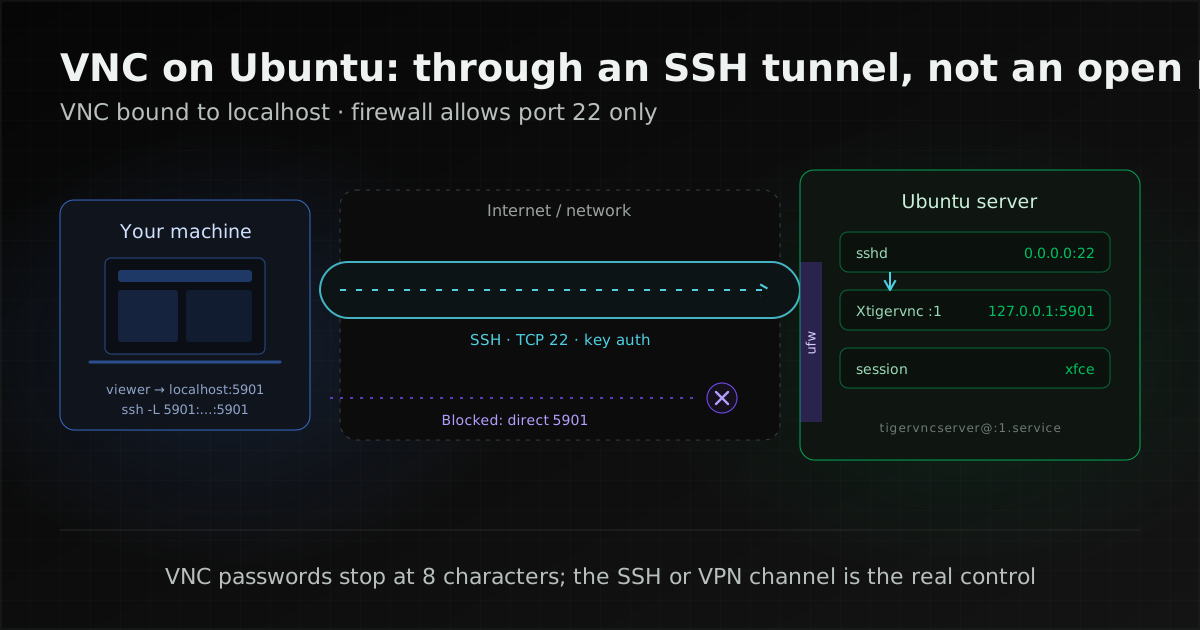
To use VNC on Ubuntu safely, have the VNC server accept connections from the machine itself (localhost) only, and reach it through an SSH tunnel or a VPN, never by opening port 5900 and up to the internet. For a server or any machine without a monitor, the most direct route is TigerVNC with a light desktop such as Xfce; Ubuntu Desktop from 24.04 LTS onwards has its own built-in remote desktop, which speaks RDP rather than VNC.
VNC (Virtual Network Computing) lets you use another machine's screen over the network. It runs on the Remote Framebuffer protocol, RFB, specified in RFC 6143: the server sends screen updates, and the viewer sends keyboard and mouse input back.
ssh -L. To administer a server, plain SSH is enough. In every case, let the firewall admit SSH only and use SSH keys instead of passwords.Which approach fits: GNOME sharing, a virtual desktop, or no desktop at all
Two questions decide it: is someone already using that machine, and does the task really need a graphical screen? The answer points to one of the options below, and it is not always VNC.
| Situation | Fits best | Why |
|---|---|---|
| Helping a user logged in to Ubuntu Desktop 24.04 LTS or later, on the same screen | GNOME Desktop Sharing (RDP) | The user must be logged in; the other side then views or controls that screen, per the Ubuntu Desktop documentation |
| Reaching your own Ubuntu Desktop account from elsewhere while nobody is at the machine | GNOME Remote Login (RDP) | You must be logged out first, and the remote user gets full control |
| A headless server or VM that occasionally needs a graphical program | TigerVNC (tigervnc-standalone-server) with Xfce, bound to localhost, over an SSH tunnel | Creates a virtual X display separate from any physical screen, without installing the full GNOME desktop |
| Routine server administration: patching, reading logs, editing configuration | SSH only, no desktop | No desktop packages or VNC service to patch and watch |
| Many staff reaching office machines from outside | The organisation's VPN first, then RDP or VNC on the internal network | Ubuntu's documentation recommends a VPN over forwarding ports to the internet |
TigerVNC also ships tigervnc-scraping-server, whose x0tigervncserver(1) does not create a display but shares an existing X server display, so it suits desktops running on Xorg.
For GNOME, an Ubuntu Discourse announcement of 10 June 2025 says that from Ubuntu 25.10 the login screen no longer offers "Ubuntu on Xorg"; Xorg itself remains for non-GNOME desktops. To share a GNOME session someone is using, the path Ubuntu documents is RDP.
What changed since the old vino and vnc4server tutorials
The packages and features those tutorials rely on have changed: vnc4server is in no Ubuntu release still in the archive, vino is still installable on 22.04 and 24.04 but absent from 26.04, and Ubuntu's built-in screen sharing moved from VNC to RDP. The table maps what old guides tell you to do onto what to use now.
| Old tutorial | Status | Use instead |
|---|---|---|
vnc4server | No results for any release on packages.ubuntu.com | tigervnc-standalone-server |
vino (the GNOME VNC server) | In universe for 22.04 and 24.04, absent from 26.04 (packages.ubuntu.com); the upstream GNOME project is archived and read-only | GNOME Desktop Sharing (RDP) or TigerVNC |
| Enabling VNC in GNOME's Sharing settings | The Ubuntu Desktop team's test plan says the VNC feature was removed from Ubuntu 22.10 | RDP in the same settings panel |
The vncserver and vncpasswd commands | The packages install tigervncserver and tigervncpasswd (the latter in tigervnc-tools); vncserver and vncpasswd are alternatives pointing to them (per the Debian install scripts for tigervnc-standalone-server and tigervnc-tools) | Either name works; this article uses the tiger-prefixed names |
Writing your own vncserver@.service | Ubuntu's package already ships tigervncserver@.service and /etc/tigervnc/vncserver.users (package file list) | The packaged unit |
Adding -localhost no and ufw allow 5901 | Undoes the localhost-only behaviour and exposes VNC directly to the network | Keep localhost and use an SSH tunnel |
tightvncserver | Still in universe up to 26.04 (packages.ubuntu.com) | Usable; see below |
tightvncserver still works, but this article uses TigerVNC because Ubuntu's package documentation covers its systemd unit, localhost binding and TLS/X509 security types (VNC's authentication and encryption methods).
Ubuntu Desktop's built-in remote desktop uses RDP, not VNC
On Ubuntu Desktop 24.04 LTS or later with GNOME, built-in screen sharing works over the Remote Desktop Protocol, according to Share your desktop remotely, which does not mention VNC at all. That is why the VNC switch in older guides cannot be found.
- Desktop Sharing: another person views or controls your screen while you are logged in; suited to helping a user.
- Remote Login: you sign in to your account remotely; you must be logged out first, and the remote user has full control.
Both use TCP 3389 by default; with both enabled, Desktop Sharing moves to 3390. The credentials set there are separate from the user's login password and work only for remote access. The same page warns that port forwarding opens the system to the world and recommends a VPN for a private group of users. For the connecting side, Access a remote desktop recommends Remmina, which speaks RDP and VNC: RDP for Ubuntu 24.04 LTS or later and Windows, VNC for earlier releases such as 22.04 LTS and for macOS.
Dropping VNC was a packaging decision, not a GNOME limitation. The gnome-remote-desktop README lists both RDP and VNC backends, while the package changelog entry 43.0-1 (21 September 2022) says only RDP is provided, citing better performance and privacy and wide client support.
Why VNC ports should never face the internet
The VNC protocol protects very little on its own: its password authentication is weak and classic VNC traffic is not encrypted. The real protection has to come from the channel VNC runs through, such as an SSH tunnel or a VPN, not from the VNC password.
- Passwords stop at eight characters: RFC 6143 section 7.2.2 describes VNC Authentication as DES encryption of a challenge keyed with the password, truncated to eight characters, and calls it cryptographically weak. tigervncpasswd(1) likewise says only the first eight characters are significant and requires at least six.
- No protection for the data stream: section 9 of the RFC says the protocol offers no security beyond that password check and no protection against observation of or tampering with the data, and suggests a secure channel such as IPsec or SSH.
- Well-known ports: server N typically listens on 5900+N, and IANA allocated 5900 to RFB.
The US Cybersecurity and Infrastructure Security Agency makes the same point in advisory AA25-343A (first published 9 December 2025). Written about operational technology and critical infrastructure, it describes attackers searching for VNC on port 5900 or 5901–5910 and trying default or weak passwords, and recommends reducing internet exposure and considering a firewall or VPN, and disabling public exposure by default with time-limited remote access.
Installing a VNC server (TigerVNC) with Xfce on Ubuntu
Install three packages, set a VNC password as an ordinary user, then start a server on display :1 listening on localhost only. The commands below match the man pages and package file lists for both 24.04 and 26.04; the file locations that differ are in the table that follows.
- Install the packages: tigervnc-standalone-server (the server), tigervnc-tools (which provides
tigervncpasswd) and xfce4 (the desktop), all in the universe component of the Ubuntu archive per packages.ubuntu.com.sudo apt install tigervnc-standalone-server \ tigervnc-tools xfce4 - Set the VNC password as the account that will use the desktop, not root; the TigerVNC HOWTO warns that running the server as root is not safe. The file goes to that release's default location.
tigervncpasswd - Start a server on display :1, naming a session that matches a file in
/usr/share/xsessions(xfce4-session shipsxfce.desktop). Per tigervncserver(1), the port defaults to 5900 plus the display number, so 5901, and the desktop defaults to 1920x1200.tigervncserver :1 -localhost yes -- xfce - Check that it listens on localhost only. ss(8) lists listening TCP sockets with their processes; the address for port 5901 must be 127.0.0.1 or [::1]. If you see 0.0.0.0, [::] or *, it is open on every interface (0.0.0.0 and :: are the IPv4 and IPv6 "any" addresses per ip(7) and ipv6(7)).
sudo ss -tlnp - List and stop sessions:
tigervncserver -listshows running servers (leftovers are marked stale), andtigervncserver -kill :1stops display :1.
Per tigervncserver(1), when -localhost is not given the server listens on localhost only unless the security types include a TLS or X509 type (and no None type), in which case it listens on every address. We pass -localhost yes explicitly so nothing depends on that rule. Guides that add -localhost no get VncAuth,TLSVnc as the default security types and a server any host on the network can reach.
Status as of 2026-11-11: TigerVNC file locations by Ubuntu release
| Item | 24.04 LTS (noble) | 26.04 LTS (resolute) |
|---|---|---|
| Released and end of standard security maintenance (Ubuntu release cycle) | Apr 2024 to May 2029 | Apr 2026 to May 2031 |
| TigerVNC version in the archive (packages.ubuntu.com) | 1.13.1 | 1.15.0 |
| Password file (noble · resolute) | ~/.vnc/passwd | ~/.config/tigervnc/passwd |
| Per-user key=value config (noble · resolute) | ~/.vnc/config | ~/.config/tigervnc/config |
| Logs | ~/.vnc/ | ~/.config/tigervnc/ when started with tigervncserver; ~/.local/state/tigervnc/ when started by the service |
| systemd unit directory (noble · resolute) | /lib/systemd/system/ | /usr/lib/systemd/system/ |
Starting VNC at boot with systemd
Ubuntu's unit is called tigervncserver@.service, not the upstream vncserver@.service, because a Debian packaging patch adds the tiger prefix to the unit and its scripts. The steps described in the unit file are:
- Map a display to a user in
/etc/tigervnc/vncserver.users, using the<display>=<username>format from TigerVNC's sample file.:1=alice - Set the session and localhost in the user's key=value config file from the table above. Options without a value are written as a single word. If a Perl-syntax file (
tigervnc.conforconfig.pl) already exists, this file is not read.session=xfce localhost - Enable and start the service. If the server you started by hand is still running on :1, stop it first with
tigervncserver -kill :1.sudo systemctl enable tigervncserver@:1.service sudo systemctl start tigervncserver@:1.service - Check again with
sudo ss -tlnpthat port 5901 is bound to 127.0.0.1 or [::1].
To enforce settings for every user on the machine, /etc/tigervnc/vncserver-config-mandatory overrides user settings, while /etc/tigervnc/vncserver-config-defaults holds defaults users can override. Per tigervncsession(8), both use Perl syntax; follow the examples in the files the package installs.
Connecting to VNC through an SSH tunnel
On the user's machine, open an SSH tunnel that forwards local port 5901 to localhost:5901 on the server, then point the VNC viewer at the local machine. Everything travels inside the encrypted SSH connection, and the server's firewall never needs a VNC port.
ssh -N -L localhost:5901:localhost:5901 \
  alice@server.example
Per ssh(1), -L forwards a local port over the secure channel to the given host and port; a bind address of localhost keeps that port for local use only; and -N runs no remote command, which is useful for just forwarding ports. If local port 5901 is taken, change the first number; the destination stays localhost:5901 on the server.
Then open the viewer at localhost::5901 (two colons and a port) or localhost:1 (one colon and a display number), per xtigervncviewer(1). TigerVNC's own viewer (package tigervnc-viewer) can also build the SSH tunnel itself with -via.
xtigervncviewer -via alice@server.example \
  localhost:1
If the organisation already runs a VPN, joining the VPN first and then opening the SSH tunnel to an internal server works the same way, and keeps the server's SSH port off the internet as well.
Configuring ufw to allow SSH only, and using SSH keys
With VNC reached through an SSH tunnel, the server's firewall only needs the SSH port, with no rule for 5901. The whole setup then depends on SSH, so use keys rather than passwords.
Per Ubuntu Server's Firewalls guide, ufw is disabled after installation, and per ufw(8), default sets the incoming policy. This example allows SSH only from the administrators' network (192.0.2.0/24 is a documentation range; use your own) and then enables the firewall.
sudo ufw default deny incoming
sudo ufw allow proto tcp from 192.0.2.0/24 \
  to any port 22
sudo ufw enable
sudo ufw status verbose
When working over SSH, always add the SSH rule before ufw enable; ufw(8) notes that it prompts when enabling the firewall under SSH. If SSH must accept connections from anywhere, sudo ufw limit ssh/tcp denies an address that initiates six or more connections within 30 seconds.
For SSH, follow Ubuntu's OpenSSH server guide: create a key on the user's machine and copy the public key to the server.
ssh-keygen -t ed25519
ssh-copy-id alice@server.example
Once key login works, disable password login by adding PasswordAuthentication no to a .conf file under /etc/ssh/sshd_config.d/ (for example 10-no-password.conf; Ubuntu includes only *.conf there). Per sshd_config(5) the default is yes, and Ubuntu's guide notes that OpenSSH uses the first value set for most directives, so check that no other file sets it first. Validate with sudo sshd -t, restart with sudo systemctl restart ssh.service, and keep your existing session open until a fresh login succeeds. To restrict which destinations may be forwarded, sshd_config provides PermitOpen.
Organisation-wide remote-access policy, such as not exposing RDP to the internet and requiring a VPN with MFA, is covered in our ransomware article.
Can TigerVNC's TLS or X509 security replace the SSH tunnel?
It can, but the server then has to accept connections from the network directly, which adds a port to manage in the firewall. For a team that already administers machines over SSH, the tunnel stays simpler: one port, existing keys and no certificates to manage.
According to Xtigervnc(1), TigerVNC supports the security types None, VncAuth, Plain, TLSNone, TLSVnc, TLSPlain, X509None, X509Vnc, X509Plain and the RA2 (RSA-AES) family. The X509 types use a PEM certificate and key given with -X509Cert and -X509Key; if none are supplied, tigervncserver(1) says the wrapper generates a self-signed certificate and does not overwrite it afterwards. The viewer checks the certificate with -X509CA.
If you choose this route, remember the rule from the installation section: the server listens on every address, so restrict sources in the firewall and preferably put a VPN in front, as Ubuntu and CISA recommend above.
Problems the TigerVNC and Ubuntu documentation describe
The issues TigerVNC's documentation names most directly are that the service cannot start a server for a user already logged into a graphical session, and that no session was specified so the desktop does not start. Check the log first; its location per release is in the status table above. The documented problems are:
- The service (tigervncserver@) will not start for a user already logged in graphically: the TigerVNC HOWTO, which describes starting the server through systemd, states this limitation. Log out of the machine, use a separate account for VNC, or use Desktop Sharing if you need the same screen as the person at the desk.
- No session specified: the HOWTO says TigerVNC then uses the first session it finds, which may or may not work. Set
session=xfceor-- xfceto match a file in/usr/share/xsessions. - An old password still works after a change: if the two differ only after the eighth character they are the same password, since only the first eight count per tigervncpasswd(1).
- Wrong screen size: the default is 1920x1200; change it with
-geometryor ageometry=line in the config file. - Stale entries after a crash:
tigervncserver -listmarks them as stale, and its-cleanstaleoption cleans them up.
When VNC is the wrong tool
VNC suits occasional graphical work on a machine without a monitor. When the task does not need a screen, or many people need access, there are easier options to run, as the decision table above sets out.
For regular support of users' screens, a remote-support tool the organisation has chosen, with access logging, is easier to audit than VNC enabled machine by machine.
If an old system that needs a graphical console cannot be patched or replaced yet, network separation and compensating controls are covered in our article on keeping legacy systems running safely.
How UNIXDEV can help
UNIXDEV administers Linux servers, including Ubuntu, RHEL and Debian, under our Linux capability. The work related to this article is surveying the services and ports open on each machine, setting a hardening baseline such as SSH and firewall configuration, patching on a schedule, and handing over configuration records and runbooks to your team, or running them for you through DevOps, SRE and managed services within the scope of a maintenance agreement. We do not sell remote-desktop software or a helpdesk service.
Sources and further reading
- RFC 6143 — The Remote Framebuffer Protocol
- CISA — Cybersecurity Advisory AA25-343A
- Ubuntu Desktop — Share your desktop remotely · Access a remote desktop
- Ubuntu Desktop team — Remote Desktop test plan
- gnome-remote-desktop — Ubuntu changelog · README (GNOME)
- Ubuntu Discourse — Ubuntu 25.10 drops support for GNOME on Xorg
- Ubuntu release cycle
- packages.ubuntu.com: tigervnc · vino · vnc4server · tightvncserver · gnome-remote-desktop · xfce4
- Package file lists: tigervnc-standalone-server (noble) · (resolute) · tigervnc-tools (noble) · xfce4-session (noble)
- Ubuntu man pages: tigervncserver(1) noble · resolute · tigervncsession(8) noble · resolute · tigervncpasswd(1) · Xtigervnc(1) · xtigervncviewer(1) · x0tigervncserver(1)
- TigerVNC — vncserver HOWTO · vncserver.users · vncserver@.service.in
- Debian tigervnc — patch 0210-use-tigervncsession-name · tigervnc-standalone-server.postinst · tigervnc-tools.postinst
- ssh(1) · sshd_config(5) · ss(8) · ip(7) · ipv6(7) · ufw(8)
- Ubuntu Server — OpenSSH server · Firewalls
- Related: ransomware preparedness and response
- Related: keeping legacy systems running safely
- Related: Linux performance tools
- All articles on DevOps and enterprise system operations
Sources checked on 2026-11-11
How we checked: based on the primary sources above, reviewed by the UNIXDEV team