
What is ngrok? Using it safely in an organisation
ngrok gives an app on your machine a public URL without opening a port: how it works, how to use it, risks for organisations, adding auth and alternatives.
By UNIXDEV Team · 17 min read
Original published · English edition
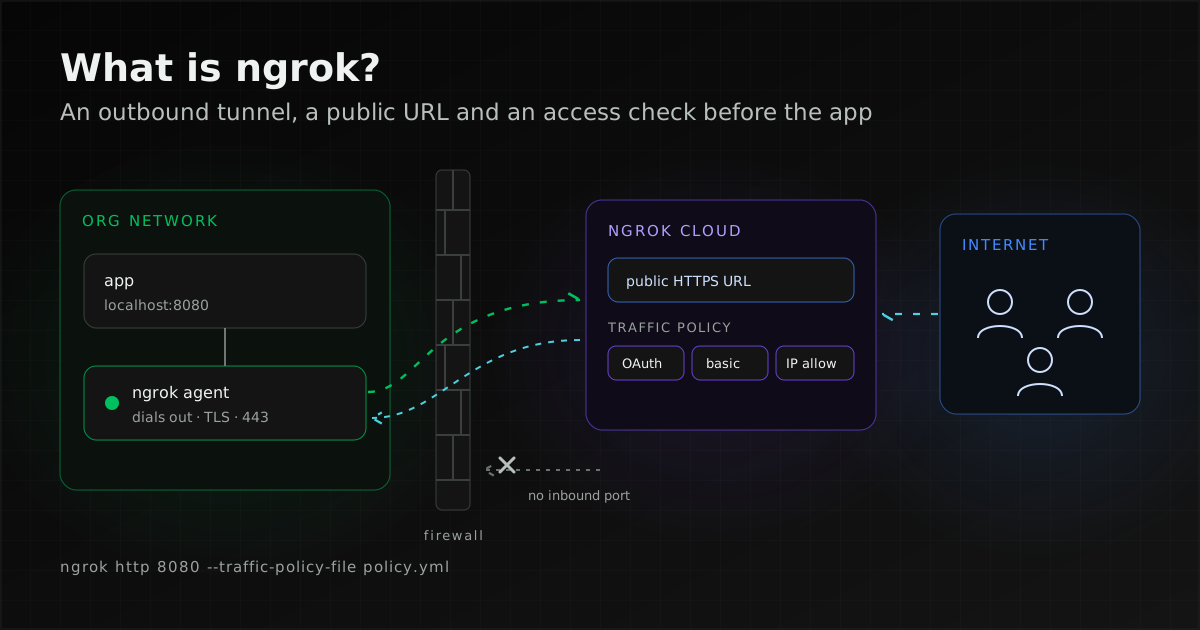
ngrok (pronounced "en-grok") is a reverse tunnel service that gives an app running on localhost or a private network a public HTTPS URL. A small agent on the machine connects out to ngrok's cloud, so no inbound port or firewall rule has to be opened.
It is useful for short-lived work such as testing webhooks or showing a client a work in progress. The URL, however, is open to anyone who has the link from the moment it exists, so inside an organisation every tunnel needs authentication, and someone has to decide who may run tunnels and on which account.
ngrok config add-authtoken, then run ngrok http <port>. Before sharing the link, add OAuth, basic auth or an IP allow list through a Traffic Policy. IT teams should allow only the organisation's own account; ngrok's own guidance is to block DNS lookups for the hostnames the agent connects to and give sanctioned agents a custom connect URL. Anything that becomes a production service belongs on a real server behind a reverse proxy with TLS, or behind a VPN.What is ngrok?
ngrok receives internet traffic on behalf of your app and forwards it through a tunnel that an agent on your machine keeps open. ngrok's documentation describes the product as "developer infrastructure that routes and secures traffic to your apps, APIs, and AI models, wherever they run".
The platform covers more than that, from API gateway features to connecting customer networks, but the job most people look it up for is sharing localhost: giving an app running at, say, localhost:8080 a URL that people outside the network can open, without deploying it anywhere.
According to ngrok's brand page, the name is pronounced "en-grok", two short syllables rhyming with "rock", and is always written in lower case, even at the start of a sentence.
How does ngrok work?
The agent opens an outbound connection to ngrok's cloud and receives a public URL in return; requests to that URL travel back over the same connection to the app on your machine. That is how How Sharing Localhost Works describes it.
The agent documentation adds that the agent dials out over TLS on port 443 and that everything travels over a single TLS connection, so there are no inbound ports to open. The tunnels page draws two consequences: the machine accepts no inbound connections, and the public URL is served over HTTPS with a certificate ngrok provisions and renews. A request that a Traffic Policy denies never reaches the app: the restrict-ips documentation puts it as "The upstream server is never reached".
Two details matter from the start. First, the tunnels page says plainly, "Your URL is public as soon as it exists": anyone with the link can open it until you add authentication, and the URL stops working when the agent stops. Second, for HTTPS endpoints ngrok terminates TLS in its own cloud by default, according to the terminate-tls documentation; TLS endpoints are not terminated by default, and the upstream service has to do it.
| What you share | Example command |
|---|---|
| Web app, API or webhook receiver | ngrok http 8080 |
| Database, SSH or RDP | ngrok tcp 3389 |
| A service presenting its own TLS certificate | ngrok tls 8443 |
The tcp type deserves the most attention from IT, because it gives a database or an RDP host on the internal network a route in from the internet that never passed through firewall configuration.
What is ngrok used for?
ngrok fits work that needs a temporary public URL for an app that has not been deployed. Its overview page lists sharing a local app, testing webhooks locally, running preview workloads in CI and opening SSH and RDP sessions, among others.
- Demos: let a client or another team try an app in development from outside the network without a staging deployment.
- Webhook testing: payment gateways, messaging platforms such as LINE, and GitHub call a public HTTPS URL when an event happens, so during development an ngrok URL can deliver those calls to a developer's machine.
- Reaching a machine behind NAT: for example a test box with no public IP address on a router you cannot reconfigure.
For webhooks, ngrok's verify-webhook action checks the signatures of supported providers, such as GitHub, GitLab, Stripe and Slack, before requests reach the app. The list checked on 2026-11-11 does not include LINE; for a provider that is not listed, verify signatures in the application itself following that provider's documentation.
How to use ngrok: install, add the authtoken, start a tunnel
The ngrok quickstart has three steps: install the agent, connect it to your account with an authtoken, and start an endpoint for your app's port. The commands below were checked against the documentation on 2026-11-11. Agent commands have changed before, so if your version behaves differently, the CLI reference is authoritative.
- Install the agent:
brew install ngrokon macOS, ngrok's apt repository on Debian and Ubuntu, and the Microsoft Store on Windows. Steps for each channel are on ngrok.com/download. Check the install withngrok help. - Connect your account: sign up, copy the authtoken from the dashboard and run
ngrok config add-authtoken, which saves it to the agent's configuration file. Many older tutorials still showngrok authtoken, which is not the form the CLI reference uses. - Start an endpoint: run
ngrok httpwith your app's port. The agent prints the forwarding URL in the terminal. Every account gets a free dev domain chosen automatically; choosing your own with--urlis for paid plans.
brew install ngrok
ngrok config add-authtoken <token>
ngrok http 8080
The configuration file's location depends on the operating system: ngrok config check prints it and ngrok config edit opens it. If you installed through a package manager such as brew or apt, the CLI reference says to update through that package manager rather than with ngrok update.
On a server, the agent can run as an operating-system service through ngrok service. The CLI reference lists Windows, macOS and Linux support and the actions install, uninstall, start, stop and restart; install needs --config to say where the service finds its configuration file. It works, but a tunnel left running on a server is a sign the job is no longer temporary, and it is time to consider a reverse proxy with TLS, as described under when to move to a real server.
Inspecting requests at localhost:4040
While the agent runs, open http://localhost:4040 on the same machine for the web inspection interface. It shows the time, duration, source IP, headers, query parameters, request payload and response body of each request, works for HTTP endpoints only, and can replay a request, which saves waiting for a provider to resend a webhook.
The same page notes that a replayed request skips any Cloud Endpoint policies, because those are applied before traffic reaches the agent. The configuration reference gives the default web_addr for this interface and the agent API as 127.0.0.1:4040, so unless that is changed it is reachable only from the machine itself.
Adding authentication with Traffic Policy
ngrok's recommended way to restrict who can open a URL is a Traffic Policy: a YAML or JSON file that tells ngrok what to do with each request before it reaches your app, with no change to the app's code. The Authentication page lists four methods: OAuth (Google, GitHub, Microsoft and other providers), OpenID Connect, SAML (in early access) and Basic Auth.
The older ngrok http flags --basic-auth, --oauth and --cidr-allow are marked deprecated in the CLI reference with the note "use traffic policy instead" (--cidr-allow on ngrok tcp is not), and the agent changelog for 3.36.0 (2026-02-03) records the deprecation of flags made obsolete by Traffic Policies: they still work, but are hidden from --help and print a deprecation warning. Scripts and guides that still use them should move to a policy file.
Basic auth: a password before you share the link
The basic-auth action asks visitors for a username and password and answers 401 Unauthorized otherwise. It accepts up to 10 pairs, and each password must be 8 to 128 characters long. A policy file shortened from the documentation's example:
on_http_request:
  - actions:
      - type: basic-auth
        config:
          credentials:
            - "demo:change-this-pass"
Then point the agent at the file with --traffic-policy-file, which the CLI reference describes as the path to a YAML or JSON policy file:
ngrok http 8080 \
  --traffic-policy-file policy.yml
Basic auth suits a short demo for a handful of people. A password that has been passed around should change every time a new tunnel is opened.
OAuth: only your organisation's email addresses
The oauth action makes visitors sign in through an identity provider first, and an expression can deny anyone whose email address does not end with your domain. The example on the Authentication page uses a Google OAuth application owned by ngrok; the documentation recommends your own OAuth application for production use.
IP restrictions and mutual TLS
The restrict-ips action allows or denies traffic by source address using CIDR lists, and the Network Security page shows it combined with OAuth on one endpoint. The same page lists mutual TLS, which admits only clients presenting a valid certificate.
The documentation pages for these actions do not say which plans include them. Before making one part of an internal standard, check the pricing page and test it on the account you will actually use.
Where the risks lie for an organisation
ngrok is not insecure in itself: the connection is encrypted and access controls are available. The risk is that a tunnel creates an entrance the network team cannot see, configured by whoever opened it.
- Public from the first second: without a policy, anyone with the link gets in. This applies to tunnel tools in general. Cloudflare's documentation gives the same warning for its own tunnels: without an Access application, the published application is available to anyone on the internet.
- Inbound firewall rules are bypassed: ngrok's firewall guide notes that firewalls usually allow outbound connections, which is what the agent uses to establish a session. A developer can therefore publish an internal service, including a database or RDP through
ngrok tcp, without asking anyone to open a port. - Traffic passes through a third party: HTTPS endpoints are decrypted in ngrok's cloud, as noted above.
- Dashboard logs: the Traffic Inspector stores only request metadata by default. If an account admin enables Full Capture, it stores the full URL including query values, every header value, and request and response bodies (bodies truncated at 10KB, header values at 1KB), and the documentation itself warns that team members may then see sensitive data.
- Data handling terms: the ngrok FAQ points to its Terms of Service and Data Processing Agreement.
- Tunnels nobody knows about: a tunnel left running by a developer, opened on a personal account or installed by a supplier is an entrance with no owner in IT's records.
Tunnel tools also appear in attacks, because their traffic looks like ordinary outbound HTTPS. MITRE ATT&CK entry S0508 describes ngrok as a "legitimate reverse proxy tool" that adversaries have used, under techniques such as Protocol Tunneling (T1572) and Exfiltration Over Web Service (T1567).
CISA advisory AA22-320A (published 16 November 2022, revised 25 November 2022) describes a compromised US federal network where the actors used ngrok to proxy RDP and for command and control; on the local network this was visible only as outgoing HTTPS connections on port 443 to tunnel.us.ngrok[.]com.
The practical conclusion: finding ngrok on a machine does not mean an attack, but an agent nobody will claim should be handled as an anomaly. The reverse also holds: a link on an ngrok domain says nothing about whether the page is safe. The ngrok FAQ explains that the hostname tells you which network served the page, not who made it.
How can IT govern tunnel use?
Start with an approved-tools policy, then use blocking to enforce it. Blocking alone tends to backfire: in a blog post of 3 May 2022, ngrok argues that teams faced with a blanket block will find a less secure option and hide it better. That is a vendor's view, but it is a good reason to offer a sanctioned route alongside the block.
Write the policy down
- Which tunnel tools are allowed, and only on the organisation's account.
- Every endpoint must have authentication or an IP restriction; no open URLs.
- How long a tunnel may stay up, who approves it, and which data must never pass through one, such as customer personal data or production systems.
- Whether
tcptunnels for databases or RDP need case-by-case approval or are not allowed.
Block accounts that are not yours
ngrok's guide Securing your tunnels says most administrators want to block ngrok accounts outside their organisation, and that the fastest approach is to block DNS lookups for the hostnames the agent uses to reach the ngrok cloud. The list in the guide on 2026-11-11:
connect.ngrok-agent.comand its regional forms such asconnect.us.ngrok-agent.com, for the regions us, eu, ap, au, sa, jp and intunnel.ngrok.comand its regional forms such astunnel.us.ngrok.com, for the same regions
An organisation that uses ngrok officially can give its account a custom connect URL and set connect_url in the configuration of approved agents. The connect URL documentation describes exactly this pattern, blocking the default connect URLs on the corporate network while allowing your own, and states that custom connect URLs are available on the Pay-as-you-go plan.
Configure the organisation's account
- Give each agent deployment its own authtoken so a leaked token can be isolated, and set a minimal ACL per authtoken so it can start only the endpoints it needs, as Securing your tunnels recommends.
- Consider restricting which IP addresses may start agent sessions, also per that guide.
- Leave Full Capture off unless you need it, and limit who can see the dashboard. Features such as SSO and RBAC appear as paid add-ons on the pricing page.
Look for use on the network
Check DNS and outbound firewall logs for lookups of the hostnames above. If those logs already go to a SIEM such as Wazuh, you can search them and alert from one place. ngrok's firewall guide also notes that ngrok may be blocked on Fortinet firewalls; if you run FortiGate, check what your existing policy already does before adding rules.
When ngrok turns up on a machine
The ngrok FAQ says that its presence on its own does not tell you whether the use is authorised, and suggests three checks:
- Find the process: note the account it runs as and its arguments. Attackers sometimes rename the binary, so also look for processes with ngrok-style arguments such as
http,tcpor--authtoken. - Find the configuration:
ngrok config checkprints the config path; if the agent runs as a service, check the service definition too. The configuration and arguments show which services are exposed, and the authtoken identifies the ngrok account. - Ask the owner: take the process owner, file path and exposed services to the IT team or the supplier who installed it.
If nobody accounts for it, the FAQ advises stopping the service, keeping the file and its configuration for the security team, and reporting it to abuse@ngrok.com with the endpoint URL and authtoken. The same page explains how to verify a genuine copy: Windows and macOS binaries are signed by ngrok, Inc. (older builds: ngrok LLC), and on Linux you compare the SHA256 hash of the downloaded archive with the published value.
How do the alternatives compare?
The tools differ on two questions: who can reach the service, and whose infrastructure the traffic crosses. The table summarises each developer's own documentation.
| Tool | Who can reach it | Worth knowing |
|---|---|---|
| ngrok via ngrok's cloud | Anyone with the link until a Traffic Policy is added | HTTPS decrypted in ngrok's cloud; OAuth, basic auth, IP restrictions, mTLS |
| Cloudflare Tunnel via Cloudflare's network | Anyone, unless Cloudflare Access is in front | cloudflared makes outbound-only connections |
| Cloudflare Quick Tunnel via Cloudflare's network | Anyone with the link, unless --allowed-mail (email authentication) is set | No account needed; for testing and development only |
| Tailscale Serve via your tailnet | Only devices in your tailnet, under its access rules | No public URL |
| Tailscale Funnel via Tailscale's relay | Anyone on the internet | Beta; ports 443/8443/10000 only; Tailscale's relay cannot decrypt the traffic |
| frp via your own server | Whatever you configure on your server | TLS on by default, but set a CA to verify the certificate |
SSH reverse tunnel (ssh -R)via your own SSH server | By default only the server itself | Needs GatewayPorts to let other hosts in |
| Reverse proxy with TLS, or a VPN via your own infrastructure | As you design it | You run the server, certificates and firewall, and keep full control and audit |
Cloudflare Tunnel restricts users with an Access policy, and a Cloudflare Quick Tunnel gets a new hostname each time. Tailscale Funnel needs HTTPS certificates, MagicDNS and the funnel attribute in the tailnet policy. frp authenticates frpc to frps with a token by default and has had TLS on by default since v0.50.0. ssh -R binds the remote port to loopback by default.
frp and SSH reverse tunnels keep traffic away from third parties, but someone has to run the receiving server: patching, authentication and logs included.
When to use a tunnel, and when to move to a real server or a VPN
Tunnels suit work with an end date; a service that has to stay up belongs inside the organisation's own infrastructure. This is UNIXDEV's guidance for matching the tool to the situation.
| Situation | Good fit | Why |
|---|---|---|
| Testing webhooks on a developer machine | ngrok or another approved tunnel, with auth or signature checks, closed afterwards | The provider must call a public URL, and the job ends within hours |
| Demo for a client | A tunnel with OAuth, basic auth or an IP allow list | Viewers are outside the network, but the app should not be open to everyone |
| Only staff need access | The company VPN or Tailscale Serve | No public URL is needed at all |
| Traffic must not cross a third party | frp or ssh -R on a company server | Traffic stays on machines you control |
| A production service | A real server behind a reverse proxy with TLS, plus monitoring and logs | It needs continuity, an audit trail and a clear owner |
Signs that a tunnel has outlived its purpose: the link is still in use after the demo, it has regular users, real customer data passes through it, someone asks about uptime, or logs have to be kept for audit. At that point the job is to set up the reverse proxy, certificates and firewall properly, not to find a better tunnel.
Facts that change often
These items come from vendor documentation and may change after the date checked. Re-check them before relying on them.
| Item | Status | Source |
|---|---|---|
| ngrok agent version | 3.x line; newest in the changelog is 3.39.13 (2026-10-22) | Agent changelog |
| Account connection command | ngrok config add-authtoken | CLI reference |
--basic-auth, --oauth, --cidr-allow on ngrok http | Deprecated; use Traffic Policy (--traffic-policy-file) | CLI reference; changelog 3.36.0 |
| Local inspection interface | 127.0.0.1:4040, HTTP endpoints only | Web inspection interface |
| Agent connect hostnames | connect.ngrok-agent.com, tunnel.ngrok.com and regional forms | Securing your tunnels |
| Free plan | Exists; HTTP/S endpoints show an interstitial page | ngrok pricing |
| TCP endpoints | On the Free plan, only after adding a payment method | CLI reference |
| Custom connect URL | Pay-as-you-go plan | Connect URL |
| Tailscale Funnel | Beta; ports 443, 8443 and 10000 only | Tailscale Funnel |
| Cloudflare Quick Tunnel | For testing and development; no account needed | Quick Tunnels |
How UNIXDEV can help
UNIXDEV does not sell or operate ngrok, Cloudflare or Tailscale. Our work is the part an organisation has to do itself once it stops relying on tunnels:
- DevOps and managed operations: a security baseline that includes network segmentation, monitoring and logs with Zabbix and Graylog, and day-to-day running of production systems.
- Linux engineering: hardening the servers that take over from a tunnel.
- FortiGate and Forescout: firewall policy design and SSL and IPsec VPNs.
If you find internal services already exposed through tunnels, a sensible first step is an inventory: what is exposed, who owns it, and where it should move.
Sources and further reading
- ngrok — What is ngrok · Agent · Brand
- ngrok — How Sharing Localhost Works · Quickstart · Download
- ngrok — Agent CLI reference · Agent configuration file · Agent changelog
- ngrok — Web inspection interface · Traffic Inspector: HTTP requests
- ngrok — Authentication · Network Security · basic-auth · oauth · restrict-ips · verify-webhook · terminate-tls
- ngrok — Securing your tunnels · Connect URL · Running behind firewalls
- ngrok — FAQ · Is ngrok a virus? · Pricing · Blog: deploying ngrok in production (2022)
- MITRE ATT&CK — Software S0508: ngrok
- CISA — Advisory AA22-320A
- Cloudflare — Cloudflare Tunnel · Self-hosted public application (Access) · Quick Tunnels
- Tailscale — Funnel · Serve
- frp (GitHub)
- OpenBSD manual — ssh(1)
- Related: DevOps and the hidden cost of manual delivery
- Related: Ransomware: how Thai organisations prepare and respond
- All articles on DevOps and enterprise system operations
Sources checked on 2026-11-11
How we checked: based on the primary sources above, reviewed by the UNIXDEV team