
Proxmox VE in production: cluster, HA, Ceph and backup
Designing a production Proxmox VE cluster: node count, quorum and QDevice, watchdog-fenced HA, Ceph or ZFS replication, backup and a go-live checklist.
By UNIXDEV Team · 17 min read
Original published · English edition
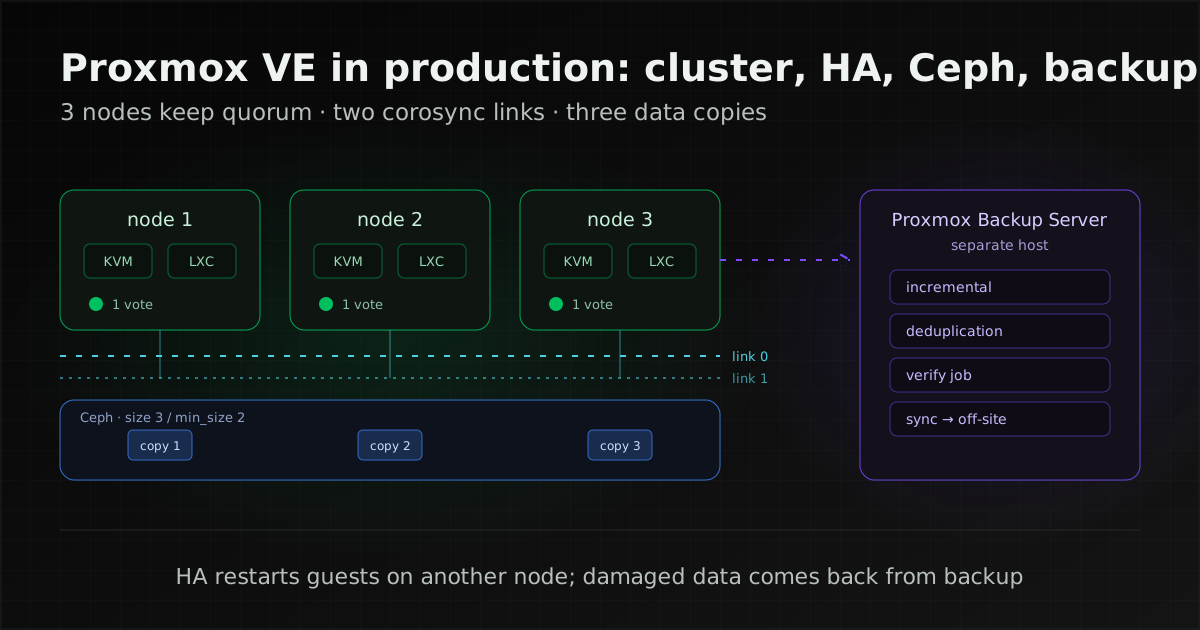
A Proxmox VE cluster that survives a server failure needs at least three nodes so it keeps quorum (the HA documentation's stated minimum; a two-node cluster can borrow a third vote from a QDevice), a separate corosync network with a backup link, and storage that every node can reach or that replicates between them.
HA cuts a failed node off (fencing) and restarts its guests on another node, but it is no substitute for backups you have actually restored.
Proxmox VE is an open-source virtualisation platform built on Debian that runs virtual machines with KVM and containers with LXC, with its source code under the AGPLv3 licence, according to the Proxmox VE introduction. If you are evaluating it after leaving VMware, our guide to leaving VMware covers converting the VMs. This article is about designing the destination cluster so it is fit for production.
The Proxmox VE components that decide resilience
Three parts decide whether a cluster survives a failed server: corosync, which lets the nodes see each other and count votes (quorum); pmxcfs, the file system holding the cluster-wide configuration; and the HA manager, which moves guests off a failed node. All three depend on the same cluster network.
- No central management server: the introduction says any node can manage the whole cluster through the web UI or REST API, and the HA stack ships with Proxmox VE, with no external tools such as Pacemaker.
- pmxcfs: per the pmxcfs documentation, a database-backed file system replicated to all nodes in real time through corosync, mounted at
/etc/pve, which turns read-only when a node loses quorum. In practice, a node cut off from the cluster cannot change VM configuration. - corosync: the cluster communication layer, which the cluster manager documentation describes as time-critical, hence the explicit network requirements below.
If several teams need to create and manage their own machines self-service, with quotas per project, that is closer to a private cloud; see our OpenStack page.
How many nodes: quorum, QDevice and two-node clusters
For HA, start at three nodes: the HA documentation requires at least three to get reliable quorum. A two-node cluster needs a QDevice as a third vote.
Quorum is the vote that decides which part of a cluster may keep working. Per the cluster manager documentation, each node gets one vote by default; when the network partitions, state changes need a majority of nodes online, and a side without quorum goes read-only. It follows that a two-node cluster that loses one node no longer has a majority, so the survivor cannot change state until a third vote exists.
| Nodes | What the docs recommend | Note |
|---|---|---|
| 2 | Add a QDevice as the third vote | QDevices are supported and recommended for two-node clusters, but HA still asks for three nodes |
| 3, 5 or another odd count | No QDevice | The docs discourage QDevices with odd counts: the QDevice gets several votes and becomes almost a single point of failure |
| 4, 6 or another even count | QDevice supported | Breaks a tie when the network splits evenly; the docs say the QDevice votes for the partition with the lowest node id |
A QDevice runs the qnetd daemon on an independent server with the corosync-qnetd package and talks to the cluster over TCP/IP, so it can sit outside the cluster LAN. Pick a machine that will not fail together with any one node.
There is no fixed node limit, but the more nodes, the tighter corosync's latency budget, as the next section explains.
Designing the cluster network
Separate traffic by type, at least corosync, storage (such as Ceph), migration, and management/guest traffic. Corosync should have its own NIC and a backup link, because a network saturated by other traffic can push nodes out of quorum.
- Latency: the cluster manager documentation requires a reliable network with latency under 5 ms (LAN performance) between all nodes, and says stable operation gets rather unlikely with more than three nodes and latency above around 10 ms. In practice that makes stretching one cluster across sites over a WAN hard to run reliably; for a copy at a second site, sync Proxmox Backup Server to another Proxmox Backup Server there instead.
- Dedicated NIC: the docs recommend a dedicated physical NIC for cluster traffic and specifically warn against sharing one network between corosync and storage.
- Redundant links: corosync supports up to 8 links; add a second one on a different network for when the primary fails. The docs also note that a single link backed by a bond can be problematic in some failure scenarios.
- Migration: by default migration uses the cluster network, which the docs call not optimal. A dedicated migration network can be set in
/etc/pve/datacenter.cfg, and the docs strongly recommend the secure (encrypted) channel unless you fully control the network, since insecure mode sends guest RAM unencrypted. - Ceph: the Proxmox VE Ceph documentation recommends at least 10 Gbps used exclusively for Ceph, and gives an example of three physically separate networks: a 25 Gbps or faster Ceph cluster network, a 10 Gbps or faster Ceph public network, and 1 Gbps reserved for corosync.
Corosync does not need much bandwidth (Proxmox's own example gives it 1 Gbps). What it needs is low, steady latency, so a separate NIC matters more than port speed.
How Proxmox VE high availability works
Per the HA documentation, the HA manager watches the VMs and containers configured as HA resources. When a node drops out of quorum, it fences that node with a watchdog and starts its guests again on another node. That is a restart, not a live migration, so the guests are always down for a while.
Requirements before enabling HA
The HA documentation lists at least three cluster nodes, shared storage for VMs and containers, hardware redundancy everywhere, reliable server components, and an optional hardware watchdog, falling back to the Linux kernel's softdog. The documentation notes that recent server motherboards often include a hardware watchdog but it has to be configured before use, and that softdog is not independent of the server's hardware, so it is less reliable. The alternative to shared storage is ZFS replication, which the replication documentation explicitly allows in combination with HA, with the data trade-off described in the storage section.
What fencing is, and how long it takes
Fencing guarantees that a failed node really is offline before its guests start elsewhere, so the same VM never runs twice and corrupts its disks. Proxmox VE fences itself (self-fencing) through a watchdog: the HA manager resets the watchdog regularly; a node that loses quorum cannot, and it reboots once the watchdog times out, which the docs put at 60 seconds.
The HA documentation describes typical error detection and failover times of about 2 minutes. Treat that as the documented typical figure, not a guarantee: measure your own failover during testing and use the measured time when you set each system's RTO (the downtime you accept).
HA rules replace HA groups
Many older guides still configure HA groups. The HA documentation says HA groups are deprecated and were migrated to HA node affinity rules as of Proxmox VE 9.0. There are two rule types: node affinity, which keeps resources on chosen nodes, and resource affinity, which keeps a set of resources together or apart, for example keeping a database primary and its replica on different nodes. Resource affinity rules are strict by default.
What HA does not protect you from
HA covers a whole node failing or leaving the cluster. Anything that happens inside a guest or to the data itself is invisible to it. That conclusion follows from how the documentation describes HA: it tracks node and resource state and restarts guests; it does not check applications.
- A hung application or a failed service inside a VM: the VM is still running, so HA does nothing. You need application-level monitoring. The HA documentation itself calls software that can run on several hosts at once, detecting errors and failing over by itself, the most elegant solution; in practice that means, for example, database replication or several application servers behind a load balancer.
- Corrupted, deleted or ransomware-encrypted data: Ceph and replication faithfully copy whatever is written, damage included. The answer is a backup outside the cluster.
- Periods when HA is disarmed (the HA stack paused cluster-wide by releasing every node's watchdog, for example while reconfiguring the network or corosync): the HA documentation states that while disarmed, HA does not protect your services and failures in that period are not recovered automatically.
- Not enough capacity after failover: guests from the failed node land on the survivors, and the docs warn this can mean high load on small clusters. Size CPU and RAM so the remaining nodes can carry the lost node's work.
- Hardware-bound guests: a guest using hardware passthrough is tied to its host and, per the HA documentation, cannot be moved by the migrate shutdown policy.
Choosing storage: Ceph, ZFS replication or shared storage
Choose by node count, the network you have, and how much data you can lose when a node fails (your RPO). Ceph keeps full copies before acknowledging a write but needs three or more servers and a fast network; ZFS replication works with fewer servers but can lose the most recent writes; an existing SAN or NAS works if the array has its own redundancy.
| Option and key conditions | Fits when | Data at risk when a node fails |
|---|---|---|
| Hyper-converged Ceph (on the hypervisor nodes) Conditions: at least three nodes, 10 Gbps or more dedicated to Ceph, pools default to size 3 / min_size 2 | Three or more similar servers, and you want live migration and HA without external storage | Per the Ceph architecture documentation, the primary OSD reports success to the client only after the replicas are stored, so nothing waits for a scheduled sync |
| Local ZFS with storage replication Conditions: local ZFS (zfspool) only; can be combined with HA | A small cluster, or no network for Ceph, and losing a short window of writes is acceptable | Writes since the last sync. Per the storage replication documentation, the default is every 15 minutes and the minimum interval is one minute |
| External shared storage (SAN over iSCSI or FC, NFS) Conditions: resilience depends on the array, its controllers and a redundant storage network | You already have a redundant array, or you are bringing a SAN over from VMware | No sync gap between nodes, since all use the same disks, but the array is one place whose failure hits every VM |
Ceph RBD, NFS, iSCSI and LVM on shared LUNs all count as shared storage in the storage documentation, which names the main benefit: running machines can be live-migrated without downtime because every node reaches the disk images directly.
Ceph minimums from the documentation
- Servers and disks: at least three, preferably identical, servers. The docs recommend at least three nodes and at least 12 OSDs spread evenly (an OSD is the daemon managing one disk), one OSD per physical disk.
- No RAID controllers: use a host bus adapter (HBA) instead, because Ceph manages redundancy itself.
- Memory: at least 8 GiB per OSD for good performance, against a daemon default of 4 GiB, and at least one CPU core per Ceph service.
- size and min_size: pools default to three replicas and need at least two to accept I/O: the Proxmox VE Ceph documentation says Ceph rejects I/O on the pool when a placement group (a subset of a pool that Ceph uses to map objects onto a set of OSDs) has fewer replicas than min_size. The defaults are chosen so that no data is lost if any OSD fails, and the docs warn not to set min_size to 1, which can lead to data loss, incomplete placement groups or unfound objects.
Backup and restore: vzdump and Proxmox Backup Server
Proxmox VE can back up guests itself with vzdump, but the backup documentation recommends Proxmox Backup Server on a dedicated host for its additional features. Every Proxmox VE backup is a full backup of the guest's configuration and data; on Proxmox Backup Server it is stored as deduplicated chunks, while on file-level storage it is a regular archive file.
- vzdump modes: stop gives the highest consistency at the cost of a short downtime; snapshot has the least downtime with a small risk of inconsistency; suspend exists for compatibility.
- Proxmox Backup Server: per its introduction, it sends only changed data (incremental), deduplicates, compresses with Zstandard, encrypts client-side with AES-256-GCM and checks integrity with SHA-256.
- Verify jobs: the maintenance documentation recommends reverifying all backups at least monthly even when earlier checks passed; prune chooses which snapshots to keep, and garbage collection frees unused chunks.
- Off-site copies: per the remotes and sync jobs documentation, data can be synced to another Proxmox Backup Server in either pull or push direction.
- Live-restore: for VM backups stored on Proxmox Backup Server, a VM can start while it is still being restored, though the docs note its disk reads are slower until the restore finishes.
Making backups resistant to deletion and ransomware, protecting snapshots on Proxmox Backup Server, and running restore drills are covered in our guide to ransomware-resistant backups. We recommend restoring at least one important VM before the cluster goes live and recording the time it took against the RTO your organisation has set.
Rolling updates and major-version upgrades
Update one node at a time: live-migrate its guests away, update and reboot, then move them back. Before you start, decide which repository production hosts use, because Proxmox splits repositories by how thoroughly packages are tested.
| Repository | The documentation says it is for |
|---|---|
| Enterprise (for subscription holders) | The most stable packages; suitable for production |
| No-subscription | Testing and non-production use; not recommended on production servers because packages are not always as heavily tested and validated |
| Test | Developers testing new features |
Ceph has its own repositories split the same way, per the Package Repositories page. If you do run production on the no-subscription repository, we recommend sending every update to a test machine first and recording that decision in writing.
- Maintenance mode: per the HA documentation, it marks a node unavailable for HA and moves HA resources away. A manually set maintenance mode is not cleared on reboot, so switch it off when you finish.
- Shutdown policy: per the HA documentation, shutting down or rebooting a node with HA resources follows the shutdown policy. The default, conditional, picks the behaviour based on whether it is a shutdown or a reboot; the others are freeze (stop services and do not recover them until the node returns), failover (stop services and recover them on another node if this one does not return soon) and migrate (move HA services to another node before powering off).
- Removing a node: the cluster manager documentation says to power the node off before removing it and never to power it on again in the same network with its old configuration, because that can damage the cluster. To bring the same machine back, reinstall Proxmox VE first and then join it.
- Migration direction: the 8 to 9 upgrade page says moving a VM or CT from an older to a newer version always works, while newer to older is generally unsupported. Upgrade an empty node first and move work forward, and per the cluster manager documentation, online migration is only supported between nodes with CPUs from the same vendor, so keep a cluster to one CPU vendor and test live migration between CPU generations.
- Major upgrades: Proxmox ships a pveXtoY checklist script for each major step (for example
pve8to9) that gives hints and warnings before, during and after the upgrade; the same page asks you to runpve8to9 --fullat least once beforehand. A valid, tested backup is always required, a trial on a separate machine is advised, and hyper-converged clusters must upgrade Ceph first in the order that page sets.
What to monitor
At minimum, watch cluster quorum, Ceph health, backup and verify job results, per-node resources and certificate expiry, and send them to a monitoring system outside the cluster so alerts still arrive when the cluster itself is in trouble.
- Metrics: Proxmox VE periodically sends host, guest and storage statistics to an external metric server; the External Metric Server page lists Graphite, InfluxDB and OpenTelemetry.
- Quorum and corosync links: alert when a node drops or a backup link fails; a backup link that failed silently will not help on the day the primary goes down.
- Ceph: alert when health is not OK, an OSD is down or capacity runs short.
- Certificates: per the Certificate Management page, each cluster creates its own CA, which browsers do not trust automatically. With ACME (Let's Encrypt), renewal is attempted by pve-daily-update.service once the certificate is within 30 days of expiry; alert when renewal fails.
If you already run Zabbix, see our Zabbix guide for how to lay out monitoring.
Go-live checklist
Use this list to accept a cluster before moving real workloads, whether your own team or a contractor built it. Each item should come with evidence: command output, screenshots or a dated test record.
- At least three nodes, as the HA documentation requires (a two-node cluster at minimum adds a QDevice on an independent machine), with quorum confirmed.
- Corosync on a NIC separate from storage, inter-node latency within the documented limits, and a backup link on another network.
- Primary link unplugged in a test, and the cluster kept quorum over the backup link.
- Fencing tested: a node holding HA resources was cut off from the cluster network, it rebooted itself and its guests started elsewhere, with the actual time recorded.
- Capacity calculated so the remaining nodes can run every HA resource without the largest node, and confirmed during the fencing test.
- If Ceph: a separate Ceph network of the documented speed, no RAID controller in the OSD path, no pool at min_size 1, and Ceph health OK.
- If ZFS replication: a replication interval matching the RPO your organisation accepts, and the system's users know the last window of writes may be lost.
- A migration network set and the secure channel in use.
- A separate Proxmox Backup Server, scheduled verify jobs, an off-site copy, and a timed restore of an important VM.
- A decided production repository, a node-by-node update procedure and a runbook for major upgrades.
- Metrics exported to monitoring outside the cluster, with alerts for quorum, Ceph, backups and certificates.
- Handover documents: network diagram, IPs and VLANs, securely stored passwords and keys, and out-of-band access (such as IPMI) for when the main network is down.
If someone will maintain the cluster for you, our MA and SLA contract checklist shows how to write these criteria and your own RTO/RPO targets into the contract.
Version-specific facts
The figures and feature names below are tied to versions; check them against the linked sources before relying on them.
| Item | Detail | Source |
|---|---|---|
| Major version | Proxmox VE 9.x on Debian 13 "Trixie"; 9.0 was released on 5 August 2025 | Roadmap |
| Point release listed on the Roadmap when checked | 9.2, released 21 May 2026, with Ceph Squid 19.2 and Tentacle 20.2 | Roadmap |
| Proxmox VE 8 (Debian 12) | The FAQ table gives end of life as August 2026 (Debian 12: July 2026), which had already passed when checked; clusters still on 8.x should upgrade to 9.x following the Upgrade from 8 to 9 page | FAQ |
| HA groups | Deprecated and migrated to node affinity rules since 9.0 | HA manager |
| Watchdog and failover | Watchdog times out after 60 seconds; typical detection and failover about 2 minutes | HA manager |
| Corosync links | Up to 8 | Cluster manager |
| Storage replication | Default every 15 minutes; minimum one minute; maximum once a week | Storage replication |
| Ceph OSD memory | At least 8 GiB per OSD recommended; 4 GiB default | Ceph |
| Pre-upgrade checklist script | pve8to9 for 8 to 9, with Ceph upgraded to Squid first | Upgrade from 8 to 9 |
| External metric servers | Graphite, InfluxDB, OpenTelemetry | External Metric Server |
How UNIXDEV can help
UNIXDEV designs, installs and maintains Proxmox VE clusters: sizing nodes, the corosync network and storage to the RPO and RTO your organisation sets, deploying Ceph or ZFS replication, setting up Proxmox Backup Server and monitoring, and testing against the checklist above before handover. If you are coming from VMware, we plan and move VMs in waves as described in our VMware exit guide. After go-live, updates, version upgrades and restore drills are available through DevOps & SRE managed services within an agreed scope. See our cloud services and our Linux capability.
Sources and further reading
- Proxmox VE — Introduction
- Proxmox VE — Cluster Manager · Proxmox Cluster File System (pmxcfs)
- Proxmox VE — High Availability
- Proxmox VE — Storage · Storage Replication
- Proxmox VE — Deploy Hyper-Converged Ceph Cluster · Ceph (Squid) — Architecture
- Proxmox VE — Backup and Restore
- Proxmox Backup Server — Introduction · Maintenance Tasks · Managing Remotes & Sync
- Proxmox VE wiki — Package Repositories · Upgrade from 8 to 9
- Proxmox VE wiki — Roadmap · FAQ
- Proxmox VE wiki — External Metric Server · Certificate Management
- Related: moving off VMware, options after the licensing change
- Related: ransomware-resistant backups, immutable, offline or air-gapped
- Related: Zabbix explained
- Related: MA and SLA contract checklist
- All articles on cloud and system migration
Sources checked on 2026-11-14
How we checked: based on the primary sources above, reviewed by the UNIXDEV team