
Moving off VMware: options after the licensing change
Broadcom stopped selling VMware perpetual licences: renew and right-size, move to Proxmox VE, OpenStack or cloud in Thailand, with inventory and V2V checklists.
By UNIXDEV Team · 17 min read
Original published · English edition
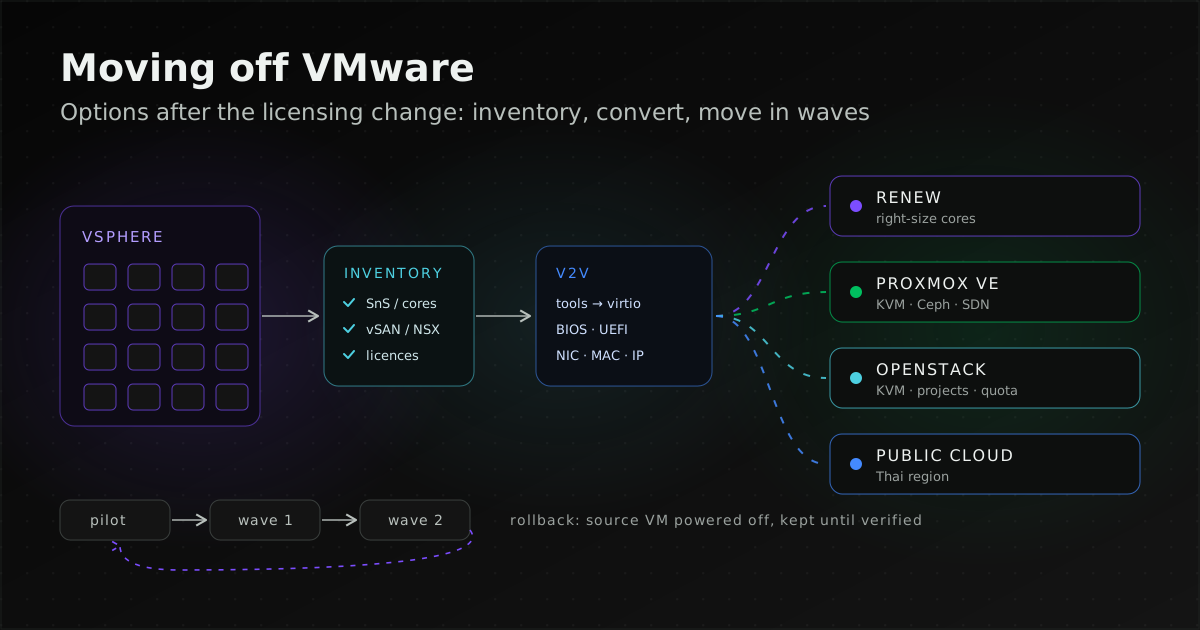
Broadcom completed its acquisition of VMware in November 2023. VMware then stopped selling perpetual licences and moved renewals to subscriptions, most of them bundled into VMware Cloud Foundation (VCF) or VMware vSphere Foundation (VVF).
There are four options: renew and right-size, move VMs to Proxmox VE or OpenStack on the hardware you already own, move to public cloud (including regions in Thailand), or combine these in phases. Which fits depends on how deeply your estate depends on VMware.
The basics of moving to cloud, such as the 5R approaches and cost estimation, are in our cloud migration guide.
What did Broadcom change in VMware licensing?
It moved from perpetual licences with annual support to subscriptions that bundle products together. A VMware Cloud Foundation blog post of 22 January 2024 says the change was announced on 11 December 2023, that affected products are at End of Availability as standalone offers, and that it covers every licensing option, including perpetual, Support & Subscription (SnS) and SaaS.
Three points bear directly on a renewal decision:
- Existing contracts are honoured to term. The same post says VMware continues support for the duration of the existing contract. Standalone products reached End of Availability; some remain available as part of VCF or VVF, and at renewal you align your requirements with the new portfolio through your VMware representative or partner.
- The lineup changed. The VMware Japan blog (8 February 2024), a translation of the English announcement, described, as of February 2024, VCF for large enterprises and VVF for mid-sized and smaller customers, with vSphere Standard and vSphere Essentials Plus for more limited deployments. Storage and disaster recovery are sold as add-ons. The lineup can change; ask your reseller for the SKUs offered today.
- Licensing is per core. Broadcom KB 313548 says VCF and VVF subscriptions are counted per physical core, with a minimum of 16 cores per CPU, so an 8-core CPU counts as 16. vSAN is licensed per TiB.
The VMware Japan post gives 4 February 2024 as the end of perpetual licence sales and of SnS renewals on them, and notes that effective dates vary, so confirm your contract terms with your reseller, and ask whether that reseller can still renew for you. We leave prices out: they depend on your core count and your contract.
Status as of 2026-11-09
| Item | Status | Source |
|---|---|---|
| Broadcom acquisition of VMware | Completed November 2023 | Broadcom Form 8-K filed 22 Nov 2023 (SEC) |
| Perpetual licences and SnS on perpetual licences | End of Availability, announced 11 Dec 2023 | VMware blog, 22 Jan 2024 · KB 309138 (notice pointing to the blog) |
| Main offers | VCF and VVF subscriptions | VMware blog, 22 Jan 2024 |
| Licence counting | Per physical core, minimum 16 cores per CPU | Broadcom KB 313548 |
| vSphere 7.x (ESXi, vCenter, vSAN) | End of general support 2 Oct 2025 | Broadcom KB 415405 · VMware blog, 31 Mar 2025 |
| vSphere 7.x: Technical Guidance | Ends 2 Apr 2027; valid VMware contracts only, not Broadcom contracts | VMware blog, 31 Mar 2025 |
| vSphere 8.0 (ESXi, vCenter, vSAN) | End of general support 11 Oct 2027 | Broadcom KB 459135 |
| Proxmox VE import wizard for ESXi | Since Proxmox VE 8.2 (24 Apr 2024); tested with ESXi 6.5 to 8.0 | Proxmox press release · Proxmox wiki |
| Huawei Cloud region in Thailand | AP-Bangkok (ap-southeast-2) | Huawei Cloud OBS endpoints |
| AWS region in Thailand | Asia Pacific (Thailand), ap-southeast-7; opt-in, so it must be enabled in the account first | AWS Regions |
What happens if you do not renew VMware?
For perpetual licences, nothing stops. Broadcom KB 429208 says that when SnS on a perpetual licence expires, ESXi hosts and vCenter keep operating normally, running VMs stay powered on, licensed features stay unlocked, and there is no automatic shutdown.
Per the VMware Japan blog (8 Feb 2024), SnS on perpetual licences could no longer be renewed from 4 February 2024, so renewing now means buying a subscription; if you already hold a subscription, check with your reseller what happens when its term ends.
What you lose is access to patches, security updates and new releases on the Broadcom Support Portal, which is limited to accounts with active SnS, and the ability to open a support request. The platform keeps running, but a newly found vulnerability will have no vendor fix. Treat the period after SnS lapses as a migration window with a deadline, not a long-term state.
If you are still on vSphere 7, no contract brings standard patches for that version after 2 October 2025. KB 415405 gives the date; VMware's blog of 31 March 2025 says that after it, users will not receive product support, security patches and updates. How to look after unsupported systems while you plan the move is covered in keeping a legacy system running safely.
What are the options after the licensing change?
There are four main options, and most organisations end up using more than one for different groups of systems.
- Renew and right-size. Renew subscriptions only for the hosts you need. Because cost follows core count, retiring hosts or consolidating VMs onto fewer machines has a direct effect. This suits estates that depend heavily on vSAN, NSX or other VMware tooling and need time to plan.
- Move VMs to another hypervisor on existing hardware. The KVM-based options are Proxmox VE, for a single team running a set of VMs, and OpenStack, whose Nova documentation names KVM as the default hypervisor, for when several teams need to create resources themselves through an API. How OpenStack differs from VMware is explained on our OpenStack page. Other platforms on the market include Microsoft Hyper-V and Nutanix AHV, which this guide does not compare.
- Move to public cloud. You stop running hardware, and can choose a region in Thailand if data should stay in the country, such as Huawei Cloud AP-Bangkok or AWS Asia Pacific (Thailand). A table of providers with Thai regions is in the cloud migration guide.
- Combine and move in phases. Keep a small VMware cluster for the systems that are hardest to move and migrate the rest in waves. This spreads risk and budget, at the cost of running two platforms in the meantime.
Which option fits: a decision table
Start from the situation closest to yours, then check the reasoning in the right-hand column against what your inventory shows.
| Situation | Option | Reason |
|---|---|---|
| Still on vSphere 7 | Treat as urgent: renew and upgrade, or move out | End of general support was 2 Oct 2025; per VMware's blog of 31 Mar 2025, no security patches after that |
| SnS ending soon; heavy use of vSAN, NSX or VMware disaster recovery | Renew only for the hosts you need, and plan the exit during that term | Replacing storage and networking needs redesign, and the Proxmox importer cannot read vSAN-backed disks |
| One team runs all the VMs, no per-team self-service is needed, and the hardware is still in service | Proxmox VE | Import wizard pulls VMs from ESXi; Ceph on the same nodes can replace vSAN with at least three servers |
| Several teams need self-service, quotas and an API | OpenStack on KVM | Per-team projects and quotas; virt-v2v can write VMs straight into OpenStack |
| Hardware due for refresh, or no wish to keep running a server room | Public cloud in a region your data rules allow | No new hardware cycle, but monthly costs and network connectivity must be planned |
| Vendor appliances supported only on VMware, or unclear database licensing | Hybrid: keep a small VMware footprint, move the rest first | Shrinks the contract without risking systems the vendor may not support elsewhere |
| Thai government agency that must re-procure | Check the contract and procurement rules before choosing a destination | A platform change may need new terms of reference; see the Thai context section below |
What should you inventory before deciding?
You need to know which VMs exist, what each depends on in VMware, and which licensing terms apply. The same data drives both a renewal quote and the choice of destination, so collect it before negotiating with the reseller.
Inventory checklist
- Contracts and versions: the SnS end date of each licence, and the ESXi and vCenter version of each cluster.
- Hardware: hosts, CPUs and cores per CPU in each machine (for the 16-cores-per-CPU minimum), and warranty end dates.
- VM list: name, OS and version, vCPU, RAM and disk size, the service it runs and its owner.
- Firmware and security: which VMs boot with BIOS or UEFI, which use a vTPM or encrypted disks, and whether every BitLocker recovery key is on file.
- Snapshots: VMs with leftover snapshots, which slow the importer and rule out some conversion methods.
- Storage: VMs on vSAN, datastore names with special characters, and VMs using external storage or disks shared between machines.
- Network: whether NSX is in use and for what (segments, firewall, load balancing), and which VMs use static IPs or DHCP reservations tied to a MAC address.
- Tools integrated with vCenter: backup, monitoring, disaster recovery and automation software that connects through vCenter. Check with each vendor whether it supports the new platform.
- Vendor appliances: systems delivered as OVA files that the vendor supports only on VMware.
- OS and database licensing: Microsoft's Windows Server 2025 licensing guidance says that licensing by physical cores requires every physical core to be licensed, with at least 8 core licences per processor and 16 per server. Standard grants two operating system environments (physical or virtual) and Datacenter an unlimited number, and licensing by VM requires subscription licences or active Software Assurance. Moving VMs to new hosts therefore means counting again against those hosts. For SQL Server and Oracle Database, check the terms with the vendor or a licensing adviser before moving hosts.
- Dependencies: VMs that must move together, such as an application and a database that need low latency between them.
What replaces vSAN and NSX on each destination?
Every destination replaces the hypervisor, but storage, networking and the tools around vCenter need redesign, and not everything has a like-for-like equivalent.
- Storage instead of vSAN: Proxmox VE can run Ceph on the hypervisor nodes (hyper-converged). It needs at least three servers, preferably identical, and Proxmox recommends at least 10 Gbps of network used only for Ceph. Budget for it if your current hosts have less.
- Networking instead of NSX: Proxmox VE SDN supports Simple, VLAN, QinQ, VXLAN and EVPN zones and is installed by default since 8.1, but IPAM/DHCP and complex routing through FRRouting are tech preview. It replaces part of NSX, not all of it; NSX firewall or load-balancing use needs its own replacement.
- OpenStack: compute, networking and storage are separate services, so there are more services for your team to run. See our OpenStack page.
- Public cloud: networking and storage are the provider's services. Map existing VLANs and firewall rules onto the provider's network model, and check whether your backup tool supports it or must change.
- vTPM: Proxmox says vTPM state cannot be migrated from VMware, so have the BitLocker recovery key ready for every VM that uses it.
How are VMs converted from VMware (V2V)?
Mostly with the destination's own tools: the Proxmox VE import wizard, virt-v2v for KVM and OpenStack, and cloud providers' server migration services. Every method requires the source VM to stop at some point, so plan a downtime window for each VM.
Proxmox VE: the import wizard
According to the Migrate to Proxmox VE page, the importer needs Proxmox VE 8 or later (the ESXi wizard arrived in 8.2), accepts ESXi and OVA/OVF files as sources, and works as a storage plugin that connects to ESXi and translates most VM settings to Proxmox equivalents. Points to know:
- Connect to the ESXi host directly; the documentation says importing through vCenter dramatically reduces performance.
- Guests must be stopped on the VMware side before import.
- It cannot import disks on vSAN (move them to other storage first) or encrypted disks (remove the encryption policy first). VMs with snapshots import more slowly, and datastore names with special characters such as
+may fail. - For mass migrations, the documentation advises importing no more than four VM disks at the same time.
- Live import starts the VM on Proxmox while its disks copy in the background, but if the import fails, all data written since it started is lost.
If the wizard does not fit, the same page documents alternatives: export an OVF with VMware's ovftool and import it with the first command below, or import a single disk with the second (it appears as an unused disk to attach to the VM).
qm importovf <vmid> <name>.ovf <storage>
qm disk import <vmid> <file>.vmdk <storage>
KVM and OpenStack: virt-v2v
virt-v2v from the libguestfs project converts one guest at a time from a foreign hypervisor to run on KVM. Targets include KVM managed by libvirt, OpenStack, oVirt and, experimentally, KubeVirt. It copies the source and leaves the original VM unchanged, installs virtio drivers during conversion, and attempts to remove VMware Tools.
- Reading from VMware: the input documentation calls VDDK usually the fastest and most flexible method and vCenter over HTTPS the slowest, and notes that the SSH transport does not work with guests that have snapshots.
- Writing to OpenStack: per the output documentation,
-o openstackcreates one Cinder volume per disk, and virt-v2v must run inside a VM on the target OpenStack (a conversion appliance).-o glanceis a legacy option. - Limits: the guest must be cleanly shut down, because a guest running during conversion ends up with filesystem corruption. Windows Fast Startup and hibernation are incompatible, a Windows system disk on a Dynamic Disk is not supported, and virt-v2v does not reconfigure the guest's network. Removing VMware Tools on Windows often fails, so remove them by hand first.
Public cloud: server migration services
Cloud providers offer their own server migration services. One example is Huawei Cloud Server Migration Service (SMS), which moves x86 physical or virtual servers to ECS instances. You install the SMS-Agent on the source, choose or create a target ECS, run a full replication, then synchronise incremental changes until the cutover date.
The SMS constraints to check against your VM list: it cannot migrate servers with RAID arrays, encrypted operating systems such as BitLocker-protected Windows, clusters, shared file systems, multi-OS servers, nested LVM or external storage attached to the source, and it migrates only disks that are mounted and in use. Also check that the service is offered in the region you choose.
V2V checklist: drivers, boot mode and networking
Most post-conversion problems come from drivers, firmware and networking. This list combines the cautions in the Proxmox and libguestfs documentation.
- Remove VMware Tools first. Proxmox advises removing the old hypervisor's guest tools, and virt-v2v often fails to remove them on Windows.
- Install VirtIO drivers. On Linux, make sure virtio drivers are in the initramfs before migrating. On Windows, use the virtio-win ISO; without the drivers, boot Windows from a SATA or IDE disk first and switch to VirtIO SCSI afterwards.
- Match the firmware. BIOS guests use SeaBIOS; UEFI guests use OVMF with an EFI disk. Some operating systems need a boot entry added by hand.
- Record network settings. The adapter name will most likely change, and so will the MAC address: update DHCP reservations or set the MAC manually. On Windows with a static IP, consider removing it before migration and setting it again at the destination.
- Have recovery keys ready. vTPM state does not migrate, so collect BitLocker recovery keys for every encrypted VM beforehand.
- Remove snapshots. Consolidate them first so imports run faster and every conversion method stays available.
- Disable Windows Fast Startup and hibernation, then shut down normally.
How do you migrate in waves with a rollback path?
Move from a pilot to larger waves, each with a tested way back. Rollback is simpler for V2V than for most application migrations because the source VM still exists, but a few rules are not negotiable.
- Pilot: pick VMs that are not critical but represent what you run (Linux and Windows, BIOS and UEFI). Convert, test and record the time per VM to plan later waves.
- Group waves by dependency: VMs that work together move in the same wave, and each wave's downtime window is agreed with the system owner.
- Cut over in the planned window: shut down the source, convert, start at the destination, then run the tests in the next section.
- Roll back if tests fail: shut down the destination VM and power the source back on. Never run both at once; Proxmox warns this corrupts the disk. If a live import fails, treat writes made since it started as lost and return to the source.
- Keep the source VM powered off, not deleted, until the destination has run in production for the agreed period and a restore from the new platform's backups has worked.
Go/no-go criteria, rehearsals and user communication on cutover day are covered in the cutover section of the cloud migration guide.
What should you test after conversion?
Test both the machine and the service before declaring a wave done.
- The VM boots with the right firmware, and disks and network use VirtIO drivers.
- Adapter name, IP, DNS and default gateway are correct, and other machines can reach it.
- Applications and databases pass the health checks or test list the system owner defined.
- Performance matches the baseline measured before the move, such as response time and disk I/O.
- Windows activation and any hardware-bound software licences are in order.
- Backups run on the new platform, and at least one restore has actually worked.
- Monitoring and logs arrive from the new VM, and alerts for the powered-off source are silenced.
What else applies in Thailand: data location and government procurement?
Moving to a new hypervisor on the same hardware does not change where data is stored. Moving to public cloud does, so check where each class of data may be held. How the Personal Data Protection Act (PDPA) treats transfers abroad, the Bank of Thailand's conditions for financial institutions, and the government's cloud guidelines are summarised, with a table of Thai cloud regions, in the cloud migration guide. Also check where backups and logs are kept at the destination.
Thai government agencies buy through formal procurement, with a terms of reference (TOR) document that defines the scope and is published through e-GP, the government's electronic procurement system. An agency that must re-procure to change platform or to hire a migration contractor should describe the destination by required characteristics rather than brand names, and start with an inventory phase. How to write such a TOR, including data classes and exit clauses, is in TOR for government cloud migration. Each agency should confirm procurement conditions with its procurement unit and legal officers.
How UNIXDEV helps you move off VMware
UNIXDEV migrates VMs off VMware to OpenStack or KVM, to Proxmox VE, and to public cloud such as Huawei Cloud. The work starts with an inventory along the lines of the checklist above, compares the options against your actual estate, runs a pilot, and then moves systems in waves with a rollback plan. See our cloud services and our OpenStack, Huawei Cloud and Linux capabilities. After migration, ongoing operations are available through DevOps & SRE managed services within an agreed scope.
Sources and further reading
- U.S. SEC — Broadcom Inc. Form 8-K filings (22 November 2023)
- VMware blog — End of Availability of Perpetual Licensing and SaaS Services (22 January 2024) · Broadcom KB 309138
- VMware Japan blog — VMware by Broadcom business transformation (8 February 2024)
- VMware blog — License changes and upgrade paths with VCF and VVF (23 April 2024)
- Broadcom KB 313548 — Counting cores · KB 429208 — Perpetual licence after SnS expiry
- Broadcom KB 415405 — End of general support for vSphere 7.0 · KB 459135 — vSphere 8.0
- VMware blog — Reminder: vSphere 7 to reach end of service October 2, 2025 (31 March 2025)
- Proxmox VE wiki — Migrate to Proxmox VE · Proxmox VE 8.2 press release · Windows VirtIO Drivers
- Proxmox VE wiki — Deploy Hyper-Converged Ceph Cluster · Software-Defined Network
- libguestfs — virt-v2v · input from VMware · output to OpenStack
- OpenStack Nova — KVM
- Huawei Cloud — SMS best practice · SMS constraints · Regions and endpoints (OBS)
- AWS — Regions
- Microsoft — Windows Server 2025 licensing guidance
- Related: cloud migration in Thailand, how to start and what drives cost
- Related: TOR for government cloud migration
- Related: modernising a legacy system toward cloud-native
- Related: infrastructure for a growing application
- All articles on cloud and system migration
Confirm licence and contract terms with your reseller; this article is not legal advice.
Sources checked on 2026-11-09
How we checked: based on the primary sources above, reviewed by the UNIXDEV team