
From legacy to cloud-native: do you need microservices?
Legacy to cloud-native: how to assess the architecture, when microservices pay off, Strangler Fig migration, Thai cloud regions and how to count ROI.
By UNIXDEV Team · 14 min read
Original published · English edition
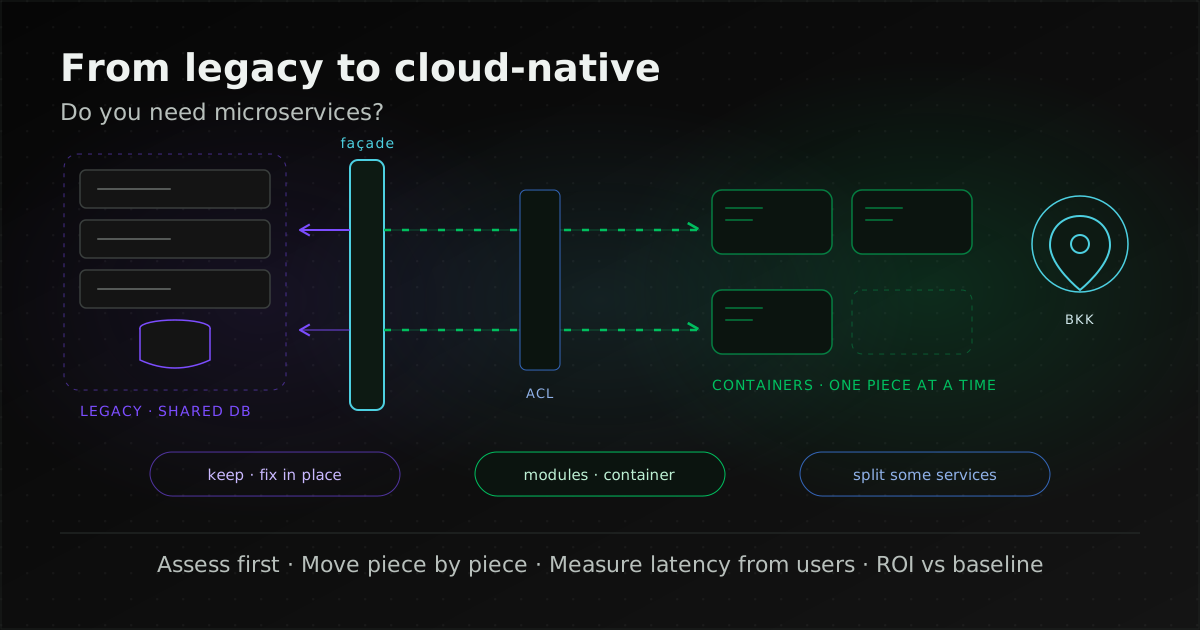
Cloud-native is a way of building and running systems as loosely coupled parts that interoperate in a manner that is secure, resilient, manageable, sustainable and observable, as the Cloud Native Computing Foundation (CNCF) defines it, on public, private or hybrid cloud. Modernising a legacy system toward cloud-native is therefore architecture and delivery work, not just moving servers somewhere new, and a legacy system does not have to be split into microservices; a better-value starting point is often clear modules run in a container, splitting out only the parts with a clear reason.
This guide is for IT managers, architects and development teams who own an older system and are being asked whether to split it into microservices or whether to use a cloud region in Thailand. What counts as a legacy system, with examples and the rehost-to-rebuild options, is covered in what is a legacy system. Migration patterns, cost categories and whether data must stay in Thailand are in our cloud migration guide, and setting business outcomes for an organisation-wide programme is in our digital transformation roadmap. This article covers the step in between: how to change the architecture of the existing system. Cloud-region facts were checked on the providers' own pages on 3 November 2026.
What is cloud-native, and how is it different from moving to the cloud?
The CNCF Cloud Native Definition v1.1 (approved 26 February 2024) describes cloud-native practices as helping organisations develop, build and deploy workloads in public, private or hybrid cloud environments, characterised by loosely coupled systems that interoperate in a manner that is "secure, resilient, manageable, sustainable, and observable". Typical technologies include containers, service meshes, multi-tenancy, microservices, immutable infrastructure, serverless and declarative APIs, and CNCF states the list is non-exhaustive.
Two points follow. Cloud-native does not mean public cloud: a system in your own data centre or on a private cloud can be built this way. And rehosting virtual machines in the cloud does not make a system cloud-native if it is still configured by hand, deployed server by server and fails as a whole when one part breaks.
| Aspect | Moving to the cloud | Becoming cloud-native |
|---|---|---|
| What changes | Where the system runs | Application structure and delivery |
| Main questions | Where to, how, at what cost | How to separate parts, deploy, recover and observe |
| Can it be done alone? | Yes, for example a rehost with no code change | Yes, for example containerising the app and running it in the existing data centre |
| Read more | Cloud migration guide | This article |
What should you assess before modernising a legacy system?
Assess three things before choosing technology: how ready the application is to run in containers, how tightly its parts are coupled, and whether the team and tooling can operate a system with many parts. This differs from migration discovery, which focuses on servers, dependencies and cost, because it looks inside the application. If the system has no documentation at all, start with taking over an undocumented legacy system.
How ready is the application for containers?
The Twelve-Factor App is a methodology for building software-as-a-service apps with twelve factors: Codebase, Dependencies, Config, Backing services, Build/release/run, Processes, Port binding, Concurrency, Disposability, Dev/prod parity, Logs and Admin processes. It works well as a readiness checklist for an existing application. The factors older systems most often fail:
- Config: database passwords or other systems' URLs are in the code or in files edited by hand on the server, instead of read from the environment.
- Processes: sessions or uploaded files live on the server's local disk, so adding or replacing a server loses data.
- Backing services: the database, queue or file store is hard-wired, so switching to a managed service needs code changes.
- Disposability: the app starts slowly or loses in-flight work when stopped, which makes automatic restarts or scaling unsafe.
- Logs: logs are written to local files and rotated away rather than emitted as a stream to a log platform.
- Dev/prod parity: test and production differ enough that test results cannot be trusted.
Each of these can be fixed on its own without a large architectural change, and they are often the best-value work early on, because they make the existing system repeatable to deploy and portable whichever path follows.
How tightly are the parts coupled?
Check whether modules have clear boundaries or call each other freely, whether they share database tables, how much business logic hides in stored procedures or triggers, and whether batch or cron jobs read and write several modules' tables at once. A system whose parts all edit each other's tables in one database is the hardest to split, and you should know that before committing to a decomposition plan.
Are the team and tooling ready?
Martin Fowler's Microservice Prerequisites names three things you need first: rapid provisioning, basic monitoring and rapid application deployment to both test and production, which together imply a DevOps culture. If deployment today means copying files to a server and you learn about outages from users' phone calls, fix those three first. The less visible costs of that work are covered in the hidden costs of DevOps.
Does every legacy system need to be split into microservices?
No. In Monolith First, Martin Fowler observes that almost all successful microservice stories started with a monolith that got too big and was broken up, and that microservices carry a premium that only pays off for more complex systems. The Microsoft Azure Architecture Center's microservices guide lists matching challenges:
- Complexity: more moving parts than an equivalent monolith, and harder development and testing.
- Network congestion and latency that build up when services call each other in long chains.
- Data integrity: each service owns its data, so updates across services usually accept eventual consistency instead of a single transaction.
- Management that needs a mature DevOps culture, plus API versioning and governance so teams do not adopt more technologies than can be supported.
- Skill set: Microsoft advises evaluating carefully whether the team has the skills and experience, and warns against overly granular services.
In practice there are more than two options. This table is the framing we use with system owners, not a formal standard.
| Option | Fits when | What you accept |
|---|---|---|
| Keep the structure, fix specific points | The system changes rarely, has few users, or is due to be retired within a few years | You still have to manage unsupported versions, as in keeping a legacy system running safely |
| Clear internal modules, run as one containerised unit | A small to mid-sized team, a few core domains, and a need for repeatable deployment, horizontal scaling and fast recovery | All modules still deploy together and scale as a whole |
| Split selected parts into services | Some parts clearly differ in load, rate of change or owning team, and the team meets Fowler's prerequisites | Monitoring, tracing, CI/CD and cross-service data handling are needed from the first service |
For many older systems the second option is a sensible starting point: you get repeatable deployment and portability first, then split out only the parts with a clear reason, without paying for a distributed system on day one.
Do you need Kubernetes?
No. Kubernetes is the widely used container orchestrator, but it brings ongoing day-2 operations such as cluster upgrades, certificates and network policy, which need a plan and an owner. A system with a few parts may be well served by a cloud provider's managed container service, or by virtual machines with automated deployment. Kubernetes pays off with many workloads, several teams, or a need for autoscaling and GitOps that the team can actually run. How we work with it is on our Kubernetes page.
How do you move off a legacy system piece by piece?
Use the Strangler Fig pattern: put an intermediary in front of the legacy system, move functionality to new components one piece at a time, and decommission the old system once nothing is left in it. The steps below are what we recommend; the façade, doing high-ROI replacements first and the anti-corruption layer come from the Azure Architecture Center's Strangler Fig pattern, as does syncing data with change data capture; the option of letting the new component own the table behind an API is our own guidance.
- Put a façade in front: an intermediary such as a reverse proxy or API gateway receives every request and routes it to the legacy system or to new components, so users and calling systems do not need to know the destination changed.
- Choose the first piece well: start with a part that has clear boundaries, few ties to other tables and a clear benefit. Microsoft describes the pattern as making the most of the existing system while modernising incrementally, which lets you do high-ROI replacements before low-ROI ones.
- Separate with an anti-corruption layer: when new components call the legacy system, or the reverse, go through a dedicated translation layer so the old system's data model and constraints do not leak into the new code.
- Split data carefully: while both sides still need the same data, one option is change data capture (CDC), reading changes from the legacy database's log and passing them to the new component; another is to let the new component own the table and have the legacy system call it through an API. Either way, decide which side owns each dataset and how you will check both sides agree.
- Switch routes one group at a time, with a way back: change routing at the façade for one group of functions, keep the old route available, and use the same go/no-go and rollback criteria as in the cutover plan in our cloud migration guide.
Microsoft also notes the pattern may not fit when requests to the legacy system cannot be intercepted, when its code and integration points cannot be changed, when the system is small enough to replace whole, or when it must be decommissioned quickly. In those cases a one-step replacement can be the right answer, with more cutover rehearsal and a stronger rollback plan.
Should you use a cloud region in Thailand?
If most of your users are in Thailand, or you have data-location requirements, Thai regions belong on the list to test. A provider-by-provider table of Thai regions is in the cloud migration guide. This section adds only two points that affect architecture, from the providers' own pages as of 3 November 2026:
- Google Cloud's Bangkok region may not offer every product: Google launched the Bangkok region (asia-southeast3) on 21 January 2026, and the regions and zones page lists three zones: asia-southeast3-a, -b and -c. Google's locations page says new regions launch with a minimum set of products, such as Compute Engine, Google Kubernetes Engine, Cloud Storage and Cloud SQL, and that others such as Cloud Run and BigQuery are added within six months of a region's launch. That window has passed for Bangkok, but we have not checked each product, so confirm the asia-southeast3 product list before designing, especially if the architecture relies on a managed service such as Cloud Run.
- Microsoft Azure has no open region in Thailand yet: the Azure geographies page still lists Thailand South as "intent to establish" (announced, not yet available).
On data location, Google's launch post says the Bangkok region supports data residency and helps businesses and public-sector institutions align with regulations such as Thailand's Personal Data Protection Act B.E. 2562 (2019) (PDPA). That is the provider's statement, not a legal assessment. Section 28 of the PDPA does not generally require personal data to be stored in Thailand; it sets conditions for transfers abroad. For government agencies, material from the Digital Government Development Agency (DGA) describes a National Cloud approach under which government data is stored in Thailand as the norm and procured first through the Government Data Center and Cloud service (GDCC); the notifications that would make it binding were still drafts at the time of writing. The full picture, including the Bank of Thailand's rules for financial institutions, is in the data-residency section of our cloud migration guide.
Choosing a Thai region still leaves you to check where backups, logs, monitoring and any optional services store or process data.
How do you measure latency before choosing a region?
Measure from where your users actually are; do not substitute map distance or marketing figures for measurement. This article gives no millisecond figures because results depend on users' networks, their internet providers and each cloud's connectivity. Practical methods:
- Put a test endpoint in each candidate region, such as a small VM or container answering HTTP requests, and measure from offices, branches, mobile networks and partners' networks that call your APIs, at peak hours. Look at the median (p50) and the slow tail (p95/p99), not only the average.
- Use each provider's tools for what they measure: the Google Cloud Region Picker weighs carbon footprint, price and latency, and Google's Performance Dashboard shows latency between regions where you have VMs and the internet locations of the devices talking to them, aggregated to city, region or country. AWS Network Manager Infrastructure Performance measures latency between Regions and across or within Availability Zones; it does not measure to end users, so measure the user side separately.
- Collect real-user monitoring data: if the current system has users, record response times from their browsers or apps as a baseline before moving, then compare afterwards.
- Count latency inside the system too: if the app calls its database or other services several times per request, the distance between app and database matters as much as the distance to users. A system split into services that call each other in chains can lose whatever a nearby region gained, as Microsoft warns.
How do you work out the ROI of going cloud-native?
Compare total cost with benefits you can measure against the old system's baseline. We do not use ready-made ROI figures, because results depend on each system and how each organisation works. What to count:
Costs
Assessment and code changes, cloud and licence fees, CI/CD and monitoring tools, the period of running old and new side by side, and training. Cost categories and multi-year TCO are covered in the cost section of our cloud migration guide. What cloud-native work adds is the ongoing cost of operating a system with many parts, which grows with the number of services.
Benefits
- Delivery speed and stability: the DevOps Research and Assessment (DORA) metrics: change lead time (from commit to production), deployment frequency, failed deployment recovery time, change fail rate and deployment rework rate. Record them before you start and compare after each step.
- Incidents: number of incidents and hours of unavailability per month, and time to recover.
- Time to change one business rule: from request to users having it, a benefit executives can see easily.
- Costs no longer paid: licences, extended support for end-of-life versions, hardware not repurchased and manual work removed.
This grouping is our practical framing, not a formal model. Use it to order the work, moving the parts with clear benefit and low risk first, which matches Strangler Fig's high-ROI-first principle. Tying these measures to organisation-level business goals is covered in our digital transformation roadmap.
Assess the existing architecture before deciding
If you cannot yet say whether a system should stay as it is, be modularised and containerised, or have parts split into services, start with an architecture assessment of the existing system. UNIXDEV's legacy application maintenance service assesses the codebase and risks first, then chooses between targeted fixes, gradual replacement or a rebuild according to the system's condition. Changes are made layer by layer with the Strangler Fig pattern and cut-overs that have a rollback, not a big-bang rewrite.
On infrastructure, our cloud services map workload requirements (sovereignty, latency, compliance, cost envelope and in-house skills) to a vendor; sometimes the answer is hybrid or private cloud, and migrations include an application-aware cutover with a rollback plan. We do not promise zero downtime; the outage window needed can be estimated only after reviewing the real system's architecture and dependencies.
Send what you know about the system, such as language and framework, database, how it is deployed today and what you want to fix, through the project brief form.
Sources and further reading
- CNCF Cloud Native Definition v1.1 (approved 26 February 2024)
- The Twelve-Factor App
- Martin Fowler: Monolith First (3 June 2015) and Microservice Prerequisites (28 August 2014)
- Microsoft Azure Architecture Center: Microservices architecture style and Strangler Fig pattern
- DORA: software delivery performance metrics
- Google Cloud: Bangkok region launch (21 January 2026), Regions and zones, Global locations and Performance Dashboard
- AWS: Network Manager Infrastructure Performance
- Microsoft Azure geographies (checked 3 November 2026)
- Personal Data Protection Act B.E. 2562 (2019) (section 28) and the DGA focus-group material on the National Cloud approach (December 2025, in Thai)
- Related: cloud migration in Thailand, how to start and what drives cost
- Related: what is a legacy system
- Related: a digital transformation roadmap for Thai organisations
- Related: keeping a software project on budget
- Related: taking over an undocumented legacy system
- Related: the hidden costs of DevOps
- Related: VPS and cloud infrastructure for a growing application
- All articles on cloud and system migration
- All articles on maintaining and improving legacy systems
By the UNIXDEV Team · 3 November 2026 · Cloud-region facts checked on the providers' pages as of the date of writing; legal points are a planning summary, not legal advice.