
Preparing Thai documents for RAG: PDFs, OCR and chunking
Why RAG misses answers that are in the documents: check Thai PDF text, choose Thai OCR, normalise Thai Unicode and chunk by structure with metadata.
By UNIXDEV Team · 21 min read
Original published · English edition
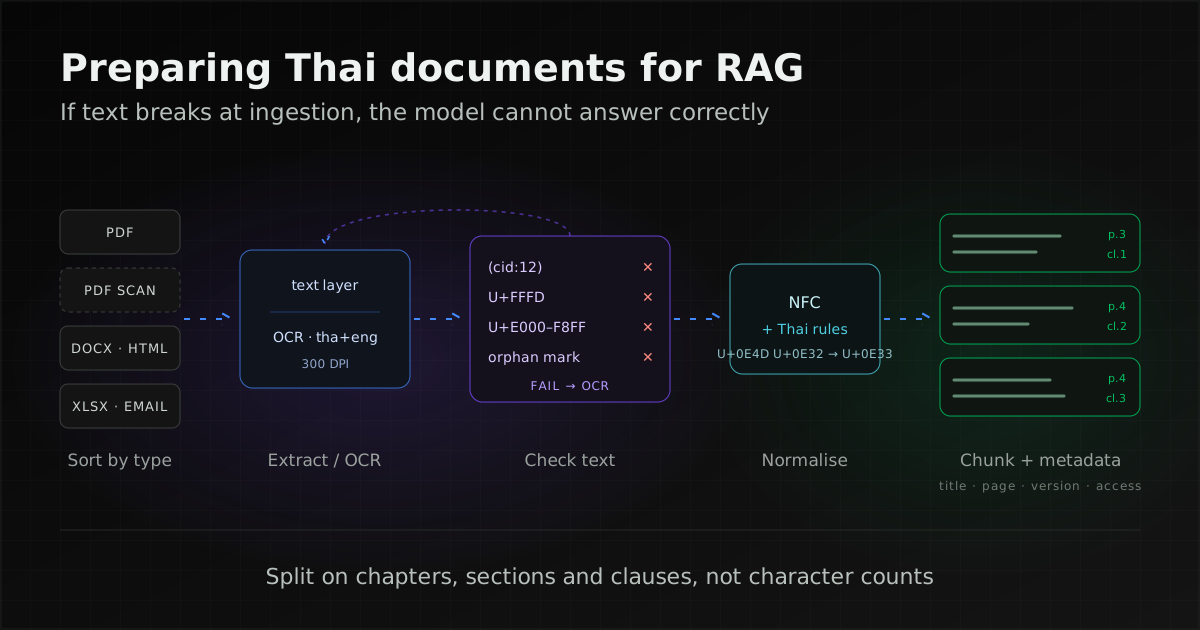
When a RAG system answers wrongly although the answer is in the documents, the text was often broken before it reached the index: a Thai PDF whose vowels and tone marks came out detached, a scan with no text layer, or a chunk that cut a regulation clause in half.
Preparing documents therefore means checking every batch of extracted text, running OCR only where it is needed, normalising Thai text with explicit rules, and chunking along the document's own structure with metadata that supports citations and permission filtering.
This article covers only the ingestion stage, for Thai-language documents from companies and government agencies. If you are new to retrieval-augmented generation, or need Thai word segmentation for search, hybrid search, evaluation, or permissions and Thailand's Personal Data Protection Act (PDPA), start with What is RAG? Thai document search with AI you can verify; those topics are not repeated here.
Why does RAG get answers wrong when the answer is in the documents?
The model sees only the text the retriever passes to it. If that text was garbled, lost or split in the wrong place during ingestion, retrieval misses it or returns an incomplete piece, even though a person opening the original file can see the answer clearly.
PDF is the usual source of trouble because it does not store paragraphs the way a word-processor file does. The pdfminer.six documentation explains that a PDF is only aware of characters and their placement; characters in a paragraph, a table or a footer are no different, and spaces have to be inserted because the format has no notion of a space character. Extraction tools therefore guess reading order and line boundaries, and sometimes guess which character a code stands for.
Three symptoms are common in Thai question-answering systems. A search for a phrase that exists in a document returns nothing, because the indexed word has a different character sequence from what the user typed. An answer is half complete, because a chunk ends in the middle of a clause or a table. An answer cites a superseded version, because no version or effective date travelled with the chunk. All three are fixed during document preparation, not in the prompt.
Sort documents by type before choosing an extraction method
Start with an inventory by document type, because each type breaks differently and needs a different extraction path. Treating every file the same way hides the problems of a small group inside an overall average.
| Document type | Start with | Why |
|---|---|---|
| Born-digital PDF that passes the text checks | The PDF's own text layer | Characters match the source, with no OCR errors |
| Born-digital PDF with many (cid:x), U+FFFD or Private Use Area characters | Render the page as an image and run OCR | The file lacks the information needed to map glyphs back to Unicode |
| Scanned PDF or image | OCR with Thai language data (plus English if mixed) | There is no text layer to extract |
| Tables and forms | Extract with positions, then rebuild a table or row-wise sentences | Line-by-line text mixes rows and columns |
| Word, Excel, HTML | Convert while keeping headings, lists and tables | The structure already exists and gives natural chunk boundaries |
| Separate the body from attachments and route attachments by type | Attachments are often the real document; sender and date become metadata |
Files exported from older Thai systems in a legacy encoding such as TIS-620 or Windows-874 break in yet another way. How to detect and convert them is covered in Migrating data from a legacy system without breaking Thai text.
Why does text extracted from a Thai PDF come out with floating vowels or garbled characters?
A PDF stores glyph codes for drawing text; the information that says which Unicode character each glyph represents is separate and may be incomplete. Under the PDF standard (ISO 32000-1), section 9.10, Unicode text comes from a ToUnicode CMap in the font dictionary or from fallback methods, and if those methods fail there is no way to determine what a character code represents.
Thai adds a further condition because the order in memory differs from what appears on the page. Unicode section 16.1 specifies that above vowels, below vowels and tone marks are stored after the consonant they modify, while the five vowels written to the left of a consonant are stored before it, in visual order. Some fonts draw tone marks and above vowels with several positional glyphs. If those glyphs have no mapping, or map to non-standard code points, the extracted text loses marks, shows them detached from their consonant, or puts them in the wrong order. Thai readers call this "floating vowels".
| Symptom | Cause, per the source | How to check |
|---|---|---|
(cid:12) strings in the output | pdfminer.six FAQ: some PDFs have incomplete Unicode mappings, so the raw character id is shown | Search the output for (cid: |
| U+FFFD replacement characters | Unicode chapter 23: a substitute for characters that cannot be mapped; PyMuPDF has a flag to return the CID instead | Count U+FFFD per page |
| Missing vowels or tone marks, or invisible characters | Code points in the Private Use Area (U+E000 to U+F8FF), which Unicode chapter 23 says have no standard meaning | Count characters in U+E000 to U+F8FF |
| Vowel or tone mark at the start of a word or after a space | A mark with no valid consonant base, which Microsoft's Thai font specification treats as invalid | Find marks at the start of text or after a character that is neither a Thai consonant nor a Thai mark |
| Tone mark before an above vowel, or two tone marks in a row | Storage order differs from the Unicode order; Microsoft's specification checks that no two marks of the same class sit on one base | Find a tone mark followed by an above vowel, and two adjacent tone marks |
| Lines out of order, footer text inside a paragraph, columns read across | Text comes out in the order the creator stored it, not reading order (PyMuPDF) | Compare with the page visually; try PyMuPDF sort=True or pdftotext -layout |
A publicly documented real case is the bact/constitution repository, which converted a Thai draft-constitution PDF to text and found both vowels and tone marks stored as Private Use Area code points and characters in the wrong order, such as a tone mark before a vowel.
Extraction tools offer options for reading order, but none can create information the file does not contain. pdftotext has -layout, which tries to keep the physical layout, and -raw, which keeps content-stream order; PyMuPDF's sort=True orders text from top-left to bottom-right.
How do you check whether text extracted from a PDF is usable?
Check every file automatically first, then compare a sample of pages with the originals by eye. Automatic thresholds catch the clearly broken pages; visual comparison catches reading-order problems that no character check can see.
- Look at the fonts: pdffonts shows
unias yes when a font has an explicit ToUnicode map. A "no" does not always mean extraction will fail, because the PDF standard has fallback methods, but it is a reason to check that file more closely. - Copy-paste test: the pdfminer.six FAQ suggests copying text from a PDF viewer into a text editor. If that gives proper text, the extraction tool should too; if it is garbled, the problem is in the file.
- Count anomalies per page: (cid:x), U+FFFD, Private Use Area characters, Thai marks with no base, doubled tone marks, a tone mark before an above vowel, and U+0E4D NIKHAHIT followed by U+0E32 SARA AA (which should normally be U+0E33 SARA AM).
- Set a threshold for sending a page to OCR: Apache Tika applies the same idea in its
autoOCR strategy, running OCR when fewer than 10 characters were extracted or more than 10 characters have unmapped Unicode values. Set your own threshold from results on your own documents. - Sample visually: pick pages from every document group, both passing and failing, and compare paragraph order, tables and numbers with the source.
The Python below is our own example, written from the code points in UnicodeData; it does not come from any tool's documentation. It counts anomalies in a page's text and does not change the text.
import re
MARK = ("\u0e31\u0e34-\u0e3a"
        "\u0e47-\u0e4e")
BASE = "\u0e01-\u0e2e"
BAD = re.compile(
  r"\(cid:\d+\)|\ufffd|[\ue000-\uf8ff]"
  rf"|(?:^|[^{BASE}{MARK}])[{MARK}]"
  r"|[\u0e48-\u0e4b]{2}"
  r"|[\u0e48-\u0e4b]"
  r"[\u0e31\u0e34-\u0e37]"
  r"|\u0e4d\u0e32")

def bad_count(page_text):
    return len(BAD.findall(page_text))
Use the counts to compare pages and extraction methods, for example the same page from the text layer and after OCR. They are not an accuracy score: text that passes every check can still be out of order or misspelt.
Scanned PDFs and images: which OCR options support Thai?
For on-premises use, a documented option with Thai language data is Tesseract, together with tools that call it, such as OCRmyPDF, Apache Tika, PyMuPDF and Fess. For cloud services, check the provider's own language list first, because not every service supports Thai.
Tesseract
According to Tesseract's language data table, Thai uses the code tha, and a script model named Thai exists in the 4.0.0 data sets. The data files page describes three sets: tessdata_fast is the fastest and least accurate, tessdata_best the slowest and most accurate and LSTM-only, and tessdata the only set that supports the legacy engine.
The command-line documentation uses -l for the language, + to combine languages (the output can differ with their order) and --oem 1 for the LSTM engine. Output can be plain text, searchable PDF, hOCR or TSV; hOCR and TSV include word positions, which helps with tables.
tesseract page-01.png page-01 \
  -l tha+eng --oem 1 --psm 4
Points from Improving the quality of the output:
- Resolution: Tesseract works best on images of at least 300 DPI.
- Borders: dark scanner borders can be picked up as extra characters, and very large borders can produce an "empty page" result.
- Binarisation: Tesseract uses Otsu internally, which can be suboptimal on uneven backgrounds; version 5.0.0 added Adaptive Otsu and Sauvola.
- Page segmentation (
--psm): 3 is fully automatic (the default), 4 assumes a single column, 6 a single uniform block, and 11 sparse text in no particular order. The documentation has no Thai-specific advice, so test on sample pages from each document group. - Tables: the documentation says Tesseract has a problem recognising data from tables without custom segmentation or layout analysis.
Tools that call Tesseract
- OCRmyPDF: adds a text layer to PDFs. Per OCRmyPDF's documentation,
--mode skip(legacy alias--skip-text) skips pages that already contain text, so only pages without text are OCRed;--mode force(legacy--force-ocr) rasterises every page, which the cookbook warns can reduce quality or lose vector content. The cookbook says the legacy flags continue to work as aliases.--deskewstraightens skewed scans and--rotate-pagesfixes upside-down pages. - OCRmyPDF with RapidOCR: the cookbook describes RapidOCR as an optional engine, installed with OCRmyPDF's rapidocr extra and selected with
--ocr-engine rapidocr; Thai uses separate models that RapidOCR downloads on first use. - Apache Tika: uses Tesseract for OCR; set the language with the
X-Tika-OCRLanguageheader and chooseX-Tika-PDFOcrStrategy: ocr_onlyto render and OCR every page. Other strategies areno_ocr,ocr_and_textandauto. - PyMuPDF:
Page.get_textpage_ocr()takeslanguage,dpiandfull(OCR the whole page, or only areas without legible text). The defaultdpiis 72, far below the resolution Tesseract recommends, so set it explicitly for Thai. - Fess: the Fess 15.9.0 release notes add settings to OCR images and scanned PDFs during crawling, and pull request #3520 says it uses Tesseract through Tika, with three keys in
fess_config.properties:crawler.document.ocr.enabled, default falsecrawler.document.ocr.language, default engcrawler.document.ocr.timeout, default 120 seconds per Tesseract run
Neither Fess document mentions Thai. The tha setting below combines two sources: the Fess language key takes Tesseract language codes, and Tesseract's code for Thai is tha. Install Tesseract's Thai data on the machine running Fess and test on sample documents before enabling it for the whole collection.
crawler.document.ocr.enabled=true
crawler.document.ocr.language=tha+eng
Cloud OCR services
If documents may leave the organisation, cloud services are another option, but check the language list and data terms first (see document permissions and the PDPA in our Thai RAG guide). The Azure Document Intelligence documentation advises not to specify a language code unless you are sure, because forcing the wrong one can return incomplete or incorrect text.
| Tool | Thai in the documentation | Notes |
|---|---|---|
| Tesseract 5.x | tha language and Thai script data | Runs on premises; LSTM engine with --oem 1 |
| Apache Tika | Uses Tesseract's language data | Language set per request in an HTTP header |
| Fess 15.9.0 (15 October 2026) | Not stated | OCR off by default; default language eng |
| Azure Document Intelligence v4.0 (Read, Layout) | Thai (th) listed for printed and handwritten text | Cloud service |
| Google Cloud Vision | Thai (th) listed for OCR | Thai script is not in the handwriting table |
| Amazon Textract | The FAQ language list does not include Thai | The FAQ says handwriting, invoices, receipts, identity documents and Queries are English only |
None of the documentation pages cited here gives an accuracy figure for Thai, so choose by measuring on your own sample pages.
Stamps, signatures, handwriting and overlapping text should be flagged for human review rather than treated as citable OCR text.
Whether a scan can legally replace the paper original is a separate question; see the Thai legal considerations in our article on digital document and approval workflows.
Tables, forms and government documents: how do you keep the structure?
Extract tables with positions and rebuild rows and columns. If a table comes out as line-by-line text, values from one column run into another, and the resulting chunk cannot answer "what is the value in this row".
- Extract with positions: pdftotext
-bbox-layoutoutputs XHTML with bounding boxes for blocks, lines and words; Tesseract's TSV or hOCR output includes word positions. Use them to rebuild rows and columns. - Choose what to index: convert a small table to a Markdown or HTML table as a whole; convert a long table to one sentence per row with the column names, for example "Item: travel expenses · Rate: as set by the regulation · Notes: …", so each row makes sense when retrieved alone.
- Headers repeated on every page: merge a multi-page table into one table with one header row, but keep the column names in every row sentence.
- Forms: store them as field-name and value pairs; for a blank template, index the field descriptions rather than empty boxes.
Thai government documents often use Thai digits (U+0E50 to U+0E59), which UnicodeData classifies as decimal digits (Nd), while users usually search with Arabic numerals. Keep the original text for display and index a copy with the digits converted, for example with thai_digit_to_arabic_digit() from PyThaiNLP.
Dates often use the Thai Buddhist Era (B.E.) calendar; convert them into a date field in the metadata as described in our legacy data migration article, and note that PyThaiNLP's convert_years() is documented to work properly only after 1941.
Normalising Thai text before indexing: why NFC alone is not enough
NFC makes canonically equivalent sequences identical, but most corruption in Thai text is outside that scope. Apply Thai-specific rules after NFC, and apply the same rules to documents and to user queries; otherwise the same word is a different string in the index and in the query.
The limits of NFC follow from UnicodeData and UAX #15:
- SARA AM: U+0E33 has only a compatibility decomposition to U+0E4D NIKHAHIT + U+0E32 SARA AA. NFC therefore does not unify the two spellings, and NFKC decomposes SARA AM into the two-character form, which is the opposite of what you want. UAX #15 warns that the compatibility forms must not be applied blindly to arbitrary text.
- Mark order: the below vowels SARA U and SARA UU have canonical combining class 103 and the tone marks 107, so NFC puts a below vowel before a tone mark. The above vowels, MAI HAN-AKAT and THANTHAKHAT have class 0, so NFC never moves a tone mark that precedes an above vowel.
A documented Thai-specific rule set is normalize() in PyThaiNLP 5.4.0. Per its documentation it removes zero-width spaces and duplicate spaces, removes spaces before tone marks, reorders tone marks and vowels into standard order, removes duplicate vowels and tone marks, and removes dangling marks at the start of text; reorder_vowels() includes the rule "Nikhahit + Sara Aa -> Sara Am".
import unicodedata
from pythainlp.util import normalize

def clean(text):
    return normalize(unicodedata.normalize("NFC", text))
normalize() calls remove_dup_spaces(), which, per the PyThaiNLP 5.4.0 documentation, replaces multiple newlines and empty lines with one newline, so paragraph breaks disappear too. Apply clean() to each chunk after structural splitting, or to the indexed copy, not to the whole document before chunking.
Zero-width spaces pull in two directions. Unicode recommends U+200B as an invisible word-break marker for Thai, while PyThaiNLP's normalize() and remove_zw() strip it so that strings match consistently.
Our approach: if the source contains zero-width spaces, use them as boundary hints while chunking, then strip them from the copy you index and embed, since queries typed by users rarely contain them, and always keep the original text for display.
Other clean-up before indexing:
- Headers, footers and page numbers: remove them from the body but keep the page number in metadata. PyMuPDF's documentation notes that a header may be written to the page in a separate step and appear at the end of the extracted text, so detect text repeated on every page rather than only the first and last lines.
- Line breaks inside words: Thai has no spaces between words, so joining wrapped lines should not always insert a space. Join without a space when both the end of one line and the start of the next are Thai letters.
- Duplicate versions: several versions of one document lead retrieval to old text. Index the version in force, remove or tag superseded versions so they can be filtered, and drop byte-identical files by checksum.
How do you chunk Thai text without cutting through meaning?
Split along the document's structure first, then use a Thai sentence or word segmenter only to bound sections that are too long. Cutting at a fixed character count does not work for Thai: UAX #29 states that reliable word boundaries in Thai require dictionary lookup, and Unicode chapter 16 notes that Thai words are not separated by spaces.
Generic splitters usually ignore this. LangChain's RecursiveCharacterTextSplitter defaults to paragraph, line, space and empty-string separators, and its documentation warns that for languages without word boundaries, including Thai, this can split words between chunks. Thai text without paragraph breaks falls through to the empty-string separator, which means cutting mid-word.
- Split on structure first: use headings from Word or HTML; in Thai regulations, announcements and laws, use the chapter, part, section and clause markers (the Thai words hmuat, suan thi, matra and kho, each followed by a number that may be written in Thai or Arabic digits). A clause or section of reasonable length belongs in one chunk, and a table should not be cut in half.
- Cut long sections at sentence boundaries:
sent_tokenize()in PyThaiNLP defaults to thecrfcutengine, documented as a CRF trained on the TED dataset;paragraph_tokenize()splits paragraphs. Official Thai prose differs from spoken language, so check the boundaries on your own documents. - Measure size in the embedding model's tokens: count chunk size with the tokenizer of the model you actually use, not characters. If a very long sentence must be cut, cut at a word boundary from
word_tokenize()(default enginenewmm), never at a character position. - Overlap only where needed: chunks cut at clauses rarely need overlap; chunks cut inside long prose should overlap by a sentence or two. Prefix each chunk with its parent heading so it makes sense when retrieved alone.
The example below cuts text where a heading starts, using a regular expression for those four marker words that we wrote for illustration (the Thai edition of this article shows it; adapt it to your documents), then splits sections that are too long into sentences with PyThaiNLP as documented.
from pythainlp.tokenize import (
    sent_tokenize)

# head: compiled re.M pattern for
# the heading markers
def sections(text, head):
    cut = [m.start() for m
           in head.finditer(text)]
    cut = [0] + cut + [len(text)]
    return [text[a:b] for a, b
            in zip(cut, cut[1:])
            if text[a:b].strip()]

def split_long(section_text):
    return sent_tokenize(
        section_text, engine="crfcut")
Segmenting words for the search index (with the OpenSearch thai tokenizer or ICU, for example) is a different task from finding chunk boundaries, and is covered under word segmentation and hybrid search in our Thai RAG guide.
What metadata does every chunk need?
Every chunk needs enough information for the system to cite the source, tell versions apart and filter by permission without reopening the original file, because retrieval and generation see chunks one at a time.
| Field | Used for |
|---|---|
| Document ID, title and source location | Showing the citation and linking back to the file |
| Heading path, such as chapter › clause | The citation, and context for the chunk |
| Page number | Letting the user open the source page to compare |
| Version, effective date and status (in force, revoked, draft) | Filtering out old versions or showing which version an answer came from |
| Access group | Filtering by permission at retrieval, before content reaches the model |
| Extraction method (text layer or OCR) and quality check result | Tracing the cause of a wrong answer and choosing pages for human review |
Permission filtering design and the PDPA are covered under document permissions and the PDPA in our Thai RAG guide. What matters here is that permission data is copied onto every chunk at ingestion; if it lives only at file level, the retriever cannot filter on it.
Pre-index checklist and post-index spot checks
Run this checklist on every document set before the first import, and again whenever you change the extraction tool, the OCR engine or the chunking method.
- Documents are inventoried by type, and each group has a chosen extraction path.
- Every PDF page has been scanned for (cid:x), U+FFFD, Private Use Area characters and misordered Thai marks, and pages over the threshold went to OCR.
- Sample pages from every group were compared with the source by eye: paragraph order, tables, numbers and dates.
- Images sent to OCR meet the tool's recommended resolution, with dark borders cropped and skewed or upside-down pages corrected.
- Pages with stamps, handwriting or signatures over text are flagged for human review.
- Tables are converted to tables or row sentences, and multi-page tables are merged.
- Each chunk has been through NFC and the same Thai rules that are applied to queries, after structural splitting.
- Headers, footers and page numbers are removed from the body, with page numbers kept in metadata.
- Thai digits and Buddhist Era years have a converted copy for indexing, with the original kept for display.
- Duplicate and superseded versions are removed or tagged for filtering.
- No chunk cuts through a word, a clause or a table, and every chunk carries the full metadata.
After indexing, spot-check routinely rather than waiting for a full evaluation:
- Search for phrases you know exist: pick phrases from each document group, especially words with above vowels, tone marks and SARA AM, and query the index directly. If one is not found, look at how the chunk spells it.
- Open a chunk next to its source page: use the page number in the metadata, and check that content is complete, in order, and that table figures match.
- Ask questions whose answers sit in a table or a long clause: these break first when chunking is wrong.
- Keep the results as a fixed list: re-run the same phrases and questions whenever tools or normalisation rules change, and fold them into an evaluation set as described in how to measure RAG accuracy.
How UNIXDEV helps prepare documents for RAG
UNIXDEV designs and builds RAG and document AI for Thai documents as part of our AI agent and RAG engineering service. The work related to this article is surveying document types, testing extraction and OCR on real sample pages, setting Thai normalisation rules and a structure-based chunking strategy, and designing metadata for citations and permission filtering. If you use or are considering Fess for search, we install it and configure its crawler for your document sources.
We recommend starting by sending samples of each document type, so we can assess how well text extracts and where OCR is needed, before deciding on a model or a search platform.
Sources and further reading
- ISO 32000-1:2008 — Document management, Portable document format, PDF 1.7 (Adobe)
- The Unicode Standard 18.0 — Chapter 16, Southeast Asia (Thai) · Chapter 23, Special Areas and Format Characters
- Unicode Character Database — UnicodeData.txt · UAX #15 Unicode Normalization Forms · UAX #29 Unicode Text Segmentation
- Microsoft Typography — Developing OpenType fonts for Thai script
- pdfminer.six — Converting a PDF file to text · FAQ
- poppler-utils — pdftotext(1) · pdffonts(1)
- PyMuPDF — Appendix 1: Details on text extraction · Text recipes · Page
- Apache Tika — PDFParser (Apache PDFBox) · TikaOCR
- Tesseract — Improving the quality of the output · Command line usage · Data files · Data files in different versions · Releases
- OCRmyPDF — Cookbook · Common error messages
- Fess 15.9.0 release notes · Fess pull request #3520 (OCR settings)
- Azure Document Intelligence — Language support: OCR
- Google Cloud Vision — OCR language support
- Amazon Textract — FAQs
- PyThaiNLP 5.4.0 — pythainlp.tokenize · pythainlp.util
- LangChain — Recursive text splitter
- bact/constitution — Thai constitution draft PDF to text (GitHub)
- Related: What is RAG? Thai document search with AI you can verify
- Related: Migrating data from a legacy system without breaking Thai text
- Related: AI and LLMs in Thai enterprise systems
- UNIXDEV capability: Fess
- All articles on AI agents and RAG for organizations
Sources checked on 2026-11-09
How we checked: based on the primary sources above, reviewed by the UNIXDEV team