
Migrating data from a legacy system without breaking Thai text
How to move data out of a legacy system: profile the source, convert TIS-620 to UTF-8, fix Buddhist Era years, check Thai IDs and reconcile before cutover.
By UNIXDEV Team · 28 min read
Original published · English edition
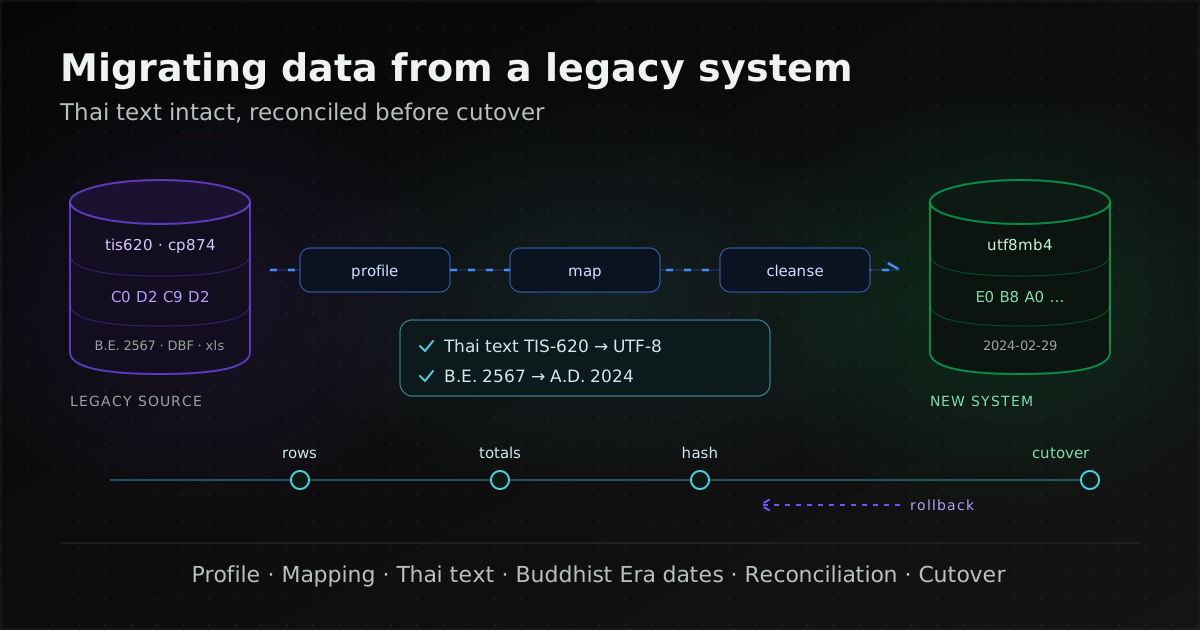
Migrating data out of a legacy system (an older system the business still depends on but finds hard to change or support) means extracting the data, transforming it to the new schema, cleansing it under rules the data owners agree, and proving through reconciliation that nothing is missing and no value has changed its meaning before you switch over. In Thai systems, the problems that corrupt data without raising an error are Thai text stored as TIS-620 or Windows-874, Buddhist Era years in Gregorian date columns, and free-text fields. All of them can be caught if the checks are in place from the first rehearsal.
This guide is for IT teams, system owners and contractors who are accountable for getting the data across intact. It covers the data side only. Run the example commands against copies only. Documents cited were checked on 8 November 2026. Thai years below use the Buddhist Era (B.E. 2567 is 2024).
Why is data migration usually the riskiest part of replacing a legacy system?
Because bad data rarely brings a system down. The new system opens and the screens work, but report totals are off, some customer names are unreadable, or dates have moved 543 years into the future, and this tends to surface after users have started working in the new system, when going back is much harder than before cutover.
New code can be tested against requirements, but data in an old system carries rules nobody wrote down: retired status codes still present in old years, fields users repurposed for something else, or rows edited directly in the database. Google Cloud's database migration guidance therefore calls for testing the data migration thoroughly and repeatedly, so that every known data item is migrated without modification errors, and warns that if new values appear in the source, the migration process might fail.
Microsoft's Dynamics 365 implementation guide notes that the legacy system can be another business application or a collection of Excel spreadsheets, and defines a data steward role that provides definitions and rules for data. The principle applies to any system: the person who decides what is correct should be the business owner of the data, not whoever writes the migration script.
What are the phases of a legacy data migration?
There are seven. Phases 1–5 repeat several times before the real move; phases 6 and 7 happen once.
- Inventory and profile the source: which tables and files exist, how large they are and what the data actually looks like.
- Map to the new schema: every target column has a source and a transformation rule.
- Agree cleansing rules with the data owners: whether wrong or missing values are fixed, dropped or carried over with a flag.
- Trial migrations: with full-size data, timed, and repeated until the result is stable.
- Reconciliation: prove completeness and correctness, with someone signing off the result.
- Cutover: freeze input to the old system, move the final delta, reconcile, decide go/no-go, and keep a way back.
- Decommission and retain: keep the old data as long as law and the business require, then delete it with evidence.
The same Dynamics 365 guide recommends testing and verifying the data migration at least once in system integration testing (SIT) and user acceptance testing (UAT) environments, and notes that data migration can be disruptive and should not coexist with other testing. That affects the schedule: rehearsals need their own time and environment.
What should source profiling cover?
Look at the data itself, not just the schema. A schema tells you a column is VARCHAR; it does not tell you which encoding the Thai text inside it uses. For each important column, get at least:
- row count, number of empty values and number of distinct values;
- minimum and maximum of dates and numbers, which immediately exposes Buddhist Era years;
- maximum text length, measured both in characters and in bytes;
- the encoding of Thai text (how to check is in the next section);
- the codes actually used in status or type columns, compared with what the documentation lists;
- duplicates by business key, such as one customer under several codes.
If there is no reliable inventory of systems and databases yet, build one from the running system first, as described in inheriting an undocumented legacy system. If an outgoing vendor runs the system, secure direct database access and restorable backups using the vendor handover checklist before profiling.
What belongs in the mapping table and cleansing rules?
Use one row per target column: source column, transformation rule, default when the source is empty, who decided the rule and when. Cleansing rules belong to the data owners: whether duplicate customers are merged, whether closed invoices move in full or only open balances, and whether records that fail validation are fixed before the move, after it, or carried over with a "to review" flag.
Do not fix data silently inside scripts. Every rule that changes values should report how many rows it changed and keep the original values in a staging table or separate column, so you can answer when a user asks why their data changed.
Which encodings do older Thai systems use?
Thai systems built before Unicode was common usually store Thai at one byte per character, as TIS-620 or Windows-874. New systems use UTF-8, which takes three bytes per Thai character. The differences that matter before converting:
| Encoding | What matters for migration |
|---|---|
| TIS-620 | Registered with IANA with the Thai Industrial Standards Institute (TISI) as source, and ISO-8859-11 as an alias. Thai letters occupy bytes 0xA1 (KO KAI) to 0xFB. |
| ISO-8859-11 | The Unicode mapping table describes it as equivalent to TIS 620-2533 plus NO-BREAK SPACE at 0xA0; bytes 0x80–0x9F are control characters. |
| Windows-874 (cp874) | Microsoft's code page 874, named windows-874, for Thai. Per the cp874 table, Thai letters sit at the same positions as TIS-620, but some bytes in 0x80–0x97 are punctuation: 0x80 €, 0x85 …, 0x91–0x94 curly quotes, 0x95 •, 0x96 – and 0x97 —. |
| UTF-8 | Thai is in U+0E00–U+0E7F, three bytes per character, starting E0 B8 or E0 B9. |
In practice, text typed in Windows applications may contain curly quotes, dashes or ellipses stored as cp874 bytes. Decoded as strict TIS-620, those bytes become control characters or fail to convert, while the Thai letters are unaffected. So decode data that came from Windows as cp874, and count bytes in 0x80–0x9F before every conversion. Microsoft itself warns that ANSI code pages can differ between computers, leading to data corruption, and recommends that applications use Unicode, such as UTF-8 or UTF-16.
According to chapter 16 of the Unicode Standard, the Thai layout in Unicode is based on TIS 620-2529 and its update 620-2533, and left-side vowels (SARA E through SARA AI MAIMALAI) are typed and stored before the consonant. The mapping tables convert TIS-620 bytes to code points one to one, so the hard part is rarely the conversion table; it is knowing for certain which encoding the bytes are in.
What does garbled Thai look like after a database migration?
Mojibake appears when bytes are read with a different encoding from the one used to write them, and the pattern tells you what went wrong. We generated the examples below with Python's codecs.
- Every Thai character turns into three characters starting with SARA E plus THO THONG or NO NU: UTF-8 bytes displayed as cp874 or TIS-620.
- The Thai word for "province" becomes
จังหวัด: UTF-8 bytes displayed as cp1252 (MySQL's latin1); under strict Latin-1 some of these appear as invisible control characters. - The Thai word for "language" becomes
ÀÒÉÒ: TIS-620 bytes displayed as Latin-1, typical when Thai was stored in a column declared latin1. - Thai becomes mostly
�mixed with stray non-Thai characters: TIS-620 bytes read as UTF-8. Most bytes are not valid UTF-8 sequences and become U+FFFD; some pairs happen to be valid and decode as unrelated characters. If that text was saved back, the original is gone from that row and must be pulled from the source again. - Double encoding: UTF-8 text interpreted as Latin-1 and encoded to UTF-8 again. Each Thai character then starts C3 A0 C2 B8 or C3 A0 C2 B9. This is reversible if nothing else changed the text (decode as UTF-8, encode with the same character set that caused it, which is cp1252 if it went through a MySQL latin1 connection, because MySQL's latin1 is cp1252, then decode as UTF-8 again). The same page says that for the five bytes cp1252 leaves undefined, 0x81, 0x8D, 0x8F, 0x90 and 0x9D, MySQL maps them to U+0081, U+008D, U+008F, U+0090 and U+009D. A strict cp1252 codec outside MySQL will therefore fail on a letter such as KO KAI (E0 B8 81) unless you handle those five bytes yourself. Try it on a copy and compare with the source first.
How do you check the encoding of Thai data in a database?
Look at the bytes, not the screen, because what you see has already passed through the client's conversion. In MySQL, HEX() shows every byte of a string in hexadecimal, LENGTH() counts bytes and CHAR_LENGTH() counts code points:
SELECT HEX(name), LENGTH(name), CHAR_LENGTH(name) FROM customer LIMIT 20;
- Correct UTF-8: each Thai character starts E0B8 or E0B9, and for pure Thai text LENGTH is three times CHAR_LENGTH.
- Double encoding: repeated C3A0C2B8 or C3A0C2B9.
- TIS-620 or cp874 in a column declared latin1: single bytes in A1–FB.
Check the connection character set too. According to the MySQL documentation, the server treats statements from the client as being in character_set_client and returns results in character_set_results. If a client sends TIS-620 bytes while declaring another character set, the data is wrong from the moment it is written. Check the current values with SHOW SESSION VARIABLES LIKE 'character_set_%';
In PostgreSQL, check the database encoding first. With SQL_ASCII, the PostgreSQL documentation says no conversion or validation is done for bytes 128–255, describing the setting as a declaration of ignorance about the encoding. Such a database may hold Thai in several encodings at once and needs row-level profiling.
How do you convert TIS-620 to UTF-8 without losing characters?
Convert once, from an encoding you have verified, and count whatever fails to convert. Example tools by source type:
- Export files with iconv: GNU libiconv supports ISO-8859-11, TIS-620 and CP874. For files from Windows use CP874, for example
iconv -f CP874 -t UTF-8 old.csv > new.csv. Do not use-con real data: according to the manual, it silently discards characters that cannot be converted. To find bad bytes, the iconv program from GNU libiconv offers--byte-subst, which replaces them with a visible placeholder (the glibc iconv shipped with most Linux distributions does not; see its Linux manual page). The iconv shipped with macOS is a different implementation with different options; list supported encodings withiconv -l. - A MySQL column with the wrong declared character set: the MySQL documentation converts the column to a binary type first, which drops the character set information without converting bytes, then to a text type with the correct character set, for example
ALTER TABLE t MODIFY col BLOB;followed byALTER TABLE t MODIFY col VARCHAR(100) CHARACTER SET tis620;, and only then to utf8mb4. The same page warns that this fails if the column holds a mix of encodings, that conversion may be lossy for characters not in both character sets, that NOT NULL and DEFAULT must be re-specified, and that character set changes require ALGORITHM=COPY. If the data came from Windows, first count rows containing bytes 0x80–0x9F, for exampleSELECT COUNT(*) FROM t WHERE HEX(col) REGEXP '^(..)*[89]';(only on a column still holding single-byte data, not a converted utf8mb4 column), because that range is where cp874 and TIS-620 differ. If any are found, test on a copy and check the result. - MySQL target: use utf8mb4, not utf8. The MySQL documentation says utf8 is a deprecated alias for utf8mb3 and recommends utf8mb4 for all new applications.
- PostgreSQL supports WIN874 (Windows CP874) as a server encoding with conversion to UTF8, but has no TIS620 entry. If raw bytes are loaded into a bytea column in a staging table, convert_from turns them into text in a UTF8 database, for example
SELECT convert_from(raw_name, 'WIN874') FROM staging; - SQL Server: Microsoft's documentation says that for non-Unicode columns (char/varchar) the collation sets the code page, and data moved between such columns must be converted between code pages. The default collation for the Thai locale is Thai_CI_AS. Since SQL Server 2019, collations ending in _UTF8 let char/varchar store UTF-8, and Microsoft recommends nchar/nvarchar for multilingual data.
Recalculate column sizes. In MySQL, the number in CHAR(M) and VARCHAR(M) counts characters, and the character set table lists tis620 at a maximum of one byte per character and utf8mb4 at four. In SQL Server, n in char/varchar is bytes, never characters, and in a UTF-8 collation each Thai character takes three bytes; Microsoft's example is that char(10) holds only three characters in the 2048–65535 range. A column that fitted Thai names in a single-byte code page can truncate them after the move to UTF-8.
Does Thai sort order change after migration?
It can, so test it rather than assume. In MySQL 8.4, the tis620 character set defaults to the tis620_thai_ci collation, while utf8mb4 defaults to utf8mb4_0900_ai_ci, which is based on UCA 9.0.0 and CLDR v30 and is accent- and case-insensitive. The MySQL 8.4 table of language-specific collations has no Thai entry, and utf8mb4_general_ci is a legacy collation without contractions.
Under the Unicode Collation Algorithm (UTS #10), Thai left-side vowels (SARA E through SARA AI MAIMALAI) have been handled with contractions since UCA 4.1 so that they sort as if swapped with the following consonant; a collation comparing one character at a time without contractions will not do this. CLDR's Thai collation further adjusts PAIYANNOI, MAIYAMOK, NIKHAHIT, LAKKHANGYAO and PHINTHU to follow the Royal Institute Dictionary of 1999 (B.E. 2542). In PostgreSQL, ORDER BY uses the collation of the sort key; libc collations depend on the operating system, and ICU collations are named with a BCP 47 tag plus -x-icu (PostgreSQL documentation).
The practical check: pick reports where users rely on order, such as name lists, and compare old and new output on the same data. If they differ, let the report owner decide which order is right, then choose the target collation.
How do you find and convert Buddhist Era years in date columns?
Look for years later than the current year, confirm with the data owner that the column was recorded in the Buddhist Era, then subtract 543 from the year. The catch is that the database will not complain, because 2567 is within the range date types accept.
- MySQL DATE and DATETIME accept years 1000–9999, but TIMESTAMP only reaches 2038-01-19 03:14:07 UTC, so a Buddhist Era year passes DATE but fails TIMESTAMP. With strict mode disabled, MySQL converts invalid dates to '0000-00-00'.
- PostgreSQL date goes up to year 5874897, and SQL Server date covers 0001-01-01 through 9999-12-31 on the Gregorian calendar.
The Thai Buddhist calendar has the same months, days and leap years as the Gregorian calendar; only the year differs. Java's ThaiBuddhistChronology defines the year in the current era as the ISO year plus 543 and aligns 2484-01-01 (Buddhist) with 1941-01-01 (ISO), and .NET's ThaiBuddhistCalendar gives 1 January 2001 as 1 January 2544. If you have dates before B.E. 2484, check them with the data owner before applying the same rule.
Points to watch when converting:
- Convert the year before building the date. 29 February 2567 B.E. is 29 February 2024, a real date, but read as Gregorian year 2567 it does not exist, because 2567 is not divisible by 4. A system that stored dates as text such as "29/02/2567" should have the year split out and reduced by 543 before conversion to DATE; otherwise that row errors or becomes '0000-00-00'.
- Columns mixing both eras, for example screen entry in B.E. and file imports in A.D.: split by source or by a period you can confirm, rather than one rule for the whole column, and send undecidable rows to the data owner.
- Two-digit years: SQL Server interprets them with the two-digit year cutoff, 2049 by default (49 becomes 2049, 50 becomes 1950). MySQL reads 00–69 as 2000–2069 and 70–99 as 1970–1999. An old file storing a Buddhist Era "67" would become 1967 in SQL Server or 2067 in MySQL, so convert it yourself before import.
- Years outside date types, such as a numeric year column or a fiscal year, need their own check, because searching date columns will not find them.
Counting likely Buddhist Era rows in MySQL: SELECT COUNT(*) FROM orders WHERE YEAR(order_date) > YEAR(CURDATE()); If a column legitimately holds future dates, such as contract expiry, use a threshold that suits it, such as years above 2400.
How do you validate 13-digit Thai citizen ID numbers during migration?
Use the 13th digit, a check digit, to catch typing errors. The widely used calculation multiplies digits 1–12 by weights 13 down to 2, sums them, takes the remainder modulo 11, subtracts it from 11 and keeps the last digit of the result. We found no official document from the Department of Provincial Administration or the Royal Gazette defining this formula, so we describe it only as the commonly used checksum, as implemented for example in the open-source python-stdnum library.
A made-up example, 1-2345-45678-78-?: (1×13)+(2×12)+(3×11)+(4×10)+(5×9)+(4×8)+(5×7)+(6×6)+(7×5)+(8×4)+(7×3)+(8×2) = 362; 362 modulo 11 is 10; 11 − 10 = 1, so the check digit is 1.
- A number that passes is well formed; that does not prove the person exists.
- Do not auto-correct numbers that fail. List them for the data owner to check against source documents.
- Store the ID as 13-character text, not a number, and check for stray dashes or spaces.
- Citizen IDs are personal data, so the PDPA section below applies.
Whether the 13-digit ID should be the new system's primary key is discussed in our welfare information system article.
What goes wrong with names, addresses and legacy export files?
Free text is rarely consistent, and old export formats have rules you need to know before reading them.
- Thai names and addresses: common patterns are inconsistent spacing (double spaces, leading or trailing spaces, or a NO-BREAK SPACE that looks like a space), both abbreviated and full forms of words such as "province", "district" or "Bangkok", and titles stored in the same field as the name. These are patterns commonly seen in free-text data, not rules from a published standard. Keep the original value and write the normalised value to a separate column so it can be traced.
- Excel files: according to Microsoft, Excel removes leading zeros, converts large numbers to scientific notation and keeps at most 15 significant digits. Phone numbers starting with 0, product codes and long identifiers can be damaged just by opening the file. Import those columns as Text and compare with the source.
- DBF files, such as Visual FoxPro tables: in the file structure Microsoft documents, the header byte at offset 29 (counting from 0) is the code page mark, and each record starts with a delete-flag byte; an asterisk (0x2A) means the record is deleted but still in the file. A tool reading the DBF directly can pick up records users deleted long ago.
- Fixed-width files: if field widths are counted in TIS-620 or cp874 bytes, cut the fields by byte position before converting the encoding, because after conversion to UTF-8 each Thai character is three bytes long.
Thai text or dates wrong after migration: what do you check?
This table collects the Thai text and date symptoms from the sections above, as a starting point when something looks wrong in a rehearsal or after cutover.
| Symptom | Cause | How to check |
|---|---|---|
| Every Thai character shows as three characters starting SARA E + THO THONG (or NO NU) | UTF-8 bytes displayed as cp874 or TIS-620 | HEX() of the stored value; if it starts E0B8 or E0B9 the data is fine and the client or viewer is wrong |
| Thai shows as ฅ | UTF-8 bytes displayed as cp1252 (MySQL's latin1); under strict Latin-1 some of these appear as invisible control characters | As above, and check character_set_ |
| Thai shows as ÀÒÉÒ | TIS-620 bytes in a column declared latin1 | HEX() shows single bytes A1–FB; fix via the BLOB step in the MySQL documentation |
| Thai shows as mostly � with stray non-Thai characters | TIS-620 bytes read as UTF-8 and saved back | Count rows whose HEX contains EFBFBD (U+FFFD); if any, reload from the source |
| HEX shows repeated C3A0 | Double encoding | Reversible if untouched since; try on a copy |
| Curly quotes, dashes or € missing or odd | cp874 data decoded as TIS-620 | Count bytes 0x80–0x9F in the source |
| Thai text cut off | Target column sized in bytes, such as SQL Server varchar or a fixed-width file | Compare CHAR_LENGTH in source and target, and check that the target column's byte size is at least three times the longest source value |
| Name lists sort differently | Different collation | Compare the same report from both systems |
| Dates in years 25xx | Buddhist Era years in a Gregorian column | Count rows with a year later than the current year |
| 29 February missing or 0000-00-00 | Date built from a B.E. year before subtracting 543, or MySQL strict mode off | Count empty and 0000-00-00 dates against the source |
| Year 1967 or 2067 where 2024 was meant | Two-digit year read with the database's rule (SQL Server's two-digit year cutoff, or MySQL's 00–69 range) | Minimum and maximum year from profiling |
| Phone numbers lost their leading 0 | File opened in Excel before import | Compare lengths with the source |
| More records than the old application shows | Deleted records read from a DBF file | Count records starting with 0x2A |
How do you verify data after a system migration?
Use several layers, because each catches a different kind of problem. Matching row counts do not mean the values are right, and matching totals do not mean the Thai names are readable. These are common reconciliation practices, not a named standard.
| Method | What it catches |
|---|---|
| Row counts per table and per status or type | Missing or duplicated rows; filters that drop too much |
| Control totals per period, such as monthly amounts or transaction counts per branch | Numeric drift, rounding, and rows landing in the wrong period because a date converted wrongly |
| Per-record hash over values normalised the same way on both sides | Changed values in any column, including Thai text |
| Thai-specific checks: rows containing U+FFFD, the repeated SARA E + THO THONG pattern, or HEX that is not E0B8/E0B9 | Mojibake a hash misses when both sides were decoded wrongly in the same way |
| Sample comparison with business users | Wrong meaning behind matching numbers, such as a mis-mapped status |
| Comparing reports from old and new systems | The combined effect of every rule, including sort order |
Agree the hash input format first: column order, date format, separators, and UTF-8 text on both sides. Otherwise identical data produces different hashes. For columns you transform on purpose, such as Buddhist Era years, apply the same rule to the source value before comparing.
How far do cloud migration tools go?
With AWS Database Migration Service, data validation compares each source row with its corresponding target row after a table's full load, and validates incremental changes in CDC tasks. Mismatches are written to awsdms_control.awsdms_validation_failures_v1 on the target as RECORD_DIFF, MISSING_SOURCE, MISSING_TARGET or TABLE_WARNING, and a validation-only task can report how many rows differ just before or during a cutover window. Limitations that matter for legacy migrations:
- the table needs a primary key or unique index, which some legacy tables lack;
- validation is not supported when character substitution task settings are used;
- columns with data-masking transformations in the table mapping are ignored;
- validation stops after more than 10,000 failed or suspended records;
- it adds load on the source, target and network, and takes time beyond the migration itself;
- the documentation also notes that if the primary key on a PostgreSQL target does not use the "C" collation, sort order differs from Oracle and validation fails, another case where collation affects migration.
The classic Azure Database Migration Service, for SQL Server to Azure SQL Database, offers a Data Integrity Check that compares source and target tables by checksum after migration (API documentation). For other Azure migration paths, check that service's documentation for an equivalent.
These tools confirm that rows match; they cannot tell whether the source data was right in business terms, so per-period totals and report comparisons with users are still needed. For Thai government contracts, the reconciliation report should be acceptance evidence in the cloud migration TOR.
What does cutover need on the data side, and how do you roll back?
A data freeze, a final backup, a final delta, reconciliation results as a go/no-go input, and a way to carry data created in the new system back if you have to retreat. Infrastructure steps such as DNS and hypercare are in the cutover and rollback section of our cloud migration guide.
- Freeze: AWS Prescriptive Guidance on cutover starts by freezing ingestion into the old system, taking a final backup usable for rollback, then completing a final data sync, and notes that locking the source prevents new transactions but may need a larger downtime window. Tell users when they must not enter work and how work during that window will be recorded.
- Final delta: if a full rehearsal takes longer than the downtime window, move older data that no longer changes in advance and move only changed rows on the day, which requires knowing reliably which rows changed, for example from a trustworthy last-modified column.
- Go/no-go from reconciliation: define in advance what passes, for example row counts and per-period totals matching for every table, with any mismatches on an exception list the data owners have accepted. AWS recommends checkpoints with predefined rollback criteria and a named person who decides whether to fix forward or roll back.
- Rolling back once the new system has data: per the same guidance, if no data has changed, rollback can be just redirecting users; if the new system has taken transactions, data may need to be restored back. AWS lists options such as a fail-forward database, dual write and native backup and restore, with restore times tested in lower environments before cutover. Decide which during planning, and prepare the reverse migration script if you choose that route.
- Back up the target before opening it: Google Cloud recommends testing basic functionality and backing up the target databases before enabling client access.
Whatever cannot be tested before cutover should be recorded as a risk, with how it will be detected and how it will be handled, as the AWS guidance recommends. Meanwhile the old system still has to be secure and recoverable; see keeping an end-of-life system running safely.
How long should you keep the old system and its data?
As long as law and the business require, then delete it with evidence, rather than leaving a switched-off server indefinitely. Google Cloud recommends taking a final backup of each source database before deleting it, so there is a defined, accessible end state.
- Legal retention varies by type of record. For example, a Revenue Department ruling (Kor Kor 0811/8629, 4 September 2001, in Thai) states that companies must keep accounts and supporting documents for five years from the closing date under section 14 of the Accounting Act B.E. 2543 (2000). Have your accounting and legal teams confirm the period for each type of data.
- Keep it in a readable form: older data you did not migrate in full, such as old daily transactions, should be exported in a format readable without the old application, such as UTF-8 CSV with column documentation, or kept as a read-only database with named people allowed to access it.
- Delete when the period ends: PDPA section 37(3) requires the controller to have a system to erase or destroy personal data when the retention period ends or when it is irrelevant or beyond the purpose. We recommend including rehearsal copies in that system.
- Sanitise old storage: use NIST SP 800-88 Rev. 2 (September 2025) as the reference for rendering access to data on media infeasible before retiring or returning hardware.
Can you rehearse with real personal data, and how does Thailand's PDPA apply?
The PDPA has no section on test environments or system migration as such. This section is our interpretation of the relevant sections for planning purposes, not legal advice.
- Section 6 of the Personal Data Protection Act B.E. 2562 (2019) (unofficial English translation) defines personal data as information relating to a person that enables identification, directly or indirectly. A rehearsal copy of the database is personal data just like the original.
- Section 22 limits the collection of personal data to the extent necessary for the controller's lawful purpose. It speaks of collection, but the same principle suggests a rehearsal copy should contain only the tables and columns the rehearsal needs.
- Section 27 prohibits the controller from using or disclosing personal data without consent unless it was collected without consent under section 24 or 26. Using data for a migration should stay within purposes the organisation already has; have your DPO confirm.
- Section 37(1) requires appropriate security measures in line with the minimum standard set by the Committee, issued as the PDPC Notification on Security Measures of Data Controllers B.E. 2565 (2022) (Royal Gazette vol. 139, special part 140 Ngor, 20 June 2022, in Thai). Clause 4(6) requires at least (a) access control on a need-to-know, least-privilege basis, (b) user access management including review and removal of rights, (c) user responsibilities to prevent unauthorised access or use, including unauthorised copying of personal data, and (d) audit trails of access, changes and deletion. A rehearsal environment holding real data should therefore have the same controls as production, with access removed when the work ends.
- Section 40 requires a data processor, such as a migration contractor, to act only on the controller's instructions, provide appropriate security measures and notify the controller of breaches, and keep records of processing. Clause 6 of the same notification asks the controller to require, in the agreement, that the processor's measures meet the clause 4 minimum.
In practice, rehearsals that test structure and timing can use masked or generated data, but Thai text checks and reconciliation need real values, because the encoding problems live in the real bytes. A balanced approach is to confine real-data rounds to an environment controlled like production, with access logging, and delete the copy afterwards. Anonymisation techniques and a Thai-language reference are covered in the PDPA section of our undocumented legacy system guide. For your actual system, consult your data protection officer (DPO) or legal adviser.
Checklist: before migrating data from a legacy system
Work through this before the first rehearsal and again before setting the cutover date.
- An inventory of the tables, files and connected systems involved, and a source backup with a tested restore.
- Direct read access to the source database, not just an export file from the previous vendor.
- Profiles of every important column: rows, empties, distinct values, date ranges, and maximum length in characters and bytes.
- The encoding of Thai text per column, from HEX, with counts of bytes 0x80–0x9F, U+FFFD rows and double encoding.
- Connection character sets checked at every point that reads or writes data, including export tools.
- Target character set and collation chosen (utf8mb4, not utf8, in MySQL) and column sizes recalculated for three bytes per Thai character.
- Date columns with Buddhist Era years, two-digit years or a mix identified, with conversion rules confirmed per column by the data owner.
- Citizen IDs checked against the check digit, with failures listed for the data owner.
- A mapping table for every target column, cleansing rules signed off by the data owners, and original values kept for anything changed.
- Codes, phone numbers and long numbers imported from Excel as text, and deleted records filtered out of DBF files.
- Full-size rehearsals repeated until stable, and timed against the acceptable downtime.
- A reconciliation set: row counts, per-period totals, per-record hashes, Thai text checks, user samples and report comparisons, with named sign-off.
- Thai sort order in reports compared between old and new systems.
- A data freeze, final backup, delta method, go/no-go criteria, and a way to bring new data back if you roll back.
- Rehearsal environments with real personal data under access control, with access logs, a processor agreement and a deletion date.
- A retention period, storage format, access list and deletion and media-sanitisation method for the old data.
Assess the data in your existing system before you move it
If you do not yet know how the old system stores Thai, where Buddhist Era years are mixed in, or which data needs a decision from its owners, an assessment before the project starts gives you facts to plan rehearsals and downtime.
UNIXDEV's legacy application maintenance service starts by surveying the source code, dependencies, deployment, data and rights holders, then plans gradual improvement with a rollback plan. When a new system replaces the old one, data migration is part of the scope of our custom software development work, and for Microsoft Dynamics AX we offer data migration from AX to a modern ERP. We do not promise zero downtime; the downtime a move needs can be estimated only after reviewing the actual data and architecture.
Send what you have, such as the database type and version, an approximate number of tables, the target system and the symptoms you see, through the project brief form. There is no need to send real data or passwords.
Sources and further reading
- Encodings: IANA Character Sets · Unicode: ISO/IEC 8859-11 mapping · Unicode: cp874 mapping · The Unicode Standard, Chapter 16 · Microsoft: Code Page Identifiers
- Collation: UTS #10 Unicode Collation Algorithm · CLDR Thai collation (th.xml)
- MySQL 8.4: Character Sets and Collations · Unicode Character Sets · utf8 (alias) · Column Character Set Conversion · Connection Character Sets · String Functions · CHAR and VARCHAR · DATE, DATETIME, TIMESTAMP · 2-Digit Years in Dates · West European Character Sets
- PostgreSQL: Character Set Support · Binary String Functions · Collation Support · Date/Time Types
- SQL Server: Collation and Unicode support · date (Transact-SQL) · two digit year cutoff
- Tools and file formats: GNU libiconv · iconv(1) · iconv(1), Linux man-pages · Excel: Keeping leading zeros and large numbers · Visual FoxPro Table File Structure
- Calendars and IDs: Java ThaiBuddhistChronology · .NET ThaiBuddhistCalendar · python-stdnum: Thai PIN (open-source library, not an official document)
- Migration and validation: AWS DMS data validation · AWS Prescriptive Guidance: cutover stage · Azure DMS (classic API): ValidationOptions · Google Cloud: Database migration concepts and principles (Part 2) · Dynamics 365 implementation guide: data migration
- Law and retention: Personal Data Protection Act B.E. 2562 (Royal Gazette vol. 136 part 69 Kor, 27 May 2019, in Thai) · PDPC unofficial English translation · PDPC Notification on Security Measures B.E. 2565 · Revenue Department ruling 0811/8629 · NIST SP 800-88 Rev. 2
- Related: What is a legacy system? Examples and modernization
- Related: Inheriting an undocumented legacy system
- Related: Switching software vendors
- Related: Keeping an end-of-life system running safely
- Related: From legacy to cloud-native
- Related: Cloud migration in Thailand
- All articles on maintaining and improving legacy systems
By the UNIXDEV Team · 8 November 2026 · The mojibake examples were generated with Python's codecs and the ID number is made up. PDPA points are our interpretation for planning, not legal advice.