
CVE monitoring and patch management: keeping up with new vulnerabilities
Find out which new CVEs affect your systems, rank patches with CVSS, EPSS and CISA KEV, then patch on a cycle with rollback and verify every fix.
By UNIXDEV Team · 20 min read
Original published · English edition
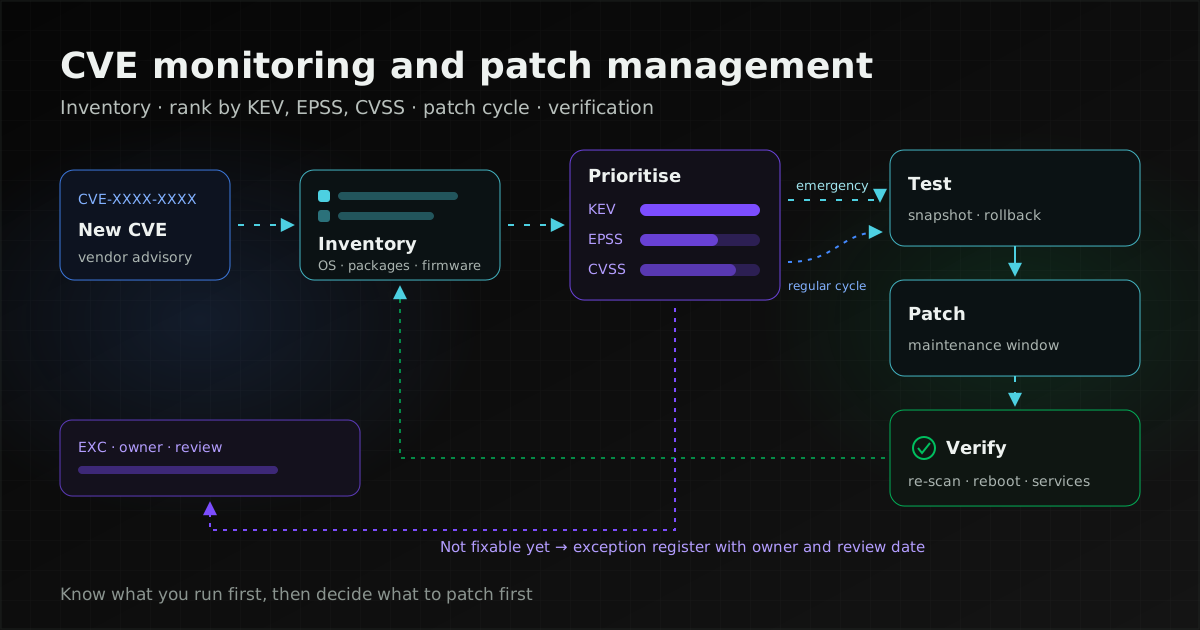
Start with an inventory of the software and versions you actually run and match it against the advisories of your own vendors and Linux distributions. Rank fixes with CISA's KEV catalog, EPSS and CVSS, weighed against how exposed and how important each system is. Then patch on an agreed cycle and verify every fix took effect.
Patch management here means the whole loop: learning that a vulnerability exists, deciding when to fix it, installing the fix and confirming it worked. Vulnerability management is slightly broader, because it also covers weaknesses fixed by configuration or other controls rather than by a patch.
What a CVE is and who publishes it
CVE (Common Vulnerabilities and Exposures) is a naming system for publicly disclosed vulnerabilities, so that everyone can refer to the same flaw by the same identifier, such as CVE-2021-44228. The identifier is the CVE ID and the information attached to it is the CVE Record.
The CVE Program's CNA Operational Rules describe the programme as a voluntary, international, community-driven effort to identify, define, catalogue and share information about disclosed vulnerabilities. IDs are assigned by CVE Numbering Authorities (CNAs), organisations authorised to assign CVE IDs and publish CVE Records. Many CNAs are vendors assigning IDs for their own products; others include open-source projects, national CSIRTs and vulnerability databases.
NIST's National Vulnerability Database (NVD) is a separate layer that enriches CVEs with details such as severity scores and affected product lists. The important point is that NVD no longer enriches every CVE, as the next sections explain.
Start by knowing what you run
You can only match a CVE to software you know you have, so the inventory has to go down to versions: operating systems, installed packages, middleware such as web servers, databases and Java runtimes, the libraries applications depend on, and the firmware of network, storage and other appliances, which is the part most often missed.
A useful inventory also records whether each system is exposed to the internet, who owns it and how much the business depends on it, because those three facts drive patch priority later.
What a host inventory usually misses is the libraries inside applications. CISA defines a Software Bill of Materials (SBOM) as "a nested inventory, a list of ingredients that make up software components". If a system has no documentation, how to survey it from the running system and produce an SBOM is covered in taking over an undocumented legacy system.
Where to watch for advisories
Your primary sources should be the advisories of the vendors and distributions you actually use, because they state which package version fixes the problem. CVE.org and NVD are secondary sources for the details of a CVE.
| Source | What it is for |
|---|---|
| Red Hat errata | An RHSA (Red Hat Security Advisory) contains one or more security fixes; RHBA covers bug fixes and RHEA enhancements |
| Ubuntu Security Notices (USN) | Issued when a security issue is fixed in an official Ubuntu package; available by mailing list, Atom or RSS |
| Debian DSA, DLA and the Security Tracker | DSAs go to the debian-security-announce list and DLAs (Debian LTS Advisories) to debian-lts-announce; Debian calls the Security Tracker its primary source of security information |
| Microsoft Security Update Guide | Described by Microsoft as "the authoritative source of information for Microsoft security updates"; release timing is in the patch cycle section |
| CISA KEV catalog | Vulnerabilities with evidence of exploitation in the wild; an urgency signal (see prioritisation) |
| ThaiCERT | A unit under Thailand's National Cyber Security Agency (NCSA): daily and monthly threat news, a CVE Monthly Report and Cybersecurity Alerts & Advisories |
| CVE.org and NVD | Look up a CVE Record by ID, with its description, scores and links to vendor advisories |
Why NVD alone is not enough: NIST announced on 15 April 2026 that NVD will enrich only CVEs that meet set criteria: those in KEV, those in software used by the US federal government, and critical software under Executive Order 14028.
Other CVEs are still added but marked "Lowest Priority - not scheduled for immediate enrichment". NIST attributes the change to CVE submissions that "increased 263% between 2020 and 2025".
In practice many CVEs may have no NVD score or product list, so use the CNA's score and the vendor's or distribution's advisory instead.
For organisations in Thailand, ThaiCERT describes itself as a unit under Thailand's National Cyber Security Agency (NCSA), with a mission to monitor, analyse, alert and coordinate responses to cyber threats in Thailand. Its Cybersecurity Alerts & Advisories page carries Thai-language notices of CISA's KEV additions, and its CVE Monthly Report compiles CVEs each month. That makes it a useful extra channel for staff who do not read English advisories every day, but it still has to be matched against your own inventory.
Tools that match CVEs to installed packages
Reading advisories by eye does not scale beyond a few servers. Distribution tools tell you which security updates a host is waiting for. In DNF 4 (RHEL and related distributions), the command reference says updateinfo displays update advisories and the --security option "Includes packages that provide a fix for a security issue", and can be used with updateinfo and upgrade.
dnf updateinfo list --security
dnf upgrade --security
On Ubuntu with the Ubuntu Pro client, a dry run of pro fix checks whether the machine is affected by a given CVE or USN and what fix would apply, without changing anything.
pro fix --dry-run CVE-XXXX-XXXXFor one view across many hosts, Wazuh 4.x Vulnerability Detection has the agent collect the operating system and installed-package inventory, and the server correlates it with the Wazuh CTI vulnerability repository or an offline copy. A package is flagged when its version falls within a CVE's affected range, and alerts are raised both when a vulnerability is found and when it is resolved by an update or package removal. Deploying Wazuh as a whole is covered in our Wazuh SIEM/XDR guide and Wazuh ransomware detection settings.
How to prioritise: CVSS, EPSS, KEV and SSVC
No single score tells you what to patch first, because each answers a different question. CVSS answers how severe a flaw is technically, EPSS how likely it is to be exploited, KEV whether it is already being exploited, and SSVC what to do about it. All of them still have to be weighed against what only you know: whether the system is exposed to the internet and how much it matters.
| Signal | Question it answers | How to combine it with your context |
|---|---|---|
| CVSS (FIRST) | How severe is the flaw technically? | Order work within the regular cycle; adjust with Environmental metrics for the real system |
| EPSS (FIRST) | How likely is exploitation in the next 30 days? | Pull high-likelihood CVEs forward even when CVSS is modest |
| CISA KEV | Is it already exploited, with a clear fix available? | KEV-listed and internet-facing goes to the emergency path |
| SSVC (SEI and CISA) | What should we do: Track, Track*, Attend or Act? | A structure for decision rules written in advance |
| Your own context | Is the system internet-facing, how critical is it, what data does it hold? (from your inventory) | Adjusts the ranking from every signal above |
CVSS measures severity, not risk
FIRST's Common Vulnerability Scoring System scores from 0 to 10. The CVSS v4.0 specification (version 1.0 published 1 November 2023) rates None 0.0, Low 0.1–3.9, Medium 4.0–6.9, High 7.0–8.9 and Critical 9.0–10.0. The bands are designed to be backward compatible with the v3.x severity boundaries. When you read a score in an advisory, check which CVSS version it is.
v4.0 names scores by the metric groups used: CVSS-B (Base), CVSS-BT (Base + Threat), CVSS-BE (Base + Environmental) and CVSS-BTE (all three). FIRST's user guide says the Base score is designed to measure severity and "should not be used alone to assess risk"; supplement it with Threat metrics and analysis of your environment (Environmental metrics).
Vendors and distributions also rate flaws their own way. Red Hat uses a four-point scale (Critical, Important, Moderate, Low) and states that "Red Hat does not solely use the CVSS rating to determine the priority with which flaws are fixed." Ubuntu assigns its own priorities separately from CVSS and says "CVSS is not a measure of risk." A distribution's rating is therefore often closer to how the flaw affects that platform than a generic score.
EPSS estimates exploitation within 30 days
FIRST defines the Exploit Prediction Scoring System as a model that "estimates the probability that a published CVE will be exploited in the wild in the next 30 days". The score runs from 0 to 1, and the FAQ explains the percentile as a ranking against all scored CVEs. Scores are updated daily, so pull fresh values each time you prioritise.
The FAQ is explicit about the limits: EPSS provides only the threat-likelihood part, it should be layered with local context, and "Multiplying EPSS by a CVSS score does not compute probability × severity and is never a good idea." Use the two separately, for example EPSS to pull likely-exploited CVEs forward and CVSS with system criticality to order the rest.
CISA KEV records exploitation already seen
A CVE enters the KEV catalog when it meets CISA's three criteria: it has a CVE ID, "There is reliable evidence that the vulnerability has been actively exploited in the wild.", and there is a clear remediation action such as a vendor update. CISA recommends that all organisations, not only government, require KEV vulnerabilities to be addressed immediately as part of their vulnerability management plan. Note that KEV admits only flaws with evidence of exploitation and a clear fix, so absence from KEV does not mean nobody is exploiting a flaw.
The directive tied to KEV is BOD 26-04, Prioritizing Security Updates Based on Risk, issued by CISA on 10 June 2026 to replace BOD 22-01. It binds only US federal civilian executive branch agencies and has no force for organisations in Thailand, but its urgency criteria are a useful model: whether the asset is publicly exposed, whether the flaw is in KEV, whether an attacker can automate every step of exploitation, and whether the technical impact is partial or total control. CISA states that the directive's timelines are informed by SSVC.
SSVC decides the action
CISA states that Carnegie Mellon University's Software Engineering Institute created Stakeholder-Specific Vulnerability Categorization with CISA in 2019, and CISA built its own decision tree in 2020. It has four outcomes: Track and Track* are remediated within standard update timelines, Track* marking flaws with characteristics that may need closer monitoring for changes; Attend sooner than standard timelines, and Act "as soon as possible". The decision points are exploitation status, technical impact, automatability, mission prevalence and public well-being impact.
The limitation is that you must answer some decision points yourself, such as how important the system is to your mission. Its value is that it makes you write the rules before an incident. When a new CVE appears, the team answers a few questions and gets a path, instead of debating each case from scratch.
Example rules you set yourself
This table shows one way to combine the signals with your own context. Every timeframe is a target the organisation sets for its own risk tolerance, not a standard or a commitment.
| Situation | Path | Example target |
|---|---|---|
| In KEV and on an internet-facing system | Emergency patch outside the cycle, then review logs for signs of past exploitation | Set your own, e.g. within a few days of the vendor fix |
| In KEV on an internal system, or high EPSS on an internet-facing system | Faster than the regular cycle | Set your own, e.g. within two weeks (CISA recommends addressing KEV items immediately, so keep this as short as you can) |
| High CVSS, low EPSS, internal system | Regular cycle | Set your own, e.g. the next monthly cycle |
| Low to medium CVSS, not in KEV | Regular cycle, or bundled with a planned upgrade | Set your own, e.g. monthly or quarterly |
| No patch yet, or a patch cannot be installed | Compensating controls, recorded as an exception | Set a review date, e.g. monthly |
From CVE published to patch verified in production
A repeatable process runs in a fixed order, from receiving the advisory through assessment, testing and installation to verification and record-keeping. The same steps apply to the regular cycle and to emergency patches; only the speed and the approver change.
- Receive: vendor and distribution advisories, KEV additions and scan results land in one queue.
- Match to the inventory: identify affected hosts and systems, the fixed version and whether the distribution has issued an advisory.
- Prioritise: apply the rules written in advance, choose emergency or regular path, and record why.
- Test: install on staging or a low-risk first group, and check the application still works.
- Prepare rollback: take a VM snapshot or a backup whose restore has been tested, and write the rollback steps with the criteria for using them.
- Install in the maintenance window: notify users in advance and roll out in groups if there are several hosts.
- Restart or reboot: check which services need a restart and whether the host needs a reboot; until then, old code may still be running in memory.
- Verify: re-scan, check package versions and check the main services (details below).
- Close and record: close the item in the vulnerability list, or move it to the exception register if it is not fully fixed.
Regular cycle and emergency patches
A regular cycle turns patching into routine work that users can plan around, while the emergency path is for flaws that cannot wait for the next cycle. Both should be written down in advance, with who approves and which maintenance window applies.
Vendor schedules help set your own. Microsoft's Windows release cycle documentation says the monthly security update comes on the second Tuesday of each month, "typically published at 10:00 AM Pacific Time", which is midnight on Wednesday in Thailand during US daylight saving time and 1 a.m. otherwise. Out-of-band updates are released off-cycle when needed.
Automatic updates help but do not replace the process. Ubuntu Server documentation says Ubuntu applies security updates automatically with unattended-upgrades, which runs once a day by default; Unattended-Upgrade::Automatic-Reboot defaults to "false", and logs are kept in /var/log/unattended-upgrades. To see what would be installed first, use a dry run:
sudo unattended-upgrade -v --dry-runAn updated package may therefore not take effect until a reboot, and automatic updates do not cover application libraries, firmware or software installed outside the repositories.
How far live patching reduces reboots
Live patching fixes kernel vulnerabilities while the system runs, but only for some flaws. Red Hat's kernel live patching (kpatch) covers "selected critical and important CVEs without rebooting your system." Canonical Livepatch comes with Ubuntu Pro, and Canonical says it "is not a replacement for rebooting". On Windows, hotpatch still requires a quarterly baseline update with a restart. Use live patching to move the reboot to the next maintenance window, not to stop rebooting.
Confirming the fix
An installed patch does not count as fixed until four checks pass: (1) the package version matches the one the advisory names as fixed; (2) a re-scan no longer shows the CVE, for example Wazuh changing its status from Active to Solved; (3) no service is still using old files, and the host has been rebooted if needed; (4) the main services work, for example the website accepts logins, batch jobs complete and monitoring shows no new alerts.
For check 3 on DNF 4 systems, needs-restarting finds processes using files from packages updated after the process started. The -r option will "Only report whether a reboot is required (exit code 1) or not (exit code 0).", and -s lists only the affected systemd services.
dnf needs-restarting -r
dnf needs-restarting -s
Vulnerabilities you cannot fix this cycle: record an exception
Some systems cannot be patched straight away, because the vendor has not released a fix, the application does not support it yet, or the platform is past end of support. Those cases need compensating controls, such as network isolation and restricted access paths, and an exception with a review date. Compensating controls, virtual patching and planning for end-of-life systems are covered in reducing risk on legacy systems past end of support.
Tracking and reporting
Management should be able to see every month which vulnerabilities are still open, for how long and who is responsible. The two tools you need are an open-vulnerability list and an exception register; a spreadsheet or a ticket system will do, as long as each item has an owner.
The open-vulnerability list
Each entry should carry the CVE or advisory ID, the affected system, the priority with its reason (for example in KEV or internet-facing), the date found, the target date under your own rules, the owner and the status.
The exception register
An exception is a vulnerability you have decided not to fix within its target. Each needs a reason, the compensating controls in place, an approver with authority to accept the risk, and a review date. Exceptions without a review date tend to become permanent holes that nobody remembers.
Monthly report
- Open vulnerabilities by priority, and those past their target date
- KEV-listed CVEs relevant to the systems in scope, with the status of each
- Patches installed this period, regular and emergency, with verification results
- Patches rolled back, and why
- New exceptions and exceptions due for review
- Systems or software approaching end of support
Thai requirements for government, critical infrastructure and banks
Some organisations in Thailand have explicit requirements here. This is a summary of the source wording to show where the process above fits, not legal advice; confirm what applies to you with your regulator or legal counsel.
- The 2021 code of practice and cybersecurity framework (in Thai), issued by Thailand's cybersecurity regulatory committee under the Cybersecurity Act B.E. 2562 (2019) and published in the Royal Gazette on 6 September 2021, applies to government agencies and critical information infrastructure operators. Clause 21.1.1 requires an up-to-date asset inventory of critical services; clause 21.3.9 requires a process to track and manage vulnerabilities found in assessments and penetration tests and to verify that all of them are adequately fixed; and sub-item 8 of clause 22.2.2 requires the security baseline to cover timely and appropriate software and security patching. It sets no deadline in days.
- The Bank of Thailand Notification No. SorKorChor 5/2566 on IT risk (2023, in Thai) applies to financial institutions and specialised financial institutions. Attachment 2, clause 6.10, requires a security-patch management process for all systems and devices, completed within a timeframe appropriate to the vulnerability's risk level and the system's criticality, compensating controls when the vendor has no patch yet, and an exception-approval process when a patch cannot be installed.
Both tie timing to risk and system criticality, which is what the prioritisation rules and exception register in this article put into practice.
What to put in a maintenance agreement about CVEs and patching
If an outside provider runs your systems, the maintenance agreement (MA) must say who follows advisories for which layer, which rules set priority and what evidence is delivered. Splitting patch responsibility across layers, and the questions to ask before signing, are covered in MA and SLA contracts: what to check before you sign. These are the items to add for CVE monitoring and patching; every number is an example you set yourself.
- Monitoring scope: which operating systems, middleware, application libraries and devices are covered, and which advisory sources are used
- Priority rules: attach the rules table (KEV, EPSS, CVSS, internet exposure) with a target for each level, for example a rule you set that KEV-listed CVEs on internet-facing systems take the emergency path
- Regular cycle: the frequency, for example monthly, and the maintenance window agreed with the system owner
- Emergency path: who declares an emergency, who approves it and how users are told
- Testing and rollback: whether there is staging, whether a snapshot or backup is taken before each patch, and who decides to roll back
- Exception register: who approves on the owner's side and how often exceptions are reviewed
- Reporting: the monthly report contents above, plus verification evidence
Status as of 2026-11-21: standards, services and versions referenced
These details change; check the source page before using them in a policy or contract.
| Item | Status according to the source | Source |
|---|---|---|
| CVSS | v4.0 version 1.0 published 1 November 2023; document revision 1.2 dated 18 June 2024; FIRST lists v3.1 under its archive | FIRST |
| EPSS | Model v5 (v2026.06.15) started publishing on 15 June 2026; FIRST's FAQ says retraining has in practice occurred approximately annually | FIRST · EPSS FAQ |
| CISA KEV and BOD | BOD 26-04 issued 10 June 2026, replacing BOD 22-01 and carrying forward the KEV criteria; binds US federal civilian executive branch agencies only | CISA |
| NVD | Prioritised enrichment since the 15 April 2026 announcement; backlogged CVEs with an NVD publish date before 1 March 2026 moved to "Not Scheduled" | NIST |
| CVE Program | CNA Operational Rules v4.2.1, effective 20 October 2026 | CVE.org |
| Wazuh | 4.x line; release notes list 4.14.10, released 5 November 2026 | Wazuh |
| Microsoft monthly security update | Second Tuesday of the month, typically 10:00 AM Pacific Time; page dated 29 September 2026 | Microsoft Learn |
| DNF commands | Based on the DNF 4 and dnf-plugins-core documentation; not checked against DNF 5 | DNF |
CVE monitoring and patching checklist
Inventory and sources
- An inventory down to versions, covering OS, middleware, libraries and firmware
- An owner, a criticality level and internet exposure recorded for each system
- Subscriptions to the advisories of the vendors and distributions you actually run, plus KEV
- A tool that matches CVEs to installed packages
Prioritisation
- Rules written in advance, using KEV, EPSS, CVSS and system context
- Your own target timeframe for each level
- No reliance on NVD scores alone
Patching
- A regular cycle and an emergency path, each with an approver
- Testing first on staging or a low-risk group
- A snapshot or tested backup, and rollback steps
- A check for pending service restarts and reboots
Verification and reporting
- Package version check, re-scan and service checks
- An open-vulnerability list updated every cycle
- An exception register with owner, compensating controls and review date
- A monthly report to the system owner
How UNIXDEV can help
UNIXDEV monitors CVEs and applies patches for the systems we look after, through our DevOps, SRE and managed services. We follow the advisories that affect the systems in scope, assess the impact, plan and apply patches on the cycle and maintenance windows agreed with the system owner in the MA, prepare a snapshot or backup and rollback steps as set out in the MA, and report open vulnerabilities and exceptions so the owner can decide.
Coverage hours follow the scope in the MA/SLA; not every package includes 24-hour cover.
For Linux servers we plan patch and reboot cycles around each release's support life through our Linux server work, and if you want every host's vulnerabilities in one place, we deploy and tune Wazuh so its Vulnerability Detection feeds the patch cycle.
Sources and further reading
- CVE Program — CNA Operational Rules v4.2.1 (PDF)
- NIST — NIST Updates NVD Operations to Address Record CVE Growth (April 2026) · NIST — National Vulnerability Database
- FIRST — CVSS v4.0 Specification · CVSS v4.0 User Guide · CVSS v4.0
- FIRST — EPSS · EPSS FAQ · EPSS data and model versions
- CISA — Known Exploited Vulnerabilities · BOD 26-04 · SSVC · SBOM
- Red Hat — Explaining Red Hat errata · Severity ratings · Kernel live patching
- DNF Command Reference · DNF needs-restarting plugin
- Ubuntu Security Notices · Ubuntu CVE priorities · Automatic updates · Ubuntu Pro client — pro fix · Livepatch
- Debian Security Information · Debian LTS Security · Debian Security Tracker
- Microsoft — Security Update Guide FAQ · Windows monthly update release cycle
- Wazuh 4.14 — Vulnerability Detection: how it works · Wazuh release notes
- ThaiCERT — About us (in Thai) · CVE Monthly Report · Cybersecurity Alerts & Advisories
- Cybersecurity regulatory committee — 2021 code of practice for government agencies and critical information infrastructure (PDF, in Thai) · Bank of Thailand Notification No. SorKorChor 5/2566 on IT risk (PDF, in Thai)
- Related: legacy systems past end of support
- Related: MA and SLA contracts
- Related: detecting ransomware with Wazuh
- Related: Zimbra vs IceWarp for enterprise email
- All articles on DevOps and enterprise system operations
Sources checked on 2026-11-21
How we checked: based on the primary sources above, reviewed by the UNIXDEV team