
What Graylog is and how to plan central log management
What Graylog is and how to plan it: components, shipping logs from each source, sizing disk for retention, setting alerts, and what Graylog Open lacks compared with the paid editions.
By UNIXDEV Team · 21 min read
Original published · English edition
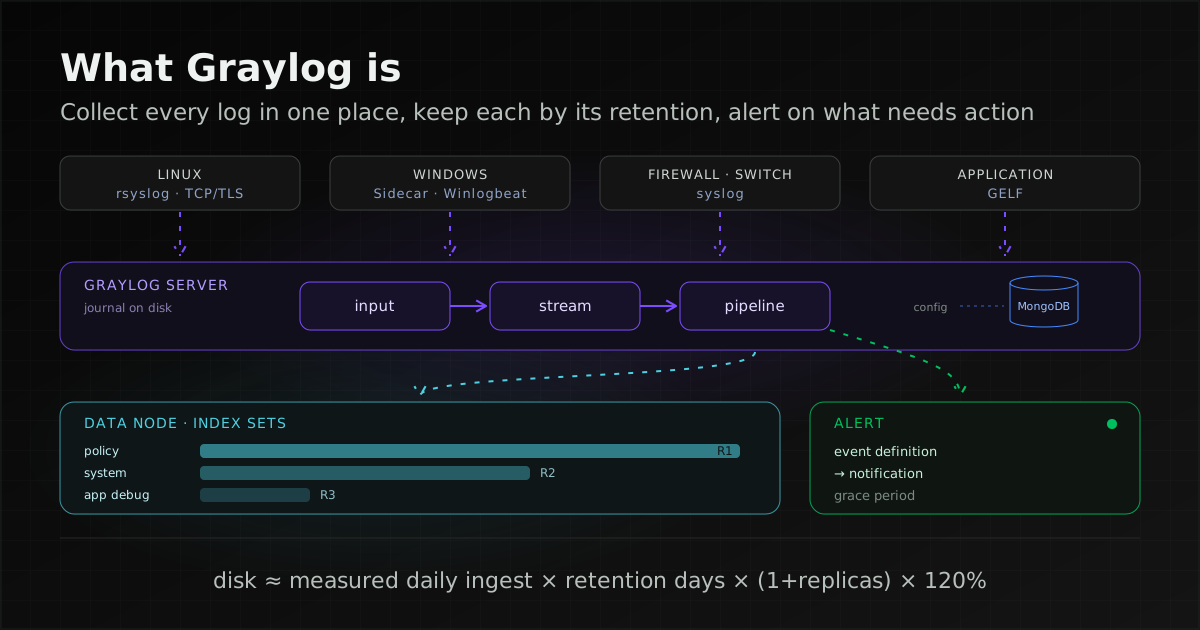
Graylog is software that collects logs from servers, network devices and applications in one place, so you can search them from a single interface, parse them with rules you define and raise alerts on the events that matter. Graylog Open carries no licence fee and is released under the SSPL. The real planning work is how logs get in, how long they are kept and what you alert on.
Centralised log management means shipping logs from every machine to a central system instead of logging into each server to read them. Two benefits are immediate: you can search across systems for the same time window, and the logs survive when the source machine fails or its local logs are wiped. Graylog's documentation describes the product as "a powerful Security Information and Event Management (SIEM) solution and log analytics platform". This guide covers the log collection and search side; for SIEM, see our guide to Wazuh.
If you are still deciding between metrics monitoring and log management, our Zabbix guide explains how the two differ.
Graylog's components: server, Data Node and MongoDB
A Graylog stack has three components: Graylog server, which receives and searches logs; Data Node, which stores and indexes them; and MongoDB, which holds configuration, according to The Graylog Stack.
- Graylog server: receives and processes logs, and provides search, dashboards and alerting through the web interface.
- Data Node: "functions as the search backend", storing and indexing log data, and also handles certificate issuance and renewal.
- MongoDB: "serves as a metadata store", holding configuration such as users, roles, permissions, dashboards, pipeline rules and alert settings, not the logs themselves.
You can run Graylog against a self-managed OpenSearch cluster instead, but the documentation states that "Data Node is the recommended search backend". Elasticsearch users need a migration plan: the Graylog 7.0 upgrade notes deprecate Elasticsearch as a search backend from 7.0 and say it "will be removed entirely in Graylog 8.0". OpenSearch 1.x is in the same position. The same page says Graylog 7.0 and later require Java 21 (bundled in the packages and container images) and MongoDB 7.0 or later.
If you follow a tutorial written before Graylog 7, check its search backend and MongoDB versions against the status table at the end before installing.
The port table in the Graylog System Architecture page lists tcp/9000 for the Graylog web interface, tcp/27017 for MongoDB, tcp/9300 for Data Node, tcp/9200 for OpenSearch and tcp/5044 for collectors managed by Sidecar. MongoDB and search backend ports should be reachable only from the Graylog machines.
Small setup or multi-node cluster: Core and Conventional layouts
The Core layout puts every component on two servers, which suits small deployments and testing but has no fault tolerance; the Conventional layout spreads Graylog, MongoDB and Data Node over multiple nodes for high availability. Choose by how long the log platform may stop accepting data: if it must not stop at all, start with Conventional; for a small or test deployment, Core is enough.
The System Architecture page describes three models:
- Core: Graylog, Data Node and MongoDB on two servers, for small deployments or testing. The documentation notes that it "lacks fault tolerance and scalability".
- Conventional: components spread over multiple nodes for high availability and scale, with Data Node on its own cluster, separate from Graylog and MongoDB.
- Custom: enterprise-scale layouts with components spread over many machines.
The multi-node installation guide uses three Graylog-plus-MongoDB nodes and three Data Nodes as its example, encourages a load balancer with a DNS name in front, and warns that is_leader is true by default and must be set to false on every follower. The pages we checked do not state a minimum node count for high availability; three is the guide's example.
The cluster configuration page explains that an administrator can set a node's load balancer status to DEAD from its More menu, after which the load balancer stops sending messages to it, for example before maintenance. When message processing is paused and the message journal is enabled (the default), Graylog keeps persisting incoming messages to disk, so no data is lost and processing resumes when the node is re-enabled.
Getting logs in: an input for each source
An input is Graylog's receiving end; each one speaks a single protocol such as Syslog, GELF or Beats. Choose the shipping method on the source side by the kind of log and by how well that network path needs to be protected.
| Source | How to ship | Graylog input |
|---|---|---|
| Linux (syslog and journald) | rsyslog forwarding with omfwd; journald hands messages to rsyslog with ForwardToSyslog=, or rsyslog reads the journal with imjournal | Syslog TCP |
| Application log files on Linux | Filebeat, managed by Sidecar | Beats |
| Windows event logs | Winlogbeat, bundled with Sidecar on Windows | Beats |
| Firewalls, routers, switches | Device syslog, directly or through a central rsyslog/syslog-ng relay | Syslog UDP or TCP |
| In-house applications | A GELF logging library | GELF TCP or GELF HTTP |
Linux: rsyslog and journald
The rsyslog omfwd documentation says it forwards over UDP, TCP or TLS, that "the default is UDP", and that "UDP is permitted to drop packets". The same page warns that plain TCP does not guarantee delivery either and recommends RELP where that matters; the Graylog Feature List (May 2026) names no RELP input, so the TCP-with-TLS advice here is about encryption, not guaranteed delivery.
On the systemd side, journald can forward to a local syslog daemon with ForwardToSyslog=, or rsyslog can read the journal itself with imjournal, which the rsyslog documentation notes is more resource-intensive than imuxsock. Sending hypervisor and Linux server logs off the host from a security point of view is covered in our guide to protecting hypervisors and Linux servers from ransomware.
Windows: Sidecar with Winlogbeat
Graylog Sidecar is "a lightweight management service" installed on each host to control log collectors centrally. It fetches collector configuration from the Graylog REST API using an API token. On Windows it ships with Filebeat and Winlogbeat, on Linux with Filebeat and Auditbeat, and it can manage other collectors such as NXLog. These collectors send to the Beats input, which "only supports TCP, not UDP" and can use TLS.
Graylog's 7.2 announcement (13 October 2026) previews the Graylog Collector, a collection agent Graylog builds itself, shared early for feedback. The post does not say it replaces Sidecar, so we recommend staying on Sidecar for production for now.
Network devices and applications
Graylog's Syslog inputs parse RFC 5424 and RFC 3164 syslog, and warn that "Many devices, especially routers and firewalls, do not send RFC-compliant Syslog messages". The suggested fix is to forward through rsyslog or syslog-ng first, which usually parses successfully.
Applications your team writes should log in GELF (Graylog Extended Log Format), a structured format where each field arrives with its name and value, so nothing has to be parsed out of free text later. The GELF specification requires the fields version, host and short_message, and states that GELF TCP does not support compression because it uses the null byte as a frame delimiter. To compress and encrypt together, use GELF HTTP with TLS enabled.
Encrypting logs in transit
Syslog over UDP travels as plain text, and Graylog's Syslog UDP input has no TLS options, even though the syslog input page calls UDP the recommended transport in most architectures. For logs that carry user names, internal addresses or personal data, we recommend TCP with TLS: the Syslog TCP input offers Enable TLS, certificate and private key fields, and TLS client authentication set to optional or required. Devices that cannot send TLS belong on a management network, forwarding through a central rsyslog relay that encrypts the next hop.
On the rsyslog side, naming a TLS-capable driver such as ossl is not enough; the omfwd documentation says StreamDriverMode must be set to 1, and StreamDriverPermittedPeers names the certificate identities of the receiver you accept. An example built from the documented parameters (replace the values in angle brackets, and prepare certificates as the rsyslog TLS documentation describes):
action(type="omfwd"
  Target="<graylog-host>"
  Port="<port>"
  Protocol="tcp"
  StreamDriver="ossl"
  StreamDriverMode="1"
  StreamDriverAuthMode="x509/name"
  StreamDriverPermittedPeers="<host>")
The Graylog input pages we checked set no default port for Syslog or GELF inputs; you choose one when creating the input. A Graylog blog post (13 July 2020) explains that binding below port 1024, such as 514, would need root, and recommends starting the input on 1514 and redirecting 514 to it in the firewall for devices whose destination port cannot be changed.
Organising logs with streams and pipelines
Streams sort logs into groups by condition, and pipelines modify and parse the logs in those streams. Together they decide where a log is stored, how long it is kept and how easy it is to search.
The Streams documentation defines a stream as "a filtered subset of your log data that matches specific conditions defined by you". Messages that match no other stream stay in the Default Stream, which cannot be deleted or paused.
Each stream writes to an index set you choose, and the Remove matches from Default Stream option stops the same message being stored twice.
The same page says stream rules "will become a legacy feature in a future Graylog release", so new deployments should route messages with pipelines.
Pipelines must be attached to a stream and run in stages in numerical order; stages with the same number run at the same time across all connected pipelines. Pipeline rules can carry conditions, for example parsing fields only for one device model, or sending matching messages to another stream.
Older tutorials still parse fields with extractors at input time, but the Extractors page states that "Extractors are a legacy feature of Graylog" and recommends pipelines instead. Build new parsing on pipelines, and move existing extractors over the next time you touch that parsing.
Planning retention and disk space
Size disk from your own measured daily log volume, multiplied by the days you must keep, plus Graylog's recommended headroom. First it helps to know how index sets, rotation and retention work.
Index sets, rotation and retention
According to the Index model page, an index set holds the settings Graylog needs to create and manage indices in the search backend. Rotation means writing to one active index until a criterion is met, then starting a new one; retention means automatically closing, deleting or exporting the oldest indices. Index sets default to one shard and zero replicas, so an index set on default settings holds exactly one copy of your logs, however many Data Nodes you run.
The same page states: "By default, Data Tiering is selected under Rotation & Retention, and this is the recommended option." The older rotation strategies (by size, time, message count, and Index Time Size Optimizing) and Delete retention now sit under a Legacy option.
Data Tiering has a hot tier (the search backend, which receives all new data), a warm tier (read-only searchable snapshots, slower to search) and an archive that stores messages until you bring them back into Graylog. "You must have an Enterprise license to set up and use a warm tier", and archiving is also an Enterprise feature. On Graylog Open you plan for the hot tier only: every day you keep lives on Data Node disks.
Rotation does not happen on an exact day. For the Legacy Index Time Size Optimizing strategy, the documentation's example of a 30-day minimum and 40-day maximum lifetime rotates the index at some point between day 30 and day 40. If you must keep logs for a given number of days, set the minimum to at least that number and size disk for the maximum. With Data Tiering, check what the day settings mean in the documentation for your version.
A sizing formula
The System Architecture page gives the Data Node index storage formula as [Daily Ingest] × [Total Retention Days] × 120%, where the extra 20% covers traffic spikes and prevents running out of storage. Graylog's formula does not mention replicas, but OpenSearch defines a replica shard as "a copy of a primary shard", so each replica adds a full copy. Our extension of the formula (UNIXDEV's working, not Graylog's):
S = D × R × (1 + N) × 1.2| Variable | Meaning | Where the value comes from |
|---|---|---|
| D | Indexed log size per day | Measured on a pilot or existing system, on normal and busy days; not an estimate from elsewhere |
| R | Days kept in the hot tier | Your policy or the rules you must follow; use the maximum of the index lifetime range |
| N | Replicas per index set | Default 0; for a spare copy in case a Data Node fails, set it above 0 and run several Data Nodes (our recommendation) |
| 1.2 | 20% headroom | Graylog's formula |
If you split index sets by retention period, calculate S for each and add them up. The message journal on each Graylog server needs its own disk too: the System Architecture page says the journal defaults to "5GB of messages or 12 hours of data" and advises allocating "3 to 5 times your daily data ingestion" on high-speed storage such as SSD. For CPU and RAM, the Graylog pages we checked give no figures per log volume; size from measurements taken during a pilot.
We recommend one index set per retention class, for example logs you must keep for a long period under policy and application debug logs kept for a few days, with streams routing each group to the right set. If Thai rules on retaining computer traffic data may apply to your organisation, our Wazuh deployment planning guide explains what they require and of whom, with primary sources. This is not legal advice.
Alerts in Graylog: event definitions and notifications
A Graylog alert starts from an event definition, which decides what counts as an event, and a notification attached to it, which delivers the alert. The Event Definitions page defines one as "a saved configuration that tells Graylog which occurrences count as events, how to describe and rank them, and who or what to notify".
The commonly used condition type is Filter & Aggregation. Sigma Rules require a Graylog Security licence, and the Graylog Feature List (May 2026) places the Correlation Engine in the Enterprise and Security editions only.
The Event Definitions page gives notification channels "such as email, Slack, or an HTTP request" and describes event priority as five levels, from Informational (1) to Critical (5). The Alerts page says script and PagerDuty notifications require Graylog Enterprise.
What to alert on first
This starter list is our recommendation, not Graylog's. Pick only what someone must act on, and name the owner before you switch it on.
- Bursts of failed logins from one source in a short window, for SSH, VPN and admin web pages
- Privilege changes, sudo use by unexpected accounts, and new accounts on servers
- Services crashing or being killed by the kernel for lack of memory (OOM)
- Disk and filesystem errors, such as I/O errors or a filesystem remounted read-only
- Configuration changes on firewalls and network devices
- An important source going silent when it should always be logging; build and test this condition on your own system before relying on it
Keeping alerts worth reading
Set a grace period on every event definition that notifies anyone. The Alerts page says the grace period "enforces a rate limit on how many alerts are triggered for identical events", and that without one, frequent triggers can build a backlog of alerts. Beyond that, we recommend giving every alert an owner and a documented response, agreeing how quickly each priority level must be answered, and moving metric and availability checks, such as a filling disk or an unresponsive service, to Zabbix, which is built for them.
Access control, licensing and Open versus paid editions
Graylog Open has no licence fee and covers ingestion, search, dashboards and alerting. Long-term storage tiers, auditing and organisation-scale user management sit in the paid editions.
Licence: SSPL, which is not open source by the OSI definition
Graylog's README states that "Graylog is released under version 1 of the Server Side Public License (SSPL)", which applies from Graylog 4.0; versions released before 4.0 remain under GPL v3.
Graylog's documentation calls the Open edition "free and open-source", but the Open Source Initiative stated in January 2021 that the SSPL is not an open source licence. The precise description is source-available under the SSPL.
The Graylog Open page says there are no per-user fees or ingestion caps, and asks anyone offering it as a hosted service to review the SSPL terms carefully.
Access control
The Permission management page says a user needs both a role granting access to an entity type and the specific entity shared with them. Teams are an Enterprise feature, and Graylog Open users can only share with everyone. If each team should see only its own streams and dashboards, settle the edition question first.
The Active Directory/LDAP page says synchronising directory groups to Graylog teams is available to Enterprise users. When connecting a directory, use TLS, since the page notes that StartTLS "allows for an insecure connection", and keep Verify Certificates enabled.
Features by edition
| Feature | Open | Enterprise | Security |
|---|---|---|---|
| Inputs (Syslog, GELF, Beats and others), Sidecar, streams, pipelines, dashboards, alerting, Data Node | Yes | Yes | Yes |
| Notifications | Basic | Advanced | Advanced |
| Role-based access | Internal | AD/LDAP | AD/LDAP |
| Teams, SSO (OIDC and others), user audit logs, scheduled e-mail reports | No | Yes | Yes |
| Correlation Engine | No | Yes | Yes |
| Warm tier, archive and searchable snapshots | No | Yes | Yes |
| Sigma rules, MITRE ATT&CK, UEBA, SOAR | No | No | Yes |
The table comes from the May 2026 Graylog Feature List and can change, so confirm with Graylog before buying. Graylog Security is the edition Graylog sells as a SIEM; if threat detection is the main goal, compare it with Wazuh using our Wazuh guide and Wazuh versus EDR.
Graylog, Zabbix and Wazuh: who does what
Graylog keeps and searches every kind of log, Zabbix watches metrics and availability, and Wazuh detects security events on endpoints. They overlap in places but are built to answer different questions.
| Aspect | Graylog | Zabbix | Wazuh |
|---|---|---|---|
| Built for | Collecting, parsing, searching and alerting on logs | Distributed monitoring of metrics and availability (Zabbix manual) | Security platform combining XDR and SIEM (Wazuh documentation) |
| Main data | All logs: system, network and application | Metrics and availability | Agent events matched against security rules |
| Question it answers | What happened, where and when? | Is something wrong? | Is there a security event to investigate? |
| Where it overlaps | Graylog Security adds SIEM features | Agent log[] items can read local log files | Accepts syslog from agentless devices |
The clearest difference between Graylog and Wazuh is what they keep. The Wazuh documentation says archives, which store every event received, are disabled by default because they consume significant storage. Wazuh therefore keeps mainly rule-matched alerts, while Graylog is designed to keep all logs for later search.
UNIXDEV's recommendation on which logs go where:
- Wazuh: security events on servers and user machines, such as logins, changes to important files and vulnerabilities, where you need detection rules.
- Graylog: logs from applications, web servers, databases, network devices and general system logs, used for troubleshooting and searching back in time.
- Zabbix: metrics and availability, such as CPU, disk and whether a service answers.
- Logs both teams need: such as login records used by security and operations alike. Decide source by source, because shipping to both doubles the disk used and means managing retention in two places.
Wazuh sizing and Wazuh-side retention are covered in our Wazuh deployment planning guide.
Choosing a Graylog version and planning upgrades
Pick a minor release line with enough release support left for your team's upgrade cycle, and read the upgrade page of every version you will pass through before you start. The Supported Versions table gives each line's End of Release Support date, defined as when Graylog stops standard code release support such as bug fixes and security patches, and a separate End of Enterprise Support date for paid customers.
The Releases page shows Graylog shipping patches for several minor lines on the same day. Follow the announcements for the line you run and patch it on a schedule like any other software; our CVE monitoring and patch management guide covers how.
Each version has an upgrade page listing its breaking changes. The 7.2 upgrade page, for example, notes that stream_aware_field_types is now enabled by default, that CEF inputs no longer prefix the source with a slash, and that the Security > Sigma Rules menu has been removed, with management of Sigma rule Git repositories moved to Alerts > Sigma Repos. Changes like these can affect existing dashboards and rules, so test on a staging system first.
Three ordering points matter:
- The 7.0 upgrade page says "MongoDB upgrades must be done from one minor release to the next", so an old MongoDB may need several upgrade rounds.
- Systems still on Elasticsearch must move to another backend before Graylog 8.0.
- The compatibility matrix supports OpenSearch 3.x only when no indices created under OpenSearch older than 2.0 remain.
We recommend backing up MongoDB before every upgrade, because it holds the whole configuration.
Status as of 2026-11-22: Graylog versions and requirements
These facts change often; check the source pages before relying on them. The documentation cited is what go2docs.graylog.org served as version 7.2 on the date checked.
| Item | Status per the source page | Source |
|---|---|---|
| Graylog 7.2 | Released 13 October 2026 per Supported Versions (the Changelog dates 7.2.0 to 12 October 2026); patch 7.2.2 released 4 November 2026; End of Release Support 13 October 2027 (Enterprise 13 October 2028) | Supported Versions · Changelog |
| Graylog 7.1 | Released 4 May 2026; patch 7.1.12 released 4 November 2026; End of Release Support 4 May 2027 (Enterprise 4 May 2028) | Supported Versions · Changelog |
| Graylog 7.0 | End of Release Support 3 November 2026 (Enterprise 3 November 2027); the Releases page still announced 7.0.16 on 4 November 2026 | Supported Versions · Releases |
| Graylog 6.3 | End of Release Support 30 June 2026 | Supported Versions |
| Java and MongoDB | From 7.0: Java 21 and MongoDB 7.0 or later. Graylog 7.2 supports MongoDB 7.x to 8.3.x | Upgrade to 7.0 · Compatibility matrix |
| Search backend | Data Node recommended. Self-managed OpenSearch for 7.2: 1.1.x to 3.7.x (Graylog Security: 2.0.x to 3.7.x). Elasticsearch and OpenSearch 1.x deprecated since 7.0, to be removed in 8.0 | Compatibility matrix · Upgrade to 7.0 |
| Operating systems for 7.2 packages | Debian 12; Ubuntu 22.04 and 24.04; RHEL (AlmaLinux, Rocky Linux) 8 and 9; SUSE Linux Enterprise Server 15 | Compatibility matrix |
| Extractors and stream rules | Extractors are legacy, use pipelines; stream rules will become legacy in a future release | Extractors · Streams |
| Rotation and retention | Data Tiering is the recommended default; warm tier and archive need an Enterprise licence | Index model · Data Tiering |
| Graylog Collector | Previewed with 7.2 for feedback; not announced as a Sidecar replacement | Graylog blog |
| Features by edition | Feature List dated May 2026 | Feature List (PDF) |
Checklist before you deploy Graylog
- List every log source with its owner and required retention.
- Pick a shipping method per source: TCP with TLS where possible, and a relay on the management network for devices that cannot send TLS.
- Choose Core or Conventional from how long the log platform may stop accepting data.
- Measure daily log volume on a pilot, then size each index set and the journal.
- Design streams and pipelines up front; do not build new parsing on extractors.
- Keep the first set of alerts small, each with an owner and a grace period.
- Back up MongoDB, and record the versions of Graylog, MongoDB and the search backend for upgrade planning.
- Check which edition the features you need, such as Teams, a warm tier or audit logs, belong to before settling on Graylog Open.
How UNIXDEV can help
UNIXDEV designs, installs, tunes and operates Graylog with a supported search backend (Data Node or OpenSearch) and MongoDB. We bring syslog and application logs in, set up streams and retention to match your policy, agree alert routing with the teams who receive alerts, and hand over a runbook. We usually deploy it alongside Zabbix as Zabbix + Graylog observability.
For ongoing care, the team looks after the platform through DevOps, SRE and managed services. Coverage hours follow the scope of your maintenance agreement; round-the-clock coverage is part of the Gold and Platinum tiers.
Sources and further reading
- Graylog — What is Graylog? · Graylog Open · Feature List (May 2026)
- Graylog — The Graylog Stack · System Architecture · Multi-node installation · Cluster configuration
- Graylog — Compatibility matrix · Supported Versions · Changelog · Releases
- Graylog — Upgrade to 7.0 · Upgrade to 7.2 · Graylog 7.2 announcement
- Graylog — Syslog inputs · GELF · GELF format · Beats input · Sidecar · How to use Graylog as a syslog server (2020)
- Graylog — Streams · Pipelines · Extractors
- Graylog — Index model · Data Tiering · Index Time Size Optimizing · OpenSearch — Intro
- Graylog — Event Definitions · Alerts
- Graylog — Permission management · Sharing · Active Directory/LDAP
- Graylog README (SSPL) · Graylog v4.0 licensing · OSI — The SSPL is Not an Open Source License (2021)
- rsyslog — omfwd · imjournal · systemd — journald.conf
- Zabbix manual — What is Zabbix · Wazuh — Getting started · Wazuh — Event logging (archives)
- Related: Zabbix explained: what it is, what it does, how to start
- Related: Planning a Wazuh deployment: sizing, retention and agent rollout
- Related: Protecting hypervisors and Linux servers from ransomware
- All articles in DevOps and enterprise system operations
Sources checked on 2026-11-22
How we checked: based on the primary sources above, reviewed by the UNIXDEV team