
Protecting hypervisors and Linux servers from ransomware
Hardening ESXi, Proxmox VE and Linux servers against ransomware: isolated management, MFA and roles, lockdown mode, PBS backup rights and host logs.
By UNIXDEV Team · 22 min read
Original published · English edition
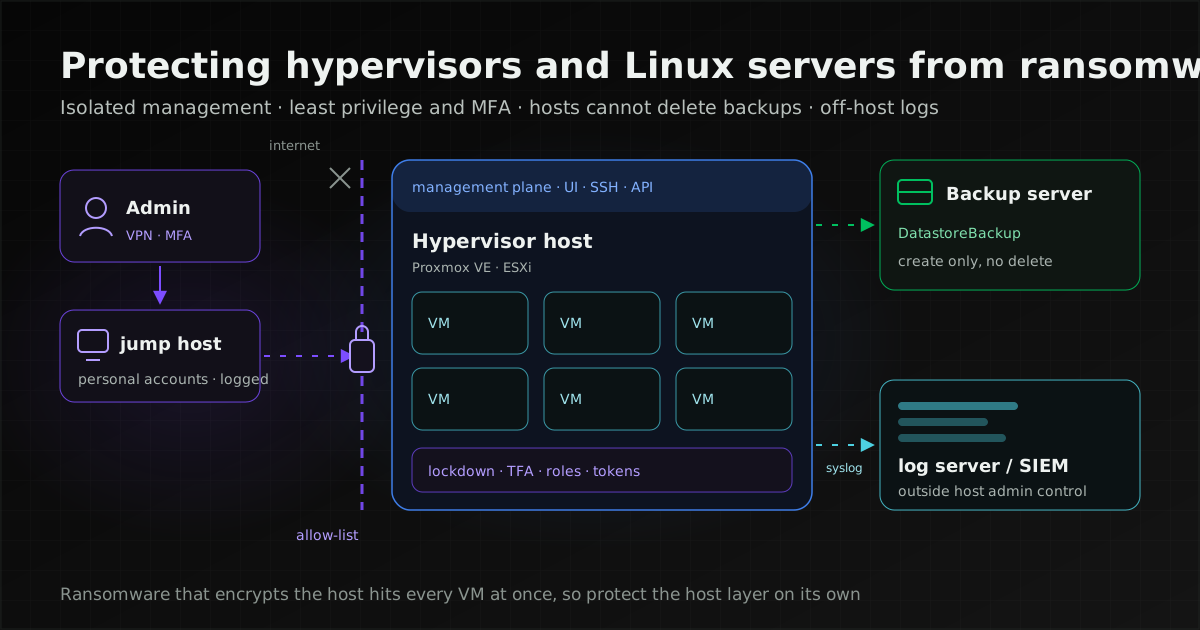
Protect hypervisors such as VMware ESXi and Proxmox VE by closing off the management plane, keeping admin accounts separate from the user Active Directory, giving hosts a backup credential that cannot delete backups, and sending host logs off the machine. Linux servers follow the same principles at machine level.
A hypervisor is the software that runs many virtual machines (VMs) on one physical server, such as VMware ESXi or Proxmox VE. Its management plane is everything used to control it: the web UI, SSH, the API and vCenter. An attacker who reaches the management plane can act on every VM on the host without breaking into any of them.
This article covers the hypervisor and Linux server layer. What ransomware is, how attackers get in, response planning and reporting duties under Thai law are in our guide to ransomware preparedness and response.
Why ransomware operators target hypervisors
Encrypting at the host hits every VM on it at once, and security tools installed inside VMs cannot see the host. Microsoft Threat Intelligence (29 July 2024) gives two reasons: "Many security products have limited visibility and protection for an ESXi hypervisor." and "Encrypting an ESXi hypervisor file system allows one-click mass encryption, as hosted VMs are impacted."
The 2023 #StopRansomware Guide from CISA, NSA, FBI and MS-ISAC advises: "Ensure that all hypervisors and associated IT infrastructure, including network and storage components, are updated and hardened." It notes that attackers have begun targeting VMware ESXi, hypervisors and other centralised systems, which "enables fast encryption of the infrastructure at scale", and points to NIST SP 800-125A Rev. 1 (Security Recommendations for Server-based Hypervisor Platforms) for detail.
Documented incidents show different ways in:
- Unpatched ESXi exposed to the internet: CISA and the FBI (AA23-039A, 8 February 2023) said the ESXiArgs actors were likely targeting end-of-life or unpatched ESXi servers. Their mitigations: update ESXi, disable the Service Location Protocol (SLP) service, and keep ESXi off the public internet.
- Domain-joined ESXi: Microsoft reported CVE-2024-37085 being used to give domain accounts full ESXi admin rights before deploying ransomware. Details are in the section on admin accounts below.
- Leaked or reused root passwords: Kaspersky (6 November 2026) described two cases. In one, a monitoring tool held ESXi credentials with broad access and the same root password was reused across several hosts; once inside the monitoring environment, the attacker used that credential to SSH into the hosts sharing the password, and turned off execInstalledOnly after the first attempt to run the encryptor was blocked. In the other, an administrator's workstation held the Proxmox VE root password in plain text; the attacker logged in with it, and the result was "the encryption of the entire virtual environment".
None of these began inside a VM. They began with access to the host or to an admin account, which is why putting EDR (endpoint detection and response) on every VM still leaves the host layer unwatched.
Isolate the management plane
The hypervisor's web UI, SSH and API should be reachable only from a dedicated management VLAN, not from user networks or production VMs, and never from the internet. Administrators working remotely should come in through a VPN with MFA first. We recommend going through a jump host (a dedicated admin machine with MFA and logging) rather than from everyday workstations, because the Kaspersky Proxmox case started on a compromised admin workstation.
Proxmox VE: turn on the firewall and use the management IPSet
The Proxmox VE firewall documentation states that "The firewall is completely disabled by default"; you enable it at datacenter level. Addresses in the IPSet named management may perform normal management tasks (web UI, VNC, SPICE and SSH). That IPSet applies only to host firewalls, not to VM firewalls.
One catch: the cluster's local network is added to this IPSet automatically (alias cluster_network). If the cluster network shares a subnet with user machines, those machines can reach the web UI too, so keep the cluster and management networks on their own VLANs. The documentation also advises keeping an SSH session open while you enable the firewall so you do not lock yourself out.
Documented ports include 8006/TCP (web UI), 22/TCP (SSH, also used by the cluster), 5900–5999/TCP (VNC), 3128/TCP (SPICE) and 5405–5412/UDP (corosync). Designing a resilient corosync network is covered in our Proxmox VE cluster guide.
ESXi: restrict which IPs can reach the host
The ESXi firewall can restrict allowed IPs per ruleset. Broadcom KB 418184 describes limiting the Host Client ruleset to a list of IPs on vSphere 7.x and 8.x, and warns that the vCenter Server's IP must be on the list or vCenter cannot connect to the host.
Hypervisor admin accounts: keep them out of the workload domain
If hypervisor admin rights come from the same Active Directory (AD) that users and servers use, an attacker who takes AD takes the hypervisor too. Microsoft's guidance is to "isolate privileged accounts from productivity accounts".
CVE-2024-37085: the ESX Admins group
Microsoft explains that domain-joined ESXi hosts give members of a domain group named "ESX Admins" "full administrative access by default". The group is not built into AD and does not exist by default, ESXi does not check that it exists when the host joins the domain, and membership is decided by the group's name, not its security identifier (SID). Anyone who can create a group with that name in AD becomes an ESXi administrator.
Microsoft lists three methods. The one seen in the wild is creating an "ESX Admins" group and adding a user to it. The other two, renaming an existing group to "ESX Admins" and exploiting the window before ESXi refreshes privileges, had not been observed in the wild. Ransomware deployed afterwards included Akira and Black Basta.
Broadcom's VMSA-2024-0013 rates it CVSS 6.8 and fixes it in ESXi 8.0 U3 (ESXi80U3-24022510). For ESXi 7.0 it says "No Patch Planned" and points to the workaround in KB 369707, which changes three advanced settings:
Config.HostAgent.plugins.hostsvc.esxAdminsGroupAutoAddfrom true to falseConfig.HostAgent.plugins.vimsvc.authValidateIntervalfrom 1440 to 90Config.HostAgent.plugins.hostsvc.esxAdminsGroupfrom "ESX Admins" to an empty value
The KB says the insecure defaults affect every version before 8.0 U3, that the settings take effect within a minute without a reboot, and that they are best applied before joining the domain.
Instead of joining hosts to the workload domain, we recommend managing them through vCenter with accounts that do not come from the user AD, with lockdown mode on and a host-local account kept for emergency console access through DCUI.Access.
If you need a directory, use one reserved for administration and separate from the user AD, and point the admin group at a group you created on purpose, as Microsoft advises: "Change the admin group to a different group in the ESXi hypervisor".
Proxmox VE with a Microsoft Active Directory realm carries the same risk: accounts in that realm authenticate against AD, so whoever controls AD controls them.
Proxmox VE: two-factor authentication, roles and API tokens
The Proxmox VE user management documentation lets users set up TOTP, WebAuthn and single-use recovery keys, and lets a realm enforce TOTP or YubiKey OTP. It recommends WebAuthn over the legacy U2F.
root@pam needs particular care, because "The system's root user can always log in via the Linux PAM realm and is an unconfined administrator." We recommend treating root@pam as a break-glass account whose password is stored outside the system, and giving each administrator a personal account with two-factor authentication for daily work.
Built-in roles include Administrator ("has full privileges"), PVEAdmin ("can do most tasks, but has no rights to modify system settings"), PVEVMAdmin ("fully administer VMs"), PVEDatastoreUser ("allocate backup space and view storage") and PVEAuditor ("has read only access"). The documentation warns that Sys.Modify and Permissions.Modify "should be handled with care", and pools let you grant permissions on a group of VMs at once.
For automation, use privilege-separated API tokens, the default for new tokens. They need their own ACLs, and their effective permissions are the intersection of the user's and the token's. We recommend a PVEAuditor token for monitoring tools, and one token per integration so each can be revoked on its own.
ESXi: lockdown mode and exception users
Broadcom KB 336894 describes three lockdown settings: disabled, normal and strict. Normal and strict differ in how they treat the DCUI (Direct Console User Interface, the host's local console):
- Normal: "the DCUI service is not stopped". The host stays reachable from the console and from vCenter, and users in DCUI.Access can use the console if vCenter is lost.
- Strict: "the DCUI service is stopped". If the connection to vCenter is lost the host can become unavailable, and in the worst case may need reinstalling.
The Exception Users list is meant for service accounts with specific tasks; the KB states that "Adding ESXi administrators to this list defeats the purpose of lockdown mode." Enabling or disabling lockdown from the DCUI discards the host's permissions, so do it from the vSphere Client. Host-level MFA for ESXi is outside the scope of this article; check Broadcom's documentation for your version.
Host integrity: shells, execInstalledOnly and supported versions
A sound host runs only officially installed software, opens a shell only for repairs and stays on a version the vendor still patches.
- SSH and ESXi Shell are off by default: Broadcom KB 444354 states "ESX ssh and bash shell are disabled by default." and KB 311213 describes the ESXi Shell as primarily intended for break-fix work. Turn them on only when needed and off again straight after; in the Kaspersky ESXi case the attacker came in over SSH.
- execInstalledOnly: KB 401376 says hosts installed or upgraded to ESXi 8.0 or later have the execInstalledOnly runtime option on by default. The same KB notes the option may be disabled during the first initialization after an upgrade, so check it after every upgrade. It allows only binaries installed through VIBs (ESXi software packages) to run, but KB 373898 notes it "does not prevent the execution of scripts run through interpreters like Python". Treat it as one layer: an attacker with admin rights can turn it off, so watch for that (see the logging section).
- Proxmox VE and other Linux hosts: Proxmox VE runs on Debian. Install only the packages the host needs, do not use the host for other work, and, in the #StopRansomware Guide's words, "Remove unnecessary accounts and groups and restrict root access".
- Supported versions: Broadcom states that general support for vSphere 7.0 ended on 2 October 2025, and ESXi 7.0 has no patch planned for CVE-2024-37085. Hosts still on 7.x belong in an upgrade or migration plan; options are in our guide to moving off VMware. Proxmox VE support dates are in the status table at the end.
Tracking vulnerabilities and running patch cycles for hosts works the same way as for other systems; see our CVE monitoring and patch management guide.
Backups at the virtualisation layer: separate backup admin from hypervisor admin
The credential a hypervisor uses to send backups should only be able to create them, not delete or change them, and the account that can delete backups must not be a hypervisor admin account. The #StopRansomware Guide warns that "Ransomware actors often hunt for and collect credentials stored in the targeted environment and use those credentials to attempt to access backup solutions".
Proxmox Backup Server (PBS) documents permissions in enough detail to separate these duties:
- Give hosts the DatastoreBackup role: the PBS user management documentation says DatastoreBackup "Can backup and restore owned backups.", DatastorePowerUser "Can backup, restore, and prune owned backups.", and Datastore.Prune "allows a user to delete snapshots, but additionally requires backup ownership." So do not give DatastorePowerUser or DatastoreAdmin to a credential stored on a host.
- One token per host or cluster: the Ransomware Protection & Recovery section recommends separate, minimally privileged API tokens per host or cluster and explains that Datastore.Backup "allows only to create, but not to delete or alter existing backups". API tokens "can never do more than their corresponding user".
- Prune on the PBS side: the documentation recommends prune jobs on PBS rather than giving clients delete rights.
- Separate PBS admins from Proxmox VE admins: we recommend PBS administrators use accounts created on PBS itself, not the same accounts or passwords as Proxmox VE administrators. PBS two-factor authentication (TOTP, WebAuthn, recovery keys) applies to the web interface only; non-interactive access should use API tokens.
- Protected snapshots: the backup client documentation says the protected flag will "prevent pruning or manual deletion of this snapshot until the flag is removed again", but the flag itself "will not be synced when using pull or sync jobs"; to protect the synced copy, set it again on the target server.
For ESXi, the equivalent permissions depend on your backup product, so check its documentation and ask the same question: if a hypervisor admin account is taken, can the attacker delete the backups? Immutable and offline backups, encryption key storage and restore drills are covered in our guide to ransomware-resistant backups; vzdump, verify jobs and syncing to a second PBS are in the Proxmox VE cluster guide.
Hardening Linux servers: SSH, sudo, service accounts and mounts
Every Linux server, including Proxmox VE and PBS nodes, should use key-only SSH, sudo limited to named commands, separate service accounts and restrictive mount options for backup targets. Values quoted come from each tool's manual page.
Key-only SSH
Per OpenSSH's sshd_config(5), PasswordAuthentication and KbdInteractiveAuthentication default to yes (ChallengeResponseAuthentication is a deprecated alias of the latter). PermitRootLogin defaults to prohibit-password, under which "password and keyboard-interactive authentication are disabled for root". Distribution packages may ship different defaults, so check the configuration on the machine itself.
PubkeyAuthentication yes
PasswordAuthentication no
KbdInteractiveAuthentication no
PermitRootLogin prohibit-password
AllowGroups ssh-admins
AllowGroups limits logins to members of the listed groups (the group name above is an example). Confirm that key login works before setting PasswordAuthentication to no. Creating keys and configuring Ubuntu are covered in our VNC on Ubuntu guide.
Do not set PermitRootLogin to no on Proxmox VE cluster nodes. The pvecm documentation says nodes use root SSH between them for console proxying, migration and replication, and that Proxmox VE itself configures sshd to allow root password login, so set prohibit-password explicitly. The default join flow does not need SSH password authentication, so PasswordAuthentication no is fine, but the legacy --use_ssh join flow requires root login over SSH.
If you use AllowGroups on a Proxmox VE node, root must be in one of the listed groups, because sshd_config(5) allows login only for users whose primary or supplementary group matches; otherwise SSH between nodes stops working.
sudo for specific commands only
sudoers(5) warns that "Using ALL can be dangerous since in a command context, it allows the user to run any command on the system", and that combining ALL with ! to allow "all but a few" commands "rarely works as intended". List the full path of each permitted command, use the NOEXEC tag for programs that should not start other commands, and edit through visudo. sudo logs to syslog by default, which is one of the logs to send off the machine.
Separate service accounts
Each service (backup jobs, monitoring agents, applications) should have its own account that cannot log in interactively and can reach only the files it needs. The #StopRansomware Guide notes that attackers often use privileged accounts for network-wide ransomware attacks; an account shared by several services means one leaked credential opens all of them.
Mount options for backup targets
Backup targets mounted on a Linux server should use options that limit what files there can do. Per mount(8), noexec does not permit direct execution of binaries on that filesystem, nosuid ignores set-user-ID and set-group-ID bits, nodev does not interpret device files, and ro mounts read-only, which suits a machine that only checks or restores from backups.
A machine that mounts a backup target read-write can delete or encrypt it once compromised, so do not keep such mounts in place unless you need them.
What to watch on hypervisors and Linux servers, and where to send the logs
Watch for changes that weaken a host and for mass actions against VMs or backups in a short time, and send the logs somewhere host administrators cannot delete them. Microsoft advises to "Configure sending ESXi logs to a SIEM system and monitor suspicious full administrative access", and Kaspersky to "Treat configuration changes as security events".
| Layer | Signal | Basis |
|---|---|---|
| ESXi and AD | An "ESX Admins" group created, renamed or given new members, and unexpected accounts with full admin access | Microsoft |
| ESXi | The messages "ExecInstalledOnly has been disabled." and "Execution of non-installed file prevented" | Broadcom KB |
| ESXi | SSH or ESXi Shell turned on, lockdown mode turned off | SSH and ESXi Shell are off by default (KB 444354); Kaspersky recommends alerting when Lockdown Mode, SSH or execInstalledOnly change |
| Proxmox VE | root@pam logins outside an emergency, new users, tokens or ACLs, or the firewall turned off | Our recommendation, based on the root login in the Kaspersky case |
| PBS | Failed verify jobs, or failed sync jobs to a second PBS | The PBS documentation describes both as possible signs of encryption or a compromised source host |
| Any hypervisor | Many VMs powered off, snapshots deleted, or backup jobs changed or disabled in a short time | Our recommendation: these should not happen outside planned work, and they make recovery harder |
| Linux servers | SSH logins from unusual sources, sudo use, new accounts, and changes to sshd_config or sudoers | sshd and sudo logs (sudo logs to syslog), together with file integrity monitoring |
PBS also warns that "an advanced enough ransomware could circumvent" verify jobs, so they do not replace log monitoring. Wazuh rules for file integrity monitoring, auditd and pre-encryption signals are in our guide to detecting ransomware with Wazuh. If you write audit rules yourself, audit.rules(7) describes the -w watch format as deprecated and kept for compatibility "at the expense of system performance", and describes syscall rules filtered by path or dir as the alternative, warning that leaving out arch selects all system calls, which affects performance.
Send logs off the host
Logs kept on a compromised host can be deleted with it. Broadcom KB 318939 notes that ESXi keeps logs on local scratch or a ramdisk by default, and shows how to forward them with Syslog.global.logHost and open the syslog firewall ruleset:
esxcli system syslog config set --loghost='tcp://<server>:514'
esxcli network firewall ruleset set --ruleset-id=syslog --enabled=true
esxcli network firewall refresh
esxcli system syslog reload
For Proxmox VE, PBS and other systemd-based Linux servers we did not find a Proxmox-specific procedure, so use systemd's own mechanisms. journald.conf has ForwardToSyslog= to hand entries to a syslog daemon that forwards them, or systemd-journal-upload sends the journal to systemd-journal-remote over HTTP, with TLS certificates configured on both sides. Like backups, the log destination should sit outside the hypervisor administrators' control.
Proxmox VE and VMware ESXi controls side by side
Proxmox VE and ESXi need the same set of controls: restricted management access, MFA, least privilege, logs sent off the host and backup credentials that cannot delete backups, but each is set in a different place. Cells marked "See vendor documentation" are topics this article does not cover in detail, not controls that are unavailable.
| Control | What it stops | Proxmox VE | VMware ESXi |
|---|---|---|---|
| Restrict management access | Web UI, SSH or API reached from user networks or the internet | Firewall on (off by default), management IPSet | Allowed IPs per ruleset; SLP off |
| Admin MFA | A leaked password being enough to log in | TOTP, WebAuthn, recovery keys; realms can enforce it | See vendor documentation |
| Least privilege | One account or tool controlling everything | Built-in roles such as PVEAuditor; privilege-separated tokens | Lockdown mode; Exception Users for service accounts only |
| Do not trust AD admin groups by name | Whoever controls AD creating a group and becoming host admin | No equivalent issue documented; keep admins apart from the user AD | ESXi 8.0 U3 or the KB 369707 workaround |
| Shell and SSH only when needed | An attacker running an encryptor from the host shell | Cluster needs SSH; root by key only | SSH and ESXi Shell off by default; on only for repairs |
| Run only installed binaries | A dropped encryptor binary running | See vendor documentation | execInstalledOnly (on by default from 8.0; does not stop scripts) |
| Logs off the host | No evidence left once local logs are deleted | journald ForwardToSyslog or systemd-journal-upload | Syslog.global.logHost (KB 318939) |
| Backup credentials cannot delete | A compromised host deleting every backup | PBS token with DatastoreBackup; prune on PBS | Depends on the backup product; see vendor documentation |
What not to do
These are settings to avoid on hypervisors and Linux servers. Most come from the cases and documents cited in this article; items without a named source are our recommendation.
- Expose the hypervisor's web UI, SSH or API to the internet. CISA's AA23-039A says to keep ESXi off the public internet.
- Join ESXi to the user AD with the default ESX Admins settings, as Microsoft and Broadcom explain for CVE-2024-37085.
- Share admin accounts, or use root for daily work. You cannot trace who did what, and Proxmox VE's root@pam is an "unconfined administrator".
- Keep root passwords in text files, or give monitoring tools the root password. Both Kaspersky cases started there.
- Reuse one root password across hosts. In the Kaspersky ESXi case, a shared password let the attacker SSH into several hosts.
- Add administrators to the lockdown Exception Users list. Broadcom says it defeats the purpose of lockdown mode.
- Give a host credential prune or delete rights on backups. The PBS documentation recommends pruning on the PBS side.
- Run the backup system with the same accounts or domain as the hypervisor. The #StopRansomware Guide notes that attackers often collect credentials stored in the environment and use them to reach backup solutions.
- Leave SSH or the ESXi Shell on after a repair. KB 311213 describes the ESXi Shell as for break-fix work, and in the Kaspersky case the attacker came in over SSH.
If a host has already been encrypted
Disconnect the affected hosts from the network first, as CISA advises in AA23-039A, then follow your response plan. We recommend not restoring VMs onto the same host or management plane until you know how the attacker got in. The first hour, reporting duties in Thailand and recovery are covered in our ransomware preparedness and response guide.
Checklist for the hypervisor and Linux server layer
Management plane
- Hypervisor web UI, SSH and API reachable only from the management VLAN, never from the internet
- Proxmox VE firewall on with a management IPSet; ESXi allowed IPs per ruleset and SLP off
- Administrators come in through a VPN with MFA and a jump host, not from everyday workstations
Accounts and privileges
- Domain-joined ESXi on a version that fixes CVE-2024-37085, or with the KB 369707 workaround, or removed from the domain
- A personal account with two-factor authentication for each administrator; root kept for emergencies
- Monitoring tools and automation on separate, least-privilege API tokens
- Lockdown mode on for vCenter-managed ESXi hosts, with only service accounts in Exception Users
Hosts and Linux servers
- SSH and ESXi Shell off when not in use; execInstalledOnly still on
- Every host on a supported version and in the patch cycle
- Key-only SSH, with PasswordAuthentication and KbdInteractiveAuthentication set to no
- sudo limited to named commands, no ALL; one account per service
- Backup targets mounted with noexec, nosuid and nodev, and not left mounted read-write
Backups and logs
- Hosts send backups with a DatastoreBackup token or an equivalent that cannot delete, and pruning runs on the backup side
- Backup administrators separate from hypervisor administrators
- Alerts when verify or sync jobs fail
- Hypervisor and Linux server logs sent to a log server or SIEM outside host administrators' control, with alerts for the signals above
- An important VM restored onto a fresh host as a drill
Status as of 2026-11-22: versions and advisories referenced
These facts change; check the source pages before relying on them.
| Item | Status per source | Source |
|---|---|---|
| Proxmox VE | 9.x line on Debian 13; 9.2 released 21 May 2026; documentation cited is 9.2.15. The support table lists Proxmox VE 8 end of life as August 2026 | Roadmap · FAQ |
| Proxmox Backup Server | 4.2 released 29 April 2026 on Debian 13; documentation cited is 4.2.14-1 | Roadmap |
| vSphere 7.x | End of general support 2 October 2025 | Broadcom KB 415405 |
| vSphere 8.x | End of general support 11 October 2027 | Broadcom KB 459135 |
| CVE-2024-37085 | VMSA-2024-0013.2 (issued 25 June 2024, updated 12 August 2024); CVSS 6.8; fixed in ESXi80U3-24022510; ESXi 7.0 "No Patch Planned". Added to CISA KEV on 30 July 2024 with known ransomware use | Broadcom · CISA KEV |
| ESXiArgs | CISA and FBI advisory AA23-039A, 8 February 2023 | CISA |
| execInstalledOnly | Runtime option on by default from ESXi 8.0; does not block interpreter-run scripts up to and including ESXi 8.x | KB 401376 · KB 373898 |
| OpenSSH defaults | Upstream sshd_config(5); distribution defaults may differ | OpenBSD man page |
How UNIXDEV can help
UNIXDEV designs, installs and maintains Proxmox VE, including the management network, firewall, accounts and roles, API tokens and Proxmox Backup Server set out in this article. If you still run VMware, we can review your current setup and plan the move of your VMs to Proxmox VE, OpenStack/KVM or public cloud; see our cloud services.
For Linux servers we set up a hardening baseline, patch cycles and reboot planning through our Linux server work, and provide ongoing care through DevOps, SRE and managed services, covering monitoring, access management, network segmentation and backups that are actually test-restored. If you want host logs in one place with alert rules, we deploy and tune Wazuh.
Coverage hours follow the scope in the MA/SLA; not every package includes 24-hour cover. Post-incident digital forensics should go to specialists in that field.
Sources and further reading
- Microsoft Security — Ransomware operators exploit ESXi hypervisor vulnerability for mass encryption (29 July 2024)
- Broadcom — VMSA-2024-0013 · KB 369707
- CISA and FBI — AA23-039A ESXiArgs Ransomware Virtual Machine Recovery Guidance
- CISA, NSA, FBI, MS-ISAC — #StopRansomware Guide
- CISA — Known Exploited Vulnerabilities Catalog (JSON feed)
- Broadcom KB 336894 — Lockdown mode · KB 444354 · KB 311213
- Broadcom KB 401376 · KB 373898 · KB 87802 — execInstalledOnly
- Broadcom KB 318939 — Configuring syslog on ESXi · KB 418184 — Host Client allowed IPs
- Broadcom — End of General Support for vSphere 7.0 · vSphere 8.0
- Proxmox VE — User Management · Firewall · pvecm · Roadmap · FAQ
- Proxmox Backup Server — User Management · Backup Storage (Ransomware Protection & Recovery) · Backup Client · Roadmap
- Kaspersky Securelist — Virtualization security: ESXi and Proxmox ransomware cases (6 November 2026)
- OpenSSH — sshd_config(5) · sudoers(5) · mount(8) · audit.rules(7)
- systemd — journald.conf · systemd-journal-upload
- Related: ransomware preparedness and response
- Related: ransomware-resistant backups, immutable or offline
- Related: detecting ransomware with Wazuh
- Related: Proxmox VE cluster, HA, Ceph and backup
- All articles on DevOps and enterprise system operations
Sources checked on 2026-11-22
How we checked: based on the primary sources above, reviewed by the UNIXDEV team